JetBrains Open-Sources ThinkRail: A Visual AI Coding Workbench

JetBrains open-sources ThinkRail, managing AI coding changes with isolated workspaces and side-by-side diff views.
JetBrains has open-sourced ThinkRail, a visual AI coding workbench that addresses opaque, hard-to-review AI coding changes. It unifies chat, file edits, code execution, and terminal output in one interface, and uses Git worktrees to create isolated workspaces per task, preventing exploratory changes from polluting the main branch. Chat and code diffs sit side by side, while requirements docs live alongside code and are maintained by the assistant. The article notes that open source doesn't mean free model calls, and review and testing remain essential. It supports Windows, macOS, and Linux.
JetBrains recently open-sourced a project called ThinkRail, which attempts to solve a core pain point of AI coding assistants: when AI writes code for you, how do you clearly see what it changed, why it changed it, and how to manage those changes safely. The project quickly rose on the GitHub daily trending list. According to observations from the Bilibili creator "每天带你了解一个GitHub新兴项目" (Take You Through a New GitHub Project Every Day), it had roughly 4,000 total stars on the day of capture, with about 1,204 new stars added in a single day. Note that this is only a snapshot from that moment and does not represent long-term ranking.
Putting an AI Coding Assistant into a Visual Development Environment
ThinkRail positions itself as a visual development environment that embeds AI coding assistant capabilities into a unified workbench. You can describe tasks in natural language, then view file edits, code execution, terminal output, and inspect exactly what the AI changed, all within the same interface.

This design approach differs from the common "chat window + code editor" separated model. Most AI coding tools require you to submit requests in a chat box, switch to the editor to see results, then switch back to the terminal to run tests. ThinkRail tries to consolidate these steps into a single workbench, reducing the cognitive burden of context switching. For developers who need to review AI changes step by step, this arrangement is more intuitive.
Isolated Workspaces: A Dedicated Desk for Each Task
A key feature of ThinkRail is isolated workspaces. Simply put, it opens a separate work desk for each task, leveraging Git worktree under the hood. Each desk has its own branch and files, making it easy to try things separately and then decide which changes to merge.
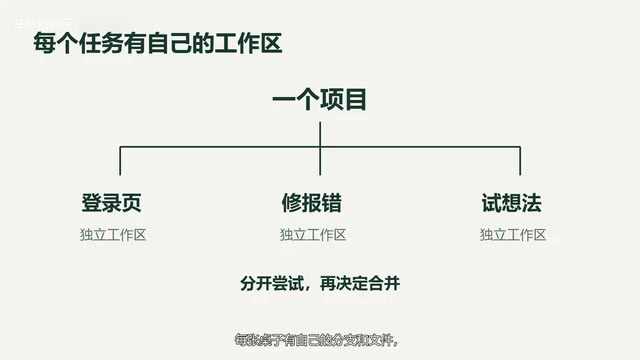
Here's a flow example (not an actual test): adding a login page to a website. You first open a workspace, hand the requirement to the assistant, then inspect the generated files and code diffs, run tests, and finally decide whether to merge. The advantage of this model is that the AI's exploratory changes won't pollute the main branch. You can open multiple workspaces in parallel to explore different approaches, then merge the best one. For developers who want to use AI to build small tools while also reviewing changes step by step, this workflow is fairly friendly.
Git worktree is a feature introduced in Git 2.5 that allows the same repository to check out multiple working directories simultaneously, each associated with a different branch. Unlike traditional git clone copies, worktrees share the same object database, resulting in lower disk usage and switching costs.
Specifically, you can use git worktree add ../feature-login login-branch to create a new directory outside the repository, which automatically checks out the login-branch branch while the main working directory remains unchanged. This lets you modify code across multiple branches in parallel without stashing or switching branches. ThinkRail leverages this mechanism to create a separate worktree for each AI task, achieving file isolation between tasks and preventing the AI's experimental changes from interfering with the main branch or other tasks.
Chat Side-by-Side with Code Diffs, Requirements Docs Alongside Code
In the official interface, the code diff view sits right next to the chat window, so you can compare what was added and what was changed at a glance.
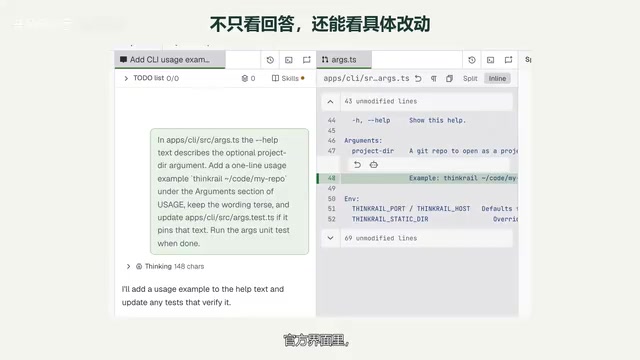
Another feature is requirements document management. ThinkRail writes project intent into documents, stores them alongside the code, and provides tools for the assistant to read and maintain them. This means that even if you switch sessions or change assistants, the documents remain available for reference, so you don't lose project context when conversation history is lost.
The code diff view is a common feature in version control tools that displays file contents before and after changes side by side, typically marking added lines in green and deleted lines in red. In AI coding scenarios, the diff view is especially important: developers need to quickly determine which lines the AI changed and whether it introduced unintended modifications. ThinkRail places the diff view alongside the chat window, so the review process doesn't require leaving the conversation context, reducing the cost of repeatedly switching between chat history and the editor. This design also makes it easy for developers to ask the assistant follow-up questions about specific diff lines, forming a closed loop of "ask—modify—review."
Open Source Doesn't Mean Free: Review and Testing Are Still Required
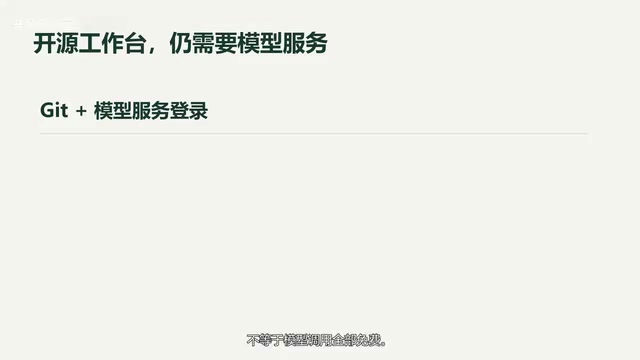
It's important to distinguish that an open-source workbench doesn't mean all model calls are free. Using ThinkRail requires Git and model service login, and the specific cost depends on the service you connect.
It also cannot guarantee that generated code is correct; review and testing are still necessary. This point deserves emphasis: a visual workbench lowers the barrier to managing AI changes, but it does not replace the developer's judgment on code quality. The project supports Windows, macOS, and Linux.
If you're interested in AI coding and want to see code, requirements, and the modification process all at once, ThinkRail is a project worth exploring starting from its open-source repository. This episode is based on official materials; the creator has not yet done an installation test. The project link can be found in the video description.
Model service login typically refers to connecting to a large language model provider (such as OpenAI, Anthropic, or a locally deployed model service) via API Key or OAuth. ThinkRail itself, as an open-source workbench, does not include model call quotas. Users need to configure credentials for the service they connect, and costs are charged by that provider based on token usage or subscription model. This means "open source" only refers to the workbench code being freely usable and modifiable, while the inference costs behind AI capabilities still fall on the user. Pricing varies significantly across model services, and developers should factor call costs into their selection, especially in scenarios involving frequent code generation and review.
One-line Summary
JetBrains open-sources ThinkRail, managing AI coding changes with isolated workspaces and side-by-side diff views.
Paragraph Summary
JetBrains has open-sourced ThinkRail, a visual AI coding workbench that addresses the pain points of opaque, hard-to-review AI coding assistant changes. It consolidates natural language chat, file editing, code execution, and terminal output into a unified interface, and creates isolated workspaces for each task based on Git worktrees, so AI's exploratory changes don't pollute the main branch and parallel exploration can be followed by selective merging. The chat window and code diff view are displayed side by side, with requirements documents stored alongside code and maintained by the assistant, reducing context switching. The article also reminds readers that open source doesn't mean free model calls: usage requires Git and model service login, correctness isn't guaranteed, and review and testing remain essential. The project supports all three major desktop platforms and suits developers who want to review AI changes step by step.
Related articles

AI's Impact on Robotics Engineering: Which Subfields Resist Replacement?
Is AI's impact on robotics engineering as great as on software engineering? This article synthesizes Reddit practitioner discussions to analyze how easily each robotics subfield can be replaced by AI, noting that hardware design, safety control, and on-site integration are relatively resistant, while perception algorithms and simulation are being significantly changed by AI.

Five Qwen3.8-27B Models Team Up to Beat Fable 5: The Memdoor Multi-Agent Approach
The Memdoor open-source project showcases the team-solve workflow: 5 Qwen3.8-27B models collaborate through role division and a memory layer to beat Fable 5 on LiveCodeBench Hard, exploring how multi-agent orchestration can achieve more with less.

How Is Norway Making "Shithouses" Great Again?
Starting from a Hacker News headline, this explores Norway's pragmatic innovation in public sanitation and eco-friendly toilet technology, and what the "Norwegian model" of infrastructure means for tech professionals.