Datasette Agent 0.6a0: Ask Questions About Your Data Right from the Homepage

datasette-agent 0.6a0 puts a natural language question box on the Datasette homepage and supports hash-mentions.
Datasette ecosystem developer Simon Willison has released datasette-agent 0.6a0, a plugin that lets users ask questions about Datasette data in natural language without writing SQL. The most visible change is moving the agent question box from inside the plugin to the Datasette homepage, below the search box, with a text input and ask button. It also supports hash-mentions: type # plus a table or query name to precisely reference a data object, with real-time autocomplete—typing #re lists the repos and releases tables. The release notes frame 0.6a0 as an alpha of cumulative small fixes, but the homepage entry point reflects a positioning shift—natural language querying is becoming a first-class interaction entry point alongside search.
Datasette ecosystem developer Simon Willison has released datasette-agent 0.6a0. This plugin lets users ask questions about data in Datasette using natural language, and the biggest change in the new version is moving the agent question box directly onto the Datasette homepage.
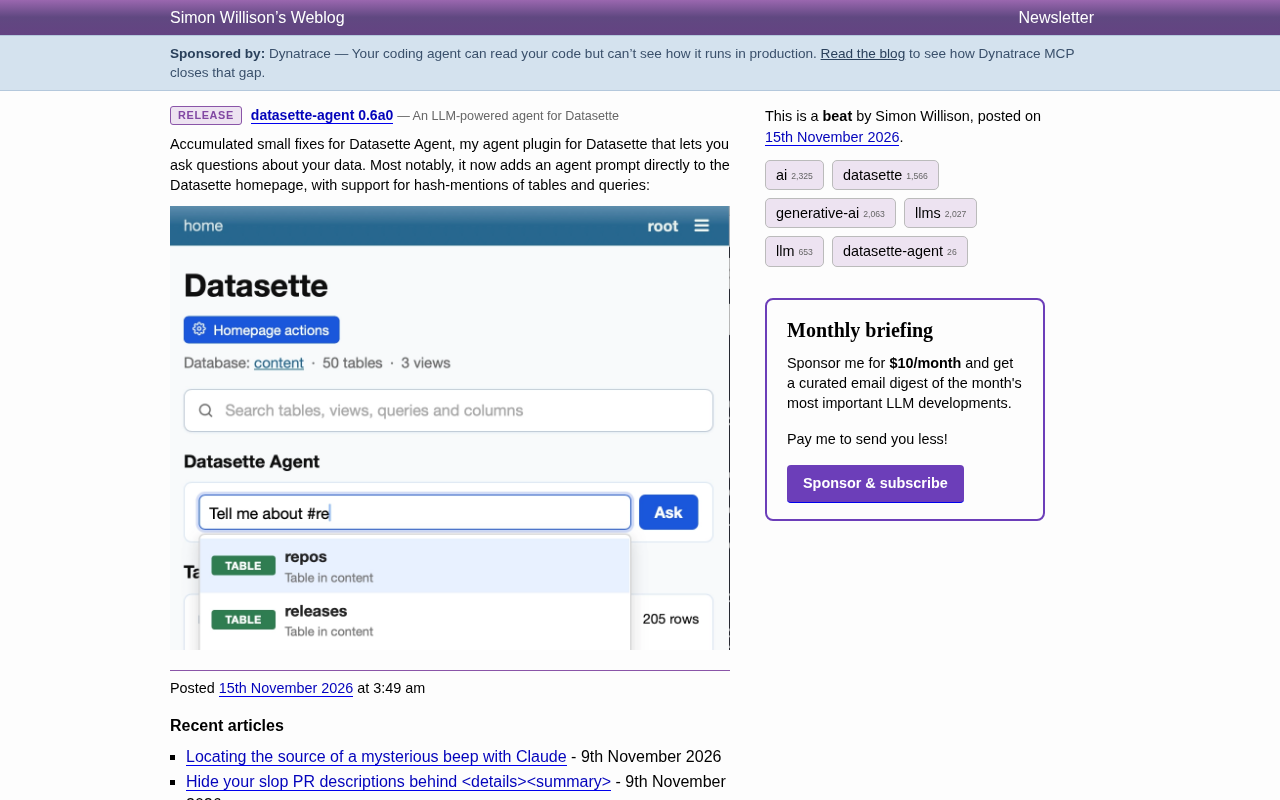
From plugin to homepage entry point
datasette-agent is an agent plugin that Simon Willison developed for Datasette. Datasette itself is an open-source tool for exploring and publishing data, and datasette-agent layers a natural language interaction capability on top of it—users don't need to write SQL; they simply describe what they want to know in everyday language, and the agent queries on their behalf and provides an answer.
0.6a0 is an alpha release, and the release notes frame it as "cumulative small fixes." But judging from the actual changes, the most visible one is placing the agent prompt box on the Datasette homepage, right below the search box.
Datasette was released by Simon Willison in 2017, with its core positioning as "an open-source tool for exploring and publishing data," built on Python's SQLite database. Users can import data such as CSV and SQLite files, and Datasette automatically generates web interfaces for table browsing, full-text search, filtering, and faceting, and also exposes a JSON API for programmatic access. Its plugin system is key to the ecosystem: almost all feature extensions (such as maps, charts, authentication, and export formats) exist as plugins, and datasette-agent is one of them. Understanding this is essential to appreciating why "making a plugin a default entry point" is a meaningful product signal—it means the agent is moving from an optional extension to a core usage path in Datasette.
Homepage question box and hash-mentions
The new version adds a "Datasette Agent" area to the Datasette homepage, containing a text input field and an ask button. Users can type questions directly, such as "Tell me about #re," and the input field will pop up real-time autocomplete results listing matching tables and queries.
Here, #re is a hash-mentions syntax: by using # plus a table name or query name, users can precisely reference a specific object in the database within their question. Autocomplete means users don't have to remember full table names—typing a few characters is enough to select from candidates. According to the screenshot in the release notes, when typing #re, the autocomplete list shows the repos and releases tables, indicating that the feature performs prefix matching on object names.
This design significantly lowers the barrier to "mentioning a specific data object." In data analysis scenarios, table names are often long and hard to remember, and hash-mentions combined with autocomplete effectively adds a layer of structured anchoring to natural language questions—the agent can clearly know which table the user is referring to, reducing ambiguity.
In applications built on large language models, a "mention" refers to a user referencing a specific entity in input text using a special symbol, giving the model or system explicit object context. Common examples include Slack's @ mentions of users, Notion's @ references to pages, and the @file syntax in many AI editors. hash-mentions follows this paradigm, using # as the trigger character to inject database tables or saved queries into the question context. Rather than letting the model guess table names from natural language, mentions pass object identifiers directly to the agent in a structured form, and the agent then decides how to construct SQL. This combination of "free text + structured anchors" is a common approach today for reducing ambiguity in natural language database querying.
The product thinking behind small iterations
Placing the question box on the homepage may look like just a UI position adjustment, but it actually reflects a shift in datasette-agent's positioning: from "a plugin you install and use" to one of Datasette's default interaction entry points. The homepage is the first interface users see after opening a Datasette instance, and putting the question box there means natural language querying is no longer a hidden feature that requires extra discovery, but a first-class citizen alongside search.
Combined with hash-mentions, this interaction attempts to strike a balance between free text and structured querying. Pure natural language questions are flexible but prone to vagueness; pure SQL is precise but has a high barrier to entry. hash-mentions lets users embed precise data object references within natural language sentences, balancing ease of use with accuracy.
Currently, 0.6a0 is still an alpha version, and the release notes do not mention other major feature changes. For users already using Datasette to publish data, what's worth noting in this version is the experience change brought by the homepage entry point; for those still watching, it demonstrates a viable direction for tools in the "database + agent" category at the interaction level.
An alpha version is a pre-release stage in the software release cycle that comes before beta, typically indicating that features may be incomplete and interfaces may still change, and it is only recommended for users willing to try new things. In 0.6a0, "0.6" is the main version sequence number, and "a0" indicates this is the first alpha build in the 0.6 series. datasette-agent follows this small-step release cadence, consistent with Simon Willison's long-standing development style: each release comes with detailed notes and screenshots, explaining a single change clearly to facilitate community follow-up and feedback. For users, the alpha label is a reminder that it should not be used in production environments with high stability requirements.
One-line Summary
datasette-agent 0.6a0 puts a natural language question box on the Datasette homepage and supports hash-mentions.
Paragraph Summary
Datasette ecosystem developer Simon Willison has released datasette-agent 0.6a0, a plugin that lets users ask questions about data in Datasette using natural language, without writing SQL. The most visible change in the new version is moving the agent question box from inside the plugin to the Datasette homepage, below the search box, with a text input field and an ask button. It also supports hash-mentions syntax: typing # plus a table or query name precisely references a data object, with real-time autocomplete—for example, typing #re lists the repos and releases tables. The release notes position 0.6a0 as an alpha version of cumulative small fixes, but the homepage entry point reflects a product positioning shift—natural language querying is turning from a hidden feature requiring extra discovery into a first-class interaction entry point alongside search.
Related articles

RePlan-VLA: Progress-Aware Replanning Breakthrough for Long-Horizon Robotic Manipulation
The RePlan-VLA framework converts VLA models' short-horizon capabilities into reliable long-horizon execution through progress-aware adaptive replanning, improving success rates by 21.9% and 10.4% on RoboCasa365 and CALVIN, and validating real-world deployment on a Franka Research 3 robot.

Geometric Bridge Flow Matching: A New Breakthrough in Blind Rigid Motion Correction
Geometric bridge flow matching enables blind rigid motion correction in head CBCT, achieving 37.1 dB PSNR and 0.27 mm RPE on simulated data in ~9.1 minutes, outperforming existing methods.

Google Releases Gemini 4 Hydrogen: 2.5x Faster Without Sacrificing Intelligence
Google releases the lightweight Gemini 4 Hydrogen: 2.5x faster task completion, AA Intelligence Index of 54 beating its flagship sibling, 7.3s single-step on Agent Arena faster than Claude and GPT rivals, four thinking levels with pay-as-you-need pricing, now available across AI Studio and more.