datasette-llm 0.1a11 Released: Connect Any OpenAI-Compatible Local Model

datasette-llm 0.1a11 supports OpenAI-compatible endpoints, enabling local models to drive Datasette Agent.
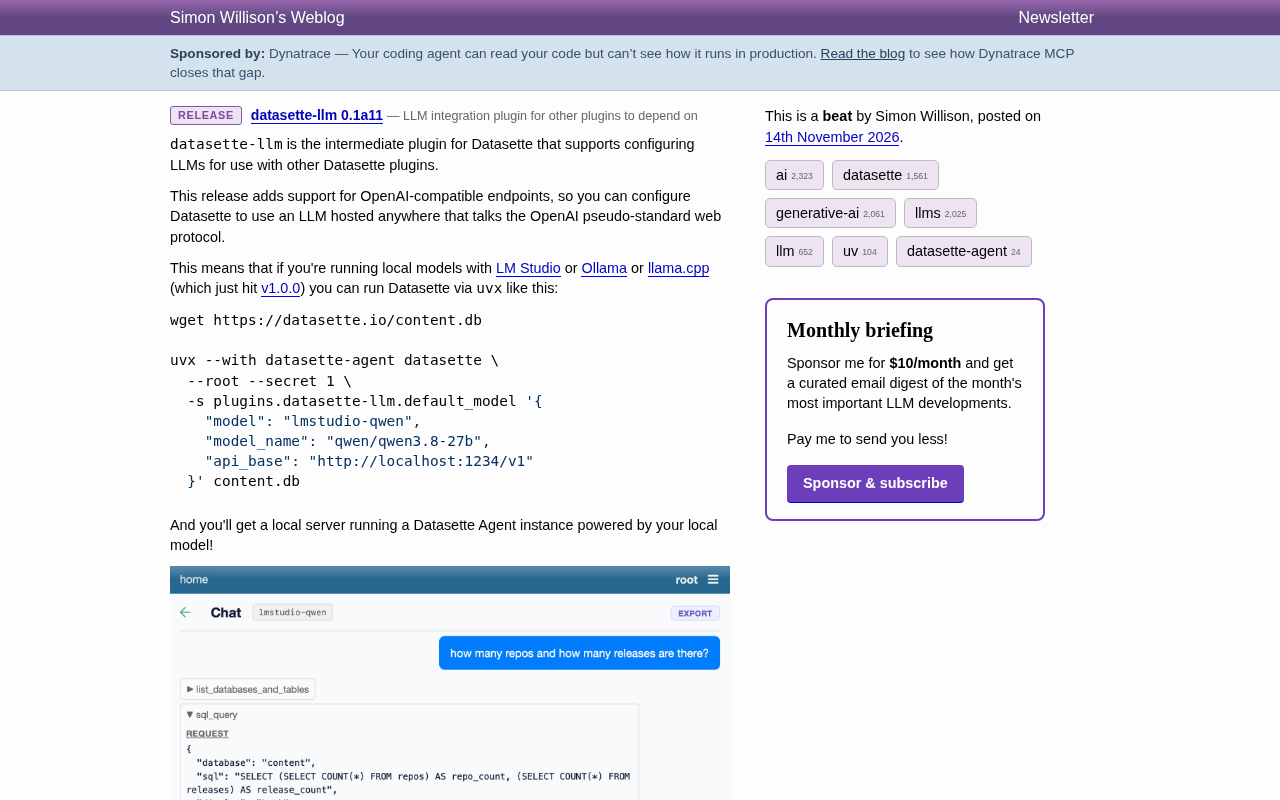
datasette-llm is a middleware plugin in the Datasette ecosystem that provides unified LLM configuration for upper-layer plugins without offering a chat interface itself. Version 0.1a11 adds support for OpenAI-compatible endpoints, meaning any model service implementing this protocol can serve as a Datasette backend, including local models running on LM Studio, Ollama, and llama.cpp. The official example uses a single uvx command to install, configure, and launch, specifying a model alias, actual model identifier, and local api_base address via the default_model setting. The screenshot shows datasette-agent using tool calls to first explore the schema and then generate SQL, directly answering database statistics questions without the user writing any SQL. The significance of this change is that it extends model choice to the entire local inference ecosystem, balancing data privacy and cost while keeping upper-layer plugin interaction logic unchanged.
A Minor Version Update That Bridges Local Models and Datasette
datasette-llm is a middleware plugin in the Datasette ecosystem responsible for providing unified LLM configuration for other Datasette plugins. Its role is clear: it doesn't directly offer a chat interface to end users, but rather serves as a "model configuration hub" so that upper-layer plugins (such as datasette-agent) can reuse the same model settings.
The core change in version 0.1a11 is just one, but its impact is substantial: added support for OpenAI-compatible endpoints. In other words, as long as a service implements OpenAI's "pseudo-standard" web protocol, Datasette can configure it as a backend model. The official blog post explicitly states that this means you can connect local models running on LM Studio, Ollama, or llama.cpp to Datasette.
Why the OpenAI-Compatible Protocol Deserves Dedicated Support
In the past, connecting Datasette to models often relied on vendor-specific SDKs or direct API calls. But OpenAI's chat completion interface has effectively become the lingua franca of local inference tools—LM Studio, Ollama, and llama.cpp all provide /v1-style compatibility layers. With datasette-llm supporting these endpoints, users no longer need to wait for plugins to be individually adapted for each inference framework; as long as a tool speaks the "OpenAI protocol," Datasette can recognize it.
This also reduces privacy and cost concerns: models run locally, data never leaves the machine, and cloud API call fees are eliminated. For scenarios where database contents need to be analyzed by a model but data cannot be shared externally, this is especially critical.
OpenAI-compatible endpoints refer to the web protocol a service implements by mimicking OpenAI's HTTP interfaces such as /v1/chat/completions, with request and response bodies following OpenAI's JSON structure (e.g., the messages array, choices return items, and role/content fields). Because OpenAI's early interfaces were adopted by a large number of toolchains, this format gradually became a de facto universal dialect, often called a "pseudo-standard" in the industry—it is not a formal specification, but it is widely implemented due to ecosystem inertia. LM Studio, Ollama, and llama.cpp's server modes all include this compatibility layer, so a client that sends requests according to this protocol can switch backend models without changing code.
For plugin developers, the benefit of supporting compatible endpoints is that adaptation cost drops from "writing one set per N frameworks" to "writing just one set." The trade-off is that compatibility layers often cover only core fields, and advanced capabilities like streaming responses, tool/function calling, and structured output may have subtle differences across implementations, so integration should be guided by the actual inference framework's documentation.
Get a Local Agent Running with a Single uvx Command
The official example is very straightforward: first download a sample database, then launch Datasette with uvx and pass in the model configuration via plugin settings.
wget https://datasette.io/content.db

uvx --with datasette-agent datasette \
  --root --secret 1 \
  -s plugins.datasette-llm.default_model '{
    "model": "lmstudio-qwen",
    "model_name": "qwen/qwen3.8-27b",
    "api_base": "http://localhost:1234/v1"
  }' content.db
The configuration has three key fields: model is the local alias for this model, model_name corresponds to the actual model identifier in the inference framework, and api_base points to the local service's OpenAI-compatible address (the example uses LM Studio's default port 1234). After launch, Datasette Agent will use this local model to drive the conversation.
For developers comfortable with the command line, this workflow has virtually no learning curve: no config file changes, no Python code to write—a single uvx command completes the entire loop from installation to running.
uvx is a command provided by the Python package management tool uv, similar in function to pipx run: it resolves and installs the specified package and its dependencies in an isolated temporary environment, then directly executes the entry command, without requiring a prior pip install and without polluting the current project's virtual environment. In the example, --with datasette-agent means additionally installing the datasette-agent plugin into the same temporary environment so that Datasette can load it on startup.
-s plugins.datasette-llm.default_model is Datasette's setting override syntax: -s (i.e., --setting) writes configuration by dotted path, with a JSON value after the equals sign, thereby pointing the default model to the local endpoint without modifying configuration files. --secret 1 provides a signing key, and --root grants all permissions—both are prerequisites for the Agent to properly read/write the database and execute tool calls. This "command line as configuration" approach is convenient for quick trials, but for production environments it's better to write to a configuration file or use environment variables.
In Practice: Query SQLite Directly in Natural Language
The official screenshot demonstrates how this combination works. The interface is a chat window, with the current model labeled as lmstudio-qwen at the top. The user asks "how many repos and how many releases are there?" The Agent first shows a collapsed list_databases_and_tables tool call, then expands a sql_query call. In the REQUEST section, you can see it generated SQL with subqueries against the content database, counting repos and releases separately.
The RESPONSE returns two columns of results, and the final table shows repo_count as 200 and release_count as 1889. The assistant then answers that "the content database has 200 repositories and 1,889 releases." Throughout the entire process, the user didn't write any SQL by hand; the model completed schema exploration, query generation, and result interpretation through tool calls.
This example shows that the value of datasette-llm isn't just "being able to connect to models," but that it gives upper-layer plugins like datasette-agent a swappable inference backend. Changing models requires only a one-line config change, while the interaction logic and toolchain remain unchanged.
The list_databases_and_tables and sql_query appearing in the screenshot belong to the tool calling / function calling mechanism: the model doesn't execute code directly, but first outputs a structured intent of "I want to call a certain tool with these parameters," and the host program (here, datasette-agent) is responsible for actual execution, then passes the result back to the model as a new message.
This division of labor—"model proposes, program executes"—has several benefits: database access is controlled by the host, allowing security policies such as read-only access and row limits; execution results can be logged and audited; and the model doesn't need the ability to directly access the filesystem. The trade-off is that the flow becomes multi-turn, and a single answer may trigger multiple tool calls, increasing latency and token consumption. In the example, the Agent first explores the schema and then generates SQL, which is a typical two-stage reasoning pattern of "look at table structure first, then write the query."
Significance for the Datasette Ecosystem
Datasette has always emphasized "turning data into something explorable and publishable," and the LLM plugin layer adds another entry point to this exploration: natural language. As middleware, datasette-llm returns model choice to users—you can use a cloud-based large model or a local small model, depending on data sensitivity and hardware conditions.
Adding OpenAI-compatible endpoint support essentially extends this choice to the entire local inference ecosystem. Considering that llama.cpp recently released v1.0.0 and the local model toolchain is maturing, this kind of compatibility layer support will increasingly become a standard capability of data tools. For teams that want to embed AI query capabilities into internal data platforms but are constrained by compliance requirements, this version provides a low-barrier validation path.
Currently, this version is still in the 0.1a alpha stage, and the interface and configuration methods may continue to change. But in terms of feature direction, datasette-llm is making "pluggable models" increasingly thorough.
Related articles

RePlan-VLA: Progress-Aware Replanning Breakthrough for Long-Horizon Robotic Manipulation
The RePlan-VLA framework converts VLA models' short-horizon capabilities into reliable long-horizon execution through progress-aware adaptive replanning, improving success rates by 21.9% and 10.4% on RoboCasa365 and CALVIN, and validating real-world deployment on a Franka Research 3 robot.

Geometric Bridge Flow Matching: A New Breakthrough in Blind Rigid Motion Correction
Geometric bridge flow matching enables blind rigid motion correction in head CBCT, achieving 37.1 dB PSNR and 0.27 mm RPE on simulated data in ~9.1 minutes, outperforming existing methods.

Google Releases Gemini 4 Hydrogen: 2.5x Faster Without Sacrificing Intelligence
Google releases the lightweight Gemini 4 Hydrogen: 2.5x faster task completion, AA Intelligence Index of 54 beating its flagship sibling, 7.3s single-step on Agent Arena faster than Claude and GPT rivals, four thinking levels with pay-as-you-need pricing, now available across AI Studio and more.