Deconstructing a Real Procurement Agent: From Task List to Auto-Generated Reports

A procurement Agent decomposes complex requirements via task lists, progressively calls tools and sub-agents, auto-retries on failure, and ultimately closes the loop with a generated report.
Using a real workflow of a procurement Agent as an example, the article shows how complex tasks are decomposed and executed. The Agent first calls the Rush to Do's tool to generate a task list with statuses (In Progress, Complete, Pending), achieving plan-before-execute. It then advances step by step: querying the URL mapping table, retrieving parts and order data from the ERP system, and automatically switching supplier parameters to retry when queries fail. After internal data collection, the Agent scrapes Bosch's official website quote page via a crawler to complete external price comparison information. Each completed step updates the task status; once all six steps are done, it automatically generates a procurement analysis report and proactively guides the user to download or analyze further, forming a complete loop from task initiation to delivery.
How an Agent Breaks Down a Complex Task
When a user raises a complex request like "compare two spark plugs and provide a procurement recommendation," the Agent doesn't go straight to searching. Instead, it first calls a tool called "Rush to Do's" to generate a structured task list. This list not only specifies what to do at each step, but also marks the status of each step (such as In Progress, Complete, Pending). It's essentially a blueprint for the entire task, and all subsequent actions revolve around it.
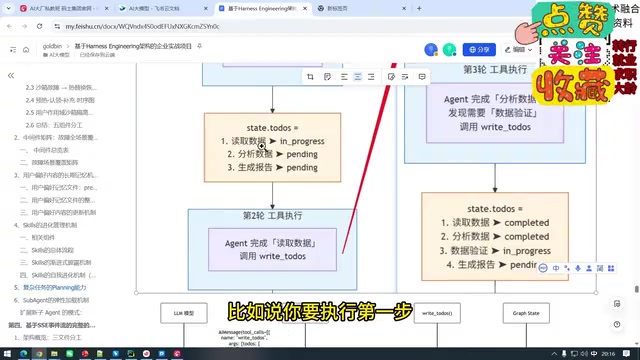
The value of the task list lies in making the Agent's execution process traceable and intervenable. Users can clearly see which step is currently in progress and which step has gone wrong, rather than facing a black box.
Following the Blueprint: Calling Tools and Sub-agents Step by Step
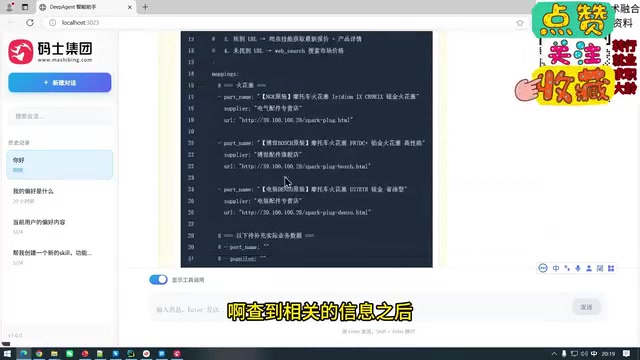
Once the task list is generated, the Agent begins executing step by step. Taking the first step "analyze the operation manual" and the second step "collect product data for two spark plugs" as examples, the Agent reads the URL mapping table while querying product information from the ERP system.
When querying parts, the Agent calls a tool called "part search." It first searches for the first part and retrieves information such as the model number; then, when searching for the second part, the first attempt may fail to find it, so it automatically switches approach—first querying the supplier, switching the parameter from "Denso" to "Bosch," and ultimately successfully finding a Bosch model spark plug. The entire process demonstrates the Agent's adaptive retry capability when encountering query failures, rather than simply reporting an error and terminating.
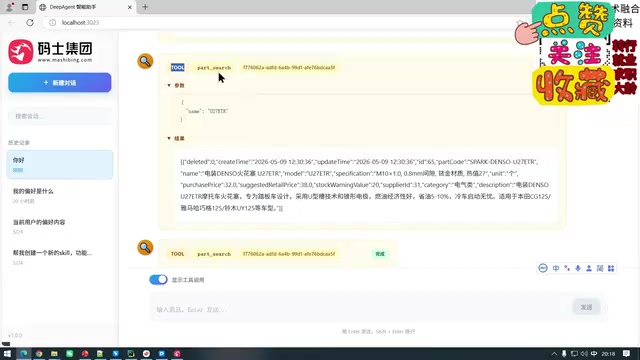
After retrieving internal data, the Agent continues to query order detail data (old search detail), which is returned in JSON format. At this point, data collection on the ERP side is complete.
Sub-agent refers to a lightweight execution unit derived from the main Agent framework that possesses independent reasoning and tool-calling capabilities. The main Agent is responsible for high-level planning and task assignment, while sub-agents focus on completing a specific subtask (such as "analyze the operation manual" or "collect product data") and return results to the main Agent. The advantage of this design is that each sub-agent has a more focused context, reducing the complexity of a single reasoning pass; meanwhile, subtasks can be orchestrated in parallel or in sequence, and failures only affect a local scope, making it easier for the main Agent to coordinate scheduling and state management.
URL mapping table is a configurable data structure that maps business semantics (such as "operation manual" or "product data page") to specific network addresses. When executing tasks, the Agent doesn't need to hard-code the address of each resource; instead, it first looks up the mapping table to locate the target URL, then initiates access or scraping. This approach decouples the Agent's data source configuration from execution logic: when adding or changing data sources, only the mapping table needs updating while the execution flow remains unchanged, and it also facilitates permission control and source auditing.
From Internal Systems to External Web Pages: Crawlers Complete the Quote Information
After internal data collection is complete, the Agent enters the external data acquisition phase. The log shows: "ERP data collection is complete; now starting to fetch external quote pages." It scrapes the spark plug quote page from Bosch's official website via a crawler, incorporating external public quotes into the analysis scope.
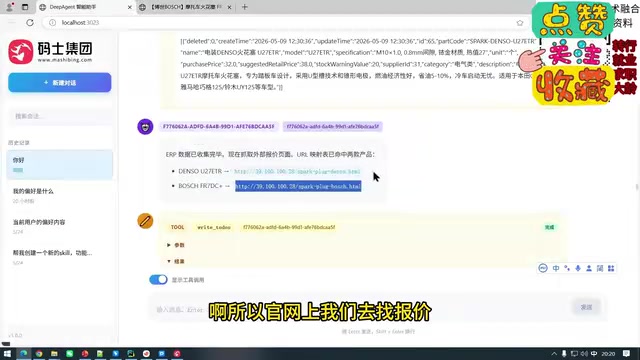
The key here is that the Agent is not limited to internal enterprise systems but can also proactively access the internet to obtain real-time quotes, giving the final procurement analysis a more complete price comparison basis. Throughout the execution process, each time a step is completed, the Agent updates the corresponding task status to Complete, until all steps on the list are finished.
ERP system (Enterprise Resource Planning) is an integrated information system used by manufacturing and distribution enterprises to manage core business data such as procurement, inventory, orders, and suppliers. In this case, the Agent queries part model numbers, supplier parameters, and order details from the ERP through tool interfaces; this data is returned in structured JSON format and serves as the basis for subsequent price comparison analysis. The Agent's integration with ERP is typically accomplished through APIs or middleware rather than directly operating the database, ensuring permission isolation and data consistency.
Auto-Generating Reports and Guiding Next Steps
When all six steps are marked as complete, the Agent automatically generates a procurement analysis report. The report begins with a summary, and the detailed content is saved to a designated directory. The Agent also proactively asks the user whether they need to download the report and offers suggestions for dimensions that could be further analyzed in the next step. This "deliver upon completion + proactive guidance" model truly closes the loop from task initiation to report delivery for complex tasks.
From task decomposition, tool calling, failure retry, and state management to report generation, this real case demonstrates the complete workflow of a procurement Agent. Its core design philosophy—plan before executing, every step observable, results deliverable—also offers reference value for building task-oriented Agents in other domains.
Related articles

Googlebook's First Developer Case Studies: How Notability and Logitech Built Desktop-Class Android Experiences
Notability and Logitech share first-hand experience building for Googlebook: using Jetpack Compose, Navigation 3, and Jetpack Ink for desktop-class Android, plus how the peripheral customization API bridges hardware and OS.
Google Play Multi-Device Publishing Guide: Modular Architecture and Review Pitfalls
Complete guide to Google Play multi-device publishing: why modular App Bundles beat a single bundle, track exceptions for Wear OS and Android Auto, how three-tier testing channels pre-validate reviews, and common rejection reasons for TV, XR, cars, and Wear OS with avoidance tips.

Why Are Baby Boomers Wealthier? An Analysis of Luck and Institutional Advantages
Why are baby boomers wealthier? This article breaks down the generational advantages, housing and stock market gains, zero-sum mechanisms like restrictive zoning, and the intergenerational impact of rising Social Security generosity in their wealth sources.