Google Play Multi-Device Publishing Guide: Modular Architecture and Review Pitfalls
Google Play multi-form-factor publishing guide: modular splitting, dedicated tracks, and form-factor review essentials.
Based on a Google Play team presentation, this article outlines a practical framework for publishing Android apps to multi-form-factor devices such as TV, cars, Wear OS, and XR. The core conclusion is that the main publishing process remains unchanged, with differences concentrated in architecture choices, track strategy, and review compliance. Architecturally, it recommends splitting app modules by form factor and generating separate AABs to avoid a single App Bundle blocking all releases due to one form factor's review failure; for tracks, Wear OS must use a dedicated track, Android Auto can only use the phone track, and version number leading digits should identify form factors; for testing, internal testing does not trigger review, while closed and open testing allow rehearsing review in advance. The article also lists common rejection points per form factor, including TV banner images and leanback intent, car category eligibility and screenshot specs, and Wear OS small round screen adaptation.
Title
Google Play Multi-Device Publishing Guide: Modular Architecture and Review Pitfalls
Meta Description
The Android ecosystem extends far beyond phones. Users interact with apps on Android TV in the living room, Android Auto and Automotive OS in cars, Wear OS on their wrists, and the emerging Android XR space. For developers, this is a growth opportunity, but publishing apps to these form factors requires more than the usual process. In a presentation by Google Play team members Jan Kleiner, a Developer Relations Engineer, and Faustine Liao, Head of Play Trust and Safety Operations, a practical framework was shared.
The Overall Process Remains the Same, but Details Matter
The main line from building an app to launching it on Google Play remains: prepare the app, create a store listing in Play Console, test, upload and submit for production, and wait for review approval. The differences for multi-device publishing lie not in the process itself, but in three areas: architecture choices, track strategy, and review compliance.
According to the two speakers, the biggest fork in the road appears before you even open Play Console—how you package your app.
Modular Architecture: Why a Single App Bundle Is Riskier
When publishing a multi-form-factor app, the first architectural decision is: do you create a single unified App Bundle containing all form factors, or split into modules by form factor and generate separate AABs?
The speakers explicitly recommend the modular approach and gave an intuitive example: suppose an app supports both phones and Android TV. If you submit a single App Bundle to the standard phone track and the TV portion fails review checks, the entire release is blocked—even if the phone side itself is fine, you must first fix the TV review issues and resubmit before users can get the update. Conversely, if phones and TV each have independent modules and independent AABs, a TV review block only affects the TV release, while the phone version goes live as usual.
Modularization itself can be implemented in various ways. The speakers used an audiobook app that supports both phones and Android Automotive OS as an example: at the top level, each form factor has an app module to isolate platform-specific dependencies; in the middle, feature modules correspond to independent functional blocks of the app; further down are data modules; and at the bottom are core/common modules frequently reused by other modules. Introducing the corresponding multi-module structure in the project's Gradle configuration supports this organization. All app modules and bundles continue to use the same package name (application ID).
App Bundle (AAB) is the publishing format Google Play has promoted since 2021. It splits the app into multiple modules based on device configuration (such as screen density, CPU architecture, language), and Play dynamically assembles APKs at distribution time based on the user's device, thereby reducing download size. For multi-form-factor apps, AAB's "on-demand distribution" capability naturally complements form-factor splitting: each app module can independently generate its own AAB, each carrying its corresponding manifest, resources, and dependencies, and Play Console treats them as different release units under the same package name. This also explains why the speakers emphasize that all app modules must use the same application ID—the package name is the only basis for Play to recognize "this is the same app," and form-factor splitting cannot change it. If all form factors are crammed into a single AAB, Play cannot distinguish form factors at the review level, and any compliance issue in any form factor will affect the entire release.
Track Strategy: Which Form Factors Require Separate Releases
Modularization directly determines the track arrangement in Play Console. Beyond the standard phone track, Google Play provides dedicated form-factor tracks for Android TV, Android XR, and Android Automotive OS—you can choose to release alongside phones or use a dedicated track.
There are two exceptions to remember: Wear OS can only use the dedicated Wear OS track; Android Auto is essentially an extension of a phone app projected onto the car screen, and the only option is the standard phone track.
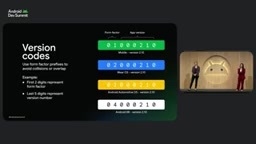
When running multiple tracks in parallel, version management is key. The speakers suggest allocating the leading digits of version numbers to form-factor identifiers—for example, 01 for phones, 02 for Wear OS, 03 for Android Automotive OS—leaving the remaining digits for the app version. A version number length of at least seven digits is recommended to avoid version conflicts in Play Console.
Three-Tier Testing Channels: Validate Reviews Before Official Release
Form-factor adaptation requires thorough testing, and Google Play offers three channels: internal testing, closed testing, and open testing. When using dedicated form-factor tracks, test tracks can also be combined with form factors for finer-grained control. For example, a phone app can run closed testing on the standard track, while an Android TV app runs another closed test on the dedicated TV track, with completely different tester groups.
Internal testing is a good starting point: you can distribute to up to 100 testers and it does not trigger a Play review, so you can quickly validate the experience on emulators or real TVs and watches, and get a shareable dedicated link.
Closed testing targets a broader tester group, managed via email lists or Google Groups, to gather targeted feedback. Open testing is publicly visible on Google Play, anyone can join without an invitation, and they can send private feedback directly to the developer.
The speakers particularly emphasized that closed and open testing do trigger reviews—and that's precisely the advantage: you can rehearse the review process before official release and clear potential obstacles in advance.
What Reviews Look For: From General Quality to Form-Factor-Specific Rules
The core of review is app quality. High-quality apps create value for users, provide a delightful experience, fully leverage high-end device capabilities, and are designed with safety in mind. Google Play has published two foundational documents: the Core App Quality Guidelines applicable to all apps, defining minimum quality thresholds; and the Adaptive App Quality Guidelines, ensuring apps deliver a good experience across different form factors, screen sizes, and display modes. Additionally, there are form-factor-specific quality guidelines, and reviewers test against these standards on real devices and emulators.
Three Common Rejection Reasons for Android TV
First, missing home screen banner. For each supported language, a 320×180 pixel banner containing localized text branding is required. Second, inadequate D-pad navigation and focus support—most TV users interact via remote control direction keys, and at minimum basic D-pad controls must be supported. Third, missing leanback launcher intent filter in the Android manifest—this filter identifies the app as TV-adapted and determines which Activity launches when the user selects the app on the home screen.
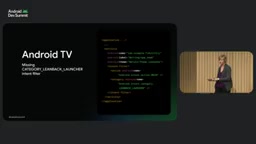
The leanback launcher intent filter is a set of <intent-filter> elements written under the <activity> node in AndroidManifest.xml, with the category android.intent.category.LEANBACK_LAUNCHER. It serves two purposes: first, it declares to Play and the TV system that the app has a TV launch entry; without it, the app will not appear on the TV home screen. Second, it determines which Activity launches when the user selects the icon on the home screen. Unlike the phone-side LAUNCHER category, the TV side requires the Activity to support D-pad focus navigation, so you typically need to declare a separate entry Activity for TV, or reuse an Activity already adapted for remote controls. Android TV apps also often include a <uses-feature> declaration for android.software.leanback to indicate the app is optimized for TV.
Android XR: Performance and Rendering Are Hard Requirements
Apps targeting Android XR headsets and glasses should focus on performance, rendering, and stability. Apps built with the Jetpack XR SDK can use Perfetto for performance profiling to confirm they meet minimum frame rate requirements; projects based on real-time engines like Unity can use the engine's built-in performance analysis tools to check rendering requirements.
Cars: Category Eligibility, Screenshot Specs, and Driving Safety
Android Auto and Android Automotive OS have a unique category concept—only specific categories are allowed to publish to cars. If you submit an unsupported category, or submit a category still in beta to open testing or production, it will result in rejection. Categories such as navigation and points of interest are fully available, and any developer can publish to production; however, categories like communication calling for Android Auto are still in beta and can only be published to internal or closed testing tracks, unless accepted into the corresponding early access program. Details and application entry points are in the Android for Cars developer guide.
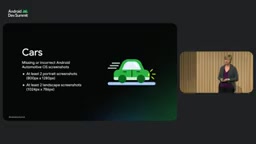
Android Automotive OS screenshot specs are another common rejection point: at least two portrait and two landscape screenshots, with dimensions meeting the requirements. The Android Automotive OS emulator can directly capture compliant images.
Safety has the highest priority in car scenarios. Apps that do not comply with driving distraction guidelines will be rejected—for example, video apps must pause playback and be invisible while the vehicle is moving.
Android Auto's "categories" are not store classification labels, but a functional access model set by Google for car scenarios. Because driving scenarios are extremely sensitive to attention occupation, Google only allows limited categories such as navigation, media, communication, and points of interest to access the car projection interface, and each category corresponds to a templated UI (such as navigation templates, media templates); developers cannot freely draw the interface. Categories are declared when submitting in Play Console, and review will verify consistency with the Car App Library declaration in the Manifest and actual functionality; if a category is still in beta, it can only appear on internal or closed testing tracks. Android Automotive OS, on the other hand, is a full system running directly on the car, with apps installed independently, not subject to projection template restrictions, but still must comply with driving distraction guidelines and undergo review by category.
Wear OS: Small Round Screen Adaptation and Screenshots
A common rejection reason for Wear OS apps is failure to optimize and lay out for small circular screens. It is recommended to use the latest stable version of Compose for Wear OS to avoid content being clipped at the edges on devices of different sizes, and to ensure scrollable content shows scrollbars. Another common reason is missing or inaccurate Wear OS screenshots—at least one screenshot showing the app running on a Wear OS device must be submitted, for example, the store screenshots of the Androidify sample app meet the requirements.
A Few Hard Reminders Before Submission
- Login credentials: If the app requires login, you must provide a working demo account and valid credentials in the app access section of Play Console. If reviewers cannot log in, they cannot test, and it will be rejected outright.
- Screenshots must genuinely correspond to form factors: If you support Wear OS and Android TV, upload high-quality screenshots for those form factors separately—don't pad with phone screenshots.
- Descriptions must be specific: Clearly explain what the app does, where its value lies, and what users can expect after installing on each type of device.
Summary
Bringing your app to every screen where users are is a real growth opportunity. Modular architecture isolates form-factor releases from each other, dedicated tracks and version number planning make multi-line parallel work manageable, three-tier testing channels expose review risks early, and mastering each form factor's quality guidelines is the shortest path to passing review. The value of this combination is turning multi-device publishing from a gamble into a predictable engineering process.
One-line Summary
Google Play multi-form-factor publishing guide: modular splitting, dedicated tracks, and form-factor review essentials.
Paragraph Summary
Based on a Google Play team presentation, this article outlines a practical framework for publishing Android apps to multi-form-factor devices such as TV, cars, Wear OS, and XR. The core conclusion is that the main publishing process remains unchanged, with differences concentrated in architecture choices, track strategy, and review compliance. Architecturally, it recommends splitting app modules by form factor and generating separate AABs to avoid a single App Bundle blocking all releases due to one form factor's review failure; for tracks, Wear OS must use a dedicated track, Android Auto can only use the phone track, and version number leading digits should identify form factors; for testing, internal testing does not trigger review, while closed and open testing allow rehearsing review in advance. The article also lists common rejection points per form factor, including TV banner images and leanback intent, car category eligibility and screenshot specs, and Wear OS small round screen adaptation.
Related articles

Building an AI Agent with Claude Code from Scratch: From Workspace to Cloud Autonomy
No coding required: build an AI Agent in four steps with the Claude Code desktop app—from workspace setup and Agent Designer to Skills, Memory, and cloud autonomy.

No Python Required: How Cursor AI Coding Is Reshaping Automated Testing and Test Development
Test engineers can do automated testing without learning Python? This article examines how Cursor and other AI coding tools empower functional testing, automation scripts, test platform development, and performance tuning, compares the cost and access restrictions of mainstream domestic and foreign tools, and offers capability transformation advice for testers.

Nearly 5,000 Affected! AI Coding Plugin Found with Backdoor, Officials Urgently Remove It
Claude Code's VS Code extension version 2.1.313 was maliciously tampered with, implanting a backdoor for remote login and persistent control, potentially affecting up to 5,000 users. Officials have removed the malicious version; this article details the attack method and cleanup steps.