Deep Dive: How Palantir Agents Interact with the Ontology

How Palantir's five-layer architecture governs Agent-Ontology interaction for safe enterprise AI deployment.
This article breaks down how Palantir Agents interact with the Ontology across five layers: Context (automatic background retrieval), Query (LLM-driven object exploration), Logic (encapsulated business functions), Action (executing real business operations), and Governance (permissions woven through every layer). The Ontology serves as a governed semantic interface — an Agent OS — ensuring Agents access only what they're authorized to, with hallucination prevention enforced architecturally rather than through Prompts alone.
Introduction: What's the Point of Building an Ontology?
After learning what an Ontology is and how to build one, many people naturally ask: what can you actually do with it once it's built? And how does an Agent interact with it? This article systematically breaks down the Agent-Ontology interaction mechanism within the Palantir ecosystem, using an end-to-end demo to make things concrete.
The short answer: in Palantir's architecture, Agents don't directly access underlying database tables, nor do they freely scan the full Ontology schema. They operate within a configured and authorized permission boundary, interacting with the business through objects, relationships, context, functions, and actions exposed by the Ontology.
In other words, the Ontology is a governed semantic interface to the enterprise's business world — and the Agent is the operator who uses that interface through natural language. A more intuitive analogy: the Ontology is the Agent's operating system (Agent OS).
The Ontology Is Not a Knowledge Graph — It's an Operational Layer
Many people instinctively equate the Ontology with a knowledge graph or some kind of data structure. It's worth clarifying both the shared roots and the key differences.
The concept of Ontology originates from the philosophical study of existence. Computer scientists — initially in AI research — adopted it to describe formal specifications of concepts and their relationships within a domain. W3C's OWL (Web Ontology Language) and RDF (Resource Description Framework) laid the technical foundation for the semantic web. Knowledge Graphs are the industrial-scale engineering realization of ontologies; Google formally coined the term in 2012, and it was subsequently adopted widely by companies like Baidu and Alibaba.
The fundamental difference between Palantir's Ontology and a traditional knowledge graph is this: the latter primarily addresses knowledge representation and reasoning — it's descriptive and largely static. Palantir's Ontology, by contrast, is an executable business semantic layer with write operations, function calls, and governance controls built in. This design philosophy is closer to an API Gateway or the "anti-corruption layer" in Domain-Driven Design (DDD) — shielding the complexity of heterogeneous underlying data systems behind a semantic interface, presenting a unified business view to upstream applications and Agents.
The Ontology is, in essence, an Operational Layer — sitting above databases, virtual tables, and models, translating low-level technical assets into business language.
Palantir officially categorizes Ontology capabilities into two types:
Describing the World: Systematic Elements
This addresses the question of how an Agent knows what exists in the enterprise and how things are connected, including:
- Object Types: entity types such as Shipments, Orders, Warehouses, and Customers
- Properties: fields such as Status, ETA, and Priority
- Links (Relationships): e.g., which Order a Shipment belongs to, and which Customer that Order belongs to
Changing the World: Kinetic Elements
This is what elevates the Agent from a "question-answering tool" to a "genuine operational executor that drives business value," comprising two categories:
- Actions: business operations expressed as functions, such as Update Shipment ETA to dynamically update estimated arrival times
- Functions: computational functions, such as calculating delay risk or optimizing scheduling
The core value of Palantir's Ontology isn't "renaming a table and calling it an ontology" — it's bringing all of the enterprise's nouns, relationships, rules, and actions under unified governance within a single semantic layer.
The Five-Layer Architecture of Agent-Ontology Interaction
The entire interaction process can be broken down into five progressive layers.
Layer 1: Context Layer
Every time a message is sent, the system automatically prepares relevant background knowledge — note: automatically, not waiting for the LLM to decide whether to look something up. This is deterministic and triggered on every message. There are three preparation modes:
- Ontology Context: retrieval from object types. For example, if you select "South China Warehouse" on a page, the Agent automatically pulls its inventory, floor area, and point-of-contact information. Semantic search over historical complaints is also supported, returning the most relevant results.
- Document Context: extracting content from documents. If you ask "What are the delay compensation terms for a specific customer?", the system uses vector embeddings to surface relevant passages from multiple contracts — rather than dumping entire contracts into the LLM. This relies on the RAG (Retrieval-Augmented Generation) paradigm, currently the dominant approach for enterprise AI deployment: first use vector search to find the most relevant passages, then send them along with the user's question to the LLM. Vector embeddings encode text as high-dimensional vectors, placing semantically similar content closer together in vector space for precise semantic retrieval.
- Function-Backed Context: preset functions for high-frequency retrieval scenarios. For example, a "Customer 360 View" simultaneously pulls CRM records, active orders, and complaint tickets, assembling a comprehensive intelligence package for the LLM.
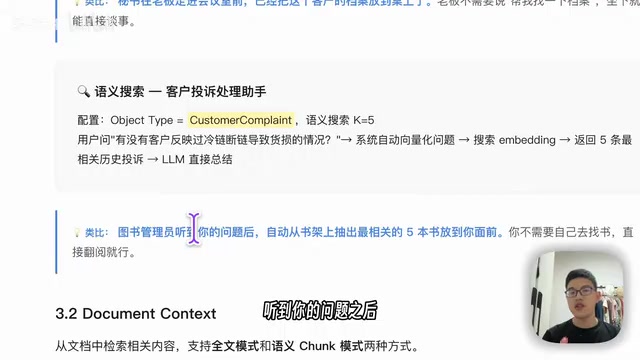
An analogy: Ontology Context is like a secretary laying files on the table before the boss walks into the meeting room; Document Context is like a librarian pulling the most relevant books from the shelf; Function-Backed Context is like a secretary simultaneously coordinating with Sales, Customer Service, and Legal to compile a full briefing.
Layer 2: Query Layer
This layer lets the LLM autonomously decide what to query — supporting filtering, aggregation, inspection, and traversal along relationship chains. The key distinction: it queries objects and relationships within the Ontology, not underlying tables and fields via SQL. Three typical patterns:
- Multi-condition filtering + aggregation: e.g., "How many delayed high-priority orders are there in the South China Warehouse?" — filter and count, then follow Links to ask which ones involve VIP customers.
- Link traversal for root-cause analysis: When asked why a particular order is delayed, the Agent traces back through the network structure layer by layer (configurable maximum depth), synthesizing causes like "vehicle breakdown + hub congestion" — much like a detective following a chain of clues.
- Aggregation for operational overview: Group by region to generate a regional "traffic light dashboard."
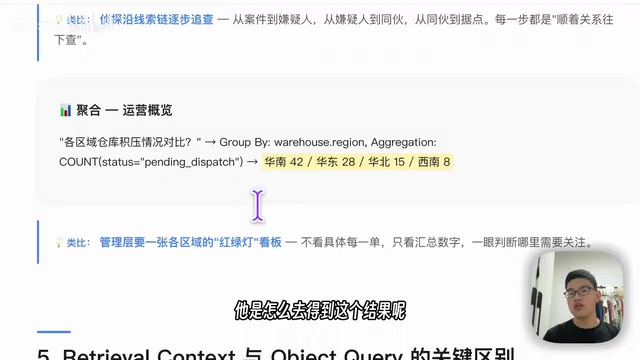
A principle that's easy to mix up: deterministic information goes into Context; exploratory information goes into Query. Getting this wrong will either bloat Context with too many tokens (adding noise), or make Query too narrow (causing the LLM to start hallucinating due to missing information).
Layer 3: Logic Layer
Once the Agent has retrieved objects, many scenarios require invoking encapsulated business logic. Why not let the LLM compute things itself? Because "this looks risky" is not an acceptable answer in an enterprise context.
With Functions in place — for example, calling calculate_delay_risk — the function checks 90 days of historical delay data for the same route, reads carrier scores, calls a weather API, runs a predictive model, and returns a structured result like "High risk — reasons: warehouse backlog + severe weather alert at destination."
This function-calling capability corresponds technically to the Function Calling mechanism in large language models — a capability OpenAI formally launched in June 2023. It allows developers to describe available function signatures (name, parameters, description) to the model, which then decides during inference which functions to call and with what parameters. This upgrades the LLM from a "pure text generator" to a "programmable decision engine": the model handles intent understanding and tool selection, while external systems handle actual execution — the two are decoupled through a structured JSON interface.
The LLM's responsibility is to understand intent, select the appropriate function, and explain results in natural language — business rules and model inference belong in Functions. Don't let the LLM substitute for specialized judgment.
Layer 4: Action Layer
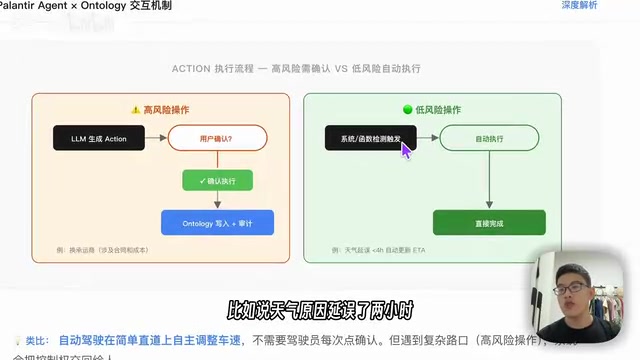
At this layer, the Agent transitions from a Q&A assistant to a genuine business operator. Action Tools let the Agent make changes to the Ontology, in two scenarios:
- High-risk operations: The LLM generates an Action that requires user confirmation. For example: "Switching to Carrier B increases unit price by 12%, adding ¥340 in freight costs, but improves delivery time by 10%" — the user must click to confirm before execution.
- Low-risk operations: Automatically triggered. For example, a two-hour weather-related delay automatically updates ETA and notifies the customer.
There are also three auxiliary tools: Update Application Variable (modifying application state), Command Tool (triggering operations in other applications, such as map annotations), and Request Clarification (confirming ambiguous instructions before execution — like a nurse verifying "left hand or right hand?" before administering treatment).
Layer 5: Governance Layer
This is the foundation of the entire architecture — and the most fundamental differentiator between Palantir and generic Agent frameworks. It's not a discrete step; it's a constraint mechanism that runs across all four preceding layers.
Consider the same "operations assistant" Agent: a dispatcher and a regional manager log in to completely different worlds. The dispatcher can only view the three routes they're responsible for, can calculate delay risk, but cannot access profit data. The regional manager sees the full South China overview, can optimize allocation, and can view profitability. It's like being in the same building: an intern only has keycard access to their own floor; the CEO has building-wide access.
Even more critical is the anti-hallucination mechanism. LLM hallucination — where models generate content that sounds plausible but is entirely fabricated — is a core risk in enterprise AI deployment. The industry typically addresses hallucination at two levels: the Prompt engineering level (constraining model behavior through instructions, but fundamentally only influencing output tendencies, not preventing the model from accessing information within its training knowledge) and the architectural level (using information isolation and access controls so the model physically cannot encounter information it shouldn't output).
Palantir chooses the latter. When a user asks "What's the company's total revenue this year?", the approach isn't to add a Prompt instruction like "don't fabricate data." Instead, three layers stack up: no financial Context is configured, no Financial Report Object Type is retrievable, and no financial functions are authorized. With all three in place, the Agent simply cannot access revenue data — rather than being merely "told not to mention it." This is philosophically aligned with Zero Trust Architecture: "never trust, always verify," shifting protection from the perimeter to every individual resource access point. All operations also enter audit logs for complete traceability.
Tool Exposure and Internal vs. External Agents
Agents invoke tools in two modes: Prompt Tool Calling (embedding tool descriptions in the Prompt, compatible with all models, suitable for models that don't natively support Function Calling) and Native Tool Calling (leveraging native model capabilities, supporting parallel invocation of multiple tools — superior in performance, particularly critical for complex scenarios that require querying multiple Ontology objects simultaneously).
One common misconception worth addressing: Palantir does not inject the full Ontology schema into the System Prompt. Only the portion configured or authorized for the current Chatbot is exposed.
The five layers described above primarily cover internal Agent interactions. External Agent integration relies on two mechanisms, both based on the MCP (Model Context Protocol) standard open-sourced by Anthropic in November 2024 — a protocol that defines standardized client-server communication between AI Agents and external tools and data sources, solving the fragmentation problem of prior tool integration approaches:
- Palantir MCP: Designed for developers — can modify Ontology type definitions (equivalent to DDL-level schema permissions), but cannot write data directly.
- Ontology MCP: Designed for external business Agents — can read data, execute Actions, and write data (equivalent to DML-level operational permissions), but cannot modify Object Type definitions.
This permission-layering design closely mirrors the "DBA vs. regular user" role separation in database systems, resolving the tension between platform stability and business flexibility at the protocol level. Regardless of which path is used, the core principle remains unchanged: Agents access everything through the governed Ontology interface, never bypassing the Ontology to directly operate on underlying data.
Demo: From Query to Decision Simulation
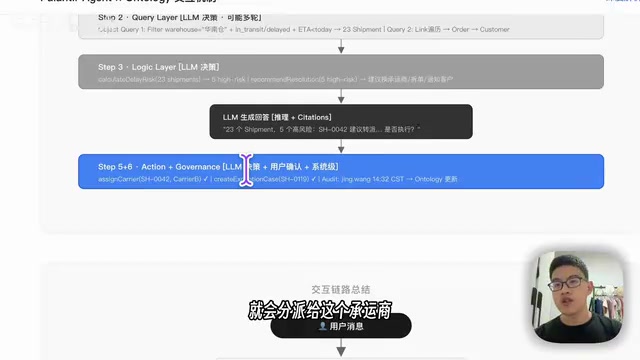
The demo accompanying this article provides a complete, runnable example. The workflow is: import Ontology → select LLM → configure user role permissions (corresponding to the Governance layer) → begin conversation.
In a live conversation, a user can query all order statuses; the Agent returns an overview of 12 orders, flagging high-risk ones (two already delayed, with risk scores at 100%). For urgent orders, the user can ask the Agent to run a role simulation comparison, outputting recommended scenarios: how much delay time would be reduced by switching carriers, how much additional cost would be incurred, and practical suggestions like "proactively reach out to the customer."
The demo also includes a "reasoning trace" feature, providing full visibility into which tools the Agent invoked: from creating context, calling Query Tools to retrieve customer/order/shipment/carrier data, to invoking functions for decision simulation — making the abstract five-layer architecture visible as an observable business decision chain.
Conclusion
Palantir's Agent-Ontology interaction design is fundamentally about fusing "large model capabilities" with "enterprise-grade governance." Within the five-layer architecture: Context and Query address what the Agent knows; Logic and Action address what the Agent can do; and Governance — which runs through everything — addresses what the Agent is permitted to do.
For teams looking to deploy AI Agents in enterprise settings, this "governed semantic interface" philosophy — using architectural constraints rather than Prompt constraints to define safety boundaries — is far more worth studying than simply piling on Prompts and model capabilities.
Related articles

Deleted Reddit Post Sparks Debate Over AI Content Moderation
A Reddit post removed with only a 'Removed by Reddit' notice highlights AI content moderation's transparency gaps, misjudgment risks, and appeal challenges for platforms and creators.

DSH + Ollama Local LLM Deployment in Practice: Free Chat with Da Fei Yu
Bilibili creator tests DSH + Ollama local LLM deployment end to end: Ollama install, Xunlei-accelerated downloads, ModelScope GGUF model import, DSH custom API address setup, and a comparison of Qwen 3.5 4B, 8B, Gemma, and other models on 8GB VRAM, with advice on choosing local deployment vs. API calls.

Tested: A $899 Mac Mini vs. a $200/Month AI Subscription
Real-world test of whether an M4 Mac mini can replace a $200 AI subscription: 16GB can't fit large models, and both speed and quality fall short—but privacy, no caps, and near-zero running costs make it an ideal host for an always-on agent. Includes buying advice per configuration and money-saving strategies.