Deep Dive into Amazon Kiro: How a Spec-Driven AI IDE Is Reshaping the Development Workflow

Amazon launches Kiro, a spec-driven AI IDE that elevates AI coding from casual generation to systematic engineering.
Amazon has released Kiro, a new AI IDE that sets itself apart from mainstream vibe coding tools with its spec-driven development approach. Core features include Steering Docs for project context understanding, a Spec feature that structures development into three phases (requirements, design docs, and task lists), and Agent Hooks for event-driven AI automation like auto-generating tests. Targeting production environments with deep AWS integration, Kiro represents the shift from AI that simply writes code to AI that does engineering.
Amazon recently launched a brand-new AI integrated development environment — Kiro. Unlike today's mainstream "vibe coding" tools, Kiro focuses on spec-driven development, aiming to elevate AI programming from "casually chatting to generate code" to "a systematic engineering process from concept to production." Kiro is currently in free preview, and anyone can try it out.
What Is Vibe Coding? Vibe coding is a programming paradigm coined and popularized by OpenAI co-founder Andrej Karpathy in early 2025. It refers to developers generating code through casual natural language conversations with AI, without needing to deeply understand the underlying implementation details. This approach dramatically lowers the barrier to programming, enabling non-professional developers to quickly build prototypes. However, its core weakness is a lack of structure: the generated code is often hard to maintain, incompatible with existing architectures, and prone to creating difficult-to-track technical debt in complex projects. Kiro was built specifically to address this pain point.
Steering Docs: Giving AI True Understanding of Your Project Context
Kiro's first highlight is the Steering Docs feature. Before starting any development work, users can generate project steering documents with a single click from the sidebar icon. These documents are stored in the project's .kiro/steering folder and describe the application's technical architecture in detail — for example, the demo uses a full-stack web application with a Next.js frontend and an AWS serverless backend.
This design philosophy is highly pragmatic. The pain point with most current AI coding tools is that the AI lacks deep understanding of a project's overall architecture and context, causing generated code to frequently clash with the existing project style or even introduce architectural conflicts. Steering Docs essentially provide AI with a "project briefing," ensuring that all subsequent interactions are grounded in a thorough understanding of the project.
Spec: A Structured Development Workflow from Requirements to Code
Kiro's most central feature is Spec (Specification). This is a capability that deeply integrates software engineering best practices with AI.
The Engineering Origins of Spec-Driven Development Spec-driven development is a well-established methodology in traditional software engineering that emphasizes clearly defining requirement specifications before writing any code. This concept traces back to the structured programming movement of the 1970s and continues today in agile development through user stories and acceptance criteria. Its core value lies in reducing rework costs through thorough upfront definition while providing a shared understanding for team collaboration. By combining this traditional methodology with AI capabilities, Kiro represents a significant upgrade to the concept of "AI programming" — it's no longer just about "writing code faster," but about "doing engineering more systematically."
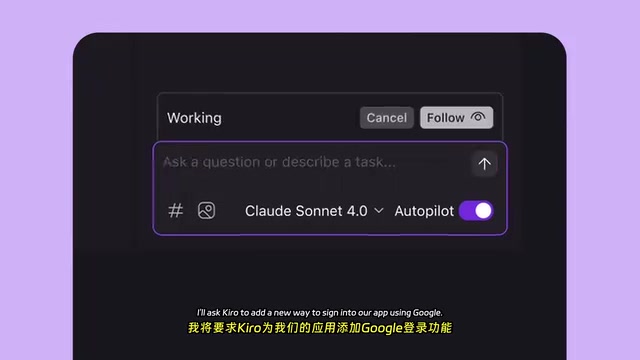
A Three-Step Spec-Driven Development Workflow
Using the demo's example of "adding Google login to the app," the Spec feature breaks the entire development process into three stages:
Step 1: Requirements document generation. Kiro automatically generates a requirements document containing User Stories and Acceptance Criteria. Developers can review and supplement it — for instance, in the demo, an acceptance criterion for improving logout handling was manually added. This human-AI collaboration approach ensures completeness in requirement definitions.
Step 2: Design document generation. Based on the confirmed requirements, Kiro generates a detailed technical design document, including Mermaid flowcharts, infrastructure change plans, and configuration instructions.
Mermaid: The "Diagrams as Code" Standard for Technical Documentation Mermaid is a text-based diagram description language that allows developers to generate flowcharts, sequence diagrams, class diagrams, and various other technical diagrams using concise Markdown-like syntax — no need for specialized tools like Visio. It's now natively supported by GitHub, GitLab, Notion, and other major platforms, making it one of the de facto standards in technical documentation. Kiro's automatic generation of Mermaid flowcharts during the design document phase means the generated technical plans can be directly embedded in project documentation, enabling the "Docs as Code" engineering practice and making architectural decisions traceable and version-controllable.
This step allows developers to see the overall technical plan before writing any code, avoiding the chaos of "code-and-revise-as-you-go."
Step 3: Task list breakdown and step-by-step execution. Kiro breaks the entire feature into multiple independently completable small tasks. Developers can have AI execute them one by one, verifying and adjusting after each completed task.
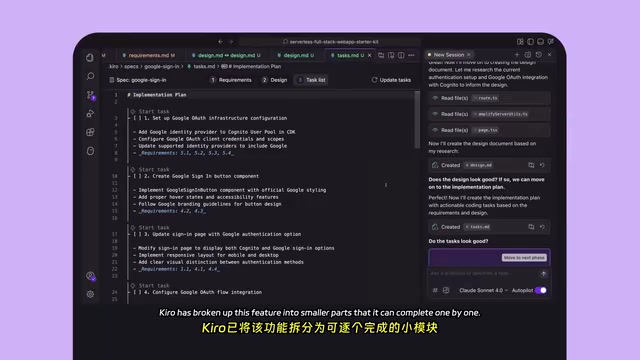
Why Is Spec-Driven Development More Reliable Than "Generate Code from a Single Prompt"?
This structured approach solves a fundamental problem in AI programming: controllability. When you have AI generate large amounts of code all at once, it's hard to pinpoint issues when something goes wrong. Kiro's step-by-step execution mode keeps developers in control of the development process at all times. In the demo, the developer made fine adjustments after each task completion, ultimately achieving a fully functional Google login — including the frontend button, backend logic, and infrastructure configuration.
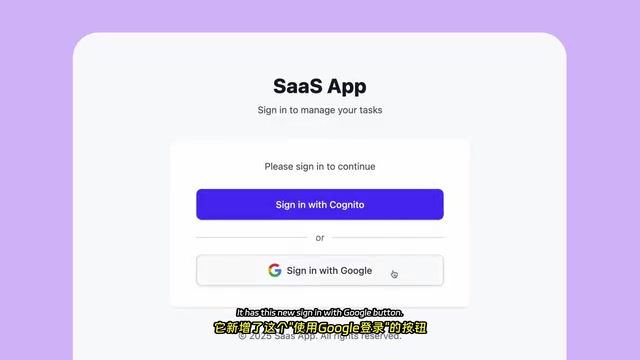
Agent Hooks: Event-Driven AI Automation Assistants
Another innovative feature in Kiro is Agent Hooks. This is an event-driven automation mechanism that automatically executes AI tasks when specific actions are triggered.
The Hooks Mechanism: From Git to AI Automation Hooks are a classic event-driven design pattern in software engineering that allows predefined callback logic to be automatically triggered when specific events occur. This concept is widely used in frontend development (e.g., React Hooks), Git workflows (Git Hooks, which can automatically execute scripts before and after operations like commit and push), and CI/CD pipelines. Kiro's Agent Hooks combine this mechanism with AI capabilities, essentially upgrading the execution logic from fixed scripts to AI agents that can understand natural language instructions — built on top of traditional automation triggers. This dramatically lowers the barrier to configuring automated workflows while preserving the predictability and controllability of event-driven architecture.
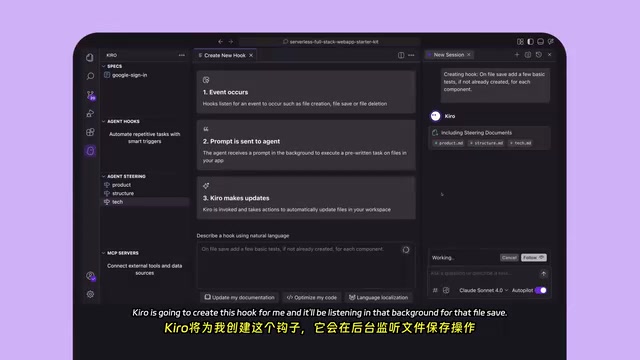
The demo showcased a highly practical scenario: setting up a Hook that makes Kiro automatically check whether a corresponding test file exists every time a component file is saved, and if not, automatically generate basic tests. Developers simply describe the rule in natural language — "On file save, add a few basic tests, if not already created, for each component" — and Kiro creates the Hook and continuously listens in the background.
When a developer modified and saved a component, the Hook immediately triggered, automatically generating a test file for the Google login button. The value of this feature is that it transforms AI from a "passive responder" into an "active collaborator," automating tasks that developers tend to forget but are important — like writing unit tests.
How Kiro Differentiates from Cursor, Copilot, and Other AI IDEs
The AI coding tools market is fiercely competitive, with products like Cursor, Windsurf, and GitHub Copilot each having their own strengths. Kiro's differentiation strategy is crystal clear:
- It doesn't replace vibe coding — it complements it. Kiro explicitly states that it also supports native MCP and vibe coding modes, but its core selling point is the spec-driven structured development workflow.
MCP (Model Context Protocol): A Unified Interface for the AI Tool Ecosystem MCP (Model Context Protocol) is an open standard released by Anthropic in late 2024, designed to solve integration challenges between AI models and external tools and data sources. It defines a unified set of interface specifications that allow AI assistants to securely and standardizedly access file systems, databases, APIs, and other external resources — similar to a "USB port" for the AI world. Major AI development tools including Cursor and Claude Desktop already support MCP. Kiro's claim of native MCP support means strong ecosystem compatibility, allowing developers to reuse their existing MCP toolchains without needing to reconfigure their entire integration environment when switching tools.
- Built for production, not prototyping. From requirements documents to design documents to task breakdowns, Kiro's entire workflow is better suited for projects destined for production deployment, rather than rapid prototype validation.
- Deep integration with the AWS ecosystem. As an Amazon product, Kiro's native support for AWS serverless architecture is a natural advantage.
Conclusion: AI Coding Tools Are Shifting from Writing Code to Doing Engineering
Kiro represents an important direction in the evolution of AI programming tools: from "AI helps you write code" to "AI helps you do engineering."
Related articles
 Product Reviews
The Programmer's Desk Setup Guide: Building a Workspace That Feels Like Home
Discover how programmers build productive, comfortable workspaces. From multi-monitor setups to ergonomic design, explore the desk philosophy that drives focus and flow.
 Product Reviews
Qoder vs Cursor Real-World Comparison: Which $20/Month AI IDE Is Better?
Hands-on comparison of Qoder vs Cursor AI IDEs: Agent autonomy, human interaction count, and architecture decisions. Qoder needed only 2 interactions vs Cursor's 8.
 Product Reviews
Cursor Cloud Agent Demo: Eliminating Bottlenecks Across the Entire Software Development Lifecycle
Deep analysis of Cursor's Cloud Agent demo showing how cloud VMs, automated test artifacts, and a full-chain control plane systematically eliminate human bottlenecks across the software development lifecycle.