Deep Dive into Codex Record and Replay: Generate Automation Skills Just by Screen Recording

Codex's Record and Replay turns screen recordings into reusable AI automation skills — no code needed.
OpenAI Codex's Record and Replay feature lets users create reusable automation Skills by simply recording their screen operations. Powered by Computer Use, Codex learns from demonstrations and replays workflows autonomously. Unlike traditional RPA tools that break with UI changes, this AI-driven approach understands intent, offering superior adaptability. It dramatically lowers the automation barrier for non-technical users.
OpenAI Codex recently launched a seriously underrated feature — Record and Replay. It allows users to demonstrate a workflow via screen recording, and Codex automatically converts it into a reusable "Skill." After that, a single command is all it takes for the AI to repeat the entire process automatically. The core value of this feature is simple: you don't need to write any code or craft complex prompts — just "show it once" and you're done.
What Is Record and Replay?
Record and Replay is a plugin-level feature introduced by Codex. The core idea is to record the user's screen operations, let the AI learn from them, and automatically replay them. The workflow is remarkably intuitive:
- Recording Phase: The user performs normal operations in the browser while Codex records every action in the background (clicks, inputs, page navigations, etc.)
- Learning Phase: After recording ends, Codex automatically analyzes the operational events and summarizes them into a named Skill
- Replay Phase: From that point on, the user only needs to invoke the Skill via a slash command, and Codex uses its Computer Use capability to automatically execute the entire workflow
This essentially combines Codex's Computer Use capability with the user's operational demonstration, creating a new paradigm of "teaching-based automation."
Computer Use: The Critical Infrastructure for AI Automation
Computer Use is one of the most closely watched capability breakthroughs in the AI field over the past two years. It refers to an AI model's ability to directly control a computer's graphical interface just like a human — moving the mouse, clicking buttons, typing text, and scrolling pages. This capability was first publicly demonstrated by Anthropic in October 2024 alongside the release of Claude 3.5 Sonnet, and OpenAI, Google, and other companies subsequently released similar capabilities. The technical core involves feeding screenshots as visual input to multimodal large models, enabling them to understand the current interface state and then output specific operation instructions (such as coordinate clicks, keyboard inputs, etc.). Unlike traditional API-based approaches, Computer Use doesn't require the target application to provide any programming interface — in theory, it can operate any software with a graphical interface, making it a critical infrastructure for general-purpose automation. It's precisely the maturation of this capability that transformed Record and Replay from a concept into a usable product feature.
The "show the AI how to do it" interaction paradigm has deep roots in academia, known as Programming by Demonstration (PbD) or Learning from Demonstration (LfD). This concept can be traced back to human-computer interaction research in the 1980s, with the core idea of letting users define program behavior through direct demonstration rather than writing code. In robotics, LfD has been widely applied to industrial robot motion teaching — an operator manually guides a robotic arm through a welding motion once, and the robot learns to repeat it autonomously. Codex's Record and Replay brings this philosophy from the physical world into the digital world, combining it with the intent-understanding capabilities of large language models. This enables the AI not only to remember the operational steps but also to understand the purpose of each step, allowing it to make adaptive adjustments when the environment changes.
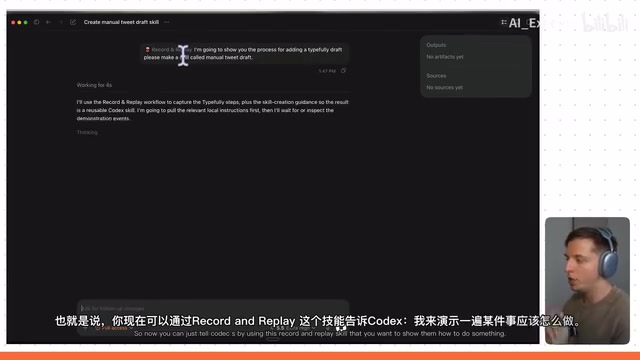
Hands-On Demo: Automating the Typefully Tweet Drafting Workflow
In the actual demonstration, Record and Replay was used to complete a typical scenario: creating a tweet draft and uploading media files in Typefully.
Typefully is a writing and publishing tool designed specifically for Twitter/X content creators, offering more powerful draft management, scheduled publishing, thread composition, and analytics than Twitter's native editor. Users can compose multiple tweets in advance in Typefully, schedule publication times, manage multiple accounts, and track each tweet's performance through a data dashboard. It's extremely popular among social media managers and personal brand builders, and is a quintessential SaaS productivity tool. In this article's demonstration, Typefully was chosen as the target application precisely because Record and Replay targets everyday, high-frequency, repetitive web application operations.
Step 1: Start Recording and Create a Skill
In Codex, enter the instruction: "Please create a skill called Manual Tweet Draft." Codex will automatically launch the Record and Replay Workflow and prompt: "Recording has started, please demonstrate the draft workflow in Typefully."
Next, the user simply performs the complete workflow once as normal:
- Open Typefully.com
- Select the target account
- Enter the draft editing interface
- Upload images or videos
- Save the draft
After completing the operations, click stop, and Codex will automatically return to the interface, review the recorded events, and generate the Skill.
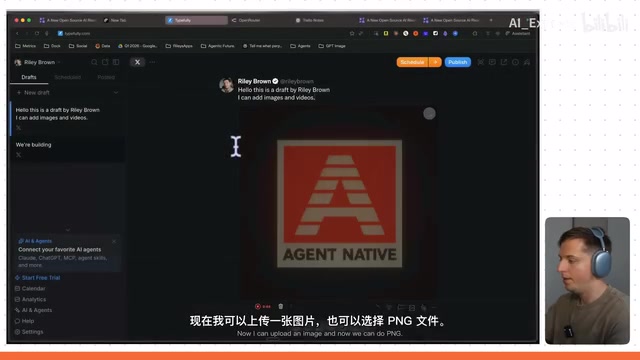
Step 2: Invoke the Skill for Automatic Execution
Once the Skill is created, type / in Codex, then enter Manual Tweet Draft, and the Skill will appear in the list.
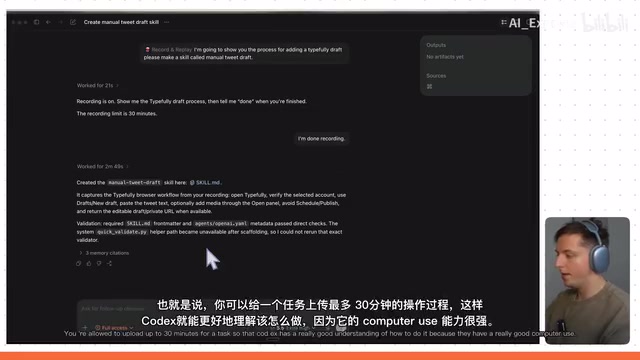
The demonstrator then gave a new instruction: "Help me upload the latest video to Typefully, complete the draft — the video is in the Downloads folder." Codex immediately began executing — the Computer Use cursor moved automatically, clicking to create a new draft, clicking the upload button, navigating to the Downloads folder, and locating the latest video file.
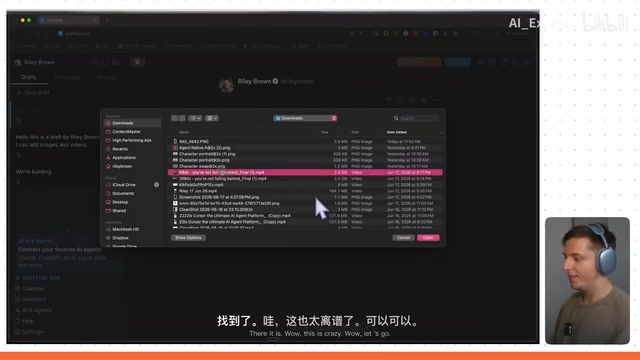
Throughout the entire process, the AI autonomously controlled the browser, precisely reproducing the workflow the user had previously demonstrated. Although the upload ultimately failed because the video file exceeded Typefully's 512MB limit, the execution of the entire automation workflow was already deeply impressive.
Key Technical Details
Recording Duration and Capability Boundaries
- Supports up to 30 minutes of recording: Even fairly complex multi-step workflows can be fully recorded and converted into Skills
- Powered by Computer Use: Codex's Skill replay relies on its computer control capabilities, covering mouse clicks, keyboard inputs, page navigation, and more
- Supports cross-application operations: The demo involved switching between the Codex interface, browser, Typefully, and other applications, demonstrating that this feature is not limited to a single application
Core Differences from Traditional RPA
Traditional RPA (Robotic Process Automation) tools typically rely on precise pixel coordinates or DOM element positioning, making them prone to failure when interfaces change. Codex's Record and Replay fundamentally lets the AI understand the operational intent rather than mechanically recording coordinates, giving it stronger adaptability and fault tolerance.
RPA (Robotic Process Automation) is an important technology branch in enterprise automation, with representative vendors including UiPath, Automation Anywhere, and Blue Prism. Traditional RPA works by recording user operations and converting them into automation scripts based on UI element selectors (such as DOM paths, CSS selectors) or screen coordinates. This approach works well in stable enterprise internal systems, but is extremely fragile when facing frequently updated web applications — a single frontend redesign can break an entire automation workflow, resulting in extremely high maintenance costs. According to Gartner, approximately 30-50% of enterprise RPA projects fail to sustain operations due to maintenance issues. Codex's Record and Replay introduces AI visual understanding to replace hard-coded element positioning, essentially substituting intelligent perception for mechanical memory, representing an important step in the evolution of RPA technology from rule-driven to intelligence-driven.
When page layouts undergo minor adjustments or button positions change, Computer Use-based AI can still find the correct operation targets through visual understanding — something traditional automation tools struggle to achieve.
Application Scenarios and Value Analysis
The application space for Record and Replay is vast. Here are several typical scenarios:
- Social media management: Batch-create tweet drafts, schedule content publishing, cross-platform synchronization
- Data entry and migration: Transfer information from one system to another
- Automated testing: Record a test operation once, then automatically execute regression tests afterward
- Customer service ticket handling: Standardized ticket processing workflows — record once, reuse repeatedly
More importantly, this feature dramatically lowers the barrier to automation. What previously required learning to code, understanding APIs, or configuring tools like Zapier can now be accomplished simply by "showing the AI once."
It's worth noting that Zapier, mentioned above, is currently one of the most popular no-code automation platforms. It uses pre-built API connectors (called Zaps) to link different SaaS applications together, enabling data flow and process automation. Similar tools include Make (formerly Integromat), n8n, Microsoft Power Automate, and others. While these tools have lowered the automation barrier, they still require users to understand trigger-action logic models, configure field mappings, handle API authentication, and other technical details. The more critical limitation is that they can only control applications that provide API interfaces — if a piece of software hasn't opened up an API, it cannot be incorporated into an automation workflow. Record and Replay bypasses this limitation entirely by directly controlling the GUI — in theory, any software that can be operated on screen can be automated. This represents a fundamental paradigm shift.
For users without a technical background, this is a genuine breakthrough.
Summary
Codex's Record and Replay feature hasn't yet gained widespread attention, but it represents an important direction: from "telling AI what to do" to "showing AI how to do it." This teaching-based interaction model is more intuitive and efficient than text-based prompts, especially suited for complex operational workflows that are difficult to describe precisely in words.
Combined with Codex's increasingly mature Computer Use capabilities, Record and Replay has the potential to become a killer feature in personal productivity tools. When everyone can easily create their own automation Skill library, the practical value of AI assistants will take a quantum leap forward.
Related articles

AI Can Read Neural Network Weights Directly: Do Models Already Exceed Expectations?
A Reddit developer experiment shows language models can directly read neural network weights and infer their function. Astra, Opus 5.5, and Muse Spark 1.3 all passed the test, sparking discussion on model generalization and training sources.

India's Microdrama Market Explodes: EloElo Secures $80M Investment from NBCUniversal
EloElo secures $80M from NBCUniversal to boost StoryTV, its microdrama platform with over 33M monthly active users, as India's microdrama market draws global capital.

Acoustic Detection of Multi-Rotor UAVs: Fusing Handcrafted Features with Pre-Trained Embeddings
Study reveals data leakage from random splits in UAV acoustic detection, proposes source-disjoint protocol with stacked ensemble of handcrafted features and YAMNet embeddings, achieving 95.29% accuracy for low-cost drone detection.