Deep Dive into Goal Mode: The Core Implementation Flow Behind AI Agent Automation

Goal mode lets an AI autonomously loop through tasks and self-verify each round until the objective is fully achieved.
Goal mode is the core paradigm for AI Agents handling complex, long-running tasks. Users simply provide a goal and a budget; the model dynamically splits work into rounds, executes each one, self-verifies, and continues until the task is complete — no per-step intervention required. A well-written goal prompt needs five elements: end state, evidence, scope, loop behavior, and stop rules, with the first two being mandatory. Round count is unknown in advance and determined dynamically. Goal mode is ideal for large tasks with clearly verifiable outcomes, and is the design pattern most worth emulating when building your own Agent.
What Is Goal Mode
There's a common interview question for AI Agent roles: Walk me through the implementation flow of Goal mode in detail. It sounds straightforward, but it trips up a surprising number of people. As the most classic automation paradigm for handling complex requirements, Goal mode is well worth a deep study for any developer who wants to build their own Agent — or simply understand how AI achieves automation.
This article covers four dimensions: the difference between ordinary conversation and Goal mode, a detailed breakdown of how Goal mode works, how Plan mode differs from Goal mode, and when to use Goal mode. Once you understand these, you'll have a clear picture of how AI Agents operate "unattended" in automated workflows.
The Essential Difference Between Ordinary Mode and Goal Mode
Ordinary mode is the interaction style we use most: you send a message, the model completes its response and stops, waiting for your next input before doing anything else. The process is discontinuous — every round requires you to send, review, and set up the next step.
Goal mode is fundamentally different. Once you send your goal, the model enters a loop: it executes the first round of work, conducts a self-review upon completion, and if it passes, moves straight into the next round — continuing until all rounds are done. Throughout this process, the model is simultaneously doing the work, verifying it, and planning the next round. Your only responsibilities are the first step (setting the goal) and the last step (accepting the result). Everything in between loops automatically.
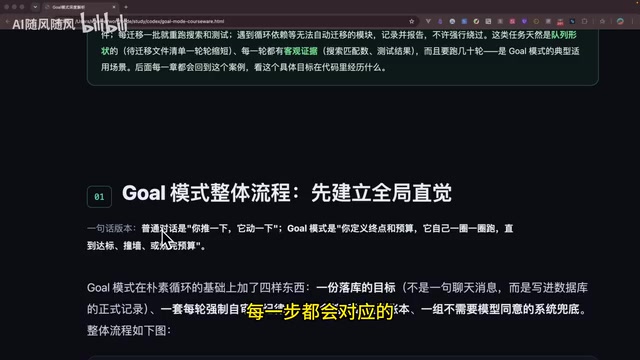
Some people ask: can't you simulate Goal mode in ordinary mode using a while-loop approach? Like writing a prompt that says "keep looping until done" and passing the conversation history each time? It looks similar, but there are three fundamental differences:
- No flexible start/stop control: Once a regular loop starts, you can't easily intervene;
- No self-verification: It relies entirely on your prompt, and the verification conditions in prompts are often vague;
- No per-round execution: A large task might run continuously for a long time with inconsistent results.
These pain points are precisely what motivated the creation of the more intelligent Goal mode.
Understanding Goal Mode Through a "Remote Employee" Analogy
Here's a vivid analogy. Imagine you're a manager with a remote employee. You give them a goal and a budget, and they go off and get it done. Meanwhile, you have a finance system monitoring whether the budget runs out — once it does, execution stops, and you decide whether to add more budget or step in yourself.
The key point: you don't need to know what the employee does each day. If the goal is "increase sales from 30% to 60%," you only care about that final outcome — how many days it takes, what they do each day, none of that concerns you.
Goal mode works exactly this way — it's laser-focused on the objective. You provide the goal and a budget; the model handles the planning and execution on its own.
From a technical standpoint, Goal mode is essentially an engineered implementation of a ReAct (Reasoning + Acting) loop. ReAct is the core paradigm of most mainstream AI Agent architectures: the model reasons about the current state and next action, executes the action, receives feedback from the environment, then reasons again — repeating in a cycle. Goal mode builds on this by adding persistent storage (SQLite for saving goals and state), budget management, and a mandatory self-review after each round, making long-running unattended operation possible. This also explains why Goal mode places high demands on the underlying model — the quality of reasoning in each round directly determines whether tasks are correctly decomposed and verified. The stronger the model, the more sensibly it allocates work across rounds and the more reliable its self-review.
A Complete Breakdown of the Goal Mode Flow
Let's walk through a real development scenario: migrating leftover CommonJS syntax in a frontend project's src directory to ESM.
Creating the Goal
Creating a goal launches a long-running task that will keep running, so it has high tooling requirements. In Codex, for example, you must explicitly select "Goal mode" for it to work — or you need to explicitly tell the model in the prompt that you want to create a goal. While AI will proactively create sub-agents, todo lists, or plans during regular development, Goal mode will never be triggered automatically — you must request it explicitly, otherwise it's easy to accidentally kick off a long-running task.
Writing the Goal Prompt
A precise goal prompt should include five elements:
- End state: What you ultimately want to achieve — be specific and concrete, not vague;
- Evidence: How to prove the end state has been reached — tell the model how to verify;
- Scope: Define what's in and out of bounds for changes;
- Loop task: Tell the tool how to iterate (optional — the model often decides this itself);
- Stop rules: When to stop — for example, if a certain type of blocker is encountered, hand off to the user.
The end state and evidence are mandatory. Scope, loop behavior, and stop rules can be included based on the situation.
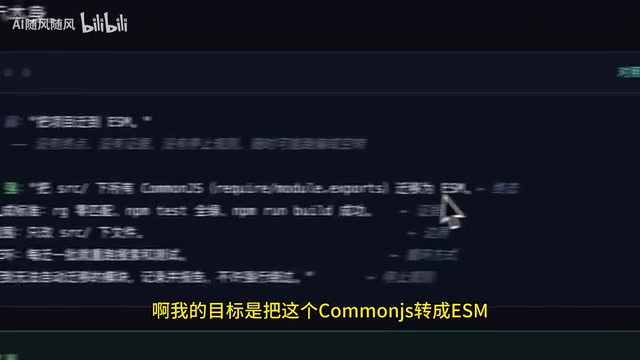
Using the CommonJS → ESM migration as an example: the end state is completing the migration; the evidence is "rg regex match + tests passing + build succeeding"; the scope is only modifying specified files; the loop behavior is re-running the search and tests after each batch of changes; and the stop rule is to log a report for any modules that can't be automatically migrated rather than force-skipping them. With all five elements in place, this becomes an extremely precise goal. Once defined, you select Goal mode, and the model saves the goal prompt and initial state to a SQLite database.
How Rounds (Turns) Are Split
A common misconception: people assume the model receives the prompt, estimates the total number of rounds needed, then executes them in sequence. That's not how it works.
After receiving the prompt, the model only plans "what to do in round one." After completing round one and running verification, it checks whether the task is done. If not, it starts round two. In other words, it slices the large task into many small chunks, and the specific content of each chunk isn't determined until that round begins.
At the start of each round, the model reads what the previous round completed, does the current round's work, and produces a summary at the end — which then becomes the context for the next round. This means the total number of rounds is unknown in advance. The task only truly ends when the model determines that all tests pass, the task is complete, and no further action is needed.
This design is highly intelligent: the model allocates a reasonable amount of work per round to ensure each one can actually be completed, avoiding the problem of a single round taking too long and dragging down subsequent ones. It's also highly dependent on the model's underlying capability.
Execution Logic Inside a Single Turn
Let's zoom into the internals of each cycle. The model receives the goal and begins executing — calling tools, receiving results, calling more tools, and so on. "Tools" here refer to capabilities for local operations: directory scanning, code editing, code search, and similar actions.
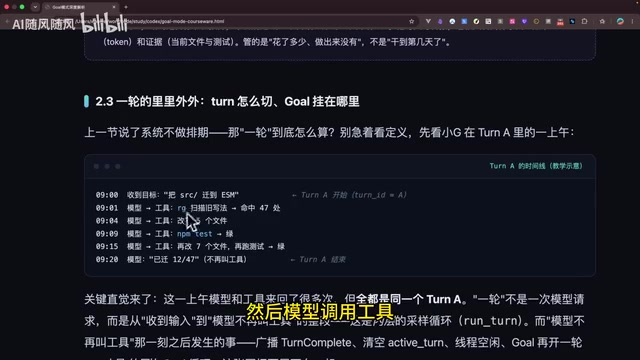
The signal that a round has ended is: the model's output no longer contains any tool calls, or the model explicitly returns "this round should end." After ending, the model produces a summary of the round's work.
The flow also provides four hooks, subscribing to four events: start, end, stop, and continue. Every round reads the previous round's task summary, along with the original goal and budget, as the prompt for the next round.
The Importance of Self-Review Verification
Self-review verification must happen at the end of every round. The basis for verification comes from the "evidence" section of the prompt — but the model doesn't stop there. It combines the prompt's verification criteria with the actual work done and changes made in the current round to infer any additional verification steps needed. For instance, if the prompt specifies "rg regex matching," the model will derive additional verification steps based on what was actually changed.
This verification mechanism is what makes Goal mode rigorous. If no verification conditions are written in the prompt, the model can only rely on its own understanding of the codebase — and any gaps in that understanding will significantly degrade the overall result. It is strongly recommended that you always define proper verification conditions.
Token Consumption and Budget in Goal Mode
Using Claude as an example, there are two usage models: API key (pay per use) and subscription (e.g., Pro plan with a 5-hour or weekly usage limit).
For subscription users running Goal mode: as long as there's any remaining quota in the current window (even just 3%), the current-round conversation can start — going slightly over is fine; the overage from the previous round will be deducted next time. Once the weekly quota hits 0%, the task automatically pauses and resumes once the quota resets.
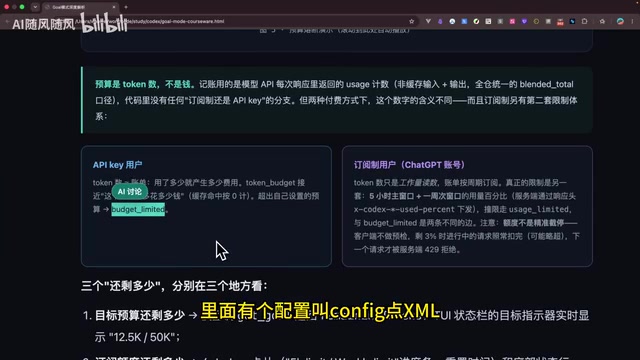
API key users have no quota limit. The only constraint is that you can set a maximum budget Token count for a Goal in the config file to prevent overspending. Subscription users don't need to worry — the system automatically stops and resumes based on quota. If you're building your own Agent, make sure to implement solid budget safeguards, or users might burn through a large number of tokens without realizing it.
Token budget is a critical safety boundary mechanism in Agent engineering. The context for each round includes not just the current round's tool calls and results, but also the original goal and the previous round's summary — meaning the prompt length grows with each passing round. This is why Goal mode "compresses and summarizes" each round's results before passing them to the next round, rather than concatenating the full history. This design preserves essential context while controlling the rate of Token growth. For developers building their own Agents, it's advisable to set both a per-round maximum Token limit (to prevent tool-call explosions in a single round) and a global budget cap (to prevent overall overspending), and to trigger a forced summary before the budget runs out to avoid losing task state.
The Five States of Goal Mode
Goal mode has five common states:
- Over limit: Usage has exceeded the plan quota; execution stops and you need to restore quota manually;
- Completed: The task finished successfully;
- Blocked: Three consecutive failures within a single Turn, or an additional blocker encountered — the task is marked as blocked and requires manual intervention to resume;
- Paused: The user actively paused; can be resumed at any time;
- Deleted: Immediately terminated; cannot be recovered.
Goal Mode vs. Plan Mode
In the early days of weaker models, Plan mode and Goal mode were quite different: Plan mode would generate a plan upfront, and for large tasks, that plan was often rough and incomplete — execution would stop after a short while.
But today, models are generally optimized for long-running tasks, and when Plan mode generates sufficiently detailed documentation, models like Claude, Kimi, and DeepSeekAd can run against that document for hours. So in terms of long-task execution capability, the two are not very different.
The real differences are:
- Execution style: Goal mode iterates in rounds with verification between each; Plan mode executes the plan in one go without verification;
- Pause/resume: Plan mode can't be flexibly paused or resumed — restarting requires going through the native session, reading history and code diffs; Goal mode can be restarted at any time.
Plan mode's technical archetype is typically called Task Decomposition or Hierarchical Planning: the model first generates a structured planning document (similar to a project brief), then executes sub-tasks in sequence. Its advantage is that the plan is human-readable and auditable, making it easy to intervene and modify before execution begins; its disadvantage is that once the plan is generated it becomes fixed, leaving little room for dynamic adjustment when unexpected situations arise mid-execution. Goal mode is closer to Online Planning: rather than generating a complete plan upfront, it decides the next step after each round based on the latest environmental state, giving it much stronger fault tolerance. Each paradigm has its place: choose Plan when you need human review of the execution path; choose Goal when you want full automation with clear verification criteria.
What Scenarios Is Goal Mode Best For
Goal mode is best suited for long tasks with verifiable outcomes. "Verifiable" comes in two forms: quantitative targets (like increasing a metric from 30% to 60%), or a clear verification checklist with well-defined completion criteria.
The task also needs to be substantial enough — typically requiring more than two hours to run — and the goal needs to be sufficiently specific. The more specific, the better the results. For small, scattered tasks, ordinary conversation mode or Plan mode is more than sufficient.
Understanding the essence of Goal mode means understanding how an AI Agent achieves true automation through the combination of goal-driven execution + self-verification + iterative rounds. It's the design paradigm most worth borrowing when you build your own Agent from scratch.
Related articles

Chain of Thought Isn't Just for AI: How Humans Can Use CoT to Improve Thinking Quality
Chain of Thought isn't just a prompt trick for large models. Starting from a Hacker News discussion, this article analyzes why CoT works for human thinking too, breaks down actionable ways to transfer it, and highlights the key differences between human CoT and machine CoT.
Cloudflare Teams Up with OpenAI: Closi…
Cloudflare Teams Up with OpenAI: Closing the Loop from Vulnerability Discovery to Defense with AI
Cloudflare uses OpenAI Daybreak to investigate security vulnerabilities and generate reviewable remediation plans, while developers use Codex to boost coding efficiency and quality.

Orca Multi-Agent Orchestration in Practice: A Guide to Parallel Collaboration with Claude and Codex
Orca is Stable AI's free open-source agent workbench supporting 34 agents like Claude Code and Codex in parallel. Learn its Git worktree isolation, multi-model orchestration, and mobile management.