Deep Dive into webpack: Core Features, Code Splitting, and Frontend Build Practices

A deep dive into webpack's core features, code splitting strategies, and its enduring relevance in frontend development.
This article provides a comprehensive analysis of webpack, the influential module bundler for frontend development. It covers core concepts including the Loader mechanism that enables an "everything is a module" philosophy, Code Splitting strategies for performance optimization, and Tree Shaking. The article also compares webpack with modern alternatives like Vite, esbuild, and Turbopack, while highlighting webpack's enduring ecosystem value and enterprise-grade capabilities.
What is webpack
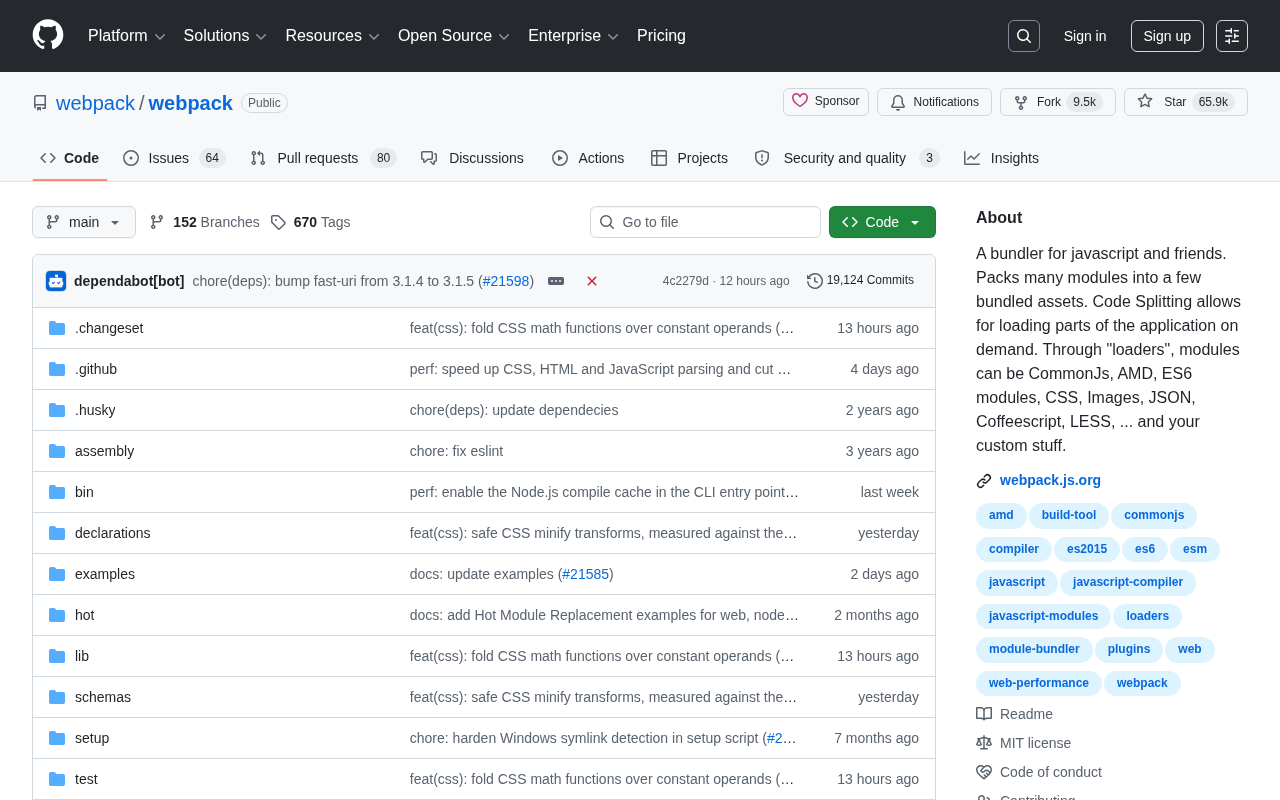
webpack is one of the most influential module bundling tools in modern frontend development. As of now, its GitHub repository has accumulated over 65,883 Stars and 9,520 Forks, and continues to gain hundreds of new stars daily. Behind these numbers lies the trust and reliance of countless developers worldwide.
In simple terms, webpack's core mission is "bundling" — it consolidates the many scattered modules in a project into a few optimized bundled assets. In modern frontend engineering, an application may contain hundreds or even thousands of JavaScript files, stylesheets, images, and other resources. If served directly to the browser without processing, this would incur enormous performance overhead. Each file load means an HTTP request, and browsers have limits on concurrent connections to the same domain (typically 6-8), meaning a large number of scattered files leads to request queuing and page rendering blocking. webpack was born to solve this pain point — it analyzes inter-module dependencies to construct a complete Dependency Graph, then efficiently consolidates all resources.
Starting from Modularity
JavaScript initially lacked a native module system, forcing developers to organize code through global variables and namespaces, which easily caused naming conflicts and maintenance difficulties. With the emergence of specifications like CommonJS, AMD, and ES6 Modules, modular development gradually became mainstream.
These three specifications each have their own historical context and use cases. CommonJS was born in 2009, first adopted by Node.js, with synchronous loading (require/module.exports) as its core feature — ideal for server-side environments, but its synchronous mechanism blocks page rendering in browsers. AMD (Asynchronous Module Definition) was popularized by the RequireJS library around 2011, loading modules through define and asynchronous callbacks, designed specifically for browser environments, though with somewhat verbose syntax. ES6 Modules is the language-level module solution introduced in the ECMAScript 2015 standard, using import/export syntax with support for static analysis — widely recognized as the future direction. However, browser support for these module specifications is inconsistent — legacy browsers like IE have no ES Modules support at all, and even modern browsers don't perform well when handling deeply nested dependencies across many modules.
webpack emerged precisely to unify, compile, and optimize these different module formats during the build phase, ultimately producing code that browsers can run directly. It can simultaneously recognize and process CommonJS, AMD, ES6 Modules, and even mixed usage — this powerful compatibility means developers don't need to worry about module support differences across target environments.
Core Features of webpack
The Loader Mechanism: Everything is a Module
One of webpack's most revolutionary designs is its "loaders" mechanism. Through loaders, modules can be not only CommonJS, AMD, or ES6 modules, but also CSS, Images, JSON, CoffeeScript, LESS, or even any custom resource type defined by developers.
From a technical implementation perspective, a loader is essentially a JavaScript module that exports a function. It receives the source file's content (string or Buffer) as input, applies specific transformation logic, and returns the processed result. webpack's loader system follows the Unix pipe philosophy — multiple loaders can be chained together to form a processing pipeline, executing from right to left (back to front). For example, the configuration for processing SCSS files ['style-loader', 'css-loader', 'sass-loader'] first has sass-loader compile SCSS to CSS, then css-loader parses @import and url() dependencies in the CSS, and finally style-loader injects the styles into the DOM. This single-responsibility design makes each loader highly reusable, and the community has accumulated thousands of loaders with various functions.
The profound significance of this design is that it fully implements the "everything is a module" philosophy. In webpack's world, an image, a stylesheet, or a font file can all be imported just like JavaScript modules and processed by the corresponding loader during the build. For example:
- css-loader: Parses
@importandurl()dependency relationships in CSS, converting them into module imports that webpack can understand - babel-loader: Integrates the Babel compiler to transpile modern syntax like ES6+/TypeScript/JSX into code compatible with target environments, supporting flexible transpilation rules configured via
.babelrc - file-loader: Handles static asset files like images and fonts, outputting files to the build directory and returning the final access URL (replaced by built-in Asset Modules in webpack 5)
This unified abstraction greatly simplifies frontend resource management logic. Developers no longer need to manually manage reference paths and build processes for various resource types — webpack automatically tracks all imported resources and incorporates them into the dependency graph.

Code Splitting
Another key feature is "Code Splitting." Code Splitting allows loading parts of the application on demand and is a core technique for optimizing frontend performance.
webpack provides three main code splitting strategies: The first is Entry Points, manually splitting code bundles by configuring multiple entries; the second is Dynamic Imports, using the import() syntax to declare async loading points in code — webpack automatically splits dynamically imported modules into separate chunk files and requests them on demand at runtime; the third uses the built-in SplitChunksPlugin to automatically identify and extract common dependencies shared between multiple entries, avoiding duplicate bundling.
Closely working alongside code splitting is Tree Shaking technology — webpack analyzes the static import structure of ES Modules to identify exports that are never used (dead code) and completely removes them during production builds. These two techniques work together to ensure each output chunk contains only the code that's truly needed.
This capability is particularly important for large Single Page Applications (SPAs). The traditional approach bundles all code into one massive bundle file, forcing users to download everything on their first visit, resulting in slow initial page loads. With code splitting, developers can divide the application into multiple smaller chunks, dynamically loading the corresponding code only when users actually need a specific feature. For example, an e-commerce application can independently bundle user management, order details, and payment flow modules — users browsing the product list don't need to load payment-related code. This not only significantly improves first-screen performance but also optimizes overall user experience and bandwidth utilization.
webpack vs. Other Frontend Build Tools
In recent years, emerging build tools like Vite, esbuild, Rollup, and Turbopack have gained momentum with faster cold start speeds and simpler configurations, making the competition among frontend build tools increasingly fierce. Some question whether webpack has become "outdated."
To understand the differences between these tools, we need to start from their underlying technical approaches. Vite (developed by Vue.js creator Evan You) completely skips the bundling step in development mode, directly leveraging modern browsers' native ES Modules support to serve each source file as an independent module to the browser on demand — meaning no matter how large the project, the dev server's cold start time remains nearly constant. esbuild is written in Go, fully utilizing multi-core CPU parallelism and shared memory models, achieving compilation speeds 10-100x faster than traditional JavaScript toolchains. Turbopack, developed by the Vercel team in Rust, is notably led by Tobias Koppers — webpack's creator himself — and can be seen as the spiritual successor of webpack's philosophy on a new tech stack, employing an incremental computation architecture for extreme HMR (Hot Module Replacement) speeds. Rollup focuses on library bundling scenarios, producing leaner code through its ES Modules-based design — Vite's production builds actually rely on Rollup.
However, looking at project activity data, webpack still maintains strong vitality. Its massive plugin and loader ecosystem, mature and stable build capabilities, and deep support for complex enterprise-level projects are aspects that many new tools cannot fully replace in the short term. A large number of existing projects and enterprise infrastructure are still built on webpack, ensuring it will continue to hold an important position for the foreseeable future.
The Core Value of webpack's Ecosystem
webpack's true moat lies not only in the tool itself but in the vast ecosystem built around it:
- Thousands of community plugins covering all types of build needs, from code minification (TerserPlugin) and asset optimization (ImageMinimizerPlugin) to build analysis (BundleAnalyzerPlugin)
- A mature and comprehensive official documentation system with full coverage from getting-started guides to advanced APIs
- Rich best practice examples and solutions covering cutting-edge directions like micro-frontend architecture and Module Federation — Module Federation is a revolutionary feature introduced in webpack 5 that allows multiple independently deployed applications to share code at runtime, providing native support for micro-frontend architecture
- Extensive enterprise-level validation, including large-scale production environment testing by major internet companies such as Netflix, Airbnb, and Alibaba
For teams requiring highly customized build workflows, webpack's flexibility and controllability remain the top choice. Its Plugin System is based on the Tapable event flow architecture, exposing hundreds of hooks throughout the build lifecycle, allowing developers to intervene at virtually any stage of the compilation process to implement highly customized build logic.
Conclusion
As the foundation of modern frontend engineering, webpack's three core philosophies — "module bundling," "Loader abstraction," and "Code Splitting" — have profoundly influenced the development direction of the entire frontend build tool landscape. Even in today's era of emerging new tools, backed by the community consensus and ecosystem accumulation represented by over 65,000 stars, it remains an essential tool that frontend developers cannot ignore.
For beginners, understanding webpack's working principles is a necessary path to mastering modern frontend engineering. For experienced developers, leveraging its advanced features — such as Persistent Caching, Module Federation, and custom plugin development — can further squeeze out application performance potential. Regardless of how technology trends shift, the engineering principles webpack established — dependency graph analysis, resource abstraction, on-demand loading, and build optimization — will continue to exert influence. They have become the fundamental paradigms for all subsequent build tool designs.
Related articles

Gaussian Process Bandit Optimization: Exploration Strategies and Inference Regret Guarantees
Cumulative regret guarantees in Bayesian optimization fail to reflect final recommendation quality. This article examines a new study that provides inference regret guarantees for Gaussian process bandit optimization through exploration query strategies and fill distance analysis, validated on hyperparameter optimization and control tasks.

The Most Detailed Codex Guide on Bilibili: From Installation to Real-World Practice
The most detailed Codex guide on Bilibili: from app store installation to daily work mode configuration, with a real coffee shop project demonstrating file organization, data extraction, dashboard creation, and other practical tasks. Learn to use Plan Mode and desktop pets to leverage Codex efficiently.

Appearance Compensation in Volume Rendering: Why RGB Accuracy Cannot Guarantee Density Correctness
Volume rendering research reveals that volumetric data perfectly reproducing external RGB views may still contain density errors: appearance compensation can double central density and keep external rays unchanged even when L2 error exceeds 14.52%. Density recovery depends on appearance capacity, spatial resolution, and measurement design.