DeepSeek Harness in Practice: Building an Industrial-Grade LLM Wiki Knowledge Base in 10 Prompts

Build a full RAG knowledge base in 10 prompts using DeepSeek Harness's Skills, plugins, and Agent presets.
This article covers a hands-on tutorial using DeepSeek Harness (DSH) to build an LLM Wiki knowledge base in just 10 professional prompts, leveraging 8 Skills, one Agent preset, and two plugins. The resulting system supports source-traceable Q&A, dual-format knowledge graphs, incremental compilation, and online evaluation. The core methodology is "assemble first, then build" — configuring Skills for domain context, plugins for diagramming and acceptance testing, and presets to enforce consistent workflow across long-chain tasks. The article cautions that claims of surpassing Codex and Claude Code are subjective, and the true value lies in the workflow decomposition and component-based configuration approach.
Building a Complete Knowledge Base System in 10 Prompts
The Agent coding tool space is intensely competitive right now, with Claude Code and Codex both vying for developer mindshare. This tutorial series chose DeepSeekAd Harness (DSH) to put its industrial-grade capabilities to the test — and the results are compelling. The entire LLM Wiki knowledge base project, from setting up the development environment to final delivery, required just 10 professional prompts, along with 8 Skills, one Agent preset, and two functional plugins.
The original author describes the tool as "insanely powerful," with a development process that was "remarkably stable and highly efficient" — a personal experience that reportedly surpassed both Codex and Claude Code. Such subjective assessments should be taken with a grain of salt, but completing a fully functional, complex project in 10 prompts is a case study worth breaking down.

What Is LLM Wiki, Exactly?
LLM Wiki represents a knowledge base architecture that has gained significant traction this year. Its core premise is collecting scattered materials, compiling them into structured knowledge, and then using retrieval-augmented generation to power Q&A. The final feature set of this project is remarkably complete:
- A polished Dashboard workbench serving as the central operations hub;
- Full document management, compilation, and upload capabilities, with the ability to review compiled Wiki results;
- Incremental document compilation — no need to recompile everything from scratch each time, ideal for continuously updated knowledge bases;
- Dual-format knowledge graphs for visualizing relationships between concepts;
- Source-traceable knowledge base Q&A, where every response links back to the original knowledge fragments — a critical design choice for reducing hallucinations and improving trustworthiness;
- Online evaluation and optimization, using metrics like retrieval hit rate and evidence coverage to feed back into compilation and retrieval pipeline improvements.
The "source-traceable Q&A" and "online evaluation" features carry the most industrial value. The former makes answers verifiable and auditable; the latter transforms knowledge base quality from a gut feeling into a measurable metric, creating a closed loop of: collection → compilation → Q&A → evaluation → optimization.
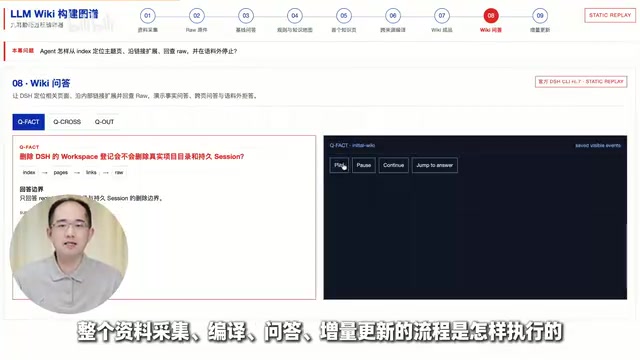
The "retrieval augmentation" referenced here is RAG (Retrieval-Augmented Generation) — the dominant architecture for knowledge base Q&A systems today. The core idea is to avoid having the model answer from memory directly. Instead, the user's question is converted into a vector, the most relevant text fragments are retrieved from a pre-built knowledge vector store, and those fragments are fed to the model as context so it can generate answers grounded in real source material. This yields a double benefit: it significantly reduces the probability of the model fabricating information (hallucination), and it allows every response to include source citations for human verification. "Source-traceable Q&A" is a natural product of the RAG architecture — because the system knows which original fragments the answer relied on, it can present them to the user as evidence. "Online evaluation" then quantifies RAG pipeline quality through metrics like retrieval hit rate and evidence coverage, guiding decisions on chunking strategy, embedding model selection, and retrieval parameter tuning.
The Key Is "Function Assembly" for Your Agent
The part of this tutorial with genuine methodological value is the core principle it introduces for using DSH effectively: assemble your Agent's capabilities around your actual development goals before you start building.
Rather than dumping a requirements statement at the model, you first configure three categories of components around the task:
Skills: Supplementing Intent and Supporting Development
The project was equipped with a set of Skills to enrich intent information and assist with development. According to the author, these Skills were hand-picked from a library of 400+ Skills maintained for course participants. Skills function like pre-installed "work manuals" for specific domains, reducing detours when the Agent interprets requirements and executes tasks.
In an Agent framework, Skills act like "modular units of the system prompt." The traditional approach is to pack all background knowledge, constraint rules, and examples into one enormous system prompt — which is hard to maintain and prone to being "forgotten" by the model during long conversations. The Skills mechanism breaks this information into independent, on-demand knowledge blocks: you mount the Skill for whichever domain context you need, and the Agent prioritizes its norms and examples during reasoning. The benefit is strong reusability — a "code review standards" Skill can be applied across multiple projects without rewriting it each time. For long-chain tasks, activating different Skills at different stages also eases context window pressure, ensuring the Agent only "sees" the most relevant guidance at each step.
Plugins: Diagramming and Acceptance Testing
Two plugins were used in the project:
- DSH Diagram: for drawing flowcharts and viewing project structure at any time;
- DSH Build-in Browser: for functional acceptance testing of product pages.
One handles design visualization; the other handles result verification — covering two of the weakest links in the development process.
Agent Presets: Described as the "Most Powerful Hidden Feature"
The author created a custom Agent preset specifically for this project — essentially a purpose-built Agent whose job is to strictly execute the LLM Wiki development workflow while flexibly invoking the relevant plugins and Skills. The author calls Agent presets the "most powerful hidden feature" of DSH, arguing that mastering them can deliver a "quantum leap" in Agent performance.
The reasoning behind this claim is sound: a preset locks in development standards, workflow constraints, and tool-calling strategies, keeping the Agent consistent across a long-chain task rather than drifting further off course as the work progresses.

An 11-Stage Standardized Development Workflow
LLM Wiki is a relatively complex project. The work was broken into 11 development stages, strictly following this spine: environment setup → project foundation → core feature module development → functional acceptance testing. The author emphasizes this also represents the most standardized complete Agent development workflow in use today.
The tutorial's presentation approach is "see the input, see the output, understand the principles in between":
- Each stage's input prompt is shown;
- The execution process and every supplementary prompt added along the way is shown;
- Milestone screenshots are included;
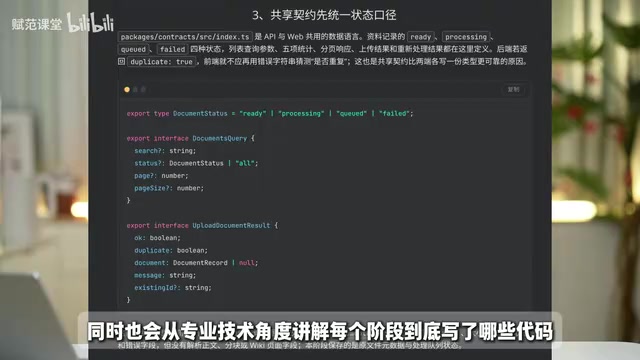
- The code written at each stage is explained from a professional standpoint — what was written and why.
This dual-track approach of "prompt walkthrough + code explanation" is beginner-friendly: even without upfront knowledge of the underlying principles or code, you can follow the prompts step by step and produce results. Those with more experience can simultaneously understand the implementation logic behind the scenes.
The Value of This Hands-On Case — and What to Watch Out For
From a methodological standpoint, the most transferable insight from this tutorial is the "assemble first, then build" mindset. Many developers get poor results from AI coding tools not because of the model itself, but because they haven't configured the right Skills, plugins, and presets for their specific task — leaving the Agent without domain context or workflow constraints.
The accompanying resources are fairly comprehensive: course materials, the DSH Studio desktop installer, LLM Wiki project source code, the Agent preset, Skills, architecture diagrams, per-round prompts, and stage screenshots are reportedly all available in the associated community, along with a one-click script to set up the development environment.
A note of caution: "surpassing Codex and Claude Code" is the creator's subjective experience, unsupported by comparative benchmark data. The "10 prompts" figure also obscures the complexity of each individual prompt and the volume of supplementary content added along the way — the actual effort involved may be considerably more than the number suggests. For developers looking to replicate this, the more practical takeaway is the workflow decomposition approach and the component-based configuration methodology, not the conclusion about which tool is superior.
In comparative evaluations of Agent coding tools, "number of rounds" is not the only meaningful metric. More rigorous benchmarks typically consider: average token consumption per round, task completion rate (not just completeness), code execution success rate, number of manual interventions required, and scores on standardized benchmarks like SWE-bench or HumanEval. The figure of "10 prompts" is difficult to compare fairly against other tools without knowing the character count per prompt and the number of mid-conversation supplements. When evaluating Agent coding tools, more informative dimensions to focus on are performance in ambiguous requirement clarification, self-correction of errors, and cross-file context maintenance — these are the three areas where current tools diverge most significantly.
Summary
This tutorial demonstrates how to use DeepSeek Harness for industrial-grade development through a complete LLM Wiki knowledge base project. Key highlights include source-traceable Q&A, dual-format knowledge graphs, incremental compilation, and online evaluation — along with the "Skills + plugins + Agent preset" assembly-based development methodology. For developers interested in Agent programming and real-world RAG knowledge base deployment, this is a comprehensive hands-on reference worth studying.
Related articles

Gaussian Process Bandit Optimization: Exploration Strategies and Inference Regret Guarantees
Cumulative regret guarantees in Bayesian optimization fail to reflect final recommendation quality. This article examines a new study that provides inference regret guarantees for Gaussian process bandit optimization through exploration query strategies and fill distance analysis, validated on hyperparameter optimization and control tasks.

The Most Detailed Codex Guide on Bilibili: From Installation to Real-World Practice
The most detailed Codex guide on Bilibili: from app store installation to daily work mode configuration, with a real coffee shop project demonstrating file organization, data extraction, dashboard creation, and other practical tasks. Learn to use Plan Mode and desktop pets to leverage Codex efficiently.

Appearance Compensation in Volume Rendering: Why RGB Accuracy Cannot Guarantee Density Correctness
Volume rendering research reveals that volumetric data perfectly reproducing external RGB views may still contain density errors: appearance compensation can double central density and keep external rays unchanged even when L2 error exceeds 14.52%. Density recovery depends on appearance capacity, spatial resolution, and measurement design.