DeepSeek Harness NetEase Music Plugin Review: Taking Vibe Coding to the Next Level

A Bilibili creator built a NetEase Music plugin for DeepSeek Harness with Vibe Coding typing effects.
A Bilibili creator developed a plugin that fully embeds NetEase Music into the DeepSeek Harness coding environment, letting developers manage their listening experience without switching windows. The plugin covers discovery, charts, personal playlists, search, and full-screen MV playback. Its standout feature is Vibe Coding mode — typing triggers animated musical note effects that make the "listening while coding" experience visually tangible. All atmosphere effects are configurable or can be disabled with one click, and installation is as simple as entering the plugin reference name in the add-plugin interface.
A Creative Idea: Stuffing Music Into a Coding Tool
Listening to music while coding is practically second nature for developers — but most people still rely on switching to a separate media player to do it. One Bilibili creator decided to cut out that friction entirely by building a NetEase Music plugin for DeepSeekAd Harness (mistakenly called "DeepSickHardness" in the video), letting users browse, queue, and listen to music without ever leaving their coding environment. The core idea is straightforward: if you're going to spend hours inside a tool anyway, why not bring the listening experience along — and while you're at it, lean into the whole "Vibe Coding" aesthetic.
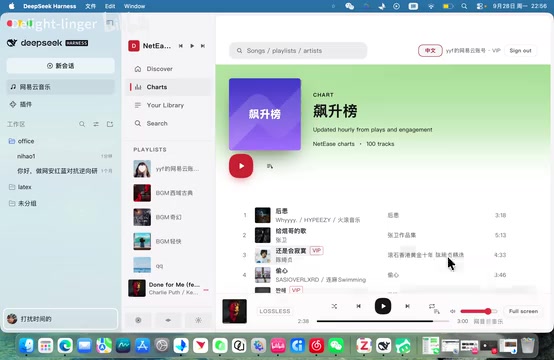
From the demo, installing the plugin adds a fully functional music module directly into the interface. Once users log in with their NetEase Music account, they can access their personal playlists. The interface also supports switching between Chinese and English, lowering the barrier for users of different language backgrounds.
DeepSeek Harness is an AI-assisted coding environment for developers that supports extending functionality through a plugin/extension system — similar in concept to VS Code's extension marketplace, where third-party developers can add new modules without touching the core application. It's this plugin ecosystem that makes integrating NetEase Music into the coding interface possible. The "DeepSickHardness" name that slipped out in the video is not a real product name — the actual tool is called DeepSeek Harness. Anyone interested in installing the plugin should refer to the creator's profile page for the correct name to avoid search errors.
Core Features: A Full-Featured Music Player
This plugin isn't just a thin playback wrapper — it brings in the major sections of the NetEase Music experience. The creator's demo covered several key entry points:
- Discovery: Browse recommended content
- Charts: Check out trending rankings
- My Music: Access personal collections and playlists
- Search: Look up and play songs directly
Beyond standard audio playback, the plugin also supports full-screen playback and MV video viewing, covering pretty much everything you'd expect from a daily-use music client. In other words, even setting aside the coding angle, it functions as a fully embedded music player living right inside your development tool.
Vibe Coding Mode: Maximum Immersion
What truly sets this plugin apart from a plain music player is its Vibe Coding mode. The creator demonstrated it with all options turned on, and the effect is pretty striking.
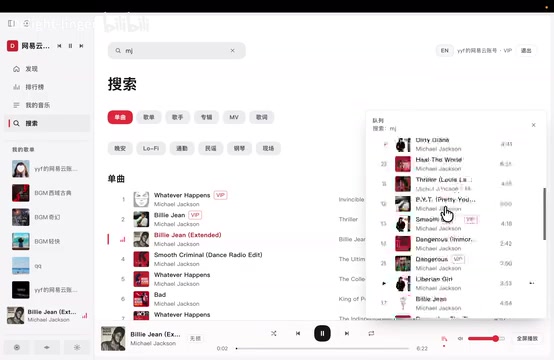
Once the mode is active and you open the chat interface, the visual changes are immediately noticeable. The most interesting detail: typing triggers musical note visual effects — and paired with whatever playlist is playing in the background, it turns the "listening while writing" experience into tangible, visual feedback. The intent is clear: make the relatively mundane act of writing code feel more rhythmic and enjoyable.
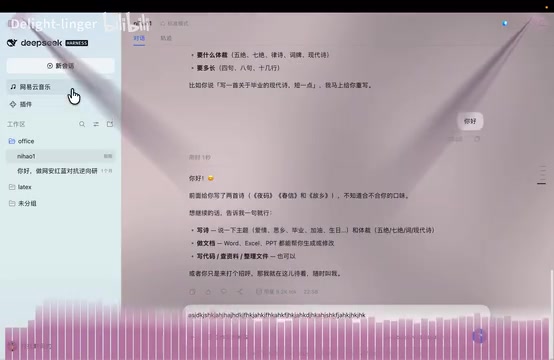
The whole atmosphere system is built to be configurable. The creator emphasized that users can choose which effects to enable based on their own preferences, rather than having a fixed set of effects forced on them.
Vibe Coding is a concept introduced by OpenAI co-founder Andrej Karpathy in early 2025. The core idea is to use AI code generation to let developers code in a more intuitive, feel-driven way — rather than scrutinizing code line by line, you ride the flow of AI assistance, staying focused on expressing ideas rather than wrestling with syntax. The concept quickly caught on in the developer community and inspired a wave of tools and plugins emphasizing immersion and flow states, with music, visual effects, and other sensory elements being brought into the coding environment as a natural extension of this trend.
Flexible Toggles: Turn It Off If It's Not Your Thing
Vibe Coding sounds appealing in theory, but not everyone needs it all the time. For users who prefer focused, distraction-free work, the plugin offers a clear exit.
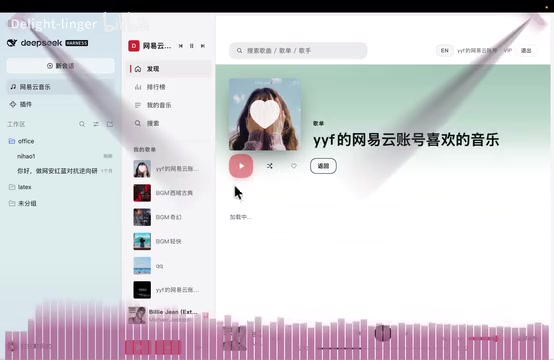
The creator specifically pointed out that if the note effects and other atmospheric elements aren't your thing, you can simply turn Vibe Coding mode off. At that point, the plugin reverts to a standard music player, keeping only the listening functionality. This "go deep or keep it simple" approach lowers the cost of trying it out — users can experience the full atmosphere when they want it, and return to a clean, minimal setup whenever they need to focus.
How to Install and Use It
The installation process looks straightforward from the demo: in DeepSeek Harness's plugin addition interface, enter the plugin reference name provided by the creator and the installation completes directly. After installation, the music module appears in the corresponding area of the interface. Log in with your NetEase Music account and you're ready to browse and play — logging out is equally painless.
One thing worth noting: the tool name spoken in the video contains a clear verbal slip. The actual target is the plugin ecosystem of DeepSeek Harness. Anyone interested in trying it out should refer to the creator's profile page for the correct plugin name and installation instructions.
Takeaway: A Small Tool That Solves a Real Problem
The technical complexity here isn't particularly high, but this plugin nails a genuine pain point — developers want to manage their listening environment without constantly switching windows. Embedding a music player into a coding tool, then layering on typing note effects and other atmospheric touches, is a grounded, practical take on the "Vibe Coding" concept.
Its value isn't in feature complexity — it's in turning "atmosphere," an inherently abstract experience, into something concrete, perceivable, and togglable. For anyone who likes to code with music playing, a plugin like this genuinely makes for a more seamless workflow. It also offers an interesting reference point for what's possible within a developer tool's plugin ecosystem.
Related articles

Amphibious Transforming Drone: Beyond 100x Power Savings, What Are the Real Needs?
Is the amphibious transforming drone just a gimmick? Starting from the 100x power difference of the M4 Morphobot, explore real application scenarios and thesis topic ideas, analyzing boundary conditions where pure drones and pure ground robots both fail.

Warhound Raises $200 Million: Genetically Engineered "War Dogs" Paired with Anduril Gear
Warhound raises $200M, backed by Ben Lamm and Palmer Luckey, to genetically engineer dogs for military and law enforcement use and equip them with Anduril gear. This article analyzes its technology direction, funding logic, and ethical controversy.

Claude API Comes to Google Cloud: IAM Integration and SDK Access Guide
Anthropic hosts the full Claude API on Google Cloud with IAM-controlled permissions and unified billing. This guide covers the Vertex AI and Anthropic-hosted entry points, IAM role configuration, and SDK access.