DeepSeek Harness Source Code Deep Dive: Everything Is a Plugin and the Event Bus

DeepSeek Harness builds a pluggable Agent runtime centered on "everything is a plugin."
DeepSeek Harness is a development preview tool whose core design philosophy is "everything is a plugin," abstracting models, MCP connections, and execution units into pluggable plugins, making it more like an Agent runtime. The article introduces two startup methods: the installed version runs with a single command on default port 3080; the source version requires cloning the repository, installing dependencies, and building. The main loop handles scheduling, while the event bus handles inter-plugin communication, together forming the runtime skeleton. The key to handwriting a plugin to connect to MCP is understanding the plugin contract and event registration points. The author also compares open-source and subscription-based approaches and gives three source code reading suggestions: get it running before reading the code, start with the plugin registry and event bus, and write a minimal plugin.
Starting from a Slogan: Everything Is a Plugin
According to a demo by a Bilibili creator in their video, DeepSeekAd Harness is a development preview tool, and its official website emphasizes five words in the largest font — Everything Is a Plugin. This means the model itself, MCP connections, and even the execution units in the main loop are all abstracted into pluggable plugins. This design makes Harness more like an Agent runtime than a client with fixed functionality.
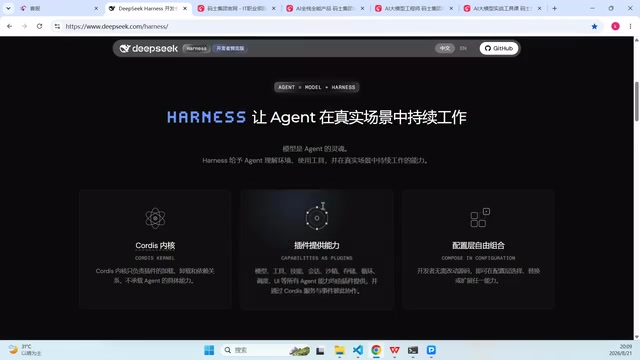
The first step in reading the source code is to build this architectural intuition: when you open the repository, don't rush to look for the main function. Instead, first locate plugin registration and the event bus, because the main loop is only a scheduler — the real capabilities all come from plugins.
Agent runtime refers to a management environment that supports the execution of intelligent agents. It typically includes a main loop, state management, tool invocation interfaces, and a plugin system, similar to how an operating system provides process scheduling and system calls for applications. Unlike a chat client with fixed functionality, an Agent runtime does not have built-in concrete capabilities. Instead, it dynamically loads models, tools, and external connections through plugins, enabling on-demand composition and hot-swapping of capabilities. This architecture allows developers to focus on plugin development without modifying the runtime core.
MCP (Model Context Protocol) is an open protocol that standardizes how AI models connect to external data sources and tools. It allows models to access contextual information such as file systems, databases, and API services through a unified interface, similar to how the USB interface provides a universal connection standard for peripherals. In Harness, MCP connections are abstracted as plugins, meaning any service that follows MCP can be integrated by writing an adapter plugin without changing the main loop, greatly enhancing the runtime's extensibility.
Two Startup Paths: Installed Version and Source Version
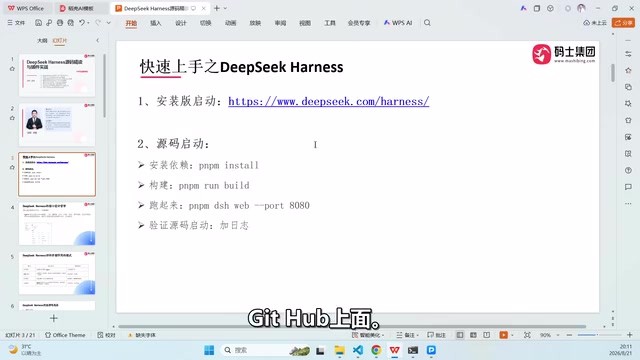
In the video, the creator compared two ways to get started. The installed version requires only one command, provided Node.js is installed, and it can run on Windows, Linux, or macOS; the default port is 3080, and if the port is occupied, you can append the --point parameter after the command to change the startup port.
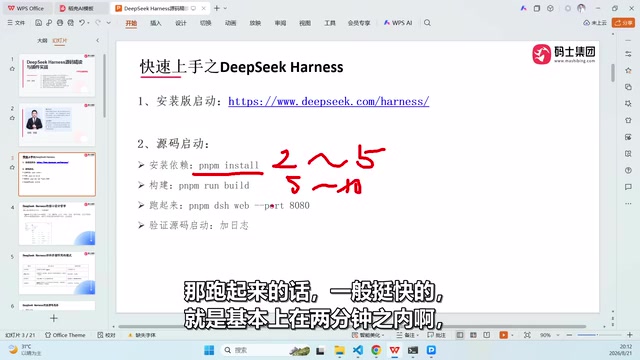
The source version requires first running git clone on the repository, then pnpm install to install dependencies, and then running the build. The creator mentioned that the first dependency installation takes about two to five minutes, the build takes five to ten minutes, and actually getting it running usually takes under two minutes; the second time is noticeably faster. Source startup also supports specifying a port, for example changing it to 8080, making it convenient to run alongside the installed version.
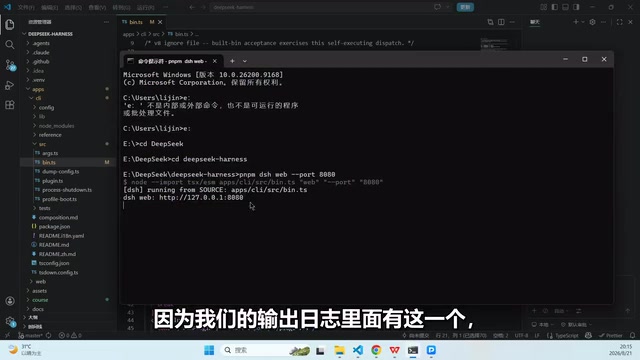
A Debugging Trick to Distinguish the Installed Version from the Source Version
To confirm that they were starting the source version, the creator added a line of debug logging in apps/client/src/bin to print the repository identifier and startup source. This way, when the custom marker appears in the terminal output, it is clear that the service comes from the source code rather than the installation package. This small change also shows that Harness's directory structure separates the client from the core logic, and the plugin entry points are not hard to find.
Main Loop and Event Bus: How Plugins Collaborate
From the source code perspective, Harness's main loop is responsible for receiving user input, triggering events, waiting for plugin responses, and then writing the results back into the session history. The event bus handles communication between plugins: model plugins generate inference events, tool plugins listen and execute, and MCP plugins connect to external services.
The direct benefit of this structure is replaceability. In the demo, the creator mentioned that Harness's interaction experience is very close to the DeepSeek web version, but because it is a locally runnable shell, developers can replace the model and connect custom MCP services without changing the main loop. The video also shows that it can load historical sessions and print previous conversation records, indicating that the event bus also participates in scheduling at the persistence layer.
Event bus is a software architecture pattern in which components do not call each other directly but communicate through publish/subscribe events. In Harness, the event bus acts as a message hub between plugins: model plugins publish inference events, tool plugins subscribe and execute, and results are sent back as events. This loosely coupled design allows plugins to be developed, tested, and replaced independently. As long as they follow the same event contract, they can be integrated seamlessly, thereby supporting the philosophy of "everything is a plugin."
Handwriting a Plugin to Connect to MCP: From Reading Source Code to Modifying It
The creator emphasized that the key to understanding Harness is not memorizing APIs but understanding the plugin contract: a plugin needs to declare which events it listens to and which capabilities it exposes. Models are plugins, and MCP connections are also plugins, so integrating an external MCP service essentially means writing a plugin that listens to specific events and forwards requests.
For developers who want to get hands-on, the path can be broken into three steps: first get the source code running and confirm that debug logging works, then locate the plugin registration points on the event bus, and finally write a minimal implementation based on an existing plugin. The video does not expand on the full code, but this approach is enough to support subsequent source code reading.
Plugin contract is the agreement between a plugin and the runtime, typically including the event types the plugin needs to listen to, the capability interfaces it exposes, and lifecycle hooks. In Harness, writing a plugin means implementing these agreements so that the runtime can recognize and schedule the plugin. Understanding the contract is more important than memorizing APIs, because the contract defines how a plugin fits into the event bus, while APIs are only the concrete implementation details of the contract. By reading the contract declarations of existing plugins, developers can quickly grasp how to integrate MCP services.
The Ecosystem Choice Behind the Open-Source Stance
In the video, the creator used Codex as a comparison: if DeepSeek Harness were not open source, Codex might not have moved toward open source. He believes that DeepSeek's approach is to directly open up the model and core toolchain, while many foreign products follow a subscription model. Newcomers may get a few days of trial quota, but enterprise-level and daily development still require paid subscriptions. This comparison may not be comprehensive, but it points out the motivation behind Harness choosing a development preview version and opening testing to global developers — using a pluggable runtime to attract ecosystem participants.
Three Suggestions for Source Code Readers
First, get it running before reading the code. Run both the installed version and the source version once, and distinguish them by port and debug logs. Second, start with the plugin registry and event bus, and treat the main loop as a scheduler rather than the entirety of the logic. Third, write a minimal plugin to connect to MCP; this builds a mental model faster than reading the entire repository. The value of Harness's source code is not in the amount of code, but in how clearly it defines the boundaries of an Agent runtime.
One-line Summary
DeepSeek Harness builds a pluggable Agent runtime centered on "everything is a plugin."
Paragraph Summary
DeepSeek Harness is a development preview tool whose core design philosophy is "everything is a plugin," abstracting models, MCP connections, and execution units into pluggable plugins, making it more like an Agent runtime. The article introduces two startup methods: the installed version runs with a single command on default port 3080; the source version requires cloning the repository, installing dependencies, and building. The main loop handles scheduling, while the event bus handles inter-plugin communication, together forming the runtime skeleton. The key to handwriting a plugin to connect to MCP is understanding the plugin contract and event registration points. The author also compares open-source and subscription-based approaches and gives three source code reading suggestions: get it running before reading the code, start with the plugin registry and event bus, and write a minimal plugin.
Related articles

Stop Pasting Error Logs Into AI Chat: Use Failing Tests to Drive Fixes
Pasting error logs to let AI fix bugs often causes unrelated changes and new bugs. DevDeck proposes a reproduction prompt: write a failing test that reproduces with exit code 1, then have the AI make it green without touching other modules, using a binary goal to constrain AI behavior.

AI Daily: GPT-6 Cyber, Claude Finance, and Cursor App Hosting
AI Daily: OpenAI launches GPT-6 Cyber security model, Claude debuts personal finance Beta, Cursor adds app hosting, Together integrates Kimi K3.1 Pro, Firecrawl adds life sciences retrieval.

Tobira Site Agent: Turn Your Website into an AI Salesperson
Tobira Site Agent turns your website into an AI agent that answers questions, negotiates, books calls, and takes orders inside ChatGPT, Claude, and Grok—leads go straight to Telegram or email. Bring your own AI key and use it free.