Stop Pasting Error Logs Into AI Chat: Use Failing Tests to Drive Fixes

Don't paste error logs—write a failing test first to lock AI from guessing mode into goal mode.
The article points out that pasting stack traces directly to AI is the most common programming misuse: logs lack runtime context such as codebase structure, dependencies, and success criteria, so the model can only guess blindly, often modifying multiple unrelated files and introducing new bugs while leaving the verification burden to the developer. DevDeck's alternative is the "reproduction prompt" in two steps: first have the AI write an isolated failing test and actually run it to confirm it fails with exit code 1; then require it to make the test pass with exit code 0 without modifying other modules. The failing test thus provides three constraints—starting point, endpoint, and boundary—compressing an open problem into a closed one. The article also compares the cost structures of the two paths and notes that bugs depending on complex runtime state may require a human to scaffold the test first.
Pasting dozens of lines of error logs straight into an AI chat window and expecting it to fix the bug in one shot—this is probably the most common misuse of AI in programming today. A short video from the YouTube channel DevDeck points out the core problem: raw stack traces lack runtime context for the model, so it can only guess blindly, and the result is often changes to three unrelated files and the introduction of new bugs.
Experienced engineers do things very differently: instead of pasting logs, they first write a failing test that reliably reproduces the bug. This simple reordering switches the AI from "guessing mode" to "goal mode."
Why Pasting Error Logs Fails

A stack trace records the call chain at the moment the error occurred, but it doesn't include the structure of the codebase, the dependencies between modules, or the criteria for "what counts as fixed." Given an isolated log, the only thing the model can do is infer the root cause based on common patterns in its training data.
DevDeck's description is blunt: the model will "guess blindly, modify three unrelated files, and introduce new bugs." This isn't a lack of model capability—it's that the input itself lacks constraints. Without a clear success criterion, the model tends toward broad changes that "look relevant," and those changes often cross the boundary of the real problem.
The more insidious cost is verification. When you get the AI's fix suggestion, you have to manually judge which files it changed, whether those changes make sense, and whether there are side effects. The log-pasting approach leaves this entire judgment burden to the developer.
The Reproduction Prompt: Two Steps to Lock the AI Onto a Single Goal
DevDeck's alternative is called the "reproduction prompt." It has only two steps, but each one tightens the AI's room to maneuver.
Step 1: Write an Isolated Failing Test
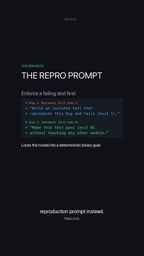
Ask the AI to write a standalone test script that precisely reproduces the bug and fails with exit code 1. Writing it isn't the end—you must actually run it once to confirm it really exits in a failed state.
The value of this step is that it turns the vague "there's a bug" into an executable pass/fail condition. Exit code 1 is a binary signal: the test didn't pass, the problem exists, and the reproduction path is deterministic. If the test comes out green, the reproduction itself didn't succeed, and every subsequent fix is built on quicksand.
Exit code is an integer status code returned to the operating system when a process ends, conventionally 0 for success and non-zero for some kind of failure (1 being the most generic "general error"). In a testing context, test frameworks rely on exit codes to determine results: commands like pytest, npm test, and cargo test return 0 when all cases pass, and non-zero if any case fails. So "fails with exit code 1" means the test command can be recognized as a failure at the shell level by scripts, CI, or the AI itself, without parsing human-readable output text. This also makes "make the test pass with exit code 0" a machine-decidable completion condition—the AI can run the command, read the exit code, and iterate on corrections until the signal flips. Compared with vague instructions like "please fix the bug," the exit code provides an unambiguous, automatically verifiable feedback loop, and it is the technical foundation that lets the reproduction prompt converge on its own.
Isolated test refers to a test that doesn't depend on launching the full application, external network services, or shared global state, typically separating the code under test from the external environment through dependency injection, mock/stub doubles, or an in-memory database. The point of isolation is repeatability: if a test depends on a real database or a third-party API, a failure may stem from environment flakiness rather than a code defect, and the "red" signal becomes untrustworthy. For the AI, isolated tests have an extra layer of value—they run fast and produce focused output, so the model can repeatedly execute, observe results, and adjust code within a single conversation without getting stuck in lengthy environment setup. Writing an isolated test often requires first clarifying the input/output boundaries of the function under test, and that act itself forces the developer (or the AI) to specify "which layer the bug actually occurs in," thereby narrowing the search space for the subsequent fix.
Step 2: Make the Test Green Without Touching Other Modules
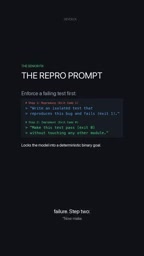
The second step's instruction is: make this test pass with exit code 0 without modifying any other modules.
The key constraint here is "don't touch other modules." At this point the AI has only a binary goal—the test goes from red to green. It has no room to do "incidental refactoring" or "convenient optimization," because any out-of-bounds change violates the instruction. DevDeck's summary: the model "can't hallucinate or break other files, because it only stops when the test turns green."
Why Test-Driven Work Is Especially Effective for AI
When a human engineer is tasked with "fix this bug," they usually bring implicit understanding of the codebase: they know which files shouldn't be touched, which interfaces are stable, and roughly how far the impact of a change will propagate. The AI lacks this understanding, so it needs an external mechanism to supply that constraint.
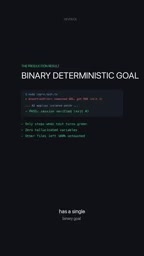
A failing test happens to provide threefold constraints. First, it defines the starting point: the bug must be reliably reproducible. Second, it defines the endpoint: the exit code goes from 1 to 0. Third, it defines the boundary: no modules other than the path covered by the test may be changed. Together, the three compress an open-ended problem into a closed one.
Another benefit of this approach is that the fix process is auditable. The test script itself is documentation, recording the bug's trigger conditions and expected behavior. If someone later questions whether the fix is complete, running the test answers it. By contrast, a conversation log from pasting logs has almost none of this reusability.
Test-driven development (TDD) has the classic "red-green-refactor" cycle: first write a failing test (red), then write the minimum code to make it pass (green), and finally refactor under the protection of tests. DevDeck's reproduction prompt is essentially moving this cycle into the human-AI collaboration scenario, but with one key modification: both the red and green phases are handed to the AI, and the human only sets the boundary conditions of the cycle. In traditional TDD, the developer's implicit understanding of the codebase makes "minimum code" second nature; the AI lacks that understanding, so "don't touch other modules" must be explicitly written as an instruction to replace the human's intuitive constraint. In other words, the real reason TDD works for AI isn't the test itself, but that the test externalizes the acceptance criteria that used to live in the engineer's head into executable assertions—the model can't read your mental model, but it can read the red light of a failing assertion.
Comparing the Two Debugging Paths
At the end of the video, DevDeck poses a binary choice: failing test first, or paste the error log and pray.
The former front-loads the cost—you need to spend time first solidifying the bug into a test; the latter back-loads the cost—you need to spend time reviewing the AI's broad changes and bear the risk of introducing regressions. For one-off, clearly scoped small problems, asking the AI directly may be faster; but for bugs involving multiple modules with regression risk, test-first almost always saves total time.
This criterion itself is worth remembering: the larger the blast radius of the problem, the more you should first draw the boundary with a test.
Practical Considerations
The reproduction prompt isn't a panacea. If the bug depends on specific runtime state (such as concurrency timing or external service responses), writing an isolated failing test itself requires considerable effort, and the AI may not be able to complete that part independently. In that case, a more realistic approach is for a human to first scaffold the test skeleton, then let the AI fix the code within the skeleton.
Also, "don't touch other modules" is a constraint that must be explicitly written into the prompt. If you don't write it, the model may still casually modify surrounding code. The precision of the instruction directly determines how effective the constraint is.
DevDeck positions this workflow as "the daily workflow of senior engineers" and uses it as an ongoing theme for the channel's content. For developers who pair-program with AI daily, putting a failing test as the first step of the prompt may be the habit change with the highest return on investment.
Related articles
 Tech Frontiers
Google Omni 1.2 Flash: 15-Second AI Video at Just $0.07 per Second
Google DeepMind releases Gemini Omni 1.2 Flash: 15-second video, 720p at $0.07/sec (30% cheaper), multi-turn editing without regeneration, draft upscaling to 4K.
 Tech Frontiers
No AI Ghostwriting: Writer's Quarter Reinvents Novel Writing with a Visual Workbench
The Writer's Quarter is an AI-free novel writing and planning tool that unifies character building, story planning, and manuscript writing in one visual workbench. This article analyzes its positioning, target users, and differentiated value amid the rise of AI writing tools.
 Tech Frontiers
Fleeep: A Unified Inspiration Collection Notes App for Creatives
Fleeep is a notes app for creatives that unifies screenshots, bookmarks, saved posts, and inspiration into one calm, cross-device, offline-capable space. This article analyzes its positioning, differentiation, and target users.