DeepSeek Harness Source Code Walkthrough: How an Agent Where Everything Is a Plugin Runs

DeepSeek Harness preview centers on everything being a plugin: run it first, then read the source.
Based on a source code tutorial, this article breaks down the DeepSeek Harness preview architecture and onboarding path. Harness is built on 'everything is a plugin': model, tools, skills, sandbox, storage, loop scheduling, and UI are all plugins, and model providers can be switched or customized, making it an Agent runtime not tied to its own model. The course closely reads the conversation main loop, event bus, and prompt assembly, and also touches on the FDE connection and preview limitations.
From Running It to Reading It: Two Levels of DeepSeek Harness
Expectations for a domestic equivalent of Claude Code are heating up, and the Harness preview that DeepSeekAd released as a sub-project on its official site offers a fairly radical answer—everything is a plugin. According to the breakdown in this source code tutorial on Bilibili, the model, tools, skills, sandbox, storage, loop scheduling, and UI are all composed of plugins, which means every functional unit of the Agent is replaceable and extensible. The author splits the course into two main threads: first get it running quickly, then read closely through the core flows and the source code of a single conversation.
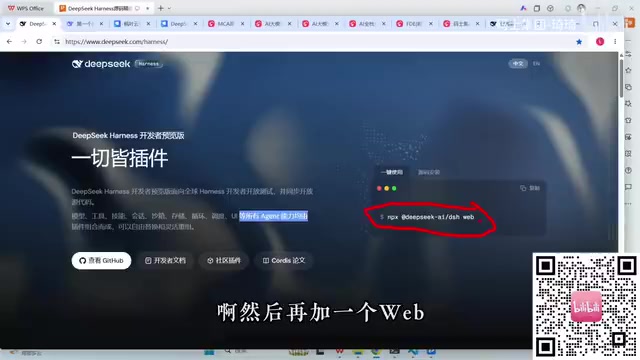
This "get it running first" design is friendly to newcomers. The installed version only requires a Node.js environment; running npx @deepseek-ai/dsh --web in the terminal pulls up the Web interface. The source version involves cloning the repository and going through the pnpm installation process, using --port 8080 to avoid the default port 3080 and prevent conflicts with an existing installed instance. After a successful launch, the terminal prints DSH Web and the local address; opening it in a browser brings up a chat window that closely resembles the main DeepSeek site.
One thing worth noting: the author manually inserts a line of console.log in apps/cli/src/bin.ts, printing ds running from source to confirm that the current instance really comes from the source code rather than the installation package. This debugging trick looks simple, but it is a practical technique for distinguishing run paths when reading source code.
Plugin Architecture: Why "Everything Is a Plugin" Is the Core Design
The phrase "everything is a plugin" is the key to understanding Harness. In the code structure the author shows, every capability of the Agent—model integration, tool invocation, skill registration, sandbox execution, storage, loop scheduling, and UI rendering—exists as an independent plugin.
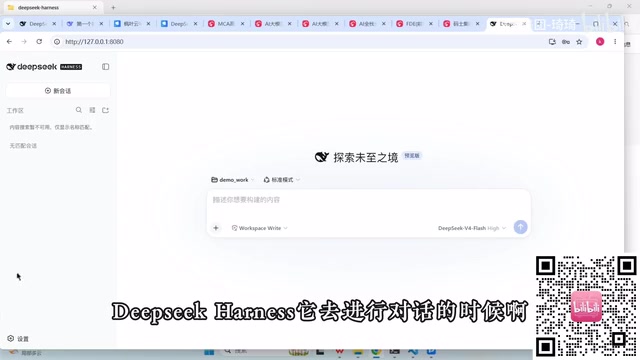
The direct benefit of this design is fully pluggable model providers. The settings page provides an entry point for a DeepSeek API Key by default, but users can also switch to providers such as Google, Kimi, and Amazon, or even use the "custom" channel to connect any compatible model. In other words, Harness is not tied to its own model; it is more like an Agent runtime framework, and the model is just one of its plugin slots.
From an engineering perspective, pluginization converges the coupling points onto the plugin contract. To add a new tool, you do not need to modify the main loop; you only need to register a plugin according to the kernel convention. The course specifically reserves a section on "how to write your own tool plugin based on the kernel," which is also the most attractive part of this architecture for developers.
Plugin Contract is the implicit premise of a plugin architecture: before the host program loads a plugin, it must agree on a set of stable interfaces—the lifecycle hooks exported by the plugin, the host capabilities it can access (such as registering tools, subscribing to events, and reading/writing configuration), as well as data structures and error semantics. Once the contract changes, all third-party plugins may break, so mature frameworks use semantic versioning and adaptation layers to buffer this. The judgment in the article that "contract stability determines the ceiling of the ecosystem" comes precisely from this: the more plugins there are, the higher the migration cost of breaking changes. When evaluating a plugin-based Agent framework, you can focus on whether it publishes contract documentation, whether it versions the contract, and whether the kernel allows plugins to be hot-loaded at runtime.
Main Loop and Event Bus: The Scheduling Logic Behind a Conversation
The core of the course is a close reading of the complete source code path of a single conversation, involving three key links: the main loop, the event bus, and prompt assembly. Although the livestream is more of a demonstration than a line-by-line explanation, the skeleton is already clear:
- The main loop drives the Agent's multi-turn reasoning and tool invocation, deciding when to continue and when to terminate;
- The event bus handles message distribution among plugins, allowing modules such as the UI, tools, and storage to respond to state changes in a loosely coupled way;
- Prompt assembly combines system instructions, conversation context, and tool descriptions into the final request sent to the model.
This layering keeps "everything is a plugin" from being an empty slogan—the main loop and event bus are the relatively stable skeleton, and plugins are mounted on it. In the demonstration, the author lays out the source directory in VS Code and uses the startup logs to locate the entry point, showing the path for tracing the call chain starting from bin.ts.
For people who want to go deeper into Agent development, this path is more valuable than simply using Web Coding tools to read code: tools can help you explain snippets, but in interviews, on resumes, and when actually troubleshooting, what you need is an overall grasp of the core flows.
Agent Loop is usually a back-and-forth process of "reason—act—observe": send the current context to the model; if the model returns a tool call request, execute the tool and append the result back to the context, then request the model again, until the model gives a termination signal or the turn/budget limit is reached. The key trade-offs in loop design include how to determine the termination condition (the model explicitly stops, no tool call, maximum number of turns), how to trim tool results to avoid context bloat, and how to feed errors back to the model for self-correction. Event Bus is a decoupling mechanism: the publisher is only responsible for emitting events, and subscribers respond as needed, with neither being aware of the other. In Agent scenarios, token streaming output, tool start/end, and state changes are all broadcast as events; the UI and logging modules each subscribe, and the main loop does not need to write dedicated callbacks for every consumer.
Relationship with FDE: Imagining the Practical Implementation of Agent Frameworks
The latter part of the course connects Harness with the FDE (Forward Deployed Engineer) role and mentions C-Medical under the open-source platform Palantir (the name was slightly misstated in the livestream), treating it as an initial experience of the ultimate form of FDE, involving concepts such as Ontology.
This part is an extension of the author's outlook, from a single source, and has not yet been corroborated by more material. But the logic chain is understandable: a plugin-based Agent runtime, combined with customizable tools and data access, is exactly what FDE needs to build hands-on in enterprise implementation scenarios. The positioning of the Harness preview is, to some extent, also a trial run for this kind of engineering demand.
FDE (Forward Deployed Engineer) refers to an engineering role that is stationed at the customer site and turns a general platform into a solution usable by the customer, requiring product understanding, data modeling, and rapid coding skills at the same time. The Ontology mentioned in the article comes from Palantir's terminology system and refers to an explicit modeling layer for business entities, attributes, and relationships, so that upper-layer applications and queries are built on unified semantics rather than directly operating on raw tables. The logic for connecting a plugin-based Agent runtime with FDE is that field engineers can register tool plugins, connect data sources, and customize prompts and processes according to the customer's business without having to fork the entire framework. It should be noted that this part is the author's extended association and does not directly correspond to the functional boundaries of Harness itself.
Practical Advice and Current Limitations
It should be clear that Harness is still a preview version, and both interfaces and plugin specifications may change. When getting started, it is recommended to: launch from the source version and keep custom logs to make it easy to confirm the source of the run; do not place the working directory in the root directory of the system drive—creating a separate Demo directory is safer; configure the API Key through the settings page first, and avoid hardcoding it.
For those who want to write plugins, getting a conversation running first and then reading the code along the main loop and event bus is more efficient than diving straight into the plugin kernel. As for how large an ecosystem "everything is a plugin" can ultimately support, that depends on the stability of the plugin contract after the preview version—there is not yet enough information to judge this.
One-line Summary
DeepSeek Harness preview centers on everything being a plugin: get it running first, then read the source code.
Paragraph Summary
Based on a source code tutorial, this article breaks down the architecture and onboarding path of the DeepSeek Harness preview. Harness is designed around "everything is a plugin": the model, tools, skills, sandbox, storage, loop scheduling, and UI all exist as plugins, and model providers can be switched freely or even customized, so it is more like an Agent runtime framework that is not tied to its own model. In practice, the installed version uses npx to launch the Web interface with one command, while the source version follows the pnpm process and can use --port to avoid the default port; inserting logs in bin.ts can confirm that the instance comes from the source code. The main thread of the course is a close reading of the conversation main loop, event bus, and prompt assembly involved in a single conversation; these three form a stable skeleton on which plugins are mounted. The article also mentions the imagined connection between Harness and the FDE role and reminds readers that preview interfaces may still change.
Related articles

Random Pruning of the DPO Computation Graph: 1.4x Training Speedup and Lower Peak Memory
DPO training too slow and memory-hungry? This paper proposes a random pruning framework for the DPO computation graph, sampling independently across position, sequence, and branch dimensions; branch pruning achieves a 1.426x step-time speedup and cuts training time by about 30%, with in-depth attribution of memory and time gains.

Why Does JEPA Underperform MLM in Longitudinal EHR Representation Learning?
New study compares JEPA and MLM for longitudinal EHR representation learning on MIMIC-IV: three JEPA variants train stably without collapse but underperform MLM; target size, not heterogeneity, drives prediction error.

Transfer Learning + Visible Light Communication: A New Approach to Energy-Efficient Indoor Positioning
A study proposes a transfer learning-based visible light communication indoor positioning method, achieving 47% accuracy improvement on the BOSCH factory dataset, 67.5% model efficiency under high noise, and introducing the ME composite metric for energy-efficient positioning in energy-constrained industrial IoT scenarios.