DeepSeek Harness Step-by-Step Guide: Plugin Ecosystem Unlocks AI Agent Automation

DeepSeek Harness step-by-step tutorial: from installing Node.js to mastering the plugin ecosystem.
Based on a Bilibili creator's step-by-step tutorial, this article systematically walks through the complete path of the DeepSeek Harness client from installation to the plugin ecosystem. It first notes that Harness's core advantage over the web version is local folder read/write capability and a Codex-based plugin architecture; then explains installing Node.js 22+ and the Harness client step by step, recommending the D drive for both; then details three plugin installation methods — sending a link in the chat window, installing from the plugin market (no credits), and command-line script installation; finally lists plugin application scenarios such as reading Bilibili content into a knowledge base, generating videos, desktop pets, and connecting to chat software, along with the course's follow-up plan and practical observations.
Why Harness Is Worth Your Attention
After DeepSeekAd launched the Harness client in October, the barrier to using AI agents dropped further. It's no longer just a chat window — it's a "super Agent" that can read and write local files, call plugins, and execute automated tasks. The step-by-step tutorial released by a Bilibili creator focuses precisely on "how to actually get started from zero." This article, based on that tutorial and combined with multiple hands-on screenshots, walks through the complete path from installation to the plugin ecosystem.
According to the creator in the video, the DeepSeek model itself is already quite cost-effective, but an official client had been missing. With the Harness client's release, combined with excellent plugins, its capability boundaries have been significantly expanded.
The core difference from the web version of DeepSeek lies in local capabilities: you can add local folders and have the AI read, modify, and save files to that directory — something the online version cannot do. For model selection, you can directly switch between multiple DeepSeek models within the client.
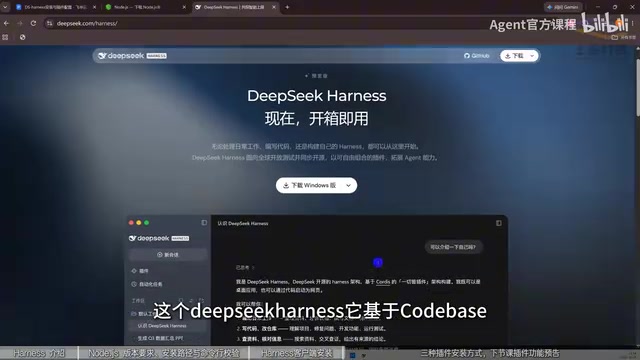
More importantly, there's the plugin architecture. The creator noted that DeepSeek Harness is based on Codex's plugin architecture, and its real strength lies in plugin integration. This means its extension logic shares the same origin as mainstream AI coding tools, giving it greater ecosystem potential.
Node.js is a JavaScript runtime environment built on the Chrome V8 engine that lets JavaScript run outside the browser on a local operating system. Many AI tools (including the Harness client and various command-line plugins) rely on Node.js for its runtime environment and package management capabilities (npm). Simply put, Node.js is the "foundation" these tools need to run — without it, plugins and scripts written in JavaScript cannot execute locally. The article requires version 22 or above because newer AI toolchains often use newer language features and APIs that older versions may not support.
Step 1: Set Up the Node.js Environment
Installation has two major steps. The first is installing Node.js, because many AI tools are built on this environment — for example, installing Cloud Codex and similar tools also requires it first.
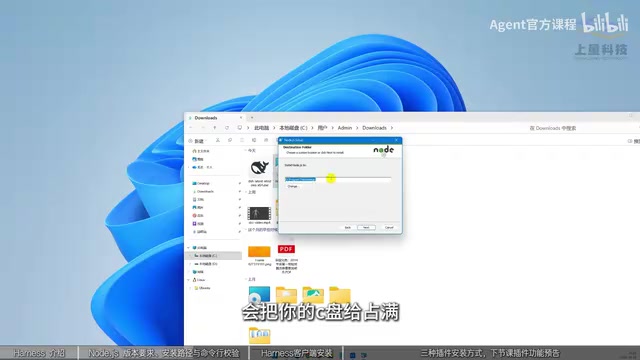
Specifically: go to the Node.js official website, and the download will automatically adapt to your system. Note the version — preferably choose 22 or above, not below 22. Both the zip archive and the MSI installer work; MSI can be clicked to install directly, while zip needs to be extracted.
It's recommended to change the installation path to the D drive. The creator explained why: installing to the C drive takes up space and also generates a large number of transfer files that can fill up the C drive.
After installation, you must verify it. Open the command line (if you can't find it, type CMD), enter the version query command with a space, and if a version number appears that is roughly 20 or above, the environment is set up correctly.
Step 2: Install the Harness Client
Click the link provided in the tutorial to go to the page, where you'll find the client file for your system. For Windows computers, choose the Windows version to download, right-click to open and install. Again, don't install to the C drive — change it to the D drive. After installation, open it and you'll find the interface is similar to the web chat window.
The difference has already been mentioned: here you can add local folders and let the AI read, modify, and save files.
Three Ways to Install Plugins
Plugins are the core of Harness's capability expansion. The creator listed three installation methods, arranged from lowest to highest difficulty.
Method 1: Install Directly in the Chat Window
If you know the plugin name and GitHub link, just send the link to the AI in the chat window and let it install it itself. This is the most direct method, but it consumes Tokens and credits.
Method 2: Install from the Plugin Market (No Credits Needed)
On the plugins page, click "Add Plugin," enter the plugin name — for example, DSH market — and click install. Once it detects installation is in progress, click Launch Now to enter the plugin market.
The entry point is in "Settings" under "More." The installed plugin market lets you search through thousands of plugins, filter by conditions, and even has recommendation slots — such as a little whale widget or desktop pet — that you can install with one click.
Method 3: Command-Line Installation
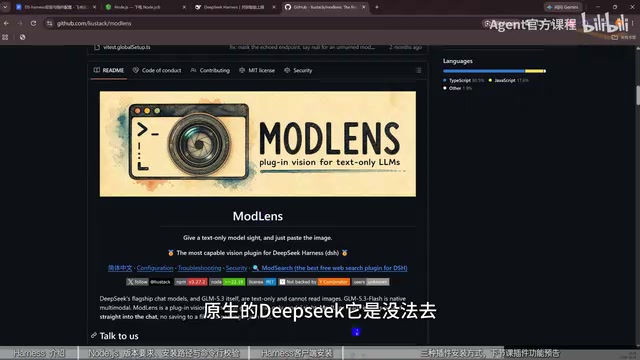
Suited to more abstract but more hardcore scenarios. The creator gave an example: a project on GitHub called "the most powerful DeepSeek Harness external vision plugin on the internet," whose purpose is to give native DeepSeek — which originally couldn't recognize local images — the ability to read images: to know how many people are in an image and what each person is wearing.
To install, find the "install with" option at the bottom of the webpage and copy that command into the command line to execute it, completing the installation. This method is somewhat abstract for some users, so the creator recommends prioritizing the first two.
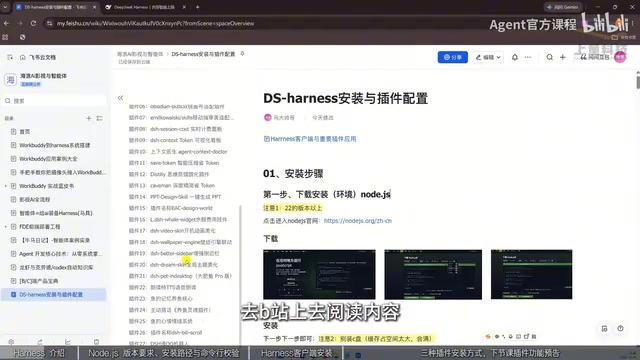
If you don't know what plugins are available, you can just ask DeepSeek to give you a list of popular and useful plugins, then pick the ones you need.
GitHub is the world's largest code hosting platform, where developers put open-source project source code, installation instructions, and release versions. The article mentions "plugin name and GitHub link" and "find the install with option at the bottom of the webpage" multiple times — this refers to getting the installation entry point from a GitHub project page. For ordinary users, GitHub mainly serves as a "plugin source": you don't need to understand the code, just find the installation command or link on the project homepage.
Command line (CMD) is the interface in Windows for entering text commands to operate the computer. The article's "open the command line (if you can't find it, type CMD)" and "copy that command into the command line to execute" both refer to running installation scripts or querying versions via the command line. Command-line installation is more "hardcore" because it directly executes scripts to complete configuration — the process is transparent but requires users to accurately copy and paste commands.
What Plugins Can Do: From Reading Bilibili to Raising Fish
The creator listed a set of plugin application scenarios in the video — these are the best samples for understanding Harness's capability boundaries:
- Have Harness go to Bilibili to read content, read it out, and then feed it to a knowledge base for knowledge base management
- Generate videos
- Organize knowledge directories
- Raise fish (desktop pet–style interaction)
- Connect to chat software and converse with others
What these scenarios have in common is: the AI is no longer just answering questions, but using tools and execution modes to complete actual tasks. This is exactly the "agent way of working" that the tutorial repeatedly emphasizes.
Token is the basic unit of measurement for AI models processing text, roughly understandable as a "word fragment." When you directly ask the AI in the chat window to install a plugin, the AI needs to understand your instructions, read the link content, and generate operation steps — all of which consume Tokens and corresponding credits. The reason plugin market installation is "credit-free" is that the installation action is completed locally by the client, without going through model inference. Understanding this helps beginners choose installation methods based on cost.
What's Next in the Course
This tutorial is positioned as systematic learning from zero, with a clear path: first explain what it is and what it can do, then cover installation, configuration, and AI environment setup, then dive into different work modes and permission settings, learn about supplementary plan operations and command-line operations, and finally demonstrate through practical cases — including hands-on creation of a small game — so learners understand how agents complete tasks in practice.
A Few Observations
From the tutorial content, Harness's value lies not in the model itself but in the two layers of expansion: "local files + plugin ecosystem." For beginners, the real barrier isn't installation — it's understanding which workflows plugins can cover. The three installation methods the creator gives actually correspond to three types of users: those who dislike hassle use the market, those with clear goals install via chat, and those seeking certainty use the command line.
One caveat: the thousands of plugins in the plugin market vary in quality, and official recommendation slots don't equal business fit. Figure out what problem you want to solve first, then go find the corresponding tool in the plugin market — that's more efficient than browsing aimlessly.
Related articles
11 Tested Rules to Slash Claude Token Costs to the Bare Minimum
Claude Token costs too high? Creator Doobie rewrote 11 token-saving rules after 30 days of logs: keep effort at medium, use /clear when switching tasks, don't let cache expire, downgrade auxiliary agents to Haiku—with official Anthropic data and cost comparisons.
Build Your First AI Agent with Zero Code: A Claude Code Practical Guide
Build an AI agent in Claude Code with zero code. Learn the full workflow: folder setup, claude.md rulebook, plan-mode briefs, skills, and independent review.
Claude Code Advisor Mode Explained: How Fable 5.2 and Sonnet 5.5 Collaborate on Code
A deep dive into Claude Code's experimental Advisor mode: how Fable 5.2 and Sonnet 5.5 split the work, access requirements, version thresholds, three ways to enable it, Fable's special billing rules, and a fact-check of the "3.4x cost reduction" claim against official docs.