DeepSeek Super Agent Local Implementation: 5 Core Designs + Real Task Demo
DeepSeek Super Agent frees human attention from monitoring multiple AI windows through five designs: orchestrator, isolation, single entry point, inspection, and persistence.
The article introduces DeepSeek's public Super Agent design and its single-machine open-source implementation, DSH Master Plugin. The design includes five core ideas—resident orchestrator, architectural member isolation, unified decision entry, scheduled inspection, and state persistence—all aimed at reducing human attention consumption in multi-AI collaboration. The creator added gate acceptance, prior-context push, and member manuals, and demonstrated with a 63-minute real task that the orchestrator can proactively extract hidden constraints and re-run verification instead of trusting reports, with only one human decision required throughout. The implementation made clear trade-offs, dropping cloud separation and event triggering, with inspection and orchestrator in the same process as a simplified version. The article notes the AI collaboration bottleneck is shifting from model capability to human attention management.
From AI Assistant to AI Legion: Why Do We Need a Super Agent?
When you open several AI windows simultaneously to get work done, the first thing that gives out is often not compute power but human attention. Results from Window A need to be manually carried over to Window B, when Window C gets stuck you have to go check on it, and after each window finishes you have to verify them one by one. You become a human relay, supervisor, and quality inspector all rolled into one. The stronger the model capabilities, the more windows you dare to open, and the amount of things you need to keep an eye on multiplies.
DeepSeekAd has publicly shared a design called Super Agent, with a clear goal: keep humans involved only where humans are truly needed. The latest episode of the Bilibili creator's "From AI Assistant to AI Legion" series breaks this design down into five core ideas and implements a complete plugin (DSH Master Plugin) on a single machine, verifying each point with a 63-minute real task recording. This article combines the video content with the public design to explain how these five ideas are put into practice and what it actually looks like when running.
The Five Core Ideas of Super Agent
The video summarizes DeepSeek's design into five points, each corresponding to a specific action that gets "eliminated."
Idea One: A Resident Orchestrator — You Only Talk to One Person
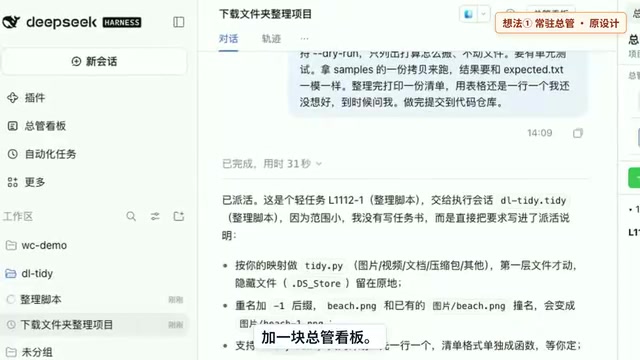
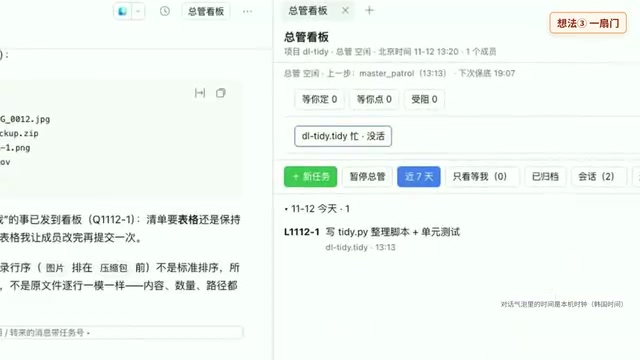
All tasks are dispatched and reported back through a single orchestrator. You don't need to relay messages back and forth between multiple windows, eliminating the role of "human message bus." In the plugin implementation, the orchestrator is simply a main window plus a dashboard where tasks, members, and progress are all visualized.
The resident orchestrator is the core role in the Super Agent architecture. It is itself an LLM instance, but is given the dedicated responsibilities of task dispatch, state management, and responding to the user. Unlike an ordinary AI assistant, the resident orchestrator does not do the work directly; instead, it maintains a global dashboard recording each task's current status, owner, and pending items. This design draws on the coordinator pattern from classic multi-agent systems, but DeepSeek's version emphasizes the "single entry point" principle: the user interacts only with the orchestrator, and all subtask results and issues are aggregated and relayed through it. The benefit is avoiding context loss when the user switches between multiple AI windows, while giving the orchestrator global information for more consistent scheduling decisions.
Idea Two: Members Work Independently — Division of Labor Comes from Architecture, Not Prompts
Each member is an independent window doing its own share of the work, and members don't message each other. The video mentions an experiment from the original text: when only a main AI was paired with a single assistant, without special reminders, not once in five attempts did it proactively delegate work. This shows that division of labor cannot rely on the model's own initiative; it must be enforced by architectural isolation. What gets eliminated is the effort of breaking down tasks yourself and then watching it distribute them.
Agent isolation means each member AI runs in an independent session or process, communicating not directly with each other but indirectly through the orchestrator and shared state (such as the dashboard and file system). This architecture forcibly cuts off message passing between members, avoiding the common problems of crosstalk and echo chambers in multi-agent systems—where multiple AIs echo each other or fall into meaningless conversation loops. The experiment mentioned in the video (the main AI paired with an assistant never proactively delegated) shows that merely using prompts to ask for "division of labor" is unreliable, because models tend to complete tasks alone to reduce coordination costs. Therefore, isolation must be guaranteed by system architecture: members' inputs and outputs are strictly confined to their own task scope, and the orchestrator is responsible for splitting tasks and merging results.
Idea Three: Only One Door — Decisions Go Through the Orchestrator
Matters that truly require human decisions are raised to you uniformly by the orchestrator; members do not interrupt you directly. In the plugin, this is implemented as a "waiting for your decision" card on the dashboard. You click once, and the answer goes directly to the responsible member—the orchestrator doesn't even need to wake up for this round. What gets eliminated is the fragmented distraction of being interrupted by each window in turn.
Idea Four: Inspection System — Regularly Check on Its Own
The plugin periodically checks: who hasn't reported back for a long time, who is waiting for you to click, which files have been modified by means other than the plugin—and reports all of this to the orchestrator. If the check finds the same as last time, it sends nothing and doesn't even wake the model. To make the recording, the creator set the inspection interval to once per minute; normally it's once every ten minutes. He specifically notes this is a simplified version—the inspection and orchestrator run in the same program. What gets eliminated is the attention drain of constantly staring at the screen.
The inspection system is essentially a lightweight scheduled monitoring process that periodically scans task status, member heartbeats, and file changes, and aggregates anomalies to the orchestrator. Unlike event-driven architecture, inspection uses polling, which is simple to implement but introduces latency—a default of once every ten minutes means problems could be discovered up to ten minutes late. The creator set it to once per minute for demonstration convenience and points out that in the simplified version, inspection and the orchestrator run in the same process, meaning an inspection failure directly affects the orchestrator. In a more complete production-grade design, inspection typically runs as an independent service and works with an event bus (such as file system watching or message queues) for near-real-time response. The "silent when unchanged" strategy is meant to reduce unnecessary model calls, thereby lowering costs and attention disruption.
Idea Five: State Persistence — Pause Anytime, Resume Where You Left Off
Task briefs, logs, and manuals are all written into the project, while progress is stored in the plugin's database. Close and reopen the plugin, and tasks and progress are still on the dashboard. Click pause, and scheduled inspection stops; click resume, and scheduling continues. What gets eliminated is the anxiety of "losing progress the moment you step away."
Local Implementation: Trade-offs and Enhancements
The creator built a single-machine version of the DSH plugin on one computer and open-sourced it on GitHub. Clear trade-offs were made during implementation: no cloud-based separation of storage and compute; no event triggering; and automatic backend repair in group chats that directly connects to members on the same topic was not done for now.
Beyond the five core ideas, he added three extra things:
- Gate acceptance: After each gate a member completes, it stops, and the orchestrator runs verification itself before signing off—it doesn't just check a box based on the member's report.
- Prior-context push: When a member is about to modify a file that was logged before, the plugin intercepts first and pushes what was recorded at the time for them to review before editing.
- Member manual: Each member has an experience manual recording standard practices, pitfalls encountered, and preferences, with sources noted for each entry; it's read first before starting work next time.
There is also a guard: members cannot commit code themselves, nor directly modify state files.
Supporting all this is the memory layer built in the creator's previous two episodes—the work log directory and decision book from the first episode, and the multi-AI shared ledger from the second episode; the plugin reuses the same approach. This cross-verification of information from multiple sources lets the design intent be more fully reflected at the implementation level.
State persistence is the foundation that lets Super Agent "pause anytime and resume where it left off." In the DSH plugin, task briefs, work logs, and member manuals are stored as files in the project directory, while task progress, member status, and pending items are stored in the plugin's local database (such as SQLite). This hybrid storage strategy balances readability and structured queries: files are easy for humans to inspect and version-control, while the database supports efficient dashboard updates and fast inspection scans. Persistence also brings a key benefit—audit trails. Every task dispatch, acceptance, and human decision is recorded, allowing the entire collaboration process to be traced afterward. For tasks that need to run for a long time or span multiple days, state persistence is a necessary condition for avoiding "losing progress the moment you step away."
Full Real-Task Walkthrough
The video runs through a complete real task starting from an empty project, recorded with a screen capture using real models for 63 minutes.
Opening: The Orchestrator Reads Out Hidden Requirements Itself
After creating a new project, the orchestrator first went through the project and proactively stated two rules: files with the same name must not be overwritten, and hidden files must not be touched. These two rules were planted in the sample in advance by the creator; not a word about them was in the requirements. This shows the orchestrator can proactively extract constraints from context.
Then the creator deliberately added a line at the end of the requirements: "For the list, use a table or one item per line—ask me when the time comes," specifically to trigger a "waiting for your decision" card. The orchestrator classified the task as a light task, did not write a task brief, and directly put the requirements into a work assignment and dispatched it to a member.
Acceptance: The Orchestrator Doesn't Check Boxes Based on Reports
The member finished in just over two minutes, and the orchestrator did not simply accept the report; instead, it took a fresh copy and re-ran everything: first a dry run of the plan, then the actual organization, then ran it again to see if it would move extra things, and only committed once it confirmed the result matched expectations. This is the creator's extra reinforcement of "Idea One" and "Idea Two."
After submission, a card appeared on the dashboard asking about the list format. The creator clicked "Table," and the answer went directly to the member—the orchestrator didn't need to wake up for this round. This is the single door of "Idea Three"; it appeared only this one time during the whole task.
Prior-Context Push: New Members Know the Old Rules Before Acting
The first time the member modified a file, the plugin stopped it and pushed a piece of prior context—what had been done with this file before and what rules were set at the time. What was pushed was the design he had left ten minutes earlier. This is the first episode's work log and decision book at work.
Second Task: Formal Task Brief and Two Gates
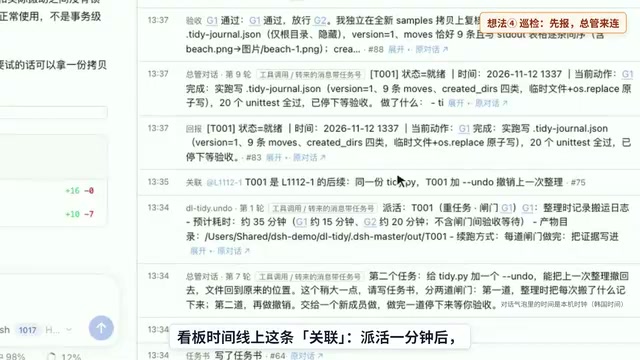
The creator asked the undo feature to go through the formal process: write a task brief and split it into two gates. The orchestrator wrote the task brief and dispatched it to a new member; the first gate records what was moved, and the second gate performs the undo. The new member first read the task brief, then the prior context, and when modifying files was again intercepted by the plugin, which pushed the record of the previous task. Although he was new, he knew the rules set by the previous task before starting.
Members can only report in six statuses: progress, waiting, blocked, failed, ready, complete. After the first gate was done, it reported ready and stopped at the gate waiting for the orchestrator's acceptance and release; the second gate worked the same way. The creator also tested error cases such as a corrupted record file, the original location being occupied, and the target file missing—in all cases files were left untouched.
Inspection and Manual
On the dashboard timeline, one minute after dispatch, inspection reported a cross-task association candidate, and the orchestrator, after checking, recognized that the undo feature was adding functionality to the first task's script, and only then connected the two tasks. The creator also used a script to secretly append a line to the end of the task brief, and within less than a minute inspection reported that the file had been modified by means other than the plugin; after checking, the orchestrator confirmed it was just an extra note line and kept it as-is while reporting it.
The member manual records concrete experience, such as "the expected file's directory order is not standard sorting—do not align character by character according to Chinese; calculate by display width," with a source for every entry. Next time work starts, the manual is read first, so there's no need to figure things out from scratch.
What This Means
DeepSeek's Super Agent design points to a trend: the bottleneck in AI collaboration is shifting from model capability to human attention management. The five core ideas essentially free "the human" at the architectural level from message passing, progress monitoring, and repeated acceptance, retaining only the decision points that truly require judgment. The creator's local implementation validates the feasibility of this design in a single-machine environment, and also exposes the boundaries of the simplified version—inspection and orchestrator in the same process, missing cloud capabilities, and event triggering not implemented.
For developers who open multiple AI windows at once, this "orchestrator + members + dashboard + inspection" structure provides a reference engineering paradigm. The plugin is open-sourced; the address and installation instructions are in the video description and pinned comment. The next episode will cover the version the creator uses daily.
How many AI windows do you open at once? Feel free to share your attention management approach in the comments.
One-line Summary
DeepSeek Super Agent uses five designs—orchestrator, isolation, single entry point, inspection, and persistence—to free human attention from monitoring multiple AI windows.
Paragraph Summary
The article introduces DeepSeek's public Super Agent design and its single-machine open-source implementation, DSH Master Plugin. The design includes five core ideas: a resident orchestrator that uniformly dispatches tasks, architectural member isolation, a unified decision entry point, scheduled inspection, and state persistence—all aimed at reducing human attention consumption in multi-AI collaboration. The creator implemented the plugin on one computer and added three layers of assurance: gate acceptance, prior-context push, and member manuals. Through a 63-minute real task recording, the orchestrator proactively extracted hidden constraints, re-ran verification instead of checking boxes based on reports, and required only one human decision throughout. The implementation made clear trade-offs, dropping cloud-based separation of storage and compute and event triggering, with inspection and orchestrator in the same process as a simplified version. The article notes that the AI collaboration bottleneck is shifting from model capability to human attention management.
Related articles

AI Writes Your Code—Do You Still Need to Learn Git? Five Reasons
AI coding agents handle Git operations automatically—is it still necessary to learn Git? Five reasons: team communication, reviewing agent PRs, monitoring code changes, fallback when AI goes down, and the joy of learning—plus how the focus of learning Git is shifting in the agent era.

Anthropic Reportedly Prices IPO at $83 Per Share, Valuing Company at $1.5 Trillion
Anthropic reportedly prices IPO at $83 per share, above the expected range, with a fully diluted valuation of $1.5 trillion. This article analyzes the signal significance of the pricing and its impact on the AI industry's financing environment.

Open-Source Code Hosting Platform Codeberg Suffers Outage, Sparking Debate in Developer Community
Open-source code hosting platform Codeberg.org suffered an outage, sparking Hacker News debate over nonprofit platform stability and open-source infrastructure dependency risks.