DeepSeek UI: An Open-Source Browser Extension That Supercharges the DeepSeek Web Experience

Open-source browser extension that supercharges the DeepSeek web interface with search, quoting, and export features.
DeepSeek UI is an open-source browser extension by a Bilibili creator that enhances DeepSeek's web interface without modifying any official code. Key features include keyword search and highlight, one-click quoting of AI responses, improved navigation, auto-collapse of reasoning chains, and Markdown/HTML export for full or single-turn conversations. It supports Edge and Chrome via standard developer-mode sideloading. This type of community-built enhancement tool fills gaps that official products leave due to generality constraints — though users should review the source code before installing any third-party extension.
An Open-Source Extension Built for DeepSeek's Web Interface
If you're a heavy user of DeepSeek's web interface, you've probably run into some frustrating friction points: manually selecting text to re-quote a previous response, hunting through long conversations to find a specific passage, or dealing with inflexible export options. A Bilibili creator has open-sourced a browser extension called "DeepSeek UI" that aims to address these pain points with a single lightweight plugin.
The project enhances DeepSeek's web interface through a browser extension — no modifications to the official codebase required. Once installed, it layers a set of practical features directly on top of the existing UI. It supports both Edge and Chrome, and is a classic example of a client-side enhancement tool.
Three Core Feature Modules
The author organizes the improvements into three areas: input experience, page-level enhancements, and export capabilities — covering the full workflow from asking questions to archiving results.
Input Experience Improvements
The first module focuses on the input side. The extension supports converting text into specific formats while typing (such as heading styles), making it easier to structure your prompts. For users who frequently write long instructions or multi-section prompts, these small input-level improvements can save a lot of formatting hassle.
Page-Level Feature Enhancements
The second module is the richest and most central to the extension's value:
- One-click quote of AI responses: Add the AI's reply directly to the input box, eliminating repetitive copy-pasting — especially handy for follow-up questions.
- Improved sidebar navigation: Better accuracy when jumping through the table of contents, making it easier to pinpoint content in long conversations.
- Keyword search and highlight: A new search function that lets you find and highlight specific keywords within an AI conversation — filling a notable gap in the native web interface.
- Auto-collapse thinking process: For DeepSeek's reasoning mode, the extension can automatically collapse lengthy chains of thought, keeping the interface clean and readable.

None of these features are complex on their own, but together they meaningfully improve retrieval and interaction efficiency in long conversation scenarios.
Export Enhancements
The third module strengthens how conversations can be exported and archived. Users can export an entire conversation or just a specific exchange, with support for both Markdown and HTML formats. A conversation bookmarking feature is also included, allowing targeted exports of saved conversations.

Markdown export is ideal for users who want to bring AI responses into note-taking tools like Obsidian or Notion, while HTML is better suited for sharing or archiving fully formatted content. The author also includes an option to change the background image for some personal flair.
Markdown is a lightweight plain-text markup language that uses simple symbols (e.g., # for headings, ** for bold) to describe document structure. Files exported as .md can be directly recognized and rendered by tools like Obsidian, Notion, and Typora. HTML, on the other hand, is a complete webpage file that preserves the original styling and layout — just open it in a browser to view a fully formatted conversation record. It's great for sharing with people who don't use specific note apps, or as a visual archive. The two formats serve different purposes: Markdown is better for re-editing and embedding into a knowledge base, while HTML faithfully reproduces the visual presentation.
Installation: Using Edge as an Example
Installation follows the standard path of loading a local extension via developer mode — no app store required.
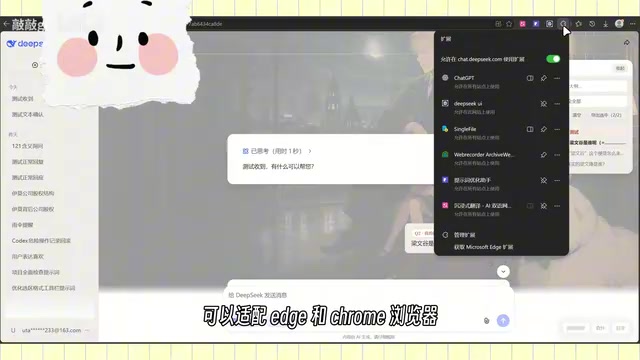
Using Edge as an example, here are the steps:
- Click the menu in the top-right corner and go to "Manage extensions";
- Download and unzip the project folder;
- Select "Load unpacked" and point it to the unzipped folder;
- The extension will appear once loaded;
- Pin the extension to the top-right toolbar for easy access.
The process in Chrome is essentially identical. Since this involves manually loading an extension in developer mode, users should make sure to obtain the extension files from a trusted source and maintain basic code awareness when it comes to open-source projects.
Loading a local extension in developer mode (also called "sideloading") is an official browser mechanism for bypassing the app store review process, primarily intended for developers testing their own extensions. Unlike installing from a store, sideloaded extensions don't go through Google's or Microsoft's security review. Users are therefore responsible for assessing the trustworthiness of the source. Both Edge and Chrome display a persistent warning banner after enabling developer mode to remind users of this risk. For open-source projects, it's generally recommended to review the source code directly on platforms like GitHub — checking for any suspicious network requests or data collection behavior — before deciding whether to load the extension.
A Few Observations
Open-source micro-tools that enhance mainstream AI products on the client side are becoming an increasingly notable phenomenon. Official products, constrained by stability and broad compatibility goals, often can't quickly address niche but frequently-needed features. Community developers, using low-barrier approaches like browser extensions, can rapidly fill those experience gaps.
DeepSeek UI itself isn't complex, but it packages high-demand features — keyword search and highlighting, one-click quoting, and flexible export — into a single plugin. For heavy DeepSeek users, it's a genuinely useful productivity add-on. As an open-source project, it also leaves room for others to fork and build upon. For general users, the appropriate caution before installing any third-party tool is to verify the open-source credibility of the extension and only load code you understand and trust.
Related articles
Using an AI Agent to Monitor Customer Job Changes: A Sales Team Automation Case Study
A Reddit user shares how he built a job change monitoring agent using Claude, MCP, and HubSpot to track 400 contacts daily and surface high-value sales signals.
How to Save Tokens on LLM Retries? Optimization Strategies for Large-Context Agent Workflows
Resending full context on LLM retries causes token costs to explode. This article covers six optimization strategies for large-context Agent workflows, including decoupling generation from repair, external context retrieval, structured state management, and lean MCP tool output.
Kijai Updates MiniMax-H3 VAE: Lower VRAM Usage Without Quality Loss
Kijai updated the MiniMax-H3 int8 quantized VAE, enabling RTX 3060 12GB users to generate 1MP/10s and 0.7MP/15s videos with no reported quality loss.