Dell 14S Slim Laptop Arrives: Another Card Played Against the MacBook

Dell's 14S is a lightweight student laptop with personality, but its true value hinges on an unannounced price.
Dell's new 14S laptop enters the student market with a 1.15kg aluminum chassis, four color options including velvet green, and an optional 2.8K 120Hz display, powered by Intel's Wildcat Lake Core Series 3. Ports are practical, including both USB-C and HDMI. The headline 21-hour battery claim comes from Dell's own testing at just 150 nits — far below typical real-world brightness — so actual endurance will likely be significantly lower. The hardware specs show promise, but Dell's decision to withhold pricing at launch leaves the biggest question unanswered: for a laptop selling itself on affordability against the MacBook, price is everything.
Dell has unveiled a new student-focused laptop built around thinness and battery life — the Dell 14S, which the company claims can deliver up to 21 hours of video playback. In a crowded market of Windows ultrabooks all gunning for Apple's MacBook, this machine attempts to stand out through its aluminum chassis, colorful options, and practical port selection. But Dell conspicuously left out one critical piece of information at launch, leaving a big question mark over its real competitive edge.
Slim Design and Colorful Options: A Personality-Driven Approach
The Dell 14S features a unibody aluminum chassis starting at just 1.15 kg, firmly placing it in the ultraportable category. It comes in four color options, including a distinctive "velvet green" — a refreshing departure from the sea of silver-gray and space-black business ultrabooks out there.

For students and young users with a tight budget who still want something that stands out, this combination of affordability and personality is genuinely appealing. Dell is clearly taking aim at the aesthetic benchmark that the MacBook lineup has set, hoping to capture the same audience with friendlier pricing and more varied color choices.
Display and Specs: High-End Configs Are Promising, But Entry-Level Requires Realistic Expectations
The higher-end Dell 14S configurations offer an optional 2.8K resolution, 120Hz display, delivering sharper visuals and smoother scrolling — a meaningful upgrade for students who spend long hours reading documents or browsing the web.
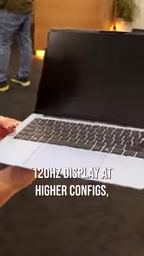
That said, the base SKU still ships with a 60Hz panel at a lower resolution. In other words, 120Hz and 2.8K are not standard across the lineup — you'll need to pay more to get the better display experience.
On the processor front, the machine is powered by Intel's Wildcat Lake architecture Core Series 3 chip. Based on its naming and positioning, this is an entry-to-mainstream ultrabook processor — more than capable of handling everyday tasks like office work, online classes, and light multitasking, but not designed for heavy creative workloads or gaming.
Wildcat Lake is Intel's processor architecture targeting the ultra-thin laptop market following the 13th/14th gen lineup, and belongs to the Core Series 3 product line. Under Intel's new naming scheme, Core Series 3 represents the more entry-level tier compared to Core Series 5 and Core Series 7, with noticeable gaps in multi-core performance and AI compute. For students handling documents, video calls, and online classes, it's more than sufficient — but tasks like video editing or compiling large codebases will reveal its limitations. Worth noting: different SKUs within the same Dell lineup may feature varying core counts and TDP configurations, meaning real-world performance can differ significantly between models. It's worth comparing spec sheets across configurations once the product officially goes on sale.
Ports and Biometrics: Nothing Missing
The Dell 14S takes a practical approach to connectivity. The chassis includes two USB-C ports, one HDMI port, and a headphone jack — a reasonably complete setup for an ultrabook. The retention of HDMI is especially useful for students and early-career professionals who need to connect to projectors or external monitors without carrying a dongle.

The laptop also supports Windows Hello facial recognition, making for a smooth open-and-go experience that's above average for this price tier. Overall, Dell hasn't over-compromised on ports or basic usability in the name of thinness — and that's worth acknowledging.
21-Hour Battery Life: An Eye-Catching Number, But Take It With a Grain of Salt
Dell claims the 14S achieves up to 21 hours of video playback — a headline-grabbing figure. But a closer look at the test conditions reveals the caveats: the result comes from Dell's own internal testing, using a lower-resolution display at a brightness of just 150 nits.

150 nits is manageable in a dimly lit indoor setting, but it's often insufficient for normal office environments or outdoor use. Once you turn the brightness up and add real workloads — rather than just looping a video — battery life will drop considerably. The 21-hour figure is best understood as a theoretical maximum, and buyers should set more conservative expectations for day-to-day use.
Laptop manufacturers universally use favorable test conditions when reporting battery life, and 150 nits is particularly worth scrutinizing — standard display brightness typically sits between 250 and 300 nits, with outdoor or bright-light scenarios often requiring 400 nits or more. Based on industry experience, manufacturer-reported "video playback" figures tend to run 30–50% higher than real-world mixed usage (multi-tab browsing, light office work, occasional video). For a more grounded reference, look to third-party review outlets like Notebookcheck or The Verge, which test under standardized brightness levels (usually 200 or 250 nits) and consistent workloads. It's worth waiting for independent reviews before drawing conclusions about real-world battery performance.
The Most Important Detail Dell Didn't Share
The biggest open question surrounding this product is the one Dell declined to answer at launch: the price. Given the broader backdrop of rising component costs worldwide, that's perhaps not surprising — but for a laptop positioning itself on affordability, price is precisely the variable that will determine whether it succeeds or fails.
A lightweight chassis, practical port layout, sharp high-end display option, and distinctive design — these elements could add up to a genuinely competitive package. But until a price is attached, the "MacBook rival" framing remains purely theoretical. Whether the Dell 14S can actually challenge Apple and other Windows ultrabooks ultimately comes down to where Dell decides to set the number.
Related articles

WorkBuddy Full Tutorial: Build an AI Office Automation Agent from Scratch
A complete WorkBuddy tutorial: installation, three working modes, multimodal picture book video practice, expert team agent building, and workflow configuration for low-cost AI office automation.

WorkBuddy Agent Complete Guide: From Beginner to Automation in 7 Days
Based on Bilibili's 256-episode WorkBuddy masterclass, this systematically breaks down Tencent's AI office workbench core capabilities: Agent principles, Skill encapsulation, cross-platform connectors, scheduled automation, knowledge bases, and zero-code development, with learning path recommendations.

8 AI Accounts, 7 Failed: An Honest Review of Using AI to Get Work Done
Only 1 of 8 AI-run Bilibili accounts succeeded. We break down the real difference between "performing AI" and "using AI to get work done."