Deploy Qwen3-VL 27B Locally on 8GB VRAM: A Step-by-Step Guide to ComfyUI Video Generation

Deploy Qwen3-VL 27B locally on 8GB VRAM and connect it to ComfyUI for AI video generation.
Alibaba's open-source Qwen3-VL 27B ranks 26th out of 600+ models on Artificial Analysis and has nearly 5 million monthly downloads. This guide covers a complete local AI video workflow: load a GGUF quantized version via LM Studio (as low as 6GB VRAM), connect it as a node in ComfyUI, and auto-generate high-quality prompts for MiniMax H3 video generation. Built-in low-VRAM nodes make the full pipeline accessible to users with 8GB or 12GB of VRAM.
Qwen3-VL 27B: A Top-Tier Model at the 27B Scale
Alibaba's new open-weight model Qwen3-VL 27B quickly gained traction after its release, approaching 5 million downloads in a single month. It's not just a chat model — it's a fully multimodal system capable of image understanding, video comprehension, long-context processing, and complex instruction following, with quantized variants available for users with limited VRAM.
On Artificial Analysis, a third-party model benchmarking site, this model ranks 26th out of over 600 models on its complex capability leaderboard — with nearly everything ranked above it being flagship paid models from major labs. That result makes clear this isn't just a "good enough for its size" model; it's genuinely top-tier within the 27B parameter class. For users who want a locally-run model that balances performance with hardware accessibility, this is a compelling option.
Multimodal LLMs are large language models capable of processing multiple types of input — text, images, and even video — as opposed to traditional language models that only accept plain text. The "VL" in Qwen3-VL stands for Vision-Language, indicating its joint visual-linguistic understanding capabilities. Parameter count (27B = 27 billion parameters) sets the upper bound on a model's capacity: more parameters generally means stronger capability, but also higher VRAM and compute requirements. Quantization compresses model weights from high-precision floating-point numbers to lower-precision integers (e.g., INT4, INT8), dramatically reducing VRAM usage with minimal accuracy loss — bringing models that would otherwise require 80GB of VRAM down to a range that consumer-grade GPUs can handle.
Local Deployment: Getting It Running with LM Studio
The core logic of local deployment isn't complicated — the key is choosing the right model variant and organizing your files correctly.
The first step is downloading the model version that matches your hardware. Different VRAM configurations correspond to different quantization tiers, and users with as little as 8GB or even 6GB of VRAM can find a workable quantized version. The creator mentioned compiling model version recommendations and deployment instructions into a document, available in the comments section.
The second step is downloading and installing LM Studio. Once installed, open the app, navigate to the general settings page, and locate the "Model Directory" option. Set your desired model storage path there, then import the Qwen3-VL model in GGUF format.
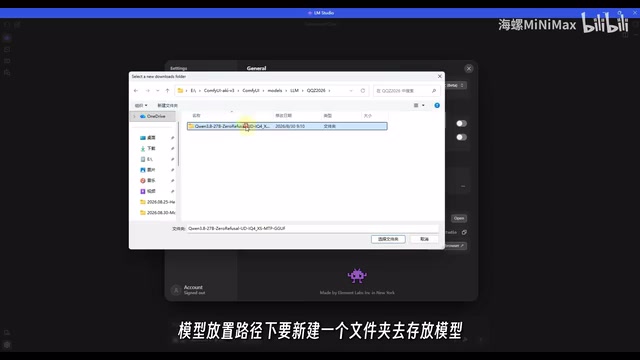
There's one easy-to-miss gotcha here: you can't just drop the model file directly into the root directory. You must create a subfolder (e.g., named "Qwen") within the model path and place the file inside it, or LM Studio won't be able to read it correctly. There's also a handy tip for saving disk space — place the model directly inside your ComfyUI models folder so a single copy serves both applications. After restarting LM Studio, the model will be ready to run locally.
GGUF (GPT-Generated Unified Format) is a model file format defined by the llama.cpp project, optimized for local inference. It bundles model weights, quantization parameters, and metadata into a single file for easy distribution and loading, and has become the de facto standard for locally deploying open-source models. LM Studio is a local model management tool designed for general users, offering a graphical interface that supports loading GGUF files and running inference on your local CPU/GPU — no complex Python environment setup required. Compared to cloud API calls, local deployment keeps your data on-device, works offline, and incurs no token costs, though inference speed is typically slower than cloud-based services due to hardware limitations.
Connecting to ComfyUI: Generating Prompts for Your Video Workflow
Getting the model running locally is just the first step. The real creative value comes from connecting it to ComfyUI, where it can automatically generate prompts for a MiniMax H3 video generation workflow.
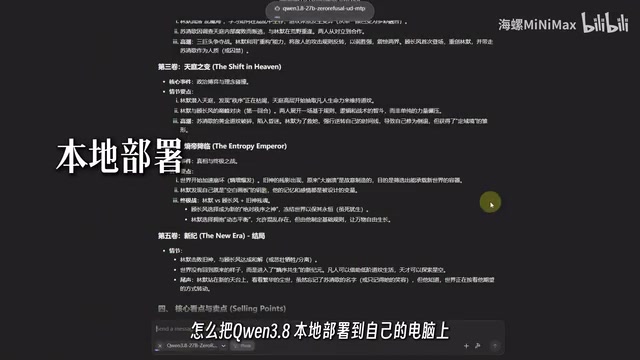
The creator has already built a custom node package that supports calling this model. Users simply need to install the node package, then install llama-cpp along with the corresponding wheel file. The full process comes with illustrated documentation.
The workflow demonstrated in the video uses a community-built quantized version specifically optimized for 16GB VRAM, designed to preserve as much model capability as possible while reducing VRAM pressure and making local inference smoother.
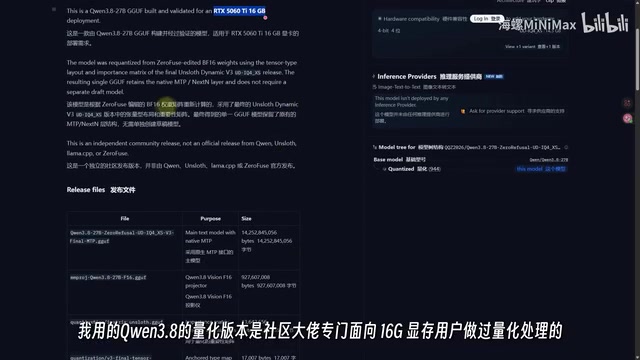
This version also features a heavily emphasized characteristic — Zero Refusal. The creator compared the official version against the uncensored variant: faced with the same prompt, the official version refused outright, while the uncensored version answered without restriction. It's worth noting that this type of "jailbroken" version is a community modification, not an official release. Users should be mindful of compliance boundaries and content risks. This article describes the technical characteristics objectively and without endorsement.
ComfyUI is an AI generation workflow editor built on a node graph architecture. Users connect different functional "nodes" to build automated pipelines, widely used for image and video generation tasks. Each node handles a single function (e.g., loading a model, inputting a prompt, sampling, decoding output), and nodes pass data between each other via connections — making the entire pipeline visual and reusable. llama-cpp is the underlying inference engine for running GGUF models, while a "wheel" refers to Python's .whl package format. Installing the wheel file that matches your CUDA version enables llama-cpp to use GPU acceleration, significantly boosting local inference speed. Embedding Qwen3-VL as a node inside ComfyUI means multimodal understanding and video generation can be automatically chained within the same workflow, eliminating the manual step of copying prompts between tools.
Using the Workflow: Video Generation That Works on Low VRAM
The barrier to using the workflow has been kept intentionally low. After loading it up, simply select your model. The workflow includes dedicated nodes configured for low-VRAM users, allowing those with 8GB or 12GB of VRAM to run it without issues.
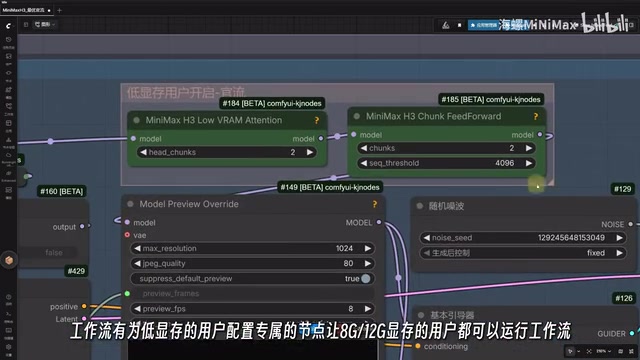
From there, adjust the video aspect ratio and desired duration, upload a reference image, and enter a rough description of the video content in the Qwen3-VL inference module. The system prompt has been pre-filled by the creator, so regular users don't need to touch it. The inference intensity in the model loader can be adjusted to suit your needs. Then simply hit run and wait for the video to generate.
The entire pipeline chains "local LLM + multimodal understanding + video generation" into a single flow: Qwen3-VL interprets your intent and produces high-quality prompts, which are then handed off to MiniMax H3 for video generation. For AI video creators, this is a genuinely practical fully local solution.
Summary
The value of this setup lies in its balance between performance and accessibility. Qwen3-VL 27B ranks near the top among models of its size, and combined with quantized variants and ComfyUI's low-VRAM nodes, it brings multimodal creative workflows — previously gated behind high-end GPUs — down to consumer hardware with just 8GB of VRAM. For newcomers looking to get into AI video creation, this is a local deployment path well worth exploring. Model download recommendations, links, and workflow resources are all available from the creator in the comments section.
Related articles

WorkBuddy Full Tutorial: Build an AI Office Automation Agent from Scratch
A complete WorkBuddy tutorial: installation, three working modes, multimodal picture book video practice, expert team agent building, and workflow configuration for low-cost AI office automation.

WorkBuddy Agent Complete Guide: From Beginner to Automation in 7 Days
Based on Bilibili's 256-episode WorkBuddy masterclass, this systematically breaks down Tencent's AI office workbench core capabilities: Agent principles, Skill encapsulation, cross-platform connectors, scheduled automation, knowledge bases, and zero-code development, with learning path recommendations.

8 AI Accounts, 7 Failed: An Honest Review of Using AI to Get Work Done
Only 1 of 8 AI-run Bilibili accounts succeeded. We break down the real difference between "performing AI" and "using AI to get work done."