Deploying a Standalone VLM Kiosk on NVIDIA Jetson with Codex

Deploy a real-time VLM as an offline, auto-boot kiosk on NVIDIA Jetson using AI coding agent Codex.
This article walks through deploying a Vision Language Model (VLM) kiosk on NVIDIA Jetson using AI coding agent Codex. The process highlights three key capabilities: proactively checking JetPack versions and storage before deployment; pausing at sudo operations so users execute privileged commands locally without exposing credentials to the AI; and converting a CDN-dependent web app into a locally hosted, offline-capable deployment. The result is a Jetson that boots independently into a fullscreen VLM demo with automatic camera capture and local inference — no Mac or internet required.
Running a Vision Language Model (VLM) on an edge device and turning it into a self-contained, offline-ready terminal that boots straight into the demo might sound like a steep challenge. But with the help of the AI coding agent Codex, the entire deployment process gets compressed into a well-structured, conversational workflow. This article breaks down a YouTube technical demo, walking through how to transform a real-time VLM demo into a self-sufficient kiosk experience on NVIDIA Jetson.
This is Part 2 of the series. Part 1 already covered setting up an AI-assisted development environment on Jetson and integrating Codex into the workflow. The goal this time is clear: run a local VLM real-time demo using a connected camera, and ultimately make it run independently — without the development Mac.
Hardware Assessment Before Deployment
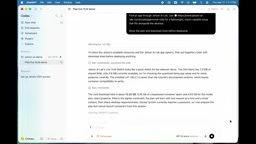
Rather than jumping straight into downloading and installing, the process started by having Codex do its homework. It browsed Jetson AI Lab for a suitable application and identified the live VLM web UI as the right fit. Before touching anything, Codex completed several key checks:
- Verified the installed JetPack version on the device and compared it against the project's documented requirements
- Estimated the download size of container images and model assets
- Confirmed that storage space was sufficient
- Generated a complete deployment plan, which was reviewed and approved before any downloads began
This "plan first, execute later" approach avoids the common pitfalls on edge devices — running out of space mid-download or hitting version incompatibilities. For a resource-constrained device like Jetson, this is especially important.
JetPack is NVIDIA's software development kit (SDK) for the Jetson series of edge computing modules. It bundles a Linux OS (Ubuntu-based), CUDA libraries, cuDNN for deep learning acceleration, TensorRT for inference optimization, and various multimedia drivers. Different JetPack versions correspond to different CUDA versions and hardware drivers, and container images are typically tightly bound to a specific JetPack version — a mismatch means GPU acceleration inside the container won't work, or the container may fail to start entirely. Jetson AI Lab is a reference implementation platform for edge AI maintained by NVIDIA, offering pre-built Docker containers and deployment scripts. The live VLM web UI is one of its sample projects, specifically designed to demonstrate real-time visual language understanding on Jetson devices.
Credential Security and Permission Boundaries
One detail worth highlighting from the deployment process: when certain operations required elevated privileges (sudo), Codex did not attempt to handle the password itself. Instead, it paused and explicitly identified which command needed authorization. The user entered the password directly in the Jetson terminal — credentials never entered the conversation log or got written into any generated file.
This reflects a clear and deliberate permission boundary design. No matter how capable an AI agent is, it should never touch sensitive credentials. Keeping the human in the loop at critical decision points ensures both security and operator control. Only after authorization was confirmed did Codex proceed to pull the container, download model assets, and apply the configuration.
Adapting for Local and Offline Environments
Where the real value of agent-assisted development shows up is in how Codex adapted the application — not just ran an install script.
The original application loaded some browser-side resources from a public CDN. Since this demo needed to run reliably on a local network and eventually operate completely offline, Codex proactively modified the application to serve those resources locally. It also configured the Web UI and camera signaling paths to work with same-device connections, while keeping the inference service isolated and running on the Jetson itself.
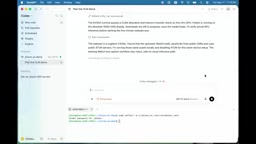
In other words, Codex was inspecting the application, identifying environment-specific issues, and adjusting the deployment for the target system — well beyond "follow the docs and run the script." This is much closer to an engineer who thinks through environmental constraints.
Loading frontend resources from a CDN (Content Delivery Network) is standard practice in modern web apps — for example, pulling in JavaScript frameworks or font files from public servers to reduce bundle size and leverage caching. However, this pattern has a clear risk in edge deployment scenarios: when the network is unstable or completely unavailable, the frontend page may fail to render because critical resources can't load, making the entire application unusable. Switching to local hosting means downloading the required static assets to the device and updating the application's reference paths to point to the local server. This is a necessary step in turning a "connected app" into an "offline-capable app," and it's standard hardening practice for edge kiosk deployments.
Building a Kiosk-Style Auto-Start Experience
Getting the demo to run was just the first step. The next goal was to turn it into an appliance-like terminal:
- Jetson boots directly into a fullscreen application
- Camera capture and inference start automatically
- Works without the Mac connected
- No internet dependency
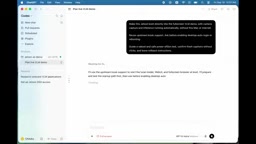
Codex reviewed the project's existing launcher, created the necessary host-side configuration, and preserved upstream kiosk behavior as much as possible to keep the setup understandable and maintainable. The final startup sequence is: bring up local services → wait for services to be ready → open the Web UI in fullscreen mode → auto-reconnect the camera.
The installer runs in the Jetson terminal, installs Chromium, and enables the services the project needs. To make the graphical kiosk auto-start after a reboot, auto-login needed to be enabled for the demo account — and here again, Codex stopped at the permission boundary, providing the exact commands for the user to run locally.
Kiosk mode is a deployment pattern that locks a computing device to a single purpose, commonly seen in retail self-service machines, museum display stations, or industrial HMI panels. The typical approach to implementing a kiosk on a Linux desktop is: configure automatic login (bypassing the login screen), auto-launch the target application when the user session starts, and open the browser in fullscreen, borderless mode (such as Chromium's --kiosk flag), while disabling right-click menus, keyboard shortcuts for exiting, and similar interactive entry points. This implementation uses Chromium as the frontend because VLM inference results are presented through a Web UI, making a browser a natural fit — no need to develop a native GUI application. systemd services manage the lifecycle of the background inference process, ensuring services start in the correct order at boot.
Final Validation of Standalone Operation
With configuration complete, the next step was a reboot test. Codex confirmed that auto-login was enabled and verified that fullscreen launch, camera capture, and real-time caption generation all worked correctly.
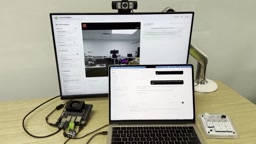
The final step was rebooting the Jetson and disconnecting the development Mac. From that point on, the Jetson ran entirely on its own: auto-login, app launch, camera reconnection, and local caption generation — all happening on-device, with no Mac in the picture.
A standalone terminal that boots directly into a VLM demo, with camera capture and local inference running automatically, was now fully operational.
What This Case Demonstrates
The takeaway from this demo isn't about any particular VLM model — it's about how an AI coding agent changes the way edge deployments work. Codex demonstrated three key capabilities: environment-aware deployment planning, respect for permission boundaries, and proactive adaptation to the target system. For developers looking to deploy local inference applications on edge devices like Jetson, this offers a reusable collaboration paradigm — humans handle authorization and decisions, while the agent handles the tedious work of checking, adapting, and configuring.
Related articles

Gaussian Process Bandit Optimization: Exploration Strategies and Inference Regret Guarantees
Cumulative regret guarantees in Bayesian optimization fail to reflect final recommendation quality. This article examines a new study that provides inference regret guarantees for Gaussian process bandit optimization through exploration query strategies and fill distance analysis, validated on hyperparameter optimization and control tasks.

The Most Detailed Codex Guide on Bilibili: From Installation to Real-World Practice
The most detailed Codex guide on Bilibili: from app store installation to daily work mode configuration, with a real coffee shop project demonstrating file organization, data extraction, dashboard creation, and other practical tasks. Learn to use Plan Mode and desktop pets to leverage Codex efficiently.

Appearance Compensation in Volume Rendering: Why RGB Accuracy Cannot Guarantee Density Correctness
Volume rendering research reveals that volumetric data perfectly reproducing external RGB views may still contain density errors: appearance compensation can double central density and keep external rays unchanged even when L2 error exceeds 14.52%. Density recovery depends on appearance capacity, spatial resolution, and measurement design.