Deploying AI Agents to Production with Docker: A Practical Guide from Development to Launch

Docker expert Rami Krispin uses a RAG app to show how containers solve AI deployment's reproducibility problem.
In this Build With AI episode, Docker expert Rami Krispin uses a RAG application to explain how containerization solves AI engineering's core challenge: reproducibility. Docker packages dependencies down to the OS level, eliminating "works on my machine" failures. Since RAG naturally comprises three independent components — ingestion pipeline, vector database, and query pipeline — it's an ideal containerization case study. Rami recommends two containers for development and three for production to enable fault isolation and size optimization, and stresses tagging images with version labels, using multi-stage builds for production, and never storing credentials inside containers.
In episode 20 of the Build With AI series, Docker expert and data science content creator Rami Krispin delivered a hands-on talk focused on deploying AI applications to production. Rather than getting bogged down in Docker's technical minutiae, he used a RAG (Retrieval-Augmented Generation) application as a case study to clearly explain the core value containers bring to AI engineering — reproducibility.
Why AI Applications Can't Live Without Docker: The Reproducibility Problem
Rami summed up the case for Docker in a single idea: a higher level of reproducibility. He recalled that when he first entered data science, he thought "reproducible" simply meant setting a random seed. But once he moved into industry, he realized environmental reproducibility goes far deeper.
A classic scenario: you build an application with an embedding model on your Mac (Apple Silicon) using Python and pip, and it runs perfectly locally. But the moment you share it with a colleague on a different setup, or deploy it to an external server, problems start cascading. This is the most iconic Stack Overflow-era question title — "It works on my machine."
Rami systematically broke down the layers where reproducibility can fail: Python version drift, package version differences (pandas 1/2/3 have different functions), OS differences (even the same Windows or Mac version can have different compilers), and hardware architecture effects. He specifically called out PyTorch: its behavior differs across AMD, ARM64, and Intel.
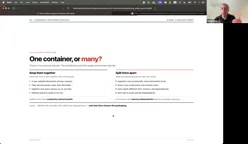
On the common question of "aren't virtual environments enough?", Rami was clear: virtual environments are only the first layer of reproducibility. He still uses virtual environments inside containers, but they can't solve missing compilers or OS-level differences. The essence of Docker is that it doesn't package your machine — it packages your dependencies, all the way down to the OS layer. That's the origin of the famous Docker meme: the goal isn't to "ship your machine" — it's to avoid that awkward situation entirely.
Why Use RAG as the Example: AI Applications Are Naturally Multi-Component Systems
Rami chose RAG as his vehicle for teaching Docker because RAG is an "ideal use case" for containerization. He briefly recapped how RAG works: language models don't actually understand language — they understand vectors. To get an LLM to answer questions outside its training data (like internal company documents or travel policies), you split PDFs and other text into small chunks, convert them into vectors using an embedding model and store them in a vector database, then at query time perform a similarity search and convert the results back into text for the user.
The key insight is that RAG can be decomposed into three independent components:
- Ingestion Pipeline: Writes documents to the vector database, either once or periodically
- Vector Database: Such as ChromaDB
- Query Pipeline: Handles user questions via similarity search
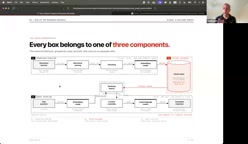
Rami emphasized that while the ingestion and query pipelines both interact with the vector database, they have no direct connection to each other — they are technically independent services. This decomposition mindset is the prerequisite for containerized deployment: before you start coding, ask yourself — what components does my AI application have? What services do I need to build? Only by clarifying component boundaries can you design a sensible architecture.
The embedding model is one of the core elements of RAG architecture, responsible for converting text into high-dimensional vectors (typically arrays of hundreds to thousands of floating-point numbers). Text with similar semantics sits closer together in vector space, making it possible to find "semantically related" text fragments by computing cosine similarity or Euclidean distance — without relying on keyword matching. Popular open-source embedding models include the Sentence-BERT family and models like all-MiniLM on Hugging Face; commercial options include OpenAI's text-embedding-ada series. Vector databases (such as ChromaDB mentioned here, as well as Pinecone, Weaviate, and Qdrant) are purpose-built for efficiently storing and retrieving these high-dimensional vectors, supporting Approximate Nearest Neighbor (ANN) search to find the most relevant fragments across millions of documents in milliseconds. Understanding the role of these two components helps clarify why RAG systems naturally split into separate "write (ingestion)" and "read (query)" paths — and why splitting them into separate containers makes sense.
The Docker Workflow: From Dockerfile to Image to Runtime
For attendees less familiar with Docker, Rami walked through the basic workflow: start with your requirements, write a Dockerfile (a text file containing instructions — think of it as a recipe: which Python version, which libraries, which port to expose), then run docker build to produce an image, and finally execute it at runtime.
He used a FastAPI application as an example: starting from a base image, defining the working directory, copying requirements.txt, installing dependencies, exposing a port, and running main.py at startup. Just a few lines produce an image that exposes an API.
Rami put particular emphasis on Docker's layer caching mechanism. A well-structured Dockerfile should place infrequently-changing content (like dependency installation) earlier, and files that change often during development later — this allows the build to reuse cached layers and save time. Another advantage containers have over virtual machines: if an application crashes, you simply tear down the container and spin it back up, which is far faster than restarting a VM. This is also why AWS, GCP, and Azure rely so heavily on container-based deployments.
Multi-stage builds are an advanced Dockerfile feature worth expanding on here, since the article's production deployment recommendations reference it. The core idea: define multiple FROM stages in a single Dockerfile. Early stages (the "build stages") install compilers, download dependencies, and generate build artifacts; the final stage only copies over the necessary executables or packages and completely discards the build toolchain. This means the production image won't contain gcc, make, pip caches, or anything else only needed at build time — image size can shrink by hundreds of MB or more, while also reducing the attack surface (fewer packages means fewer vulnerabilities). For AI applications, embedding model weight files can be quite large; multi-stage builds combined with a strategy of copying only runtime-required files is the standard approach for keeping production image sizes under control.
Two Containers for Development, Three for Production: The Container Strategy Trade-offs
Rami's practical strategy is particularly instructive: use two containers during development, split into three for production.
During development, he puts both the ingestion and query components in the same Python container, with the vector database (e.g., ChromaDB) in a separate container. The reasoning: during development, dependencies change frequently — you often discover "I need to install another library" — and rebuilding images takes time. So it's more efficient to develop both pipelines in parallel within a single unified Python environment.
But in production, you must split them, for three reasons:
- Different usage frequency: The query engine runs constantly; the ingestion engine is typically run by administrators periodically (weekly/monthly/quarterly). Bundling them together needlessly inflates container size.
- Fault isolation: If ingestion and query share a container, a crash in the ingestion pipeline takes down the query engine too — affecting users in the middle of a session.
- Size optimization: The ingestion side caches Hugging Face chunking functionality and tends to be bulky; the query pipeline is lightweight (no model inside the container) and runs far more frequently.
In production, the three services communicate via API across different ports: ingestion on 8081, vector database on 8000, query on 8080. Rami's deployment path is: development → testing (split services, re-run tests) → cloud environment testing → production. He recommends the VS Code Dev Containers extension (from Microsoft), which lets VS Code run natively inside a container for complete project-level isolation — from font themes to the runtime environment, everything can be configured independently.
Live Demo and Production Q&A

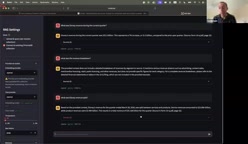
Rami gave a live demo of a toy RAG application: ingesting Disney's quarterly earnings PDFs, building a UI with Streamlit, running on two containers under the hood (Python app + ChromaDB). When asked "What was the revenue this quarter?", the application returned "approximately $25 billion, up 5% year-over-year" and provided source citations for verification.
During Q&A, he shared several production-grade best practices:
- Version management: Always tag images with explicit version labels — never use the default
latest, or you lose the ability to trace back to previous versions. He recommends separate tags for dev and prod: development images are heavier and more flexible; production images should use multi-stage builds to slim down and strip unused dependencies. - Security: Never store credentials or API keys inside containers; inject them at runtime via mounts. Don't run as root. Use Docker Scout for security assessments.
- Parsing strategy: Regardless of whether the source is Excel or PDF, first convert everything to Markdown/text, then chunk, embed, and index. He mentioned using tools like Docling to extract content from PDFs.
- Hallucination prevention: Take advantage of RAG's controlled input to do fact verification — run the LLM-generated content back through RAG to confirm whether there's evidence supporting it.
- Cloud deployment: On platforms like AWS, prefer official enterprise-grade containers provided by vendors (such as those from ChromaDB) — they're ready-made and reliable.
Docker Compose is the standard tool for managing multi-container applications, and it plays a central role in the "two-container development, three-container production" setup described in this article — though the article doesn't elaborate on it. It uses a single docker-compose.yml file to declare all services' images, port mappings, environment variables, network connections, and volume mounts. A single docker compose up command starts all containers simultaneously and automatically creates a private virtual network between them, allowing containers to address each other by service name (e.g., the query service accesses chromadb:8000 without needing to know the host IP). This is the underlying mechanism that makes Rami's demo work — ingestion on port 8081, vector database on 8000, and query on 8080, all cooperating seamlessly. Understanding the division of responsibilities between Docker Compose and Dockerfile — the former orchestrates multi-service relationships, the latter defines the contents of a single image — is essential groundwork for deploying multi-component AI applications.
Key Takeaways
The most valuable thing about Rami's talk isn't the Docker commands themselves — it's an engineering mindset: decompose AI applications into independent services, and use containers to achieve seamless migration from development to production. As he put it, once something runs in a local container, it will "most likely just work" on AWS, GCP, or Azure; and even if something goes wrong in the cloud, you can easily reproduce it locally — because everything is reproducible. For data scientists who are comfortable experimenting with models in notebooks but dread deployment, this is precisely the capability that bridges the "last mile."
Related articles

Gaussian Process Bandit Optimization: Exploration Strategies and Inference Regret Guarantees
Cumulative regret guarantees in Bayesian optimization fail to reflect final recommendation quality. This article examines a new study that provides inference regret guarantees for Gaussian process bandit optimization through exploration query strategies and fill distance analysis, validated on hyperparameter optimization and control tasks.

The Most Detailed Codex Guide on Bilibili: From Installation to Real-World Practice
The most detailed Codex guide on Bilibili: from app store installation to daily work mode configuration, with a real coffee shop project demonstrating file organization, data extraction, dashboard creation, and other practical tasks. Learn to use Plan Mode and desktop pets to leverage Codex efficiently.

Appearance Compensation in Volume Rendering: Why RGB Accuracy Cannot Guarantee Density Correctness
Volume rendering research reveals that volumetric data perfectly reproducing external RGB views may still contain density errors: appearance compensation can double central density and keep external rays unchanged even when L2 error exceeds 14.52%. Density recovery depends on appearance capacity, spatial resolution, and measurement design.