Deploying Qwen3 on AMD GPUs: A Complete Pitfall Guide for Running LLMs with the Strata Engine

Complete guide to deploying a 125B MoE LLM on an AMD RX 7900 XTX using the Strata engine, covering every major pitfall.
A hands-on deployment log for running Qwen3.8 Flash Next (125B MoE) on an AMD RX 7900 XTX 24G using the Strata engine. Covers the full pipeline: choosing the right repository branch, accelerating downloads via mirrors and Aria2, aligning the HipBLASLt tuning table (the key to 1.8× Prefill gains), CPU-based image recognition, and upgrading to v0.1.38 for 2–2.5× Prefill and 3× decode improvements. Proves that AMD GPU local LLM deployment is viable and thoroughly underrated.
Why Run Local LLMs on an AMD GPU?
For a long time, locally deploying large language models has been almost exclusively an NVIDIA game — the maturity of the CUDA ecosystem kept AMD GPU users on the sidelines. But this hands-on deployment log proves there's another way: running Qwen3.8 Flash Next (a MoE model with roughly 125B parameters) end-to-end on a single RX 7900 XTX 24G using the Strata engine, with full support for text inference, image recognition, and ongoing version upgrades.
The test environment: RX 7900 XTX 24G + Ryzen 9 9950X + 62 GB RAM + 2 TB free storage. The model is Qwen3.8 Flash Next; the inference engine is Strata. This isn't a "just get it running" demo — the full pipeline was walked through: deployment, compilation, tuning, image recognition, and version upgrades, with particular focus on the steps that are easy to overlook and the pitfalls that were actually hit.
A Brief Intro to MoE (Mixture of Experts) Models
Qwen3.8 Flash Next uses a MoE (Mixture of Experts) architecture that's fundamentally different from traditional dense models. Dense models activate all parameters on every inference pass, whereas MoE models distribute parameters across a number of "expert" sub-networks, routing each token to only a small subset of experts. Having 125B total parameters doesn't mean 125B are computed every time — the actual activated count is far lower (the article records 10,138 experts activated, reflecting the model's dynamic selection during inference). This gives MoE models a unique advantage on consumer GPUs with limited VRAM: infrequently used expert weights can temporarily reside in system RAM or be cached at lower precision, loading into VRAM only when needed — allowing a 24 GB card to handle a model that nominally far exceeds its VRAM capacity.
The First Fork: Repository Branch and Downloading the Model
The very first step of deployment presents a critical choice. The Strata repository has only two lines: Main and RC 0.1.30. RC is an old release candidate from late September that only carries the old backend — the HIP engine didn't enter the mainline until V0.1.34. AMD GPU users must therefore use the Main branch (version 0.1.36 at the time of writing). Choosing the wrong branch will directly prevent you from using the AMD backend.
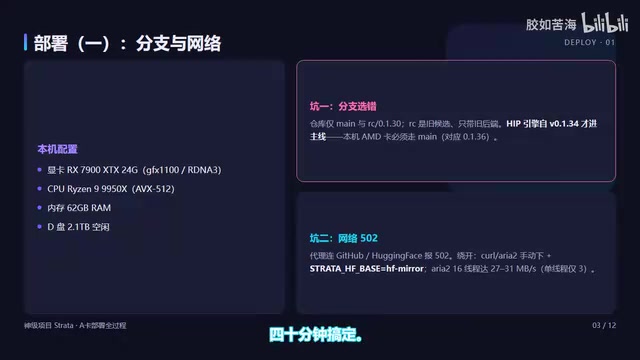
Networking is the first major pitfall in the entire process. Even with a proxy configured, Python connections to GitHub and Hugging Face will still throw 502 errors. The fix is to bypass Python's download pipeline entirely and use Curl or Aria2 to manually download the release package, pointing the download tool's STRATA_HF_BASE to an HF Mirror. Single-threaded download tops out around 3 MB/s — at that rate, a 66 GB model takes roughly 6 hours. With Aria2 at 16 threads, you can hit 27–31 MB/s and finish in about 40 minutes.
Another very easy-to-miss detail: to make Setup skip the model download, you must use the GGUF_DIR advanced parameter to specify the directory. Simply placing the files in the Models directory is not enough — if the correct marker file is absent, Setup will conclude the model doesn't exist and re-download it. That marker must be in place before Setup launches.
Benchmark results for the two quantization tiers: IQ2_XXS delivers 48 tokens/s on short prompts and 63 tokens/s on long ones; IQ3_XXS delivers 30 and 39 tokens/s respectively. VRAM usage sits at approximately 16.44 GB with 10,138 experts activated. IQ2 is about 60% faster than IQ3.
Compilation and Tuning: The HipBLASLt Tuning Table Is the Performance Key
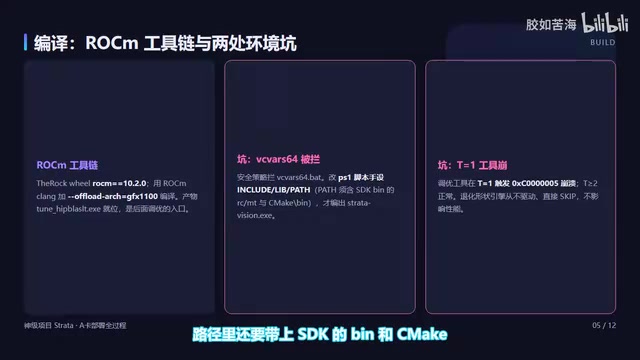
Before tuning, the toolchain needs to be compiled. ROCm uses The Rock's Wheel package (version 10.2.0 installed locally). When compiling the HipBLASLt tuning tool, use ROCm's clang with OFFLOAD_ARCH=GFX1100. Since VC Force64 is blocked by security policy, MSVC and Windows SDK header and library paths need to be injected manually via script. The final output, hipblaslt-bench.exe, is then in place.
Two compilation pitfalls here: the tuning tool crashes when T=1 and only runs correctly at T>=2 — this is a degenerate shape; and the engine skips the Vision compilation entirely due to the same VC Force64 blocking issue. The fix is to use a PS script to manually inject MSVC and SDK environment variables, including SDK bin and CMake bin paths, to successfully compile StrataVision.exe.
The core of tuning is the HipBLASLt tuning table. The root cause is clear: when the table's header version or architecture doesn't match, the engine rejects the entire table. This causes all 16 dense projections (which account for roughly half of Prefill) to fall back to the slow path, yielding only 405–485 tokens/s on 4–9K prompts. The runtime version on this machine is 100500, while the GFX1100 table in the repository uses an earlier version — the 100500-matching table is for GFX1201, so there's no alignment.
The solution is to make the engine match exactly by TypeMKLDY, then pick the T-bucket closest to the actual token count. The final result is a table of 112 shapes (16 shapes × 7 T-buckets). Pointing the launch script to it and enabling MMQ and Prefill chunking, fresh Prefill on 4–9K prompts jumped from 405 to 701–775 tokens/s — right in the 700–800 range the community reports — an improvement of roughly 1.8×. Decode stabilized at 52–55 tokens/s.
Another silent pitfall is the calibration script. The "alignment" step in Setup only works for NVIDIA cards and quietly skips over AMD installations. You need to manually re-run it in a virtual environment. The resulting optimal Prefill chunk size of Auto 16384 gives another ~20% boost on long prompts. AMD caches default to full-length VRAM residency, which is the fastest Prefill path.
How the HipBLASLt Tuning Table Works
HipBLASLt is the matrix multiplication acceleration library in AMD's ROCm ecosystem, analogous to NVIDIA's cuBLAS. Virtually all the compute bottlenecks in LLM inference come down to matrix multiplication (GEMM), and different matrix shapes (M×N×K) have very different optimal algorithms on the GPU. The tuning table is essentially a pre-computed "shape → optimal algorithm" lookup reference: in an offline phase, for a specific GPU architecture and driver version, all candidate algorithms are benchmarked against commonly used matrix shapes and the best choice is recorded. During inference, the engine looks up the table directly instead of searching at runtime. The table's version number and architecture identifier (e.g., GFX1100 for the RX 7900 series) must exactly match the actual runtime environment — otherwise the engine rejects the entire table and falls back to an unoptimized general path, causing a dramatic Prefill throughput drop. This is the fundamental reason for the gap between 405 tokens/s and 701–775 tokens/s.
Image Recognition: The CPU Route Is the Only Viable Option for AMD
The official position is clear: AMD has no GPU image encoder. The Windows AMD HIP package only includes the text backend; the GPU image encoder requires a separate compilation step. The original deployment is therefore text-only.
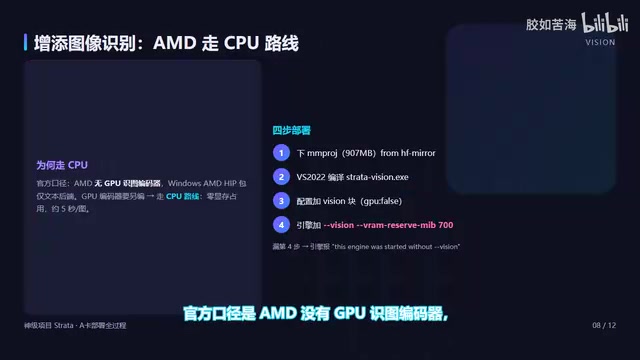
The solution is to go the CPU route: download the mmproj file from the mirror, compile StrataVision.exe and place it in the engine directory, then add the Vision parameter and two lines — Vision and VRAM Reserve — to the config. One important note: if the VRAM Reserve line is missing, the engine will report "Vision not loaded" and fail to start.
With the full pipeline connected, sending a local image gets an accurate description from the model. CPU encoding uses zero VRAM and takes about 5 seconds per image. For scenarios where 24 GB of VRAM is already fully occupied by the model weights, the zero VRAM overhead of CPU encoding is actually an advantage.
The Image Encoding Pipeline in Multimodal Models
Large language models that support image input typically work in two stages: first, a separate vision encoder (corresponding to the mmproj/StrataVision component here) converts the image into a vector sequence with the same dimensionality as text tokens; then those vectors, together with the text prompt, are fed into the language model backbone for inference. Vision encoders are typically based on architectures like CLIP or SigLIP — relatively small in compute but requiring independent compilation and deployment. On NVIDIA platforms, the vision encoder can run directly on the GPU via CUDA. On AMD Windows platforms, because the HIP package currently doesn't include a GPU image encoder, this step must be executed on the CPU. While CPU encoding takes about 5 seconds, it uses zero VRAM — and for a scenario where VRAM is already maxed out by a 125B model, this is actually the most practical choice.
Version Upgrade: Changes from 0.1.36 to 0.1.38
Before upgrading, check GitHub: after 0.1.36, there are versions 0.1.37 and 0.1.38. Version 0.1.37 switches to counting VRAM usage against the WDDM budget, so expert cache is no longer written all at once; 0.1.38 changes the HIP prompt path and adds Pro Group MTP.
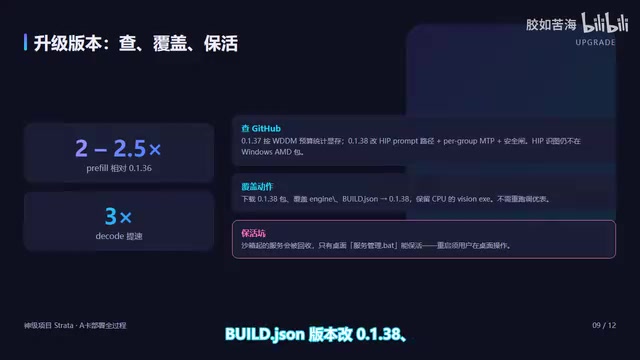
One thing to note: the Windows AMD HIP package still only includes the text backend, and the GPU image encoder still requires a separate build — so the CPU route remains the only option for image recognition. Version 0.1.38 also adds a security gate: only localhost addresses are accessible, and cross-origin browser requests are rejected. The local manager accesses via 127.0.0.1 without an Origin header, so it passes through normally.
The upgrade process: download the 0.1.38 package, overwrite the engine directory, update the Build GSOM version number to 0.1.38, and keep the CPU VisionX in place. There's a keep-alive pitfall here: services started inside the sandbox get recycled and restarted, so you need to use the service management script on the desktop to keep them running persistently.
Post-upgrade benchmarks show Prefill improved 2–2.5× over the previous version, and decode improved 3×. Two findings deserve special mention: first, a 32K Prefill recorded 1,931 tokens/s, with attachment scenarios showing cold-state stability around 1,300–1,931 tokens/s — this is the hot-cache peak where experts are resident in VRAM, with the true compute range around 2,100–2,400; second, extending the context from 192,000 to 256,000 tokens caused the engine to crash (Strata exclusively occupying ~40 GB system RAM, with the 24 GB GPU fully occupied). Both quantization tiers ran stably, except the expert cache dropped from 16.44 GB to 13.66 GB, KV rose from 4.31 GB to 7 GB, and the total still filled capacity. Speed tests showed Prefill curves overlapping and decode in the same range — because KV is fully resident in VRAM and the expert cache self-balances, extending context is essentially free.
WDDM VRAM Budget Management
The WDDM budget statistics change introduced in 0.1.37 is worth understanding. WDDM (Windows Display Driver Model) is the unified GPU driver interface on Windows. Unlike Linux's direct memory management, WDDM dynamically schedules VRAM allocation — applications can't lock down the full physical VRAM the way they can on Linux. Older versions of the engine may have attempted to fill all expert cache into VRAM at once, which in a WDDM environment can easily trigger over-allocation or get reclaimed by the driver. Version 0.1.37 switches to dynamically tracking against the actual available WDDM budget, loading expert cache in batches — better aligned with Windows driver scheduling and making VRAM boundary behavior more stable and predictable. This change is a key foundation for improved stability on AMD cards on Windows, and it set the stage for 0.1.38's further HIP prompt path optimizations.
Key Takeaways from the Full Deployment
After walking the entire path, here are five core lessons worth remembering:
- Use the Main branch: The HIP engine is only in mainline; the RC branch doesn't include the AMD backend.
- Use mirrors + multi-threading for downloads: Bypass Python's proxy, use Aria2 multi-threaded downloads from HF Mirror.
- Watch the engine crash line for speed tests: VRAM and context boundaries are important signals.
- Align the tuning table version and architecture: The calibration script must be run manually on AMD.
- Use the desktop script to keep services alive: Sandbox services will be recycled.
256K context can be used with confidence. The path to deploying large models on AMD GPUs has been walked end-to-end. For users with AMD GPUs who want to run local LLMs, the Strata engine combined with this pitfall guide provides a viable solution that has been seriously underestimated — until now.
Related articles

Gaussian Process Bandit Optimization: Exploration Strategies and Inference Regret Guarantees
Cumulative regret guarantees in Bayesian optimization fail to reflect final recommendation quality. This article examines a new study that provides inference regret guarantees for Gaussian process bandit optimization through exploration query strategies and fill distance analysis, validated on hyperparameter optimization and control tasks.

The Most Detailed Codex Guide on Bilibili: From Installation to Real-World Practice
The most detailed Codex guide on Bilibili: from app store installation to daily work mode configuration, with a real coffee shop project demonstrating file organization, data extraction, dashboard creation, and other practical tasks. Learn to use Plan Mode and desktop pets to leverage Codex efficiently.

Appearance Compensation in Volume Rendering: Why RGB Accuracy Cannot Guarantee Density Correctness
Volume rendering research reveals that volumetric data perfectly reproducing external RGB views may still contain density errors: appearance compensation can double central density and keep external rays unchanged even when L2 error exceeds 14.52%. Density recovery depends on appearance capacity, spatial resolution, and measurement design.