Designing a Question Bank for an AI Exam Prep Platform: From Layout to Management

Question bank design for AI exam prep platforms should prioritize reducing cognitive load and strengthening information architecture so AI can function.
The article uses a developer's Dev.to post about an AI exam prep platform's question bank interface to explore the often-underestimated question bank interaction architecture in EdTech product design. The author points out that the value of a question bank lies not in "storing questions" but in the complete path of searching, filtering, practicing, and reviewing; clean layout and convenient filters are essentially cognitive load management. AI's role is not to show off, but to enable dynamic recommendations and weak-point identification based on clear structure and reliable tags—chaotic classification only amplifies algorithmic errors. The article also summarizes three major EdTech pitfalls: feature stacking instead of experience optimization, neglecting teacher/administrator experience, and lagging mobile adaptation. Finally, it offers advice to indie developers: first solidify the core workflow interface, acquire customers through concrete work, and avoid empty talk about AI concepts.
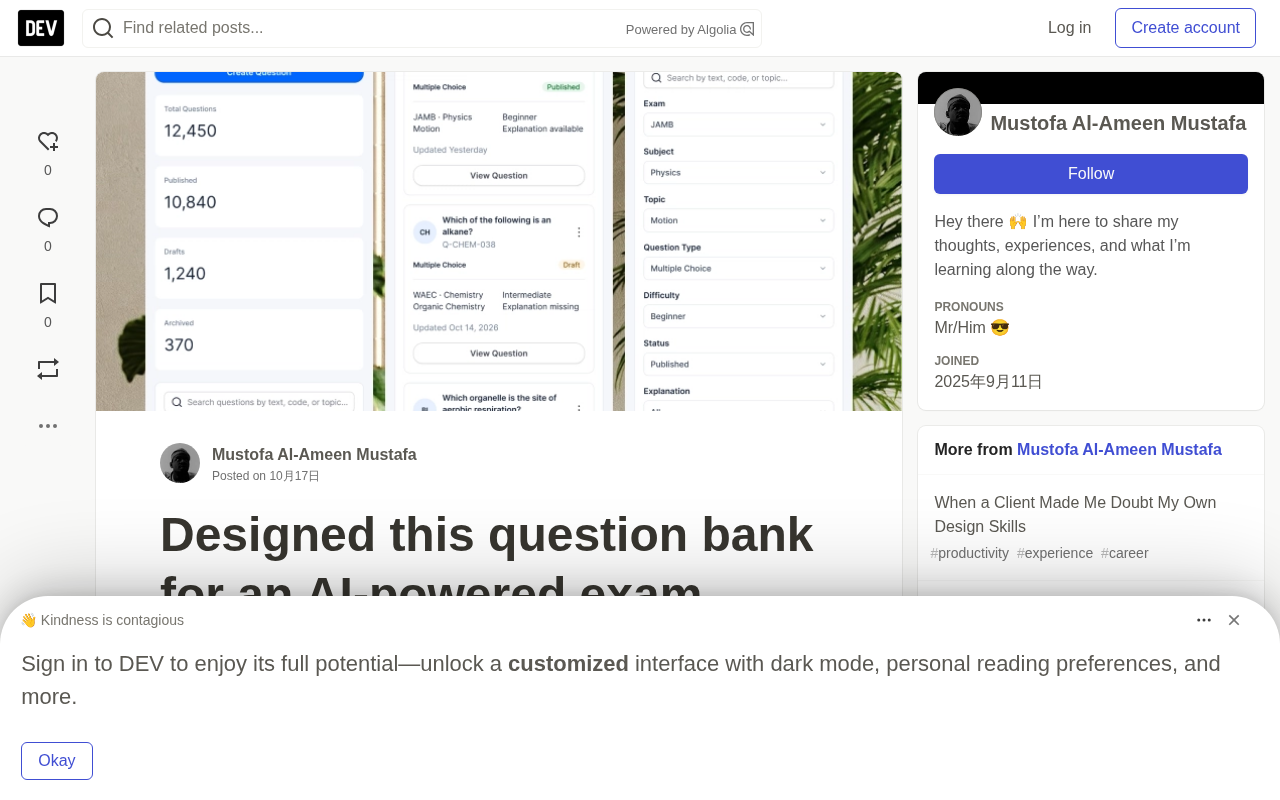
AI is rapidly permeating educational scenarios, and exam prep platforms are a typical area of implementation. A developer shared on Dev.to his design for a question bank interface for an AI-powered exam prep platform—clean layout, convenient filters, and a simple way to manage thousands of questions. Although brief, this case touches on an often-underestimated aspect of EdTech product design: the interaction architecture of the question bank.
Why the Question Bank Interface Deserves Dedicated Design
Many people understand a question bank as "storing questions in a database," but in actual use, what students face is not a database, but an entire path of searching, filtering, practicing, and reviewing. If the interface is cluttered, even the strongest AI recommendation algorithm cannot translate into learning outcomes.
From the screenshot, the designer's approach is clear: use intuitive filters to reduce search costs, and use a unified card or list layout to ensure visual consistency. This "cleanliness" is not an aesthetic preference, but cognitive load management—every additional distraction adds a moment to the time it takes students to find the target question.
For the management side, CRUD operations on thousands of questions are equally challenging. The designer emphasizes "a simple way to manage a large number of questions," meaning a balance must be struck between batch operations and single-question editing, rather than piling up feature buttons.
Cognitive Load was proposed by educational psychologist John Sweller in 1988, referring to the burden on working memory when processing information. It is divided into three types: intrinsic load (the complexity of the task itself), extraneous load (additional burden caused by the presentation method), and germane load (effective investment used to build knowledge schemas). In question bank interface design, the difficulty of the question itself is intrinsic load and cannot be eliminated; but cluttered buttons, redundant filter options, and inconsistent typography are all extraneous load, which will crowd out the working memory capacity students could otherwise use for understanding and memorization. Therefore, "clean layout" is not an aesthetic issue, but an engineering decision directly related to learning efficiency—only by reducing extraneous load can limited cognitive resources be left for真正的学习活动.
The Role of AI in Exam Prep Platforms
The prefix "AI-powered" is easily abused. In this case, the value of AI is not in flashy features like automatic question generation or algorithmic recommendations, but in making the question bank truly "alive"—dynamically adjusting practice order based on students' answering performance, identifying weak knowledge points, and automatically categorizing similar questions.
But all these intelligent features are built on one premise: the question bank itself has a clear structure, reliable tags, and an operable interface. If AI recommendations are built on chaotic question classifications, the output will only be chaotic suggestions.
This also explains why the designer focused on "layout" and "filtering" rather than AI features themselves. Good information architecture is the soil in which AI capabilities can function.
Taxonomy and Metadata are the underlying dependencies of AI recommendation systems. Each question typically needs to be annotated with dimensions such as knowledge points, difficulty level, question type, and cognitive level (e.g., memory, understanding, application, analysis in Bloom's Taxonomy). The quality of these tags directly determines the upper limit of the recommendation algorithm: if the same knowledge point is labeled as "quadratic function," "parabola," and "quadratic" in different questions, recommendations based on collaborative filtering or vector retrieval will suffer serious deviations. In industry practice, mature question banks establish controlled vocabularies, combined with manual review and semi-automatic annotation to ensure consistency. This is also why the article emphasizes that "information architecture is the soil in which AI capabilities can function"—without reliable metadata, even the most advanced models can only output noise.
Common Pitfalls in EdTech Product Design
From the slice of question bank design, we can extend to more general issues in EdTech products.
Feature stacking instead of experience optimization. Many exam prep products try to offer everything at once—videos, question banks, notes, communities—resulting in every module being rough. In contrast, fully mastering a single module like the question bank is more likely to create differentiation.
Neglecting the teacher/administrator experience. Student-facing interfaces are usually polished with priority, but if backend operations such as question entry, review, and tag management are inefficient, the speed of content updates will drag down the entire platform. The designer mentions "managing thousands of questions," indicating awareness of the importance of two-sided experience.
Lagging mobile adaptation. The screenshot shows a desktop layout, but in exam prep scenarios, a large amount of fragmented time is spent on phones. How filters collapse on narrow screens and how question cards adapt are issues that need to be considered in advance.
Two-sided experience originates from the concept of "two-sided markets" in platform economics. In the EdTech context, it refers to the need to optimize the user experience for both students and teachers/administrators simultaneously. The student side determines retention and word-of-mouth, while the management side determines the speed and quality of content supply. If entering a question on the management side requires filling in a dozen fields, uploading images one by one, and manually assigning tags, the productivity of the content team will quickly hit a ceiling, question volume growth will stagnate, and students will eventually churn due to outdated content. Therefore, mature EdTech products often design efficiency tools for the management side, such as batch import (e.g., Excel/CSV templates), intelligent deduplication, tag inheritance, and review workflows, turning "managing thousands of questions" from manual labor into a scalable process.
Implications for Indie Developers
At the end of the post, the designer directly states: "Building a SaaS or EdTech product? DM me. Let's design yours." This is a typical way for indie designers/developers to acquire customers—showcasing ability through concrete work rather than empty talk about services.
For developers working on AI education products, this case provides a starting point worth referencing: rather than piling up AI concepts on the homepage, first solidify the interface of the core workflow (search → filter → practice → feedback). The "intelligence" users perceive often comes from smooth operational experience, not technical buzzwords in marketing copy.
Question bank design may seem basic, but it is the first threshold for whether an AI exam prep platform can retain users.
One-line Summary
Question bank design for AI exam prep platforms should prioritize reducing cognitive load and solidifying information architecture, so that AI capabilities have room to function.
Paragraph Summary
Using a developer's Dev.to post about an AI exam prep platform's question bank interface as an example, the article explores the often-underestimated question bank interaction architecture in EdTech product design. The author points out that the value of a question bank lies not in "storing questions" but in the complete path of searching, filtering, practicing, and reviewing; clean layout and convenient filters are essentially cognitive load management. AI's role is not to show off, but to enable dynamic recommendations and weak-point identification based on clear structure and reliable tags—chaotic classification only amplifies algorithmic errors. The article also summarizes three major EdTech pitfalls: feature stacking instead of experience optimization, neglecting teacher/administrator experience, and lagging mobile adaptation. Finally, it offers advice to indie developers: first solidify the core workflow interface, acquire customers through concrete work, and avoid empty talk about AI concepts.
Related articles

Amphibious Transforming Drone: Beyond 100x Power Savings, What Are the Real Needs?
Is the amphibious transforming drone just a gimmick? Starting from the 100x power difference of the M4 Morphobot, explore real application scenarios and thesis topic ideas, analyzing boundary conditions where pure drones and pure ground robots both fail.

Warhound Raises $200 Million: Genetically Engineered "War Dogs" Paired with Anduril Gear
Warhound raises $200M, backed by Ben Lamm and Palmer Luckey, to genetically engineer dogs for military and law enforcement use and equip them with Anduril gear. This article analyzes its technology direction, funding logic, and ethical controversy.

Claude API Comes to Google Cloud: IAM Integration and SDK Access Guide
Anthropic hosts the full Claude API on Google Cloud with IAM-controlled permissions and unified billing. This guide covers the Vertex AI and Anthropic-hosted entry points, IAM role configuration, and SDK access.