DeskFleet: Let Teams Share Coding Agents for Cross-Machine Collaborative Development

DeskFleet lets teams share coding agent sessions while credentials stay on the work machine.
DeskFleet is a collaboration tool launched on Product Hunt that aims to let teams share coding agent sessions. Agents like Claude Code, Codex, and Cursor run directly on the machine where the code lives, and teammates join from their own laptops to review diffs, approve the next command, or take over the remote desktop. Its core design keeps agent credentials and tools on the machine executing the work, avoiding the spread of API keys and local environments across multiple devices. The product suits code review, remote pair programming, onboarding, and distributed team collaboration. It currently has 76 votes and ranks 7th on Product Hunt, at an early stage. Permission boundary design and remote desktop experience are key challenges to team adoption, and it overall reflects the trend of AI coding evolving from personal assistants to team infrastructure.
Why Do We Need Shared Coding Agents?
AI coding assistants are transforming development workflows, but most tools are still designed around individual workflows. When teams need to collaboratively review AI-generated code, they often have to communicate through screenshots, copy-pasting, or screen sharing—inefficient and error-prone. DeskFleet, launched on Product Hunt, is positioned to let teams share coding agent sessions, running Claude Code, Codex, or Cursor on the machine where the code lives. Teammates can join from their own laptops to review diffs, approve the next command, or even take over the remote desktop.
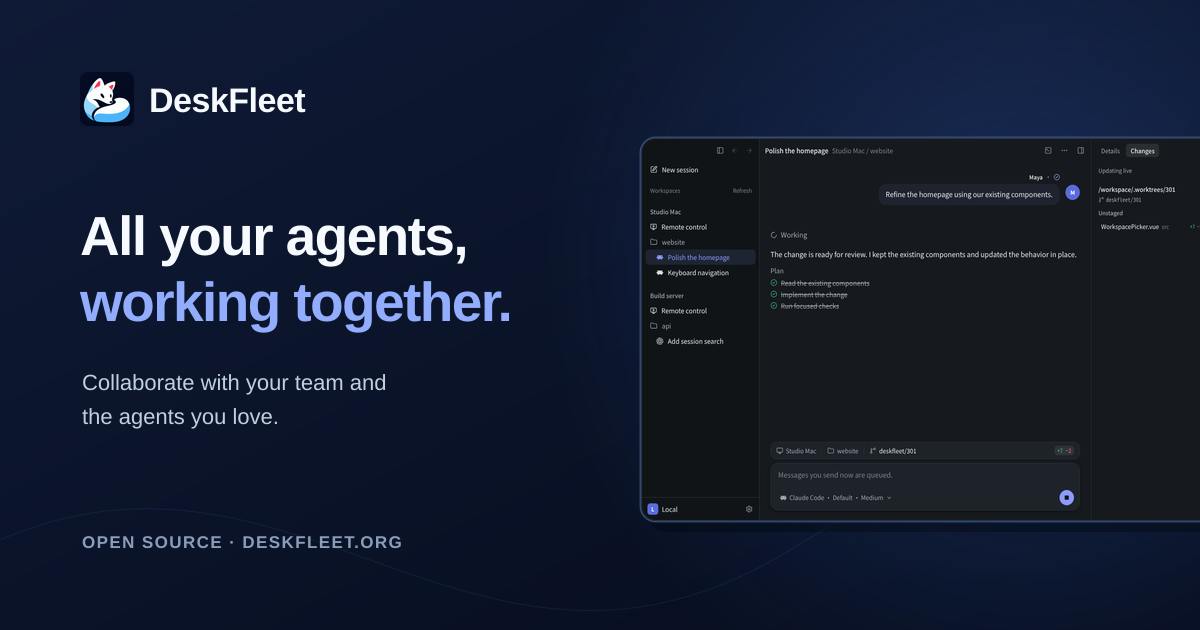
The core idea is that the agent's credentials and tools stay on the machine doing the work, and team members participate through shared sessions rather than spreading sensitive information across everyone's local machines.
Core Features: Shared Sessions and Remote Collaboration
Run Agents on the Machine Where the Code Lives
DeskFleet doesn't require you to sync code to the cloud or reconfigure environments. Agents like Claude Code, Codex, and Cursor run directly on the machine where the code lives, and the team connects through shared sessions. This means the agent can access the full local context, including dependencies, configuration files, and environment variables, without any migration steps.
Coding Agent refers to AI systems that can understand natural language instructions, autonomously plan and execute tasks such as code editing, running commands, and debugging. Typical examples include Claude Code, OpenAI Codex, and Cursor's agent mode. Unlike traditional code completion tools, coding agents usually have tool-calling capabilities—they can read and write files, execute shell commands, and access version control—so they need to run in an environment with full project context. DeskFleet keeps agents on the machine where the code lives precisely to avoid losing access to dependencies, configuration, and local paths due to environment migration, which contrasts with cloud IDEs or remote container solutions.
Teammate Join and Permission Control
Teammates can join the session from their own laptops to review code, approve the next command, or take over the remote desktop. This design makes collaboration flexible: senior engineers can supervise AI-generated code, newcomers can observe and learn how the agent works, and remote team members can participate in real time.
Remote desktop takeover in this context is not screen sharing in the traditional sense, but rather giving collaborators interactive control over the agent's running session, including entering instructions, approving operations, and directly operating the remote machine's desktop. Compared with pure screen sharing, takeover mode requires the product to implement control transfer, input isolation, and operation auditing at the session layer. Network latency and resolution adaptation are the main experience bottlenecks—especially when the agent executes long-running commands or when real-time terminal output viewing is needed, the responsiveness of the remote desktop directly affects collaboration efficiency. This also explains why DeskFleet positions takeover as an optional capability rather than the default collaboration method.
Credentials and Tools Stay on the Work Machine
DeskFleet emphasizes that agent credentials and tools remain on the machine executing the work. This design addresses a common concern when teams adopt AI coding tools: API keys, access tokens, and local development environments should not spread to multiple devices just because of collaboration.
Credential sprawl is a typical security risk when teams adopt AI coding tools: when each member configures API keys, access tokens, and cloud service credentials locally, the number of keys grows linearly with the number of people, the attack surface expands accordingly, and unified rotation and auditing become difficult. DeskFleet centralizes agent credentials and toolchains on the machine executing the work, and teammates use these capabilities indirectly through shared sessions rather than each holding their own copies. This model is similar to the role of jump servers or bastion hosts in operations security—converging sensitive access points onto a few controlled nodes—but it also means that the work machine becomes a single point, whose availability and access control policies need extra attention.
Product Positioning and Potential Scenarios
DeskFleet is currently categorized as an Android, open-source, developer tool, AI, and GitHub-related product, published by Maker Delton. It received 76 votes on Product Hunt, ranking 7th, indicating some attention but not yet a breakout hit.
Potential scenarios include:
- Code review: Team members directly view the diff after the agent generates code and approve the next step
- Remote pair programming: One person runs the agent, another joins from their own device and takes over
- Onboarding: Observing how experienced colleagues guide coding agents
- Distributed teams: Collaborating across time zones without screen sharing or frequent code pushes
Challenges Worth Noting
Sharing coding agent sessions introduces new collaboration complexity. Permission management needs careful design: who can approve commands, who can only view, who can take over the desktop—if these boundaries are vague, they may lead to security and accountability issues. Although remote desktop takeover is flexible, the experience may suffer under network latency or resolution differences. In addition, the open-source nature means teams can deploy and audit it themselves, but they also need to bear the corresponding maintenance costs.
DeskFleet's direction aligns with the trend of AI coding evolving from personal tools to team infrastructure. As coding agents become part of team workflows, how to enable multiple people to collaborate safely and efficiently around the same agent session is a real and not yet fully addressed problem.
Summary
DeskFleet attempts to turn coding agents from personal assistants into shared resources for team collaboration. It lets agents run on the machine where the code lives, with teammates participating through shared sessions to review, approve, and take over, while credentials stay on the work machine. For teams already using Claude Code, Codex, or Cursor, this is a collaboration-layer attempt worth watching. The product is currently at an early stage, and permission design and remote experience will be key to whether teams adopt it.
Related articles

A 19-Year-Old's Rental Horror Story: Ceiling Collapse, Bug Infestation, and the Lessons It Taught Me
At 19, my first off-campus rental brought bug infestations, no heat, a collapsed ceiling, and a ruined laptop with no renter's insurance. Here are the hard-won lessons for first-time student renters.

Veda Nurse's Cranial Nerve Exam: Why ASMR Role-Play Is Going Viral
Bilibili creator Veda's cranial nerve exam ASMR video goes viral, blending humor and sensory triggers through nurse role-play. This article analyzes its unique appeal and the audience psychology behind ASMR role-play.

LG Cinebeam AI Review: 120-Inch Giant Screen + 3000 Lumens, a New Choice for the Living Room Theater
LG Cinebeam AI projector review: 3000 ANSI lumens, 4K, 100 inches from about 8 cm and 120 inches from about 18 cm. Built-in webOS, AI Concierge voice recommendations, AI Sound Pro 11.1.2 virtual surround, and Game Optimizer—positioned for fixed living room installation, complementing the portable Cinebeam S.