Dify 1.8.0 Hands-On Tutorial: Deploy and Build Your AI Application Platform from Scratch

Deploy Dify 1.8.0 with Docker Compose and learn its core Workflow, Chatflow, and RAG features.
This tutorial walks through deploying Dify 1.8.0 — an open-source LLMOps platform — using Docker Compose in just a few steps. It explains the differences between Workflow and Chatflow, covers the RAG-powered Knowledge module, and highlights enterprise features like MCP support, making it a practical starting guide for AI application development.
What Is Dify? A Genuinely Useful AI Application Development Platform
As AI tools continue to evolve rapidly, Dify has emerged as one of the most compelling platforms for building AI applications. In short, Dify is an AI application development platform that lets you quickly build a wide range of AI-powered applications without writing complex code from scratch.
Built around the concept of LLMOps (Large Language Model Operations), Dify is an open-source AI application development framework that integrates several core technologies under the hood — including Prompt orchestration, RAG pipelines, Agent frameworks, and a workflow engine. Unlike traditional low-code platforms, Dify is purpose-built for LLM application scenarios. It natively supports major model APIs (OpenAI, Anthropic, and Chinese providers like Baichuan and Qwen), and replaces large amounts of glue code with a visual node-based orchestration interface, allowing developers to focus on business logic itself.
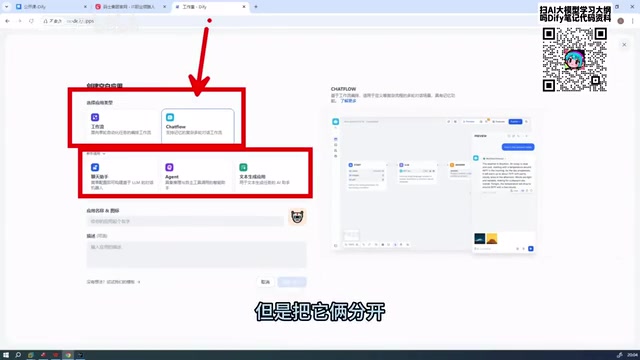
Compared to Coze, which most developers are familiar with, Dify supports a richer set of application types. Coze primarily supports two application types — standalone Agents and Workflow-based Agents — while Dify supports up to five application types. In the latest 1.8.0 release, three of the more beginner-oriented types have been collapsed by default, with the platform now centering on two core paradigms: Workflow and Chatflow. Both are fundamentally workflow-based, but they serve different use cases.
If I were to rank tools for real-world enterprise deployment, Dify would be first, followed by Coze, with RAGFlow and N8N also worth considering. Compared to tools like N8N from overseas, platforms like Dify and Coze are more mature in terms of feature completeness and user-friendliness, with broader functionality support overall.
Dify 1.8.0 Deployment Guide: Much Simpler Than Before
This tutorial uses Dify 1.8.0 as the deployment reference. Compared to earlier versions, the new deployment process has been significantly streamlined — requiring almost no additional environment configuration — making it very beginner-friendly.
Step-by-Step Deployment
The entire deployment process is straightforward and boils down to just a few steps:
- Navigate to the project directory:
cdinto the directory where Dify was extracted; - Enter the Docker folder: locate the
dockerdirectory within the project; - Configure environment variables: find the
.env.examplefile in that directory and rename it to.env. It already contains all the required environment variables — no manual edits needed; - Launch with a single command: run
docker-compose up -dto start Dify.

It's worth explaining what's happening under the hood: Docker Compose is a tool for defining and running multi-container Docker applications. A single YAML configuration file describes the dependencies, network settings, and storage volumes for multiple services. Dify's full runtime depends on several microservice components — including a web frontend, API service, Worker async queue, vector database (Weaviate/Qdrant), relational database PostgreSQL, and caching layer Redis. Docker Compose orchestrates all of these together, so a single docker-compose up -d command can spin up the entire system concurrently without manually configuring each component one by one. The tedious extra configuration steps required in older versions have been completely eliminated thanks to this improved orchestration setup.
Image Size and Download Speed
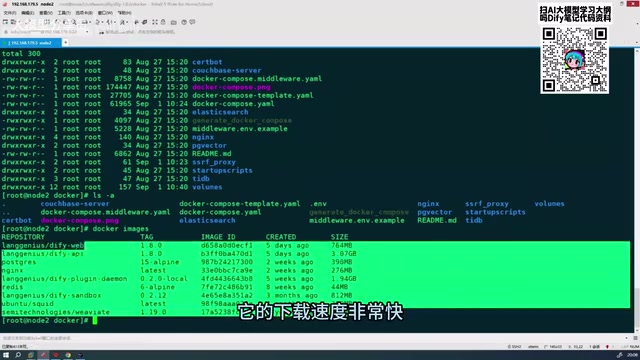
The total size of the Docker images for this version is fairly manageable — all images combined come to roughly 5–6 GB, well within 10 GB. Download speeds are noticeably faster compared to previous versions (likely due to a mirror source change), and the full pull-and-launch process completes in a short amount of time.
More importantly, this release fixes many bugs that previously frustrated users, with notable improvements to overall stability and user experience. That said, any new release may still have minor issues — just address them as you encounter them in practice.
Logging Into Dify and Touring the Interface
Once the deployment is complete, access Dify through your server's address. You'll find the overall interface style consistent with previous versions, organized around these core modules:
- Explore: Discover and use pre-built application templates;
- Studio: The primary development area for creating and managing AI applications;
- Knowledge: Manage documents and data for RAG;
- Tools: Integrate external tools and extend capabilities.

The Knowledge module deserves special mention. It's built on RAG (Retrieval-Augmented Generation) technology — the core idea being that private documents are chunked and vectorized into a vector database. When a user asks a question, the most semantically relevant document chunks are retrieved and passed alongside the query as context to the LLM, which then generates a grounded response. This approach effectively addresses two major pain points with large language models: knowledge cutoffs and hallucinations, enabling AI to answer accurately based on a company's real-time internal data. Dify's Knowledge module encapsulates the entire pipeline — document parsing, chunking, vectorization, and retrieval strategies — so users only need to upload documents to complete the full RAG setup. This dramatically lowers the barrier to deploying enterprise knowledge base applications.
The Studio is where most of your day-to-day development happens. To build an AI application, simply click "Create Blank App" and the system will present the five application types mentioned earlier. In the new version, three beginner-oriented types are collapsed by default, leaving Workflow and Chatflow as the primary options for most use cases.
Workflow vs. Chatflow: What's the Difference?
Both are fundamentally workflow-based, but they serve different scenarios. Understanding the technical paradigm behind each is especially important:
Workflow represents a deterministic orchestration paradigm: developers pre-define execution paths, node sequences, and data flows, and the system executes them predictably. Results are reproducible and auditable. This approach is best suited for one-off or batch automation tasks with relatively fixed inputs and outputs — ideal for data processing, document generation, structured information extraction, and other production scenarios that require high stability.
Chatflow introduces conversational memory and multi-turn reasoning within a structured workflow framework — a fusion of workflow control and Agent-style interaction. It retains the controllability and auditability of workflows while maintaining conversation history context to enable natural multi-turn interactions. This makes it better suited for building customer service assistants, knowledge Q&A bots, and other AI applications that require continuous dialogue.
Compared to fully autonomous Agents (where the model dynamically plans execution steps and decides which tools to call), both Workflow and Chatflow strike a better balance between flexibility and controllability — which is a key reason why Dify is so well-regarded for enterprise deployment.
Understanding the distinction between the two is an important foundation for building more complex AI applications down the road.
Summary: Why Dify Is Worth Learning
For developers looking to enter the AI application development space, Dify is an excellent starting point. It dramatically lowers the barrier to building AI applications while retaining enough flexibility and extensibility — including enterprise-grade capabilities like MCP support, database integrations (e.g., MySQL), and multi-model connectivity.
It's worth highlighting Dify's native support for MCP (Model Context Protocol). MCP is an open standard proposed by Anthropic in late 2024, designed to standardize how AI models communicate with external tools and data sources — think of it as the USB interface for AI: a standardized "tool interface" that allows models to safely and controllably access file systems, databases, third-party APIs, and other external capabilities. Dify's MCP support means developers can rapidly integrate a large number of ready-made tool services from the ecosystem, greatly expanding the scope of what AI applications can do.
Combined with its Workflow, Chatflow, Knowledge, and Tools modules, Dify can cover the vast majority of use cases — from simple Q&A bots to complex Agent systems. The significant improvements in deployment convenience and stability in version 1.8.0 also make onboarding much easier for newcomers. If you're interested, the recommended approach is to get the deployment running locally first, then gradually work toward building your first AI application.
Related articles

Gemini 4 Interprets 500-Page Chemistry Patents: Boosting Drug Discovery Efficiency
Isomorphic Labs researchers used Gemini 4 to process 500-page chemistry patents and academic papers, generating high-quality reports in 10-15 minutes — work that originally took a month was done in an afternoon.

Apple HomeView First Look: The Prototype of a Smart Home Control Hub
First look at Apple HomeView smart home control interface: thermostat and accessory customization, up to nine camera live feeds, iCloud+ and Apple Intelligence video descriptions, and tiered permissions blocking recording access in guest mode.

Gemini 4 Teaches a Humanoid Robot to Play Cornhole: A Breakthrough in Video Learning and Self-Iteration
Google Gemini 4 Argon's experiment shows a humanoid robot learning Cornhole from a human video, iterating via the Mojoku simulator, and making seven consecutive real-world hits.