Dify Beginner's Guide: A Complete Walkthrough for Building AI Applications from Scratch

A beginner's guide to Dify: local Docker deployment and four core AI application types explained.
Dify is a low-code platform for AI application development that dramatically lowers the barrier to building AI apps through a visual interface. This guide covers the three deployment options — online, local Docker, and source code — recommending local Docker for data security and internal connectivity. It explains how to set up MySQL 8 flexibly across different environments, and introduces Dify's four core application types: Chatbot Assistant, Text Generation, Agent, and Workflow. A clear learning path is provided: understand the platform, set up the environment, practice foundational apps, then advance to Workflow.
What Is Dify: A Low-Code AI Application Development Platform
Dify is a low-code platform purpose-built for AI application development. Its core value lies in helping developers rapidly build a wide variety of AI applications — from complex enterprise business scenarios to lightweight personal projects, Dify provides the infrastructure to support them all.
Through Dify's visual interface, users can deliver AI functionality that would otherwise require extensive coding, using a configuration-driven, modular approach instead. This dramatically lowers the barrier to AI application development, and is a key reason why Dify has gained such rapid traction in the developer community.
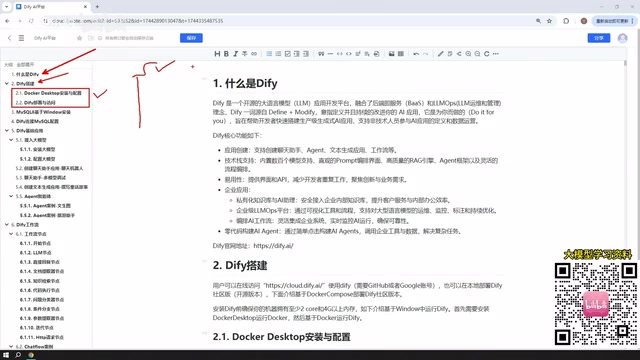
For those looking to get started with AI application development, Dify offers three deployment options: source code deployment, Docker-based deployment, and the official hosted online version. Each approach suits different scenarios — this article focuses on local deployment using Docker on Windows.
Choosing Among Dify's Three Deployment Options
Dify's deployment flexibility is a major strength, but it can also be confusing for newcomers. Here's a breakdown of when to use each approach so you can make a quick, informed decision.
Online Version: The Best Choice for a Quick Try
Dify's official hosted version is nearly identical in features and interface to a self-hosted deployment, and you can start using it immediately with zero environment setup. However, it has one notable limitation: if your AI application needs to access a local database or resources on your own machine, the online version cannot connect to them directly.
In that case, you'd need an intranet tunneling tool to expose your local IP to the public internet, allowing the online version to reach your local resources. This adds complexity for beginners and introduces potential security risks.
Local Docker Deployment: The Recommended Approach for Production
For real production environments and internal enterprise applications, deploying Dify locally is the better choice. Installing Docker on Windows and then deploying Dify on top of it allows Dify to access your local MySQL database or other environment resources directly, with smoother communication and no need for intranet tunneling.

This approach is especially well-suited for internal company deployments — data stays within the intranet, keeping things secure and controlled. Docker networking can also communicate normally with MySQL on the host machine, or even with services deployed on a virtual machine via VMware.
Docker is a containerization platform that packages an application and all its dependencies into a self-contained "container," allowing it to run consistently across any environment. Unlike traditional virtual machines, Docker containers share the host OS kernel, making them faster to start and lighter on resources. On Windows, Docker runs Linux containers via WSL2 (Windows Subsystem for Linux 2) or Hyper-V. Dify itself is composed of multiple service components — including a web frontend, API service, database, and vector database — and Docker Compose can orchestrate and launch all of these with a single command, greatly simplifying what would otherwise be a complex manual setup. Docker's networking layer supports communication between containers and the host machine (Windows) by default, which is the technical foundation that allows Dify to access a local MySQL instance directly.
Environment Setup: Installing and Configuring MySQL 8
Before building any AI applications, setting up the database environment is an unavoidable step. The reason you need MySQL 8 on Windows is that many AI applications built in Dify will need to interact with a database — reading configurations, storing data, and handling business logic.
Flexible Options for Where to Deploy MySQL
You may not realize it, but MySQL 8 doesn't have to be installed in any one specific place. You can choose based on your own situation:
- Directly on the Windows host machine: The simplest and most straightforward option
- In a Docker container: Easier to manage and migrate
- Inside a VMware virtual machine: Ideal for isolated testing environments
Whichever you choose, all that matters is that Docker networking can reach it. By default, once Docker is installed, Dify's network can communicate normally with MySQL 8 on the Windows host, as well as with services running inside a virtual machine. This flexibility means teams with different tech stacks can all find an approach that works for them.
Key Configuration Points for Connecting Dify to MySQL
Once MySQL is installed, the critical next step is configuring the connection between Dify and MySQL. Since the AI applications you deploy will need to read database configurations and perform data interactions, the connection parameters must be set correctly. This is the core step that bridges your AI applications with your business data.

A Deep Dive into Dify's Four Core Application Types
Understanding Dify's application types is essential to mastering the platform. When you create an application in Dify, you can choose from three foundational types, plus one advanced workflow application.
Chatbot Assistant: The Foundation of Conversational AI
The chatbot assistant is the most basic and intuitive application type — at its core, it's simply a conversational interface with an AI large language model. It's perfect for scenarios like customer service Q&A, knowledge consulting, and everyday assistant tasks. It also has the lowest learning curve of any application type.
Text Generation: A Powerful Tool for Content Creation
Text generation applications are focused on content creation — writing articles, drafting documents, generating stories and fictional narratives, and so on. When you need AI to produce structured text content at scale, this is the right application type to reach for.

Agent: An AI Assistant That Can Use Tools
The key distinction between an Agent and the previous two types is its ability to invoke tools. An Agent can systematically use multiple tools to complete complex instructions from the user. For example, you could have an Agent first scrape content from a webpage, then analyze and summarize that content — multi-step tasks that require tool coordination are exactly where Agents shine.
The concept of an Agent originates from the "ReAct" framework (Reasoning + Acting) in AI research. The core idea is that large language models should not only be able to "think" but also actively "act" — autonomously deciding which tools to call, in what order, and dynamically adjusting subsequent steps based on intermediate results. Unlike a single LLM call that returns one response, an Agent goes through multiple cycles of "perception → reasoning → tool invocation → result feedback" until the task is complete. Common tools that can be invoked include web search, code execution, database queries, and external API calls. Dify's Agent encapsulates this entire mechanism into a visual configuration interface — users don't need to write any scheduling logic. Simply declare the available tools and prompt instructions, and you have an autonomous task executor capable of multi-step reasoning.
Workflow: The Core Capability for Advanced Applications
Beyond the three foundational types, Workflow is one of Dify's most important advanced features. It allows users to visually orchestrate multiple nodes, logical conditions, and tool invocations into a complete automated pipeline, enabling it to handle far more complex business scenarios. Workflow is essentially the dividing line between beginner and advanced Dify usage.
The underlying design philosophy of Dify's Workflow is similar to RPA (Robotic Process Automation) and low-code workflow platforms like n8n or Zapier, but optimized specifically for AI use cases. Each "node" in a workflow represents an independent processing unit. Common node types include: LLM call nodes, code execution nodes, HTTP request nodes, conditional branch nodes, and database query nodes. Variables are passed between nodes via directed connections, forming a Directed Acyclic Graph (DAG) structure. This design allows complex tasks to be broken down into individually debuggable steps, greatly improving maintainability. The main difference between Workflow and Agent is this: a Workflow follows a predefined, deterministic execution path, while an Agent's execution path is determined dynamically by the model at runtime. Workflows are better suited for business automation with fixed processes; Agents are better suited for open-ended, exploratory tasks.
Recommended Learning Path for Dify
Putting it all together, here's a sensible learning path for mastering Dify:
- Understand the platform: Learn what Dify is and the differences between the three deployment options
- Set up your environment: Complete the local Docker deployment and configure the MySQL 8 environment
- Practice with foundational applications: Build hands-on experience through the Chatbot Assistant, Text Generation, and Agent application types
- Advance to Workflow: Master workflow orchestration to tackle complex business scenarios
Every stage of learning should be paired with real hands-on practice. Going through each step from scratch is the only way to truly internalize the complete cycle from environment setup to live deployment. For developers and teams looking to build AI applications quickly, Dify is a highly efficient tool well worth the investment of learning.
Related articles

Qwen 3.8 Beats Opus at Coding—But Can Your Mac Run It?
Open-source Qwen 3.8 beats Opus 4.6 at coding at just 18GB, but how much Mac memory do you need? 24GB crashes; 32GB is the sweet spot. Full config guide inside.

Claude Code + Agent: Building a Fully Automated AI Testing Loop
Bilibili course breakdown: how test developers can use Claude Code terminal-based Agents to build a fully automated AI testing loop. Compares permission boundaries of terminal vs. device Agents, explains why enterprise projects choose Claude Code over Open Claude-type tools, and outlines the Node.js environment setup and DeepSeek model integration path.

Working with AI Agents Requires Nerves of Steel
The more autonomous AI agents become, the heavier the user's psychological burden. Drawing from a Hacker News discussion, this article analyzes black-box anxiety, behavior drift, and monitoring fatigue in agent collaboration, and offers practical approaches like sandbox isolation, permission control, and task granularity management to reduce cognitive load.