Dify Beginner's Guide: Interface Overview & Complete Docker Self-Hosted Deployment Guide

A beginner's guide covering Dify's interface, core modules, and Docker self-hosted deployment.
This guide introduces Dify's four core functional modules—Explore, Studio, Knowledge Base, and Tools—explaining how each contributes to building AI applications. It covers model configuration, application type selection, and provides a complete step-by-step walkthrough for deploying Dify locally using Docker Compose, including environment requirements and troubleshooting tips.
Introduction
Dify is an open-source platform for developing large language model applications, and an increasing number of enterprises and developers are using it to build production-grade AI applications. For newcomers to Dify, two core questions need to be addressed first: What does the platform's overall feature layout look like? And how do you choose the right deployment method?
Based on a Bilibili tutorial, this article systematically covers Dify's interface structure, its four core functional modules, and the complete process for local self-hosted deployment via Docker, helping you quickly build a comprehensive understanding of Dify.
Two Usage Options: Cloud vs. Self-Hosted Deployment
Dify offers two usage options suited to different scenarios and needs:
Cloud Version: Simply visit the Dify official website and register with an email or Google account. It's straightforward and ideal for personal learning and quick experimentation, though the free tier has application limits (up to 5 workflows).
Self-Hosted Deployment (Community Edition): Deploy Dify locally or on a server via Docker, giving you full control over your data. Docker is an OS-level virtualization technology that packages applications and all their dependencies into standardized units called "containers." Unlike traditional virtual machines, Docker containers share the host machine's OS kernel, resulting in faster startup times and lower resource consumption. Docker Compose is Docker's official multi-container orchestration tool that lets you define and manage multiple interrelated container services through a single YAML configuration file. Dify's self-hosted deployment involves multiple components including databases, caches, web services, and worker processes—Docker Compose enables the convenience of spinning up the entire service stack with a single command. Enterprises typically prefer this approach for security and compliance reasons. Self-hosted deployment has no application limits, allows unlimited workflow creation, and is the preferred solution for enterprise production environments.
For beginners, it's recommended to start with the cloud version to familiarize yourself with the interface and features, then try the community edition deployment as soon as possible—virtually all real enterprise projects use self-hosted deployment.
Dify's Four Core Functional Modules Explained
Dify's main interface consists of four core menus, each serving a distinct purpose. Let's walk through them one by one.
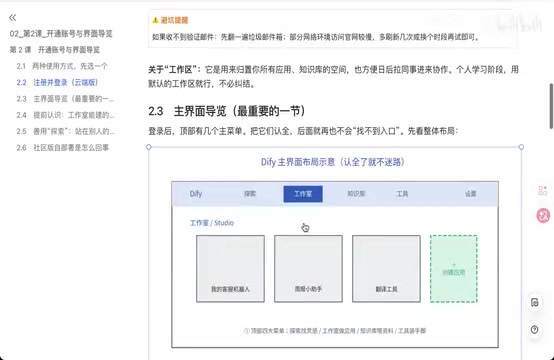
Explore: Official Templates & Inspiration
The "Explore" module features a collection of official pre-built application templates, including file translation, personalized memory assistants, chatbots, intelligent customer service routing assistants, and more. You can directly open and use these templates, or study the workflow design approaches of others.
While some templates may not run directly due to missing plugins, studying their workflow structures and prompt designs is extremely helpful for understanding Dify's capabilities.
Studio: Create Your Own AI Applications
"Studio" is Dify's core creative workspace, supporting three types of applications:
- Text Generation Applications: Suited for single input/output scenarios, similar to standard LLM API calls
- Chat Assistants: Support contextual memory, can mount knowledge bases, ideal for conversational scenarios like customer service bots
- Workflows: Enable complex multi-step AI processes through visual node orchestration
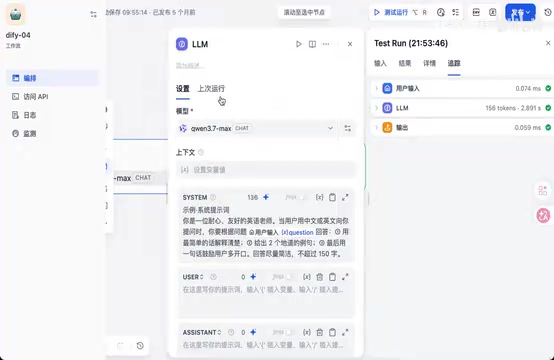
Take a simple English teaching workflow as an example: User inputs a question → processed by an LLM node (system prompt set to "friendly English teacher") → outputs an answer. In the workflow details, you can see the input/output at each step, token consumption, and processing time.
Here it's important to understand the concept of Tokens: A Token is the basic unit of measurement for how large language models process text. For English text, one Token corresponds to roughly 4 characters or 0.75 words; for Chinese text, one character is typically encoded as 1-2 Tokens. LLM API pricing is usually based on input Tokens and output Tokens separately—for example, GPT-4o's input price is approximately $2.5 per million Tokens, and output price is approximately $10 per million Tokens. Viewing Token consumption in Dify's workflow details helps developers precisely estimate application running costs and control expenses by optimizing prompt length, reducing unnecessary context passing, and other techniques.
For instance, if an LLM node takes 2.889 seconds, you can reduce response time by adjusting the temperature parameter or optimizing prompts. Temperature is one of the most important sampling parameters during LLM inference, typically ranging from 0 to 2. Lower temperature values make the model's output more deterministic and conservative, favoring the highest-probability tokens; higher values make output more random and creative, but also more likely to produce irrelevant or inaccurate content. In practice, scenarios requiring accuracy like customer service Q&A and data extraction typically set temperature to 0-0.3, while creative writing and brainstorming scenarios can use 0.7-1.0. Beyond temperature, parameters like Top-P (nucleus sampling) and Frequency Penalty also affect output diversity and quality—Dify provides visual adjustment controls for these parameters in model nodes.
Knowledge Base: Upload and Manage Resources
"Knowledge Base" is used to upload and manage reference documents for AI applications. It supports importing PDF files and connecting to external databases.
The Knowledge Base is the foundation for implementing RAG (Retrieval-Augmented Generation), enabling AI responses to be grounded in your professional materials rather than relying solely on the model's pre-trained knowledge. RAG (Retrieval-Augmented Generation) is one of the most mainstream knowledge enhancement approaches in enterprise AI applications today. Its core idea is: before the LLM generates an answer, first retrieve the most relevant document fragments from an external knowledge base, then feed these fragments as context into the model so it generates answers based on real materials. This approach effectively mitigates the LLM "hallucination" problem (where models fabricate non-existent information) while avoiding expensive fine-tuning. A typical RAG pipeline includes five stages: document chunking, vectorization (Embedding), storage in a vector database, semantic retrieval, and context assembly. Dify's Knowledge Base module is essentially a productized wrapper around this complete pipeline. For application scenarios requiring domain expertise, the Knowledge Base feature is indispensable.
Tools: Extending AI's Capability Boundaries
The "Tools" module gives AI applications the ability to call external services. Dify includes built-in tools like web scraping, code interpreter, time queries, and regular expressions, and also supports MCP (Model Context Protocol) services.
MCP (Model Context Protocol) is a standardized protocol open-sourced by Anthropic in late 2024, designed to establish a unified communication interface between LLMs and external tools/data sources. Before MCP, every AI application needed custom integration code to call external tools, and tools couldn't be reused across different platforms. MCP's design philosophy is similar to what USB ports are for hardware devices—it defines a standard request/response format that allows any protocol-compliant tool to be plug-and-play with any MCP-supporting AI platform. Currently, multiple platforms including Dify, Claude Desktop, and Qwen support the MCP protocol, and the tool ecosystem around it is expanding rapidly.
Notably, platforms like Qwen offer an MCP marketplace with numerous free tools including weather forecasts, Amap (Gaode Maps), document-to-Markdown conversion, image and speech processing, and more—all of which can be directly added to Dify.
Even more powerful: workflows themselves can be published as tools. For example, if you build a translation workflow and publish it as a tool, it can be called as a node within other workflows, enabling "nested" complex orchestrations. This modular design is a key aspect of Dify workflow flexibility.
Model Configuration & API Integration Setup
Before creating applications, you must first complete model configuration. The correct workflow for beginners is: connect your models first, then go to Studio to create applications.
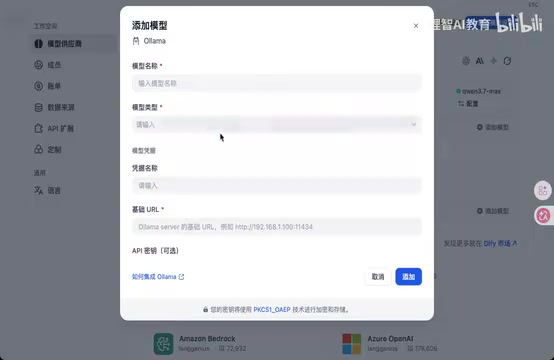
The model configuration entry point is in "Settings" at the top right corner, involving two main parts:
Model Provider Configuration: For configuring API Keys for cloud-based LLMs, such as OpenAI, Qwen, etc. Simply enter your API Key under the corresponding provider.
Local Model Integration: If you've deployed models locally using Ollama or vLLM, you can integrate them into Dify by adding models. Ollama is an open-source local LLM runtime framework that supports one-click downloading and running of mainstream open-source models like Llama 3, Qwen, Mistral, and Gemma on personal computers or servers. It encapsulates underlying complexities like model quantization, GPU acceleration, and API serving—users only need a single command (e.g., ollama run llama3) to start a model and get a local API endpoint compatible with the OpenAI format. vLLM is another high-performance inference engine that uses techniques like PagedAttention to optimize memory management, making it better suited for high-concurrency production environments. Integration requires filling in the model name, type, authentication information, and access URL. This approach is particularly suitable for enterprise intranet environments where both the model and platform run locally, keeping data within the internal network to meet strict compliance requirements in industries like finance, healthcare, and government.
Additionally, Settings includes member management (controlling workspace access), log viewing (querying historical conversation records), monitoring dashboards (viewing active message counts and other operational data), and other practical features.
Docker Local Self-Hosted Deployment in Practice
Environment Requirements
Before starting deployment, confirm your machine meets these minimum specifications:
- CPU ≥ 2 cores
- RAM ≥ 4GB
- Docker and Docker Compose installed
If your machine falls below these requirements, it's recommended to use the cloud version for learning first.
Deployment Steps
Step 1: Clone the Dify Code Repository
mkdir soft
cd soft
git clone https://github.com/langgenius/dify.git
Step 2: Navigate to the Docker Directory and Prepare the Configuration File
cd dify/docker
cp .env.example .env
The .env file is Docker Compose's environment variable configuration file. Dify centralizes parameters like database connection information, port mappings, and secret key configurations in this file. Generating the actual configuration file by copying the .env.example template is standard practice in Docker projects—it ensures sensitive information isn't committed to the code repository while allowing developers to flexibly adjust parameters for their environment.
Note: The cp command may not work on Windows. Windows users can use the copy command instead, or simply copy and rename the file in File Explorer.
Step 3: Start Docker Services
docker compose up -d
The -d flag means running in detached (background daemon) mode, so containers won't occupy the current terminal after starting. On first execution, Docker will automatically pull all required service images from the registry (including PostgreSQL database, Redis cache, Weaviate vector database, Nginx reverse proxy, etc.). The entire process may take anywhere from a few minutes to over ten minutes depending on network speed.
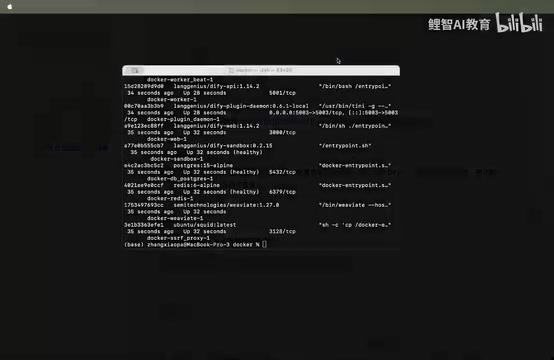
After all containers have started, confirm each service's status shows as healthy using the docker ps command.
Step 4: Access the Dify Admin Interface
Visit http://localhost (default port 80) or http://localhost:8080 in your browser, then set up your admin email, username, and password as prompted to enter the system.
Common Issue: How to Resolve Port Conflicts
If Docker starts but you can't access the service normally, the most common cause is the default port being occupied by another program. There are three solutions:
- Find and terminate the process occupying the port
- Modify the port configuration in the
.envfile to an available port - Restart Docker services after modification:
docker compose restart
Application Type Selection Guide
When facing specific requirements, how do you choose the right application type? Take "a customer service bot that can maintain context and mount a knowledge base" as an example:
- Text Generation Application ❌: No contextual memory capability, unsuitable for multi-turn conversations
- Workflow ⚠️: Achievable but doesn't include context management by default, requires additional configuration
- Chat Assistant ✅: Natively supports contextual memory, can directly mount knowledge bases, most suitable for customer service scenarios
The core principle for choosing application types is: understand the business process first, then decide on the technical solution. Before building a workflow, you must first clarify what the business logic looks like, then you can properly orchestrate the various nodes.
Summary & Recommended Learning Path
Dify's learning path can be summarized in four stages: Learn the interface → Configure models → Create applications → Optimize and iterate. This article covers the core content of the first two stages, including the roles of the four functional modules, model configuration methods, and the complete Docker self-hosted deployment process.
For enterprise-grade AI application development, it's recommended to familiarize yourself with self-hosted deployment early and leverage the Tools module and MCP ecosystem to extend your application's capabilities. As a next step, try connecting an LLM and building a chat assistant hands-on to deepen your understanding of each Dify module through practice.
Key Takeaways
Related articles

Gemini 4 Argon Launches Globally: Key Highlights from the AI Daily Brief
Google opens Gemini 4 Argon globally across Pro and Ultra subscriptions and the API, and demonstrates robot control. This article rounds up open-source models, Agent infrastructure, cost transparency, and safety governance updates.

OpenCode Surpasses Cursor with 213.5k Stars: The Three-Way AI Coding War Behind a $60 Billion Sale
OpenCode overtakes Cursor with 213.5k stars as Cursor reportedly seeks a $60B sale. We break down the business models, user scenarios, and moats of open-source OpenCode, commercial IDE Cursor, and Anthropic's Claude Code, plus three possible endings for the AI coding tool landscape.

Vercel CEO's AI Coding Workflow: 7 Key Principles
Vercel CEO shares his complete workflow for collaborating with AI agents: validate ideas with an MVP, use the direction command to prevent drift, scan security debt with DeepSec, use a breaker agent to attack the app, test from a first-visit user perspective, and close the customer feedback loop through MCP—plus seven actionable AI coding practices.