Dify Enterprise-Grade AI Agent: From Beginner to Expert — Deployment and Hands-On Building Guide

A complete beginner path for Dify, from private deployment and connecting large models to building your first chat assistant.
This article systematically outlines the beginner path for the open-source LLM application development platform Dify. Dify integrates BaaS and LLMOps concepts and includes built-in model integration, knowledge base, and tools, supporting secondary development and multiple business scenarios. For deployment, cloud service can be used directly for trying it out, while private deployment is recommended via Docker Compose. It can run with a minimum of two CPU cores and 4G of memory. The process includes downloading the source code, copying the configuration file, running docker compose up -d, and checking service status, while paying attention to port conflicts and firewall settings. After deployment, configure the model provider in the admin backend; SiliconFlow is recommended because of its rich model selection and free quota. At the application level, Dify provides five categories: chat assistant, Agent, text generation, Chatflow, and workflow. Using the chat assistant as an example, it demonstrates prompt writing and creating a translation bot, and emphasizes that after editing you must click publish update to save.
Dify, currently one of the most popular open-source large language model application development platforms, is increasingly being used by developers and enterprises to build production-grade AI applications. Based on a systematic tutorial from a Bilibili creator, this article walks through the complete beginner path for Dify — from private deployment to building your first chat assistant.
What Is Dify: The Core Positioning of an Open-Source LLM Application Development Platform
Dify combines the concepts of Backend as a Service and LLMOps, enabling developers to quickly build production-grade generative AI applications. Even non-technical users can participate in defining AI applications and managing data operations.
The platform comes with the key technology stack required for large models built in. It has already integrated with hundreds of models and provides a clean, easy-to-use interface along with standard API endpoints for easy business integration, saving time on reinventing the wheel. The main interface includes core modules such as app creation, knowledge base, and tools.
Dify's core advantage lies in being open source — built jointly by a full-time professional team and the community. Developers can do secondary development based on the source code to create a personal edition or an enterprise professional edition. It can be used for startup MVP validation, integrating large model capabilities into your own business, serving as enterprise-grade large model infrastructure, and exploring prompt engineering and agent technologies.
BaaS (Backend as a Service) is a cloud service model in which developers don't need to build and maintain backend infrastructure themselves — they can directly call ready-made capabilities provided by the platform (such as databases, authentication, API management, etc.) to complete application development. In Dify, developers don't need to write cumbersome backend code to handle model calls, session management, and data storage — the platform has already encapsulated these capabilities as services that can be called directly.
LLMOps (Large Language Model Operations) refers to a full set of engineering practices surrounding the entire lifecycle of large language models, covering prompt management, model version iteration, performance evaluation, log monitoring, and cost control. Traditional MLOps mainly focuses on the training and deployment of machine learning models, whereas LLMOps places more emphasis on large-model-specific operational needs such as prompt engineering, context management, and multi-model scheduling. Dify's integration of BaaS and LLMOps concepts is precisely intended to let developers quickly build and continuously operate production-grade generative AI applications just like using ordinary cloud services, without having to build the underlying technology stack from scratch.
Private Deployment: From Environment Configuration to Container Startup
There are two paths for using Dify. If you just want to try it out, you can directly visit the official website, register an account, and use the cloud service — the functionality is not much different from self-hosting. If you need customization or integration into an enterprise's internal systems, private deployment with Docker Compose is recommended.
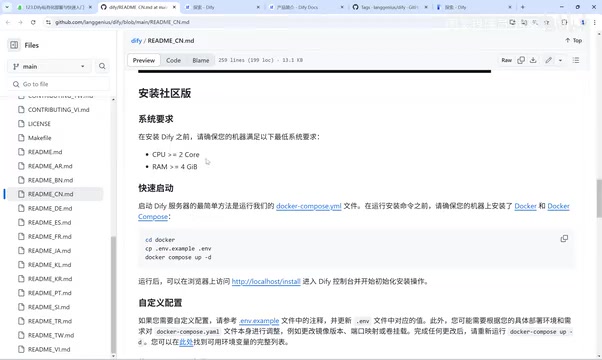
Before deployment, pay attention to the configuration requirements: Dify itself has low resource requirements — two CPU cores and 4G of memory are enough to run it. The main consumption comes from large model calls. If the large model is also deployed on your own, the overall configuration requirements will increase significantly.
The deployment process is as follows: first download the installation package, either by cloning the project or directly downloading the source package. After downloading, switch to the docker directory, first copy the environment configuration file (copy .env.example to .env), then run the docker compose up -d command.
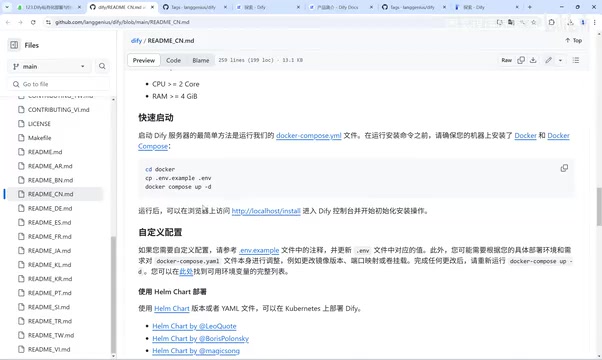
The first execution will download images. By default, it uses an overseas image acceleration address, which takes about ten-plus minutes. The creator recommends configuring a domestic image accelerator to improve speed. After installation is complete, run docker compose ps to check the running status of each service — normally it should show an up status.
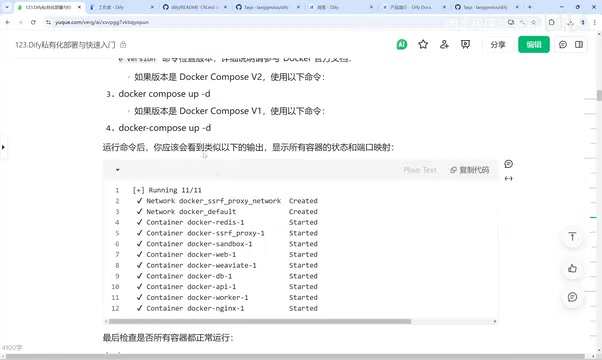
For access, just use the IP address directly. The default port is 80. If deploying on a cloud server, pay attention to firewall and IP whitelist settings. To update the version, simply pull the latest code and run docker compose up -d again. The creator specifically reminds that only one version can run at the same time; otherwise, port conflicts will occur.
Docker Compose is the container orchestration tool officially provided by Docker. It defines and runs multiple interrelated containers through a YAML-format configuration file (usually docker-compose.yml). Dify consists of multiple services such as a web frontend, API backend, database, vector store, and cache. Using Docker Compose allows all services to be started simultaneously with a single command and automatically handles the network and dependency relationships among them. In the docker compose up -d command mentioned in the article, up means to create and start containers, and -d means to run in the background (detached mode), so after execution the terminal won't be flooded with logs. The .env file is used to store environment variables such as database passwords, port numbers, and keys. It is copied from .env.example and then modified as needed, which prevents sensitive configuration from being written directly into the code. docker compose ps is used to view the running status of each container in the current project.
Connecting to Large Models: Configuring Model Providers
After deployment is complete, the first thing to do is connect to a large model. Go to the "Model Providers" page in the admin settings and select the model you need. The creator recommends using SiliconFlow, which has a rich selection of models covering Qwen, DeepSeekAd, and multiple categories such as speech, image, and video. Registration comes with free quota, making it suitable for learning and API calls. In addition, you can also use DeepSeek's official API, Tongyi Qianwen, Zhipu, and other services.
Model Provider is the abstraction layer in Dify for unified access to various large models. Because different vendors have different API protocols, authentication methods, and parameter formats, Dify unifies them into standardized interfaces through built-in adapters. Developers only need to enter the API Key and the necessary access address to call different models in the same way within an application. SiliconFlow is a model aggregation and inference service platform whose feature is concentrating multiple open-source models (such as Tongyi Qianwen, DeepSeek, etc.) under the same API set and providing a certain amount of free quota, making it very suitable for use during learning and testing. An API Key is the identity credential for calling a model service. It usually needs to be applied for in the user center of the corresponding platform. After configuring it in Dify, it can initiate requests on behalf of your account, so it must be kept secure to avoid leakage.
Building Your First Application: From Chat Assistant to Agent
Create a blank application in the studio. Dify provides multiple application types:
- Chat Assistant: Quickly build a conversational bot through simple configuration, suitable for Q&A scenarios
- Agent: Has reasoning and autonomous tool-calling capabilities, suitable for tasks such as weather queries, travel planning, and image generation
- Text Generation App: For specific tasks such as translation and speech generation
- Chatflow and Workflow: For advanced users, supporting complex multi-turn dialogue orchestration and task branching logic
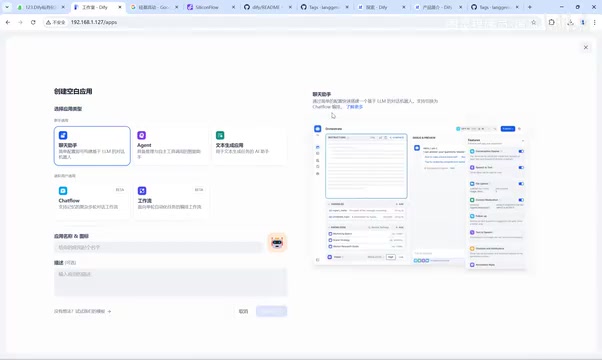
Taking the chat assistant as an example, after creation, write a prompt to define the AI role, such as "You are an English learning assistant." If you don't know how to write prompts, you can click generate to let the large model write it automatically. The creator demonstrated the process of making a translation bot: after configuring the source language and target language, Chinese-English mutual translation can be achieved.
The application also supports configuring conversation opening remarks, uploading files, text-to-speech, speech-to-text, and other features, and can add a knowledge base and visual capabilities.
Note: after editing is complete, you must click "Publish Update" to save; otherwise, the content will be lost after refreshing.
Summary
Dify's beginner path can be summarized in four steps: understand the platform's features, complete private deployment, connect to a large model, and build and test your first application. For developers who want to quickly enter the field of AI application development, Dify provides a low-barrier and extensible starting point.
One-line Summary
A complete beginner path for Dify, from private deployment and connecting large models to building your first chat assistant.
Paragraph Summary
This article systematically outlines the beginner path for the open-source LLM application development platform Dify. Dify integrates BaaS and LLMOps concepts and includes built-in capabilities such as model integration, knowledge base, and tools, supporting secondary development and multiple business scenarios. For deployment, cloud service can be used directly for trying it out, while private deployment is recommended via Docker Compose. It can run with a minimum of two CPU cores and 4G of memory. The process includes downloading the source code, copying the configuration file, running docker compose up -d, and checking service status, while paying attention to port conflicts and firewall settings. After deployment, configure the model provider in the admin backend; SiliconFlow is recommended because of its rich model selection and free quota. At the application level, Dify provides five categories: chat assistant, Agent, text generation, Chatflow, and workflow. Using the chat assistant as an example, it demonstrates prompt writing and creating a translation bot, and emphasizes that after editing you must click publish update to save.
Related articles

How Big Can Stars Really Get? The Physical Limits of the Largest Stars
Red supergiants are the largest stars by volume, with radii up to 2,000 times the Sun, engulfing the inner solar system. But there is no precise upper limit on stellar size—models predict up to 15,000 solar radii. The most massive blue stars are far smaller than red supergiants—biggest and heaviest are two different things.

Apple HomeView Smart Display Full Feature Breakdown: Wall-Mount or Desktop, $299
Apple launches HomeView, a $299 smart display with wall-mount and desktop options, 12MP camera for facial recognition, smart home control, music playback, and recipe step-by-step cooking. Full breakdown of watch faces, apps, privacy, and cooking integration.

Where Did the Promised New Studio Go? Craft Computing Answers After Five Years
Craft Computing's host responds to viewer questions: the new studio promised five years ago was shelved as construction costs soared from $30,000 to $75,000, and was replaced by a 168-square-foot garage conversion.