Dify from Beginner to Mastery: A Practical Guide to 20+ Enterprise AI Workflows
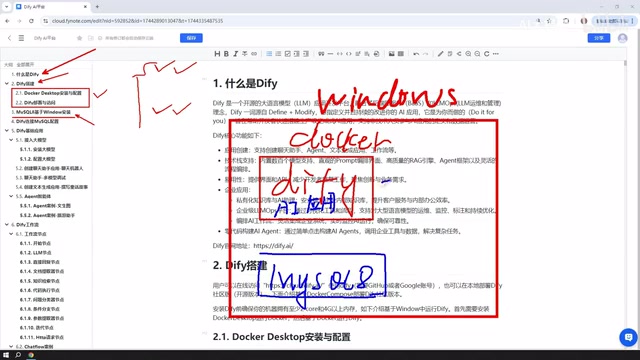
Bilibili creator's Dify course covers deployment, five app types, model integration, and publishing in a complete workflow.
This article, based on a Bilibili creator's "Dify from Beginner to Mastery" course, systematically outlines Dify's core usage path. As a visual AI application orchestration platform, Dify lowers engineering barriers and supports Windows Docker deployment, source code deployment, and an online version. It offers five application types, with Workflow as the advanced focus. Model integration prioritizes paid or free-token models, and apps can be published as sites, embedded, or called via API. The course claims 20+ cases in a week, suitable for beginners, though version timeliness should be noted.
Dify is becoming a popular choice for building AI applications, but most tutorials stay at the surface. A Bilibili creator published a "Dify from Beginner to Mastery" course, claiming to walk you through 20+ enterprise-level practical projects in one week, all substance. This article, based on that course, outlines Dify's core concepts, deployment paths, and application types to help you decide whether it's worth your time.
What Is Dify: A Platform for Rapidly Building AI Applications
The course opens by defining Dify as "an AI platform" through which you can quickly build AI applications, covering both personal and enterprise scenarios. Unlike directly calling large model APIs, Dify provides a visual application orchestration layer, letting developers focus on business logic rather than low-level integration.
This view aligns with community consensus: Dify's value lies in lowering the engineering barrier for AI applications. The creator emphasizes that the course focuses on using Dify rather than digging into its source code, making it suitable for developers who want to get up to speed quickly.
The visual orchestration layer is the core mechanism that distinguishes Dify from directly calling large model APIs. In traditional development, implementing a multi-turn conversation or tool-calling application requires writing your own prompt management, context maintenance, function routing, and more; Dify encapsulates these capabilities as graphical nodes and configuration panels, letting developers build applications by dragging and filling in forms. Under the hood, it typically includes a model abstraction layer (unifying differences between vendor APIs), a workflow engine (executing nodes in a directed-graph order), and runtime context management (storing conversation history and variables). This design resembles low-code platforms but is optimized for LLM applications, reducing engineering costs from prototype to deployment.
Deployment Options: Local Docker, Source Code, or Online Version?
Dify offers three ways to use it, and the course focuses on local deployment via Windows Docker.
Advantages of Local Docker Deployment
The creator chose Windows + Docker to deploy Dify, mainly for data and environment connectivity. After local deployment, Dify can directly access the local MySQL or other services without additional tunneling. For production environments, he recommends "deploying it yourself on local machines for internal company use," which is easier to control.
Limitations of the Online Version
The official online version looks almost identical to the self-deployed version, but when an application needs to read a local database or call the local environment, you must use a tunneling tool to expose the local IP to the public internet. This adds configuration complexity and security risks, so the course uses local deployment as its main teaching path.
Why Windows Needs MySQL 8 Installed
The course dedicates a section to installing MySQL 8 on Windows. The logic: Dify runs in Docker, and AI applications need to read business data, so installing MySQL on the Windows host lets the Dify container communicate with it over the network. The creator also notes that MySQL 8 can be deployed via Docker or placed in a VMware virtual machine—the location is flexible as long as the network is reachable.
Docker containers have their own network namespace by default, and localhost inside a container points to the container itself, not the host. Therefore, if Dify running in Docker needs to access MySQL installed on Windows, it cannot use 127.0.0.1; it must use the host's LAN IP (e.g., 192.168.x.x) and ensure MySQL is configured to allow remote connections and Windows Firewall allows port 3306. The course places MySQL on the host precisely to leverage Docker's bridge network for container-to-external-service communication, a common practice when connecting to existing business databases in local deployments.
Five Application Types: From Chat Assistant to Workflow
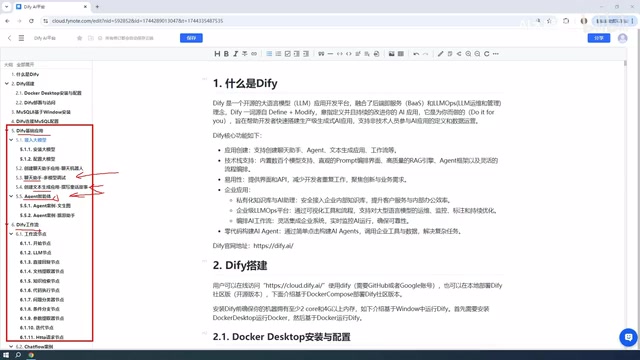
When you open Dify to create an application, you'll see five types: Chat Assistant, Text Generation, Agent, Chatflow, and Workflow. The course clearly distinguishes them.
The Basic Trio: Chat Assistant, Text Generation, Agent
Chat Assistant is for multi-turn conversations; Text Generation is for writing articles, documents, or novels; Agent can call tools to complete complex instructions, such as scraping a webpage and then analyzing it. The creator says all three basic application types will have step-by-step case walkthroughs.
Two Faces of Workflow: Chatflow and Workflow
Workflow is Dify's key capability, divided into Chatflow and Workflow. Simply put: Chatflow supports conversational interaction with a workflow, while Workflow is one-time input and output. The course later demonstrates building and applying both with detailed cases.
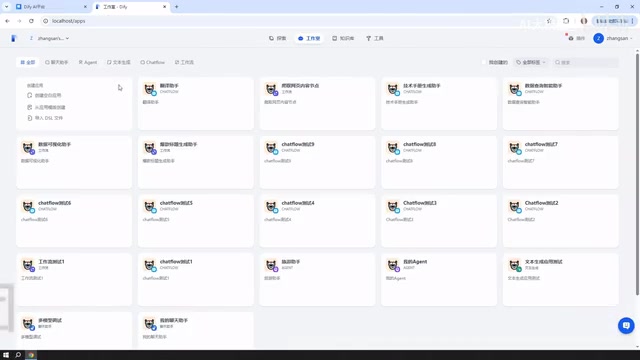
The difference between Chatflow and Workflow essentially lies in interaction mode and state management. Chatflow targets conversational scenarios, retains multi-turn session memory, and allows users to input multiple times during workflow execution—suitable for customer service and assistant applications. Workflow targets batch or single tasks, where one input triggers the entire process and returns a result without retaining conversation state—suitable for deterministic tasks like content generation and data processing. Both share the same node system, but Chatflow additionally provides conversation variables and session history nodes, while Workflow emphasizes structured input/output definitions. Understanding this distinction helps you choose the right type when creating an application and avoid later refactoring.
Workflow Nodes
Building a workflow requires individual modules, i.e., "nodes." The course covers common nodes and nearly all node types offered on Dify's official website, with a case for each. The creator mentions that there are over a dozen workflow node cases, plus application cases, totaling more than 20—forming the core of the "enterprise-level practical projects."
Large Model Integration: Paid Models First, Caution with Local Solutions
All AI applications rely on large models. The course recommends prioritizing paid models like DeepSeekAd and ChatGPT, or using free tokens from Baidu ERNIE Bot or Alibaba Tongyi Qianwen (usually millions after registration, enough for learning).
The creator uses DeepSeek as an example: a 10-yuan top-up lasts a long time; his account has used less than 1 yuan over a long period.
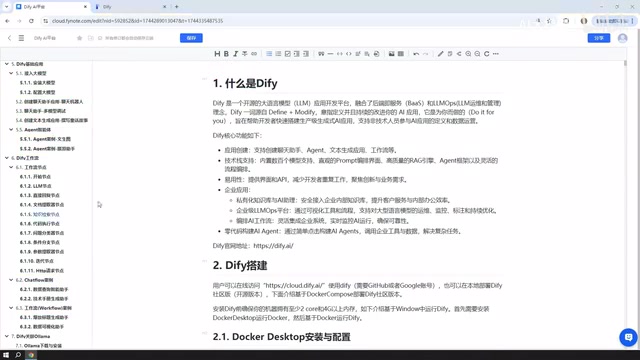
For local models (e.g., Ollama), the course is cautious: although Dify can integrate locally deployed models via Ollama, results are usually not ideal. However, if your machine is powerful enough, or your company has a cluster-deployed large model (e.g., DeepSeek's open-source large-parameter model, whose download may exceed 400GB), building enterprise applications with Dify is entirely feasible.
Ollama is a local large model runtime that supports pulling and running open-source models like Llama and Qwen on a personal computer, integrating with Dify via a local API. The course is cautious about its results, mainly because: locally runnable models usually have smaller parameter counts (7B-14B), making them weaker at complex instruction following, multi-step reasoning, and tool calling than cloud models; also, local inference speed is limited by consumer-grade GPUs or CPUs, making it hard to support production-level concurrency. However, if an enterprise has a GPU cluster and deploys large-parameter models (e.g., DeepSeek 671B), a localized solution offers advantages in data privacy and cost control, and Dify can still add value as an orchestration layer.
Application Publishing: From Local to Public Site
Built applications aren't limited to use inside Dify. The course concludes with publishing methods: generate a public access link, publish as a website (requires tunneling); embed in your own website; or call via API (including Python API). This provides an outlet for real-world deployment.
Course Value and Target Audience
From the outline, this course covers Dify's core usage path: deployment, database configuration, five application types, workflow nodes, model integration, and publishing. If the promise of 20+ cases is fulfilled, it's an efficient entry path for beginners.
Note that the course was recorded on a specific Dify version, and workflows were still labeled as a test version at the time, which may have changed. Also, the creator's spoken content contains repetition and colloquialisms, so you'll need to distill it yourself when learning from text. Overall, for developers who want to build practical Dify skills within a week, this tutorial is worth checking out.
One-line Summary
A Bilibili creator's Dify course covers deployment, five application types, model integration, and publishing in a complete workflow.
Paragraph Summary
Based on a Bilibili creator's "Dify from Beginner to Mastery" course, this article systematically outlines Dify's core usage path. As a visual AI application orchestration platform, Dify lowers engineering barriers and supports Windows Docker local deployment, source code deployment, and an online version; local deployment allows direct access to local databases. The platform offers five application types: Chat Assistant, Text Generation, Agent, Chatflow, and Workflow. Workflow is the advanced focus, and the course covers most nodes with cases. For model integration, prioritize paid models (e.g., DeepSeek) or free tokens; local Ollama results are limited, but enterprise-scale large models are feasible. Applications can be published as public sites, embedded in websites, or called via API. The course claims 20+ cases in one week, suitable for beginners to quickly build practical skills, but note version timeliness and verbal redundancy.
Related articles

Cerebras CS-4 Stuns with Launch: The 4-Trillion-Transistor Wafer Monster That Crushes GPUs in Inference Speed
Cerebras CS-4 wafer-scale engine launched: 4 trillion transistors, 900,000 AI cores, inference an order of magnitude faster than GPUs. Modular power rack plus compute backpack design, 3D vertical stacking, and half-millimeter power delivery—online in minutes.

Apple's M6 Chip Lands in iMac: A Week in Review of Performance Upgrades and AI Controversy
Apple launches new iMac and MacBook Pro with M6 chip, N1 wireless chip brings speed gains; OpenAI claims three major discoveries but faces academic skepticism; data centers become a U.S. midterm election issue; Anduril teams up with Qualcomm for all-American laptops.

AI Cracks the Quasi-Riemann Hypothesis? A Mathematician's Account of a Stunning Moment
Number theorist Alex recounts on Lex Fridman's podcast the shocking experience of AI proving the quasi-Riemann hypothesis, plus Fermat's Last Theorem formalization and Navier-Stokes within a month, explaining the signal-processing intuition behind the Riemann hypothesis and the boundaries of AI breakthroughs in mathematics.