Dify in Practice: Building an ECharts Data Visualization Assistant with Workflows

Use Dify workflows to automatically convert uploaded data files into rendered ECharts visualizations.
This article breaks down an ECharts visualization assistant built with Dify workflows. The pipeline splits data processing into single-responsibility nodes: a start node accepts file uploads (use Markdown/PDF to avoid Dify's Excel-reads-empty bug), a document extractor reads the file without any LLM, an LLM-driven format conversion node transforms raw data into CSV, a parameter extractor stores the CSV in a variable, and a code execution node assembles it into an ECharts-compliant code block (the `echarts` keyword wrapped in triple backticks), which Dify's frontend automatically renders as a chart. The value lies not in any single node's complexity, but in demonstrating a reusable "decompose, implement, combine" workflow methodology for enterprise AI applications.
When using LLMs to process business data, plain text or tables often fail to make statistical information immediately clear. For data with time and ranking dimensions — like box office figures or sales numbers — charts are a far more intuitive choice. This article breaks down a Dify hands-on tutorial from Bilibili, showing step by step how to build an ECharts visualization assistant using Dify workflows. Upload a data file, and the system automatically generates bar charts, line charts, and other visualizations.
Why You Need an ECharts Visualization Assistant
In real business scenarios, we frequently deal with batches of statistical data. Using the tutorial's example: the author compiled box office champion data from recent Chinese New Year film seasons. If you just list it in a table, readers have to go row by row to understand the trends. With an ECharts bar or line chart, box office trajectories and ranking comparisons become instantly clear.
For developers, ECharts is a go-to choice for data visualization. The core goal of this project is to use Dify as the orchestration layer — users upload raw data, the system automatically handles parsing and format conversion, and ultimately outputs chart code that conforms to ECharts specifications and renders it on screen.
ECharts (Enterprise Charts) is an open-source JavaScript data visualization library from Baidu, built on Canvas and SVG rendering. It supports dozens of chart types including line charts, bar charts, scatter plots, pie charts, and maps. Charts are described through a JSON-format configuration object (
option) that defines both data and styling — developers simply pass in a compliant config object and ECharts handles the rendering automatically. This "config-driven rendering" model has made it one of the most popular choices for frontend data visualization, and it's the target output format for this workflow. In Dify's rendering layer, any code block that starts with theechartskeyword and is wrapped in triple backticks will be recognized by the frontend, which then calls the ECharts engine to render the chart — no frontend code required from the user.
Overall Workflow Design
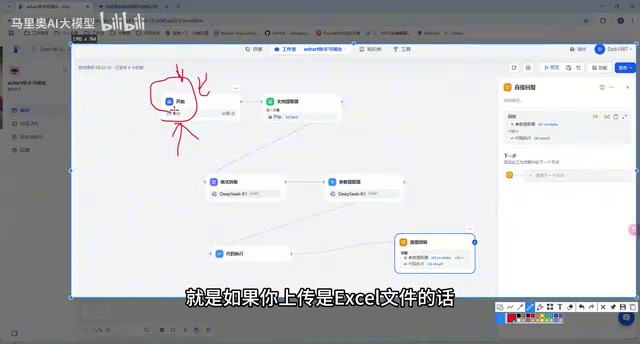
The entire application is built on Dify's workflow system, with a clear node-chaining logic. From the start node where the file is uploaded, through document extraction, format conversion, parameter extraction, and code execution, to a final direct reply output — each step has a single, well-defined responsibility.
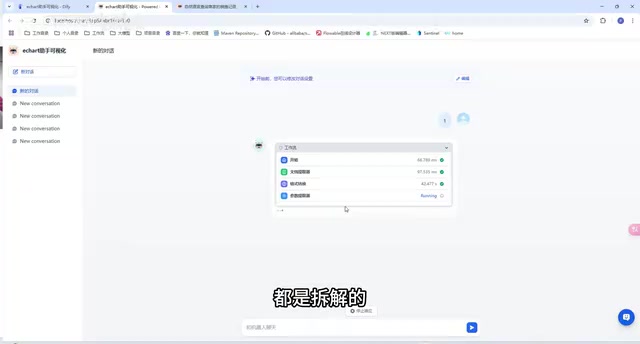
The author emphasizes a key philosophy: break complex business logic into basic functions and implement them one at a time. Many examples in the tutorial start by thoroughly explaining individual nodes before combining them. Once you've mastered these foundational building blocks, you can implement relatively complex business processes in an enterprise environment.
Dify Workflow is a visual orchestration capability provided by the Dify platform. It allows developers to connect LLM calls, code execution, document processing, HTTP requests, and other capabilities as nodes in a drag-and-drop interface, forming a DAG (Directed Acyclic Graph) execution chain. Compared to calling a single LLM directly, workflows excel at breaking complex tasks into single-responsibility steps, where each step's inputs and outputs can be inspected and debugged, reducing overall uncertainty. Each node handles only its own transformation logic; upstream and downstream nodes exchange data through variable references. The entire chain requires no hand-written orchestration code, making it ideal for integrating heterogeneous operations like data cleaning, model inference, and format output into a repeatable, automated pipeline.
Breaking Down the Key Nodes
Start Node and File Upload
The start node accepts a file-type input and supports multiple formats including Excel, Markdown, PDF, and HTML. There is one critical pitfall to watch out for: Dify has a bug when reading Excel files — the extracted content comes back empty. The author therefore recommends putting your data in a Markdown or PDF file to work around this issue.
Document Extractor and Format Conversion
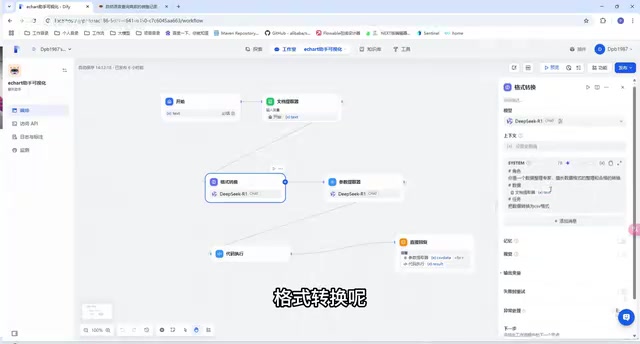
The document extractor reads the content from the uploaded file — no LLM is involved at this step. The extracted raw data then passes into the format conversion node, which is LLM-driven. Its system prompt is fairly concise: the role is defined as a "data organization expert skilled in data formatting and conversion," and the task is to convert the data into CSV format.
Parameter Extraction and Code Execution
The converted data flows through a parameter extractor, which pulls the content into a custom variable (e.g., csv_data). The code execution node then takes over and transforms this data into a format that ECharts can consume.
The processing logic works like this: split the CSV data by line, read each row, convert row data into columnar structure, loop through the results, then assemble everything into the chart configuration format required by ECharts.
Dify's Parameter Extractor node is essentially a structured output tool: it takes unstructured or semi-structured text and uses an LLM to extract target information into developer-defined fields and types, storing them in variables that subsequent nodes can reference. In this workflow, the CSV text produced by the LLM conversion step is extracted into the
csv_datavariable, which the code execution node can call directly by name — no string parsing needed. The code execution node supports Python or JavaScript and runs in a sandboxed environment, handling purely logical data processing tasks. These kinds of tasks are more reliable, faster, and easier to verify when handled by deterministic code rather than an LLM. The combination reflects a clear division of labor: "LLMs handle semantic understanding; code handles precise transformation."
Outputting ECharts-Compliant Format
The assembled data must ultimately be wrapped in a format that meets ECharts rendering specifications — specifically, a code block starting with the designated keyword and enclosed in triple backticks. Only when this specification is met will Dify render it as a visual chart in the output.
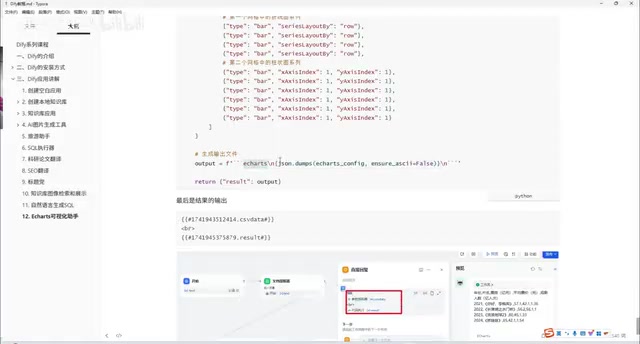
The direct reply node outputs two pieces of content: the CSV data extracted by the parameter extractor, and the ECharts chart returned by the code execution node.
Results in Action
Once configured, you can run a test. Start a new conversation, upload the prepared box office data .md file from your local machine, enter any message, and click start. The workflow executes sequentially: document extraction, format conversion (this step involves the LLM, so expect a brief wait), parameter extraction, and code execution.
When it finishes, the upper portion of the page displays the data converted to CSV, while the lower portion shows the ECharts chart generated from that data — displaying film titles, average box office figures, and year-over-year rankings. Compared to plain text or a standard table, this kind of visualization is clearly far more satisfying to present to a client.
Summary
The value of this ECharts visualization assistant example lies not in the complexity of any single node, but in demonstrating Dify workflow's methodology of "decompose, implement, combine." Document extraction, LLM-driven format conversion, parameter extraction, and code execution — these basic capabilities, when combined, solve real-world needs like data visualization. For developers looking to deploy enterprise-grade AI applications with Dify, this kind of example provides a reusable blueprint. Two practical points to keep in mind: avoid the Excel-reads-as-empty bug by using Markdown or PDF files, and strictly follow the ECharts code block output specification.
Related articles

Amphibious Transforming Drone: Beyond 100x Power Savings, What Are the Real Needs?
Is the amphibious transforming drone just a gimmick? Starting from the 100x power difference of the M4 Morphobot, explore real application scenarios and thesis topic ideas, analyzing boundary conditions where pure drones and pure ground robots both fail.

Warhound Raises $200 Million: Genetically Engineered "War Dogs" Paired with Anduril Gear
Warhound raises $200M, backed by Ben Lamm and Palmer Luckey, to genetically engineer dogs for military and law enforcement use and equip them with Anduril gear. This article analyzes its technology direction, funding logic, and ethical controversy.

Claude API Comes to Google Cloud: IAM Integration and SDK Access Guide
Anthropic hosts the full Claude API on Google Cloud with IAM-controlled permissions and unified billing. This guide covers the Vertex AI and Anthropic-hosted entry points, IAM role configuration, and SDK access.