Dify Local Deployment Tutorial: Build Your AI Application Development Platform from Scratch

A beginner-friendly guide to locally deploying the open-source Dify AI platform using BT Panel and Docker.
This tutorial walks you through deploying Dify — an open-source LLM application development platform — on your local machine. It covers installing VMware and Ubuntu, setting up BT Panel for server management, and deploying Dify via Docker. The guide also explains Dify's core concepts including BaaS, LLMOps, RAG, and Agent technology, making it accessible even for beginners with no prior experience.
What Is Dify? Why Is It Worth Learning?
Dify is an open-source large language model (LLM) application development platform that combines the concepts of Backend as a Service (BaaS) and LLMOps, enabling developers — and even non-technical users — to quickly build production-grade generative AI applications.
Two key concepts here are worth unpacking. BaaS (Backend as a Service) is a cloud service model where developers don't need to build or maintain backend servers, databases, user authentication, or other infrastructure themselves. Instead, they call backend functions provided by the cloud directly through APIs. Firebase and Supabase are classic examples of BaaS products. LLMOps, borrowing from the MLOps (Machine Learning Operations) philosophy, is a concept specifically designed for managing the full lifecycle of large language model applications. It covers prompt management, model version control, performance monitoring, cost tracking, data annotation and evaluation, and more. By merging these two concepts, Dify means developers don't need to worry about backend architecture or manually handle the tedious details of LLM application operations.
Compared to another well-known AI development framework, LangChain — if LangChain is a toolbox (containing hammers, nails, and various other tools), then Dify is more like a complete scaffolding system. It not only provides tools but also comes with systematic engineering design and software testing, ready to support building enterprise-grade applications out of the box.
More specifically, LangChain is an open-source framework initiated by Harrison Chase in late 2022, primarily developed in Python and JavaScript. It provides modular components such as Chains, Agents, Memory, and Retrieval, and developers need to write code to assemble these components into applications. It offers extreme flexibility but has a steep learning curve, and there's a significant amount of engineering work required to go from prototype to production deployment. Dify takes a different approach — it provides a visual orchestration interface, a built-in workflow engine, an out-of-the-box RAG pipeline, and comprehensive API management, encapsulating much of the engineering work within the platform so developers can focus on business logic itself.
More importantly, Dify is fully open-source, meaning it's free to use and can be freely extended on top of the open-source codebase.
Core Capabilities of Dify
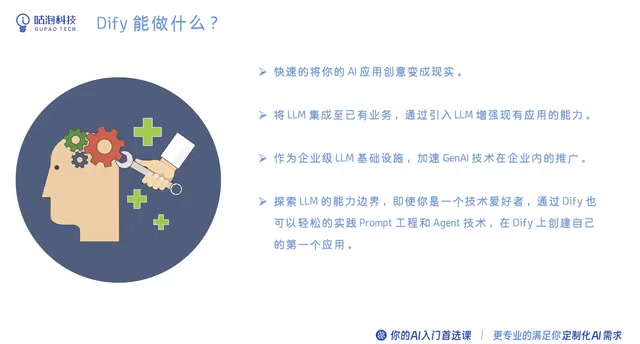
- Turn AI application ideas directly into usable products
- Integrate large language models into existing business systems via APIs
- Serve as enterprise-grade LLM infrastructure to accelerate AI adoption across industries
- Enable independent developers and tech enthusiasts to create their own AI applications through prompt engineering and Agent technology
Among these, Prompt Engineering refers to the technique of carefully designing input prompts for large language models to guide them toward producing desired outputs. It includes strategies such as zero-shot prompting, few-shot prompting, Chain of Thought (CoT), role-playing, and more — making it one of the most essential skills for working with LLMs today. Agent technology goes a step further by giving LLMs the ability to autonomously plan, call tools, and perform multi-step reasoning. A typical Agent receives a user task, breaks it down into sub-steps on its own, calls external tools like search engines, code executors, or database queries as needed, and ultimately synthesizes the results into an answer. ReAct (Reasoning + Acting) and Function Calling are currently the mainstream paradigms for Agent implementation.
Dify's Model Ecosystem
Dify supports hundreds of models, covering major LLMs from around the world:
- International: OpenAI, Gemini, Claude, etc.
- Chinese: Zhipu, Baichuan, iFlytek Spark, Tongyi Qianwen, ERNIE Bot, DeepSeekAd, Moonshot, etc.
A small detail worth noting: different models support different features. In Dify's model list, a hammer icon indicates support for tool calling (suitable for building Agents), while a glasses icon indicates vision capabilities. If you want to build an Agent that can call tools, you'll need to select a model marked with the hammer icon, such as DeepSeek or Moonshot.
The Function Calling capability here means that after a large language model identifies the user's intent, it can automatically generate structured function call requests. These are executed by external systems, and the results are returned to the model for integration. OpenAI pioneered Function Calling in June 2023, and other major model providers quickly followed suit. Not all models support this capability — it requires the model to be specifically fine-tuned for tool-calling scenarios during training. In Dify, models marked with the hammer icon have undergone tool-calling training and can reliably parse tool descriptions, generate call parameters, and process return results. This is a fundamental prerequisite for building reliable Agents.
Overall Tutorial Framework
This tutorial is divided into seven modules, progressively guiding you through mastering Dify:
- Understanding Dify: Learn about the platform's positioning and core capabilities
- Local Deployment: Install and configure Dify in a local environment
- Building AI Applications: Create intelligent chatbots, Agent-based assistants, and more
- Toolbox Usage: Configure and invoke various tools for AI applications
- Workflow Design: Orchestrate automated workflows for specific business scenarios
- Knowledge Base Integration: Import enterprise product data as an external knowledge base for AI (RAG)
- Application Publishing: Publish as a public website or embed into existing applications via API
Module 6 involves RAG (Retrieval-Augmented Generation), a technical architecture that combines external knowledge retrieval with the generative capabilities of large language models. The core process works as follows: enterprise documents, product manuals, and other data are first split into text chunks, then converted into vectors via an Embedding model and stored in a vector database. When a user asks a question, the system first retrieves the most relevant text chunks through semantic similarity search, then injects these chunks as context into the LLM's prompt, allowing the model to generate answers based on real data. RAG effectively addresses LLM knowledge cutoff limitations and hallucination issues, making it the most mainstream knowledge-enhancement solution in enterprise AI applications today. Dify includes a complete built-in RAG pipeline that supports importing multiple document formats, automatic chunking, vectorization, and retrieval strategy configuration.
Local Deployment of Dify: BT Panel Approach in Detail
Dify can be deployed in multiple ways, including from source code or via Docker. After comprehensive comparison, this tutorial chose the BT Panel (宝塔面板) deployment approach, which is the most beginner-friendly.
Step 1: Install a Virtual Machine and Linux System
Required Software:
- VMware Workstation or VMware Player (virtualization software)
- Ubuntu 22.04 ISO image file (Linux operating system)
VMware Workstation is an industry-leading desktop virtualization software that uses Hypervisor technology to emulate a complete hardware environment on a physical machine, allowing multiple independent operating systems to run simultaneously on a single computer. We chose Ubuntu 22.04 LTS (Long Term Support) as the deployment system because it's one of the most popular Linux server distributions, offering five years of official security update support, a rich software package ecosystem, and an active community. The LTS designation means long-term stable maintenance, making it ideal as a foundation for service deployment. For Windows users, running Linux through a virtual machine is the lowest-cost way to experience the server deployment process, and it avoids the risks of dual-boot installation.
After installing VMware, follow these steps to create a new virtual machine:
- Open VMware and select "Create a New Virtual Machine"
- Choose "I will install the operating system later"
- Select Linux → Ubuntu 64-bit as the system type
- Customize the virtual machine name; make sure to choose a non-C drive for the installation location (to avoid cache files filling up the C drive)
- Allocate 20GB of disk space (sufficient for Dify deployment alone)
- Complete the creation
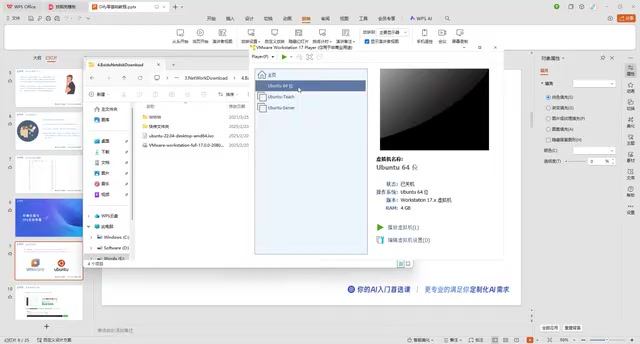
After creation, the virtual machine is still empty and needs the Ubuntu image mounted:
- Select the virtual machine → Edit Virtual Machine Settings
- Find the CD/DVD option and select "Use ISO image file"
- Browse and select the downloaded Ubuntu 22.04 ISO file
- Click OK, then power on the virtual machine
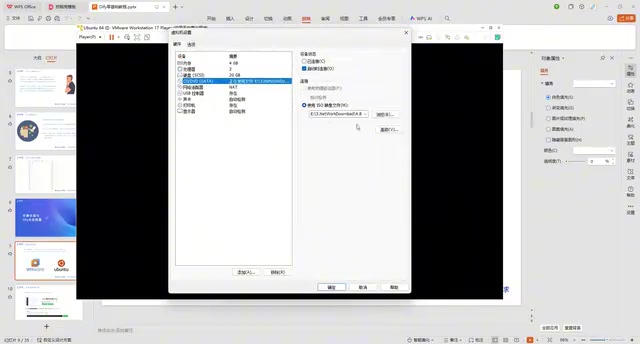
After booting, select "Try or Install Ubuntu." In the installation interface, switch the language to your preference, choose Minimal Installation (sufficient for Dify deployment), set your username and password, and wait for the installation to complete. After installation, restart and remove the ISO image.
Step 2: Install BT Panel
Open the terminal in Ubuntu (shortcut: Ctrl+Alt+T) and visit the BT Panel official website to get the Linux panel installation command:
- Go to the BT Panel website → Products → BT Linux Panel → Install Free Version
- Select the installation command for Ubuntu and copy it
- Paste the command in the terminal and press Enter to execute
- Enter the system password (it won't be displayed as you type — just type it and press Enter)
- Confirm the installation path and wait for installation to complete
Once installed, BT Panel will provide the panel login URL (local network address), username, and password. Copy the address into your browser to access the BT Panel management interface.
Recommended: Modify default settings immediately after installation:
Enter the bt command in the terminal to quickly change the panel port, password, username, and security entry path for improved security and convenience.
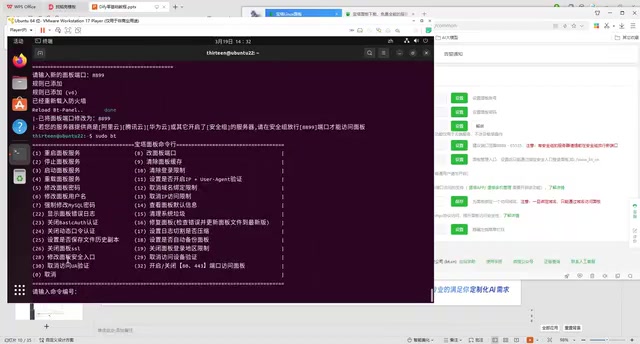
For example, change the port to 8899 and the security entry to /biken, so the access URL becomes http://192.168.x.x:8899/biken — easier to remember and more secure.
Step 3: Deploy Dify via Docker
With BT Panel installed, deploying Dify takes just a few clicks:
- Find the "Docker" module on the left sidebar of BT Panel and click to install Docker
- Choose the default installation method and wait for it to complete
- Enter the Docker management interface and search for "Dify"
- Click Install, confirm the configuration, and wait for deployment to complete
Docker is an OS-level virtualization technology that packages an application along with all its dependencies (runtime, libraries, configuration files, etc.) into a standardized container image. The key difference between containers and traditional virtual machines is that containers share the host machine's OS kernel, resulting in faster startup times and lower resource consumption. Dify's Docker deployment actually uses Docker Compose to orchestrate multiple container services, including the web frontend, API service, Worker for async task processing, PostgreSQL database, Redis cache, Weaviate/Qdrant vector database, and other components — all brought up with a single command. Through BT Panel's Docker management module, this process is further simplified into graphical click operations.
Common Troubleshooting:
If you encounter image pull failures during installation, it's usually caused by network issues. Try the following solutions:
- Modify DNS: Edit the
/etc/resolv.conffile and change the nameserver to8.8.8.8and8.8.4.4(these are Google's public DNS servers, which can sometimes improve DNS resolution stability in certain network environments) - Configure Docker mirror acceleration: Add a domestic acceleration URL in Docker settings (refer to the acceleration links in BT Panel's official tutorial posts). Docker images are pulled from Docker Hub by default, and since the servers are overseas, access speeds can be unstable. Configuring a mirror accelerator is essentially using domestic cache nodes to speed up downloads
- Downgrade version: Try installing Dify version 1.0.0
After modifying DNS, restart the panel, uninstall the previously failed installation, search for Dify again, and reinstall.
Step 4: Access and Initialize Dify
After installation is complete, change the protocol in Dify's access URL to http, set the port to 8088, and append /install to enter the initialization setup page. After setting up your email and username, your locally deployed Dify is officially ready to use.
Conclusion
Deploying Dify through BT Panel involves multiple components — virtual machines, a Linux system, and Docker — but every step is a visual, click-based operation, making it very beginner-friendly. Once deployment is complete, you'll have a fully private AI application development platform. From there, you can build chatbots, Agent-based assistants, automated workflows, integrate enterprise knowledge bases, and ultimately publish usable AI products.
For developers who want to get started quickly with AI application development without writing code from scratch, Dify offers a low-barrier, high-ceiling path to practice. Its open-source and free nature allows individual developers and small-to-medium businesses to get started at zero cost — well worth exploring in depth.
Related articles

Lightpanda: A Headless Browser Built for AI and Automation
Lightpanda is a headless browser built from scratch in Zig for AI and automation, with 37,852 GitHub stars. This analysis covers its technical approach, design choices, and use cases.

From Will Smith Eating Spaghetti to AI Short Films: The Astonishing Pace of AI Video Evolution
Tracing AI video's evolution: from Runway's 2019 short film *The Orange* to the Will Smith spaghetti video, a Twitter comparison reveals the astonishing pace of technological progress in just a few years.

Opus 4.6 Chat Experience: Why Do Older Models Feel More "Human"?
A Reddit user shares a late-night chat with Opus 4.6, noting older models feel more personable. We analyze the causes of model personality differences and the balance between capability and experience.