Dify Self-Hosting Complete Tutorial: Building an AI Application Platform from Scratch
Step-by-step guide to self-hosting Dify, integrating LLMs, and building your first chat application.
Dify is an open-source LLM application platform combining BaaS and LLMOps principles, supporting hundreds of models and enabling rapid production-grade generative AI development. This tutorial covers the full path: Docker Compose self-hosting (2-core/4GB is enough), integrating domestic and international LLMs, and creating a chatbot. It also introduces Dify's four application types — Chatbot, Agent, Text Generator, and Workflow — with Workflow being the platform's most powerful differentiator, capable of chaining multiple models and tools together.
Dify has become one of the most popular open-source LLM application development platforms, emerging as a go-to tool for individual developers and enterprises building generative AI applications. This article, based on a hands-on tutorial, walks through the complete Dify self-hosting process — including model integration and building your first chat application — to help you get up and running quickly.
What Is Dify and Why Use It
Dify is an open-source LLM application development platform that blends Backend as a Service (BaaS) with LLMOps principles, enabling developers to rapidly build production-grade generative AI applications. Its biggest strength is a low barrier to entry — even non-technical users can participate in defining AI applications and managing data operations.
The platform comes with a built-in technology stack for LLM applications, integrates hundreds of models, features a clean and intuitive interface, and provides a practical API for business integration — saving significant time otherwise spent reinventing the wheel. The main interface includes several core modules: application creation, Studio, Knowledge Base, and Tools.
Compared to similar tools like LangChain, Flowise, and the OpenAI Assistants API, Dify stands out as an open-source project built by a dedicated full-time team alongside an active community. Users can fork the source code to develop their own customized or enterprise-grade versions of Dify. According to the official comparison documentation, Dify is more mature in workflow orchestration and enterprise features, and relatively straightforward to deploy locally.
Dify's use cases are broad: it can be used to quickly build MVP products for proof-of-concept (POC); it can integrate LLM capabilities via API into existing business code to enhance intelligence; or it can serve as enterprise-grade LLM infrastructure — banks and major internet companies have already deployed it as an internal LLM gateway to accelerate the adoption of generative AI within their organizations.
LLMOps (Large Language Model Operations) is an engineering practice framework inspired by MLOps, specifically designed for managing the full lifecycle of LLM applications. It covers prompt versioning, model evaluation and switching, call log monitoring, cost tracking, and more. BaaS (Backend as a Service) is an architectural model that hosts and exposes common backend capabilities — such as authentication, databases, file storage, and API gateways — as managed services, so developers don't need to build backend infrastructure from scratch. Dify combines both: it provides ready-made backend services (vector databases, user management, API endpoints) alongside built-in LLM operations tooling (conversation logs, annotation feedback, model performance comparison), letting developers focus on business logic rather than rebuilding foundational infrastructure.
Two Ways to Use Dify: Cloud Service vs. Self-Hosting
There are two main ways to use Dify. If you just want a quick experience, you can visit the official cloud service at cloud.dify.ai and sign up — the features are largely the same as a self-hosted deployment, making it ideal for exploring the platform.
If you need customization, secondary development, or internal enterprise integration, you'll need to self-host. The officially recommended approach is Docker Compose. Notably, Dify has low hardware requirements — a basic setup of 2-core CPU + 4GB RAM is enough to run it, since Dify calls external models and doesn't handle model inference itself. Hardware requirements only become significant if you also want to self-host your LLMs.
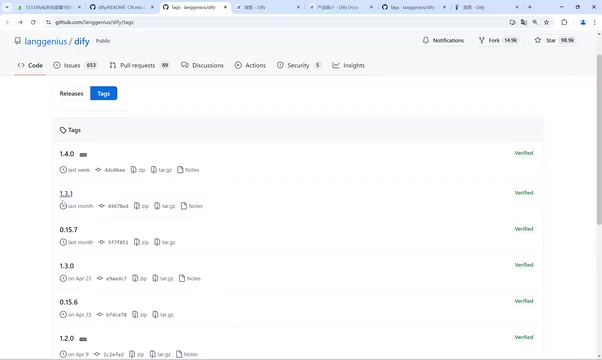
Regarding version selection, Dify currently maintains both 0.x and 1.x release lines. The tutorial author chose version 0.15.7 for stability; if you want the latest features, 1.x is also an option.
Deploying with Docker Compose
There are two ways to get the installation package: clone the repository via Git and switch to the desired version, or download the source code as a ZIP archive directly. For beginners, downloading the ZIP is simpler.
The tutorial uses an Ubuntu 22.04 server. After uploading and extracting the archive on your Linux server, navigate to the docker directory, where you'll find the key docker-compose.yaml file.
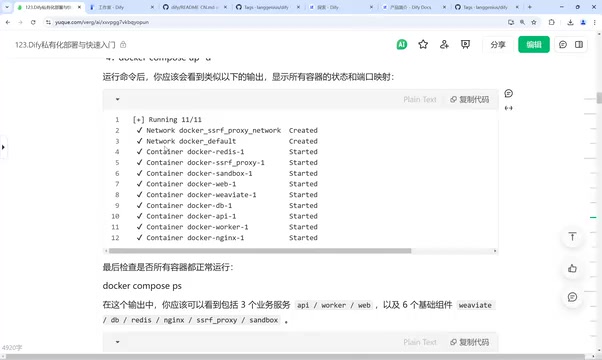
Deployment is straightforward — just two steps:
- Copy the environment config file: Copy
.env.exampleto.env. This file defines the base environment for Dify, including the default port of 80 (meaning you can access it directly via IP after deployment, no port number needed). - Start the services: Run
docker-compose up -d(ordocker compose up -dfor Docker Compose 2.0).
The first run will pull Docker images. Since the default image registry is hosted overseas, this can be slow — the author found it took around ten minutes. It's recommended to configure a domestic mirror accelerator to speed things up.
Once started, use docker-compose ps to view running containers. Dify is composed of multiple services: Nginx (serving port 80 externally and handling request forwarding), Dify Web, Dify API, Redis, and a vector database (Weaviate by default). When all services show Up status, the deployment is successful.
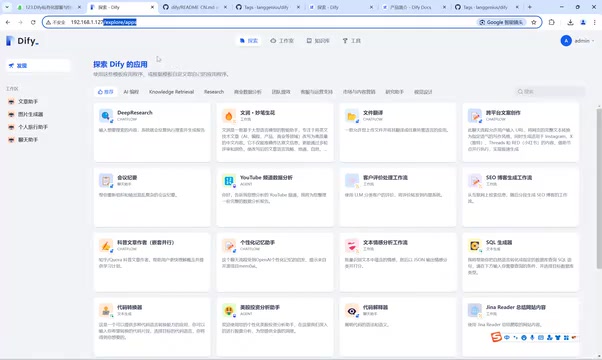
Accessing Dify is simple — just enter your server's IP address in a browser (e.g., 192.168.1.127). On first access, you'll be prompted to set up an admin account with an email address and password.
Updates and uninstallation: To update, pull the latest code and run docker-compose pull followed by up -d. To uninstall, run docker-compose down inside the docker directory. Importantly, all docker-compose commands must be run from the directory containing docker-compose.yaml, or they won't work. Also note that only one version of Dify can run on the same server at a time — multiple versions will cause port conflicts.
If you're using a cloud server and can't access Dify, the issue is usually network-related — check that the security group whitelist and firewall rules allow traffic on the relevant ports.
Docker Compose is Docker's official multi-container orchestration tool. It uses a single YAML configuration file to describe all services (containers), networks, and storage volumes required by an application, allowing the entire service stack to be started or stopped with a single command. For a system like Dify — composed of multiple microservices including a web frontend, API service, database, cache, and vector store — Docker Compose eliminates the hassle of manually starting and configuring each container. The
.envfile is Compose's environment variable injection mechanism: when Compose starts, it automatically reads the.envfile in the same directory and substitutes the defined variables into the placeholders indocker-compose.yaml. This separates configuration from code, meaning you only need to edit.envto change ports, keys, or other parameters — no need to touch the core config file.
Integrating LLMs
The first thing to do after deployment is connect an LLM. Click the admin menu in the top-right corner → Settings → Model Providers, then select and configure your desired model.
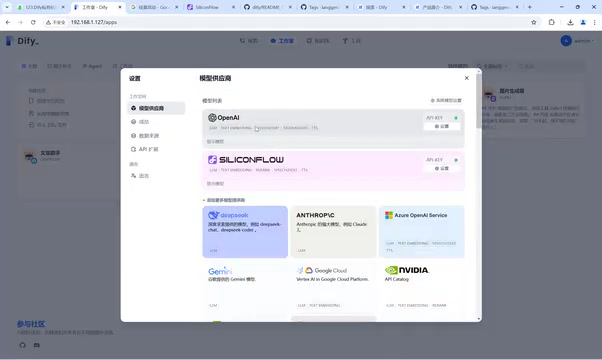
The tutorial author configured two models: OpenAI and SiliconFlow. SiliconFlow is recommended as one of the better domestic model providers — it aggregates a large number of models including Qwen and DeepSeek, covering text, voice, image, and video capabilities, all accessible via API without any self-hosting required. It also offers free credits upon registration, making it great for learning.
Beyond SiliconFlow, domestic options include Qwen, Zhipu, ERNIE Bot, Kimi, and others — most offer free tiers with affordable paid pricing. For international use, Google and Hugging Face are available options. Configuring a model simply requires entering the API key from the corresponding platform.
Building Your First Chat Application
Once models are connected, you can create an application. In the Studio, click "Create from Blank" to see the available application types:
- Chatbot: Quickly build a conversational bot with simple configuration, ideal for Q&A scenarios.
- Agent: Equipped with reasoning and autonomous tool-calling capabilities, suited for task execution such as weather queries, travel planning, or image generation.
- Text Generator: Focused on specific tasks like translation or speech transcription.
- Chatflow / Workflow: For advanced users. Chatflow supports complex multi-turn conversations with memory, while Workflow can orchestrate complex processes involving branching logic, multi-model calls, knowledge base retrieval, third-party API calls, and more.
Workflow is where Dify's capabilities truly shine. For example, to generate viral video content, you can chain together nodes for scriptwriting (calling DeepSeek), voice-over generation, video synthesis, and digital avatar lip-syncing — with outputs passed between nodes as variables. Dify reportedly includes over a hundred built-in tools, covering weather queries, text-to-image (DALL·E, Stable Diffusion), text-to-speech, Feishu messaging, calendar scheduling, search engines, and more. Note that a workflow must be complete before publishing — incomplete flows will cause errors and prevent saving.
The tutorial demonstrates the simplest case: a chatbot. After creating the application, define the AI's role in the prompt area (e.g., "You are an English learning assistant"). If you're unsure how to write prompts, click the "Generate" button, describe your needs in plain language, and Dify will use the configured GPT-4o to generate prompts automatically. The author tested this by creating a multilingual translation bot — entering the Chinese sentence "我今天去爬山了" immediately produced an English translation.
Chat applications also support configuring opening greetings, context, file uploads, text-to-speech, knowledge bases, vision capabilities, and more for continuous UX improvement.
Important reminder: After completing your configuration, you must click the "Publish / Update" button in the top-right corner to save your changes — otherwise they will be lost on page refresh.
The core difference between an Agent and a regular chatbot lies in its tool-calling and multi-step reasoning capabilities. A regular chatbot is essentially a single-turn or multi-turn prompt conversation where the model only generates text. An Agent, built on frameworks like ReAct (Reasoning + Acting), can autonomously decide whether to call a tool, which tool to call, and how to handle the results — maintaining a reasoning chain across multiple tool calls before synthesizing a final output. Workflow, on the other hand, crystallizes this orchestration logic into a visual node graph, making it ideal for processes that are relatively fixed and require precise control over each step's inputs and outputs. Compared to the autonomous decision-making of an Agent, Workflow behavior is more predictable and easier to debug, making it better suited for production environments where stability is critical.
Summary
Getting started with Dify can be summarized in four steps: understand its features → deploy locally with Docker Compose → integrate LLMs → build and test an application. With an extremely low hardware barrier and modular out-of-the-box design, Dify allows individuals and enterprises to enter generative AI application development at minimal cost. Once you've mastered the basics with a simple chatbot, you can go further by exploring Agents and Workflows to build more sophisticated intelligent applications.
Related articles

A DeepSeek Researcher's Confession: The AI He Trained Is About to Replace Him
DeepSeek V4.1 kernel engineer Liu Shengyu admits the AI he trained will surpass his own skills within a year—yet he keeps pushing forward. Here's why.
n8n Automation in Practice: How AI Workflows Help SMBs Cut Costs and Boost Efficiency
Learn how SMBs use n8n and AI tools to automate multi-platform messaging, AI customer service replies, and bulk exam data entry — real-world workflows for cutting costs.
DeepSeek Harness Hands-On: Build Your Own Coding Agent for Free
DeepSeek Harness hits 190K GitHub stars as a free Claude Code alternative. This hands-on review covers installation, plugin models, full traceability, and driving Claude Code as a subprocess.