Dify Workflow in Practice: A Guide to Local Deployment and Private Knowledge Base Agents
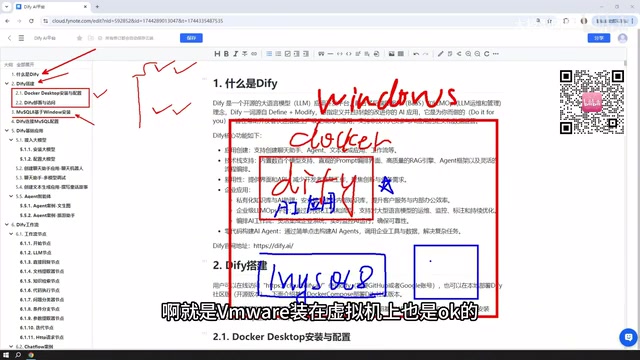
Dify course review: a complete path from local deployment to database, workflows, model access, and publishing.
This article reviews a Dify hands-on course based on Windows + Docker, outlining its full-chain content from deployment, database connection, and app building to publishing. It explains Dify's five application types—Chatbot, Text Generation, Agent, Chatflow, and Workflow—and notes that workflows come in two forms: multi-turn conversation and one-time output. The course recommends self-hosting for direct MySQL access, a "one node, one case" workflow learning approach, paid models like DeepSeek (with free tokens from ERNIE Bot and Tongyi Qianwen), and Ollama for local models. Publishing supports public websites, embedding, and APIs. Overall it leans toward engineering implementation and suits Windows developers, though Linux deployment details are less covered.
Why Dify Deserves Attention
There are plenty of Dify tutorials on Bilibili, but most stay at the level of clicking around the interface. The value of this course is that it strings together "deployment—data connection—app building—publishing" into a complete path to production, rather than demonstrating isolated features. From the content, the instructor demonstrates Dify's local deployment based on Windows + Docker, along with the installation and connection configuration of MySQL 8. The goal is clear: to let the AI apps you build actually read and write to your local database, rather than being just toy demos.
Dify is essentially an AI application development platform, and the online and self-hosted versions have nearly identical interfaces. But the instructor recommends self-hosting for production environments, for a very practical reason—when your app needs to access an intranet database, the online version has to rely on NAT traversal to expose your local IP to the public internet, which is both cumbersome and adds a layer of risk. Local Docker deployment lets Dify communicate directly with MySQL on Windows, and databases inside virtual machines can also interconnect, making the deployment location fairly flexible.
Dify's Five Application Types: Distinguish Them First, Then Start
The course categorizes Dify's applications into five types: Chatbot, Text Generation, Agent, Chatflow, and Workflow. The first three are basic applications, while the latter two are the two branches of workflows.
Chatbot and Text Generation are easy to grasp—the former for conversation, the latter for producing articles or documents. The difference with Agent is that it can call tools, such as scraping a webpage before analyzing it, and it can orchestrate multi-step tasks like this on its own.
The workflow layer deserves more time. Chatflow supports multi-turn conversations with workflows, while Workflow leans toward one-time input and output. In the video, the instructor admits that this distinction is confusing when you haven't touched Dify before, so detailed cases are provided later to expand on it. That's the right approach—the concept of workflows is hard to explain thoroughly when detached from concrete nodes.
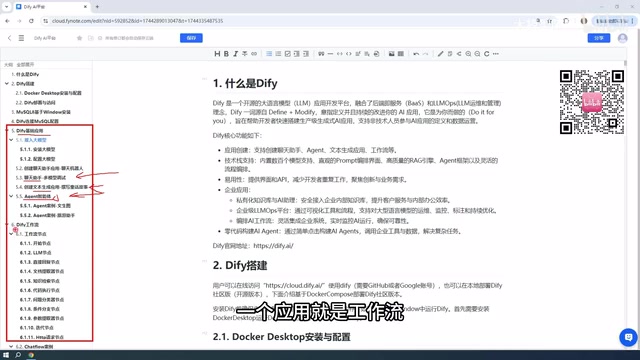
Workflow Nodes and Case-Driven Learning
A workflow is composed of individual nodes, and the course covers most of the commonly used nodes officially provided by Dify, with a case for each node. According to the instructor, more than a dozen cases were prepared for the node section alone, plus complete process cases for Chatflow and Workflow—the volume is not small.
This "one node, one case" arrangement is fairly friendly to beginners. The difficulty of workflows often lies not in a single node, but in the data passing between nodes and the design of branch conditions. Building node-level muscle memory first, then assembling complete processes, makes the learning curve gentler.
Nodes in a Dify workflow are the basic units that make up a process. Common types include the Start node, LLM node, Knowledge Retrieval node, Code Execution node, Conditional Branch node, HTTP Request node, Variable Aggregator node, and End node. Each node has input and output variables, and data is passed between nodes through variable references. For example, an LLM node can reference the user question passed in from the Start node, or reference document fragments returned by the Knowledge Retrieval node. The Conditional Branch node determines the subsequent path based on the value of upstream variables, and is the key to implementing complex logic. Understanding the input-output contract of nodes is a prerequisite for avoiding workflow runtime errors.
Model Access: The Practical Consideration of Prioritizing Paid Models
The course explicitly recommends connecting external paid models rather than running small models locally. The reason is straightforward: locally deployed models are generally small in scale, and their actual performance is not ideal. The instructor's advice is to prioritize paid services like DeepSeekAd, where ten yuan of credit lasts a long time—he shows his account, where less than one yuan sustained him for a long period.
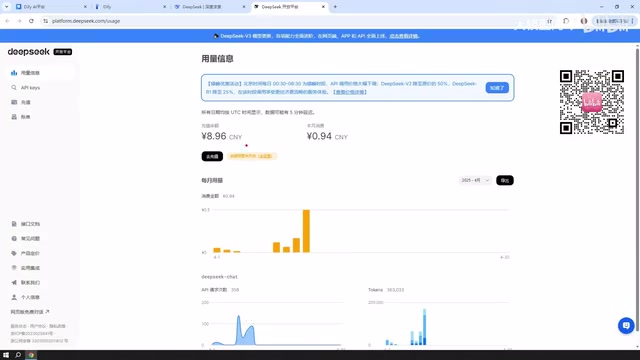
For those who want to start at zero cost, Baidu ERNIE Bot and Alibaba Tongyi Qianwen both offer free token quotas after registration, described by the instructor as being in the millions, which is basically enough for daily testing. The course also provides application entry points for each platform.
The local model route is not completely closed off. Dify supports integrating local models deployed via Ollama, and the course includes a case for this. If your machine has sufficient performance, or you go with an enterprise-level cluster deployment, downloading large open-source models with many parameters (such as the largest open-source version of DeepSeek, which reaches hundreds of GB in size) will perform noticeably better than small models.
Ollama is an open-source tool for running local large models, supporting one-click download and execution of open-source models like Llama, Qwen, and DeepSeek on Windows, macOS, and Linux. It provides services externally through an OpenAI-compatible API interface, so Dify can integrate it as a custom model provider. The performance of local execution depends on the model's parameter count and the machine's VRAM. Small models of 7B to 14B can run on consumer-grade GPUs, but their reasoning ability and context length are limited; models above 70B usually require multiple GPUs or a large-memory server. The benefit of using Ollama is that data never leaves your local machine, making it suitable for privacy-sensitive scenarios, at the cost of hardware cost and inference speed.
From Building to Publishing: Don't Let Your App Get Stuck Locally
Apps built with Dify have multiple exit points. The course mentions that they can be published as public websites with accessible links, embedded into websites you develop yourself, or called via API (including Python API). The public website route also involves NAT traversal, which is the same type of problem encountered with the online version.
This publishing step is often overlooked by tutorials, but it determines whether what you've spent time building is for your own amusement or something genuinely delivered. The API approach especially deserves attention—integrating a Dify app into an existing business system as a backend capability is more practically valuable than opening a standalone chat page.
NAT traversal refers to the technology of mapping intranet services to publicly accessible addresses through a public server relay. Common tools include frp, ngrok, and cpolar. The Dify online version is deployed in the cloud and cannot directly access a MySQL database on your local machine or company intranet, so NAT traversal is needed to expose the database port to the public internet before the cloud-based Dify can connect. This approach introduces additional network latency, and exposing the database port to the public internet carries security risks, requiring firewalls and access control. When self-hosting Dify, Dify and the database are on the same intranet and can communicate directly via intranet IP without traversal—this is one of the core reasons the instructor recommends self-hosting for production environments.
Overall Assessment
The structure of this course is a complete chain of "concepts—deployment—database—workflows—model access—publishing," leaning toward engineering implementation rather than a feature list. It is suitable for developers with a Windows environment who want to get private knowledge base Q&A or tool-based agents running on their own machines. One thing to note: the Dify workflows mentioned in the video were still in beta at the time, and although the instructor judged them to be fairly stable, interface changes from version iterations need to be checked against the latest documentation. In addition, the course follows the Windows + Docker main line and covers relatively few details of Linux server deployment, so production users will need to supplement their knowledge in this area.
One-line Summary
Dify course review: a complete path to production from local deployment to database, workflows, model access, and publishing.
Paragraph Summary
This article reviews a Dify hands-on course based on Windows + Docker, outlining its full-chain content from deployment, database connection, and app building to publishing. It first explains Dify's five application types—Chatbot, Text Generation, Agent, Chatflow, and Workflow—and notes that workflows come in two forms: multi-turn conversation and one-time output. The course recommends self-hosting in production to connect directly to local MySQL, avoiding the hassle of NAT traversal with the online version. Workflow learning follows a "one node, one case" approach, emphasizing that data passing between nodes and branch logic are the real difficulties. For model access, it recommends paid external models like DeepSeek at very low cost; ERNIE Bot and Tongyi Qianwen offer millions of free tokens, and local models can be integrated via Ollama given sufficient hardware. The publishing step supports three exit points—public website, website embedding, and API—with API integration into business systems being the most practically valuable. Overall it leans toward engineering implementation and suits Windows-environment developers, though Linux deployment details are less covered.
Related articles
A Complete Guide to Distributed LLM Training: DP/TP/PP/SP Explained
Starting from the single-GPU memory bottleneck, this guide systematically explains DP data parallelism, TP tensor parallelism, PP pipeline parallelism, and SP sequence parallelism in distributed LLM training, covering their splitting dimensions, communication costs, and hybrid parallelism selection logic.

DeepSeek Harness Step-by-Step Guide: From Installation and Setup to Plugin Practice
DeepSeek Harness step-by-step guide: Node.js setup, client installation, and three plugin installation methods to get you started fast with this open-source AI Agent framework.

MCP Beginner's Guide: The Standardized Protocol for LLMs to Connect to External Tools
Based on open course content from Bilibili, this article explains the core definition and value of the MCP protocol: why large models need a standardized tool connection protocol, how MCP can encapsulate and reuse traditional software interfaces, and the conceptual distinction between MCP and Skill, offering beginner guidance for Agent developers.