Dina 4.5: Integrating Screen Recording, Screenshots, and 3D Motion Effects into One Workflow

Dina 4.5 unifies screen recording, screenshot beautification, 3D motion effects, and link sharing into one workflow.
Dina 4.5 is an all-in-one screen recording tool for designers and content creators, integrating recording, screenshots, cinematic 3D perspective motion, and instant link sharing into a single workflow. Its key differentiator is bringing 3D perspective animation — previously requiring After Effects — down to lightweight presets anyone can use. It earned 83 upvotes on Product Hunt and version 4.5 signals multiple rounds of iteration, though pricing, platform support, export formats, and collaboration permissions remain unclear.
A Design Tool That Wants to Redefine Screen Recording
When demoing products, recording tutorials, or creating social content, creators typically bounce between screen recording software, screenshot tools, motion editors, and sharing platforms. Dina 4.5 is built to solve exactly that fragmentation — it integrates screen recording, beautiful screenshots, cinematic 3D motion effects, and instant sharing into a single workflow.
On Product Hunt, this tool built by Zaid earned 83 upvotes and 9 comments, ranking 12th for the day. Listed under the Design Tools, Productivity, and Video categories, its positioning is clear: it targets visually-minded content creators and design professionals.
Core Features: A Four-in-One Creative Loop
Based on official descriptions, Dina 4.5's capabilities break down into four stages that form a complete creative pipeline.
Screen Recording and Screenshots
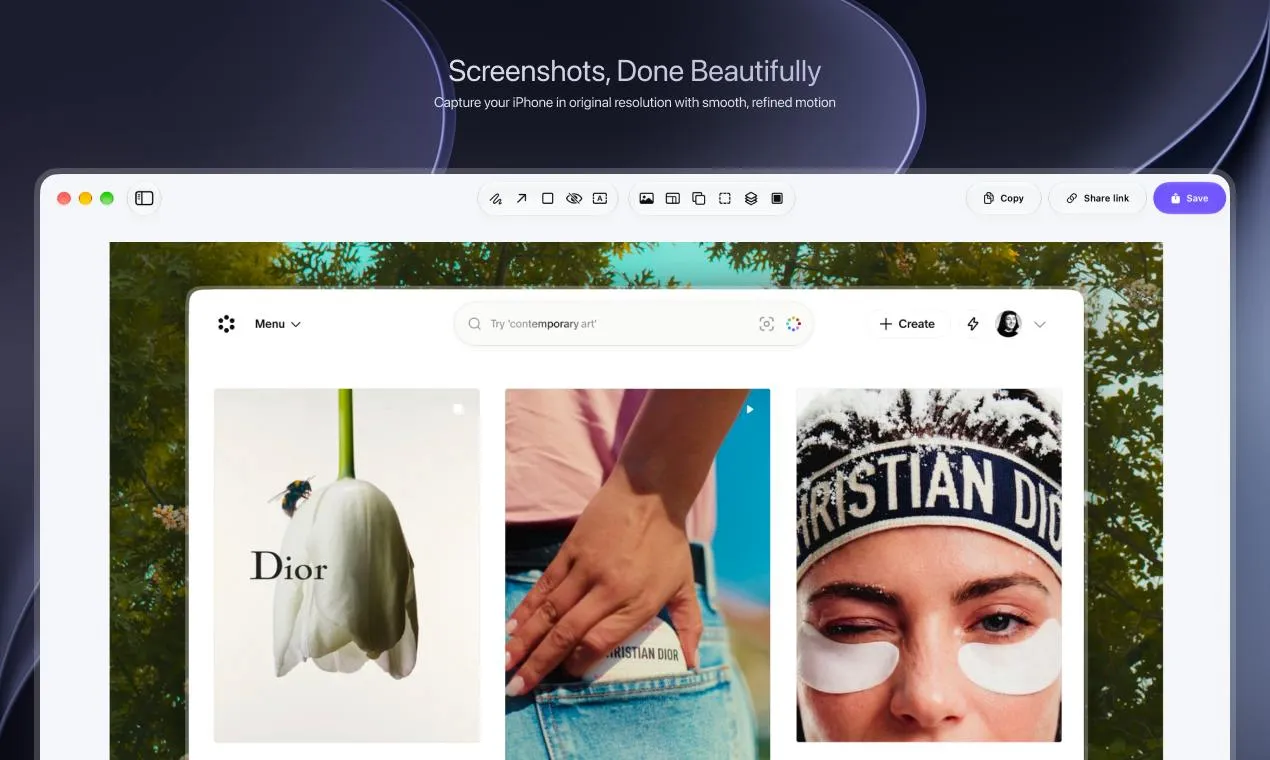
Recording and screenshots are table stakes for this type of tool. What Dina emphasizes isn't just the ability to capture — it's capturing beautifully. "Beautiful screenshots" is a phrase the product returns to repeatedly. This signals that the product has invested real design thinking into auto-layout, background enhancement, padding, and shadow handling, so raw screen content is immediately presentation-ready without needing post-processing in a separate design tool.
Cinematic 3D Motion and Perspective
What truly sets Dina apart from ordinary screen recorders is its cinematic 3D motion and perspective. By adding spatial motion and perspective shifts to static screenshots or recorded clips, the result gains depth and a sense of movement. This style of effect is popular in product demo videos, App Store previews, and social media short-form content — it previously required professional tools like After Effects to pull off. Dina brings it into a far more lightweight workflow.
Technically, 3D perspective motion effects are typically achieved by applying matrix transformations (perspective transforms) to 2D imagery, simulating rotation, tilt, and depth to make a static screenshot appear to "float" in space at an angle. Adobe After Effects' Camera tool and Apple Motion are the professional-grade solutions in this space, but they come with steep learning curves and dedicated rendering requirements. In recent years, tools like Rotato and ScreenSnapAI pioneered a lighter-weight approach to similar 3D device mockup effects on macOS. Dina's emphasis on cinematic 3D motion follows the same product philosophy — packaging what was once the domain of motion designers into preset parameters that any non-technical user can apply in one click. This visual style has already become a standard convention in App Store screenshots, Product Hunt hero images, and Twitter/X product launch posts. The growing accessibility of these tools has, in turn, raised audience expectations for what a "product showcase image" should look like.
Granular Customization
"Customize every detail" suggests the tool offers a meaningful degree of control. For designers, the ability to fine-tune backgrounds, spacing, motion parameters, and aspect ratios often determines whether a tool is a toy or a genuine productivity asset. How well this holds up in practice remains to be tested firsthand.
One-Click Link Sharing
Once a creation is complete, Dina supports instant sharing via link. This "create-and-share" model lowers the friction of passing content along — especially useful for internal team demos, async communication, or rapid distribution on social platforms.
What Need Does It Address
Dina 4.5's product philosophy reflects a clear trend in content creation tools: consolidating scattered point solutions into a cohesive workflow, and making "looks great" the default output rather than an extra manual step.
For indie developers, designers, and marketers, producing an eye-catching product demo no longer requires navigating multiple applications. Record, beautify, add motion, share — in theory, all in one place. That integration is the value proposition itself. What it saves isn't just software subscription costs; it's the cognitive overhead of constant context-switching.
The version number 4.5 signals that this isn't an early-stage experiment — it's a mature product shaped by multiple iterations. Sustained versioning typically reflects a stable feedback loop between developers and users driving ongoing refinement.
This tool-consolidation trend has concrete competitive reference points in the industry. Cleanshot X focuses on macOS screenshot beautification, Loom leads in async video communication, and Rotato specializes in 3D device mockup presentations — each owning a single niche. What Dina is attempting to connect is the full "record → beautify → animate → share" pipeline. The real competition isn't about any one feature being superior; it's about capturing users' attention and workflow habits. For indie developers and small teams, reducing the number of subscribed tools carries real cost and cognitive benefits. For larger design teams, collaboration permissions, brand consistency management, and batch export capabilities matter more — and these are precisely the areas where Dina's current lack of transparent information is most problematic.
Questions Worth Asking
Most publicly available information comes from the Product Hunt listing, which leaves out specifics on pricing, platform support (macOS/Windows/Web), export formats and quality, and the full range of 3D motion customization. These details are exactly what would determine whether it can fit into a professional workflow.
For anyone considering trying it, three things deserve close attention: the actual rendering quality and customization freedom of the 3D motion effects, the resolution and format compatibility of exported video, and the permission management capabilities for shared links. These dimensions will ultimately determine whether Dina is a "good-looking toy" or a "reliable productivity tool."
Summary
Dina 4.5 represents the evolution of screen recording and screenshot tools toward an all-in-one, high-aesthetic direction. It packages recording, screenshots, 3D motion effects, and sharing into a single workflow, targeting content creators' dual demand for efficiency and visual polish. In a crowded competitive landscape, whether it can carve out a durable position on the strength of its 3D motion differentiator is something that real-world usage will need to prove.
Related articles

Gaussian Process Bandit Optimization: Exploration Strategies and Inference Regret Guarantees
Cumulative regret guarantees in Bayesian optimization fail to reflect final recommendation quality. This article examines a new study that provides inference regret guarantees for Gaussian process bandit optimization through exploration query strategies and fill distance analysis, validated on hyperparameter optimization and control tasks.

The Most Detailed Codex Guide on Bilibili: From Installation to Real-World Practice
The most detailed Codex guide on Bilibili: from app store installation to daily work mode configuration, with a real coffee shop project demonstrating file organization, data extraction, dashboard creation, and other practical tasks. Learn to use Plan Mode and desktop pets to leverage Codex efficiently.

Appearance Compensation in Volume Rendering: Why RGB Accuracy Cannot Guarantee Density Correctness
Volume rendering research reveals that volumetric data perfectly reproducing external RGB views may still contain density errors: appearance compensation can double central density and keep external rays unchanged even when L2 error exceeds 14.52%. Density recovery depends on appearance capacity, spatial resolution, and measurement design.