Ditch the GUI! Build the Ultimate AI Terminal Workflow in Five Steps

Five steps move AI from the chat box into the terminal, building an engineered workflow with memory, parallelism, persistence, and rollback.
The article breaks down the five-step "ultimate AI setup" proposed by YouTube creator NetworkChuck. The core isn't switching to a stronger model, but solving three engineering problems: how AI remembers you, how it works in parallel, and how it never goes offline. The five steps are: subscribe to Claude or ChatGPT and drive them from the terminal with Claude Code and Codex, letting output flow into the file system and script pipelines; install Life OS for cross-session long-term memory; use multiple windows and panels for asynchronous, parallel multi-agent collaboration; deploy the whole system to a VPS for persistent uptime and cross-device access; and finally use snapshots and rollback as the bottom-line safeguard after granting write permissions. The author also notes that Life OS is described only by the creator, and the VPS recommendation carries Hostinger sponsorship—the method is worth borrowing, but choices need independent verification.
Why Your AI Workflow Needs a "Decluttering"
Most people still use AI by opening a web page, typing a question, and copying the answer. But according to YouTube creator NetworkChuck, this "chat box mode" barely scratches the surface of what AI can really do. His approach is blunt: throw out the GUI, run AI in the terminal, and layer on an engineering setup built around persistence, multitasking, and disaster recovery.
This five-step method, which he calls the "ultimate AI setup," isn't about recommending a more powerful model. Its core logic tackles three engineering problems—how AI remembers you, how it works in parallel, and how it never goes offline. Below is a breakdown of each step's actual intent and where it applies.
Step 1: Subscribe to a Model, but Drive It from the Terminal
NetworkChuck's advice is to subscribe to Claude or ChatGPT (or both), then call them from the terminal via Claude Code or Codex. The key here isn't "switching tools"—it's switching interaction paradigms.
The value of terminal-driven AI lies in composability: its output can flow directly into the file system, version control, and script pipelines, rather than being trapped in a web chat box. Ask the AI to edit a config file, and it actually can. Ask it to read a log, and it actually does. That's something a GUI chat window can't do.
But be clear-headed: this step requires basic command-line familiarity, and you need to manage the terminal agent's permission boundaries yourself. For pure content creators, the payoff may be less obvious than for developers.
Claude Code and Codex are both agent-style tools that bring large model capabilities into the command line. Claude Code, launched by Anthropic, can read project files, execute commands, modify code, and run tests in the terminal—essentially a coding agent with tool-calling permissions. Codex is OpenAI's early code model series, which has now also extended into a terminal/CLI coding assistant. The key difference between these and web chat windows is tool use: the model can proactively read and write local files, execute shell commands, and access version control, forming an "observe–act–verify" loop. This also means users must design permission management themselves—for example, restricting writable directories and avoiding granting sudo access directly in production environments.
Step 2: Give AI Long-Term Memory with Life OS
According to NetworkChuck, after having the agent install Life OS, the AI "went to college"—it gained better memory, a skill library, and a set of algorithms it can reason with on its own, and "it understands you." He claims to have used it for years.
This step touches on a real problem in current AI applications: cross-session context persistence. By default, every conversation starts from scratch, while an agent with a memory layer can accumulate preferences, project background, and historical decisions.
But note: Life OS's specific capabilities are currently described only by this creator, with no independent third-party verification. Whether it's a general memory framework or a wrapper for specific scenarios, readers should verify before investing.
Cross-session context persistence is typically implemented through three mechanisms: first, writing conversations and decisions to external files or databases and retrieving/injecting them at each startup; second, vectorizing historical fragments and recalling them by semantic similarity; third, maintaining structured "memory files" (such as preferences, project conventions, and people relationships) that the agent actively reads and writes. Common industry practices include retrieval-augmented generation (RAG), memory layer frameworks, and file-system-based "second brain" storage. The shared challenge is the selection, expiration, and conflict resolution of memories—remembering too much pollutes the context, and remembering wrong misleads subsequent decisions. When evaluating such solutions, focus on how they decide "what to remember, what to forget, and when to invoke."
Step 3: Multiple Windows, Multiple Panels in Parallel
"You won't just be talking to an agent in one window." This line was emphasized repeatedly in the original, showing how much importance it carries.
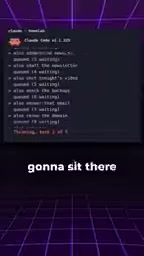
The point of multiple panels is parallel task management: one agent runs code, one organizes materials, one waits for your confirmation. When a task gets stuck or needs your decision, the system pushes a notification. This effectively turns AI from a "Q&A tool" into an "asynchronous collaborating colleague"—you don't need to watch it; it finds you when it needs you.
For users accustomed to synchronous conversation, this is a mindset shift: managing multiple background agents is more like managing a team than using a piece of software.
Asynchronous collaborating colleague corresponds to task queues and human-in-the-loop mechanisms in agent orchestration. When multiple agents run in parallel, a scheduling layer typically distributes tasks to different sessions, each running in an independent context, and suspends and notifies the user when authorization is needed, information is missing, or an error occurs. The fundamental difference from synchronous conversation is that the user no longer occupies every step of the reasoning loop, but acts as an approver and corrector. The cost is information desynchronization due to context isolation, and the risk of conflicts when multiple agents write files simultaneously—so lock, branch, or snapshot mechanisms are often needed.
Step 4: Move the Whole System to a VPS
This is the most engineering-valuable step in the whole setup. NetworkChuck explicitly argues against running this configuration on your local machine or laptop, advocating deployment to a VPS, and names Hostinger's offering.

The reasoning is practical: a VPS is always online, accessible from anywhere, and unaffected by local machine sleep or network outages. When your agent needs to run long tasks, or you want to access the same working environment from your phone, the limits of local deployment become obvious.
Disclosure: The original video is sponsored content for Hostinger, offering a 67% discount on the KVM2 plan, an extra 10% off with a promo code, and a spin-to-win giveaway. The VPS deployment idea itself is sound, but readers should judge which provider to choose independently, not be driven by discounts.
VPS (Virtual Private Server) is a service that uses virtualization to partition a physical server into multiple independent instances, each with its own operating system, IP, and resource quota. Compared with local machines, a VPS provides 24/7 uptime, a fixed public address, and remote SSH access, making it suitable for long-running services and persistent agent processes. When choosing, consider CPU/memory specs, bandwidth and traffic, snapshot backup capability, and data center location. Note that exposing an agent with file write permissions on a public instance expands the attack surface; configure firewalls, key-based login, and least-privilege accounts.
Step 5: Snapshots and Rollback Are the Bottom Line
Agents automatically modifying files means "destructive changes" are the norm, not the exception. NetworkChuck's fifth step is snapshots and backups: roll back when problems occur, and downtime is unacceptable.

This point is often overlooked. Once you give AI file write permissions, a single mistake can overwrite critical configurations. Including snapshots in your VPS plan and backing up regularly is a prerequisite for turning "AI automation" from a toy into a production tool.
Who This Setup Is For
The five-step method as a whole is an engineering-oriented solution for power users: terminal-driven, memory layer, multi-agent parallelism, remote persistence, and disaster recovery rollback—each link addresses a real pain point. It's not for people who just want to ask occasional questions, but for developers and small teams who have already embedded AI into their daily workflow and are willing to invest time in debugging, this framework is worth using as a starting point.
The judgment to retain: Life OS's actual effectiveness is currently backed by a single source, and the VPS recommendation carries a commercial partnership. The method is worth borrowing, but verify the specific choices yourself.
One-line Summary
Five steps move AI from the chat box into the terminal, building an engineered workflow with memory, parallelism, persistence, and rollback.
Paragraph Summary
The article breaks down the five-step "ultimate AI setup" proposed by YouTube creator NetworkChuck. The core isn't switching to a stronger model, but solving three engineering problems: how AI remembers you, how it works in parallel, and how it never goes offline. The five steps are: subscribe to Claude or ChatGPT and drive them from the terminal with Claude Code and Codex, letting output flow into the file system and script pipelines; install Life OS for cross-session long-term memory; use multiple windows and panels for asynchronous, parallel multi-agent collaboration; deploy the whole system to a VPS for persistent uptime and cross-device access; and finally use snapshots and rollback as the bottom-line safeguard after granting write permissions. The author also notes that Life OS is described only by the creator, and the VPS recommendation carries Hostinger sponsorship—the method is worth borrowing, but choices need independent verification.
Related articles

A 19-Year-Old's Rental Horror Story: Ceiling Collapse, Bug Infestation, and the Lessons It Taught Me
At 19, my first off-campus rental brought bug infestations, no heat, a collapsed ceiling, and a ruined laptop with no renter's insurance. Here are the hard-won lessons for first-time student renters.

Veda Nurse's Cranial Nerve Exam: Why ASMR Role-Play Is Going Viral
Bilibili creator Veda's cranial nerve exam ASMR video goes viral, blending humor and sensory triggers through nurse role-play. This article analyzes its unique appeal and the audience psychology behind ASMR role-play.

LG Cinebeam AI Review: 120-Inch Giant Screen + 3000 Lumens, a New Choice for the Living Room Theater
LG Cinebeam AI projector review: 3000 ANSI lumens, 4K, 100 inches from about 8 cm and 120 inches from about 18 cm. Built-in webOS, AI Concierge voice recommendations, AI Sound Pro 11.1.2 virtual surround, and Game Optimizer—positioned for fixed living room installation, complementing the portable Cinebeam S.