Do It For Them: Turn Photos into Collage Wallpapers, Customized for the People You Care About

Do It For Them lets you make personalized photo collage wallpapers for people you care about, in three browser steps.
Do It For Them Wallpaper Maker is a browser-based photo collage tool positioned as "photo wallpapers for the people you do it for." In three steps — choose a layout, add text, arrange photos — users turn photos into tape-collage-style phone wallpapers, desktop backgrounds, video call backgrounds, or social banners. Freemium: free watermarked downloads; $5 for five watermark-free exports with ZIP packaging and 300 DPI print PDF up to 4 × 6 feet. Developed by Jason Howie, it got 68 votes and 2 comments on Product Hunt, ranking 14th. Its core differentiator is emotional customization; long-term retention depends on layout updates and mobile drag-and-drop experience.
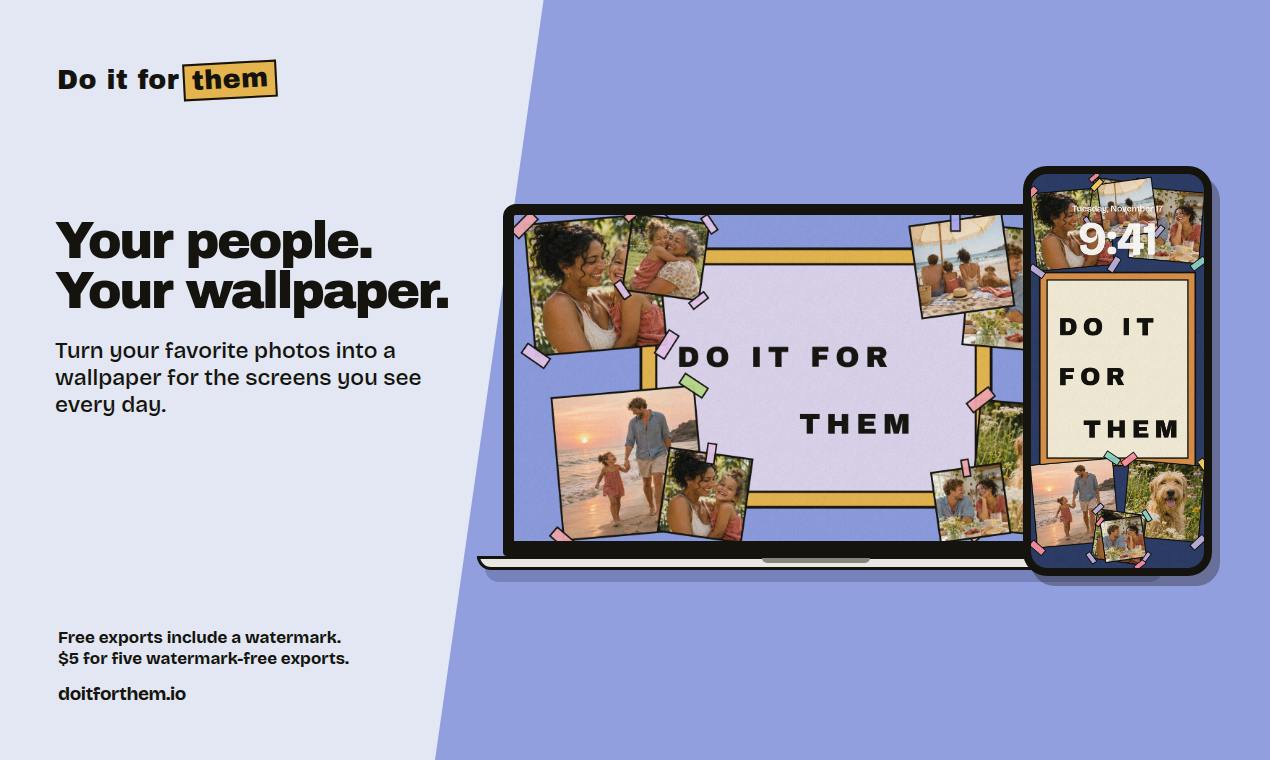
Phone wallpapers, desktop backgrounds, video call backgrounds, and social banners — these interface elements you see every day are often filled with default images or random stock photos. A tool called Do It For Them Wallpaper Maker that appeared on Product Hunt tries to make these spaces more personal through "photo collage" — and its positioning is clear: make a wallpaper for the people you care about.
What Problem It Solves
There's no shortage of wallpaper tools, but most products focus on "looking good": offering templates, filters, gradients, or AI-generated images. Do It For Them takes a different angle — it puts "people" at the center. The official tagline is "Photo wallpapers for the people you do it for."
This positioning brings a very practical use case: turn photos of family, friends, or a partner into a tape-collage-style wallpaper for your phone lock screen, computer desktop, or video meeting background. Compared to a single photo filling the screen, the collage format can hold more images, and the tape-sticker visual language carries a handmade, private feel — not as distant as a carefully retouched photo.
According to the Product Hunt page, the product was developed by Jason Howie, ranked 14th on that day's product list, and received 68 votes and 2 comments. The numbers aren't blockbuster-level, but as a lightweight tool, it has found a specific enough niche need.
Workflow: Collage Done in the Browser
The product's interaction design centers on "low barrier to entry." Users don't need to install desktop software — they simply choose a layout, add text, and arrange photos directly in the browser. The three actions described officially — pick a layout, add text, arrange photos — basically sum up the entire creation process.
The advantage of this design is an extremely low learning cost. For users unfamiliar with design software, dragging photos into preset layouts is far more friendly than starting from a blank canvas. The tape-collage style is inherently decorative, so users don't need to adjust shadows, borders, or angles to get a finished piece that looks "designed."
Output scenarios are well covered: phone wallpapers, desktop wallpapers, video call backgrounds, and social banners. This means the same creative logic can be reused across multiple platforms — make one collage and export versions adapted to different sizes.
Pricing: Free with Watermark, Paid Unlocks HD Export
Do It For Them uses a freemium model. Watermarked downloads are free, so users can try it out at zero cost and decide whether to pay after confirming the result.
The paid price is $5, which includes five watermark-free exports, ZIP packaging, and a 300 DPI print PDF at sizes up to 4 × 6 feet. This pricing strategy is worth noting: it's not a subscription but a one-time buyout export pack. For this kind of low-frequency tool, subscriptions often make users hesitate, while pay-per-use better fits the actual need of "making a few wallpapers."
The 300 DPI and 4 × 6 feet print support show that the product isn't limited to screen scenarios. Users can output collages as physical posters or photo walls, extending the "do something for the people you care about" positioning from digital space to physical space — and strengthening its gift appeal.
300 DPI refers to 300 dots per inch, the industry-standard resolution for commercial printing and photo printing. Screen display typically only needs 72–150 DPI, while printing below 300 DPI will make images look blurry or grainy. The product's 300 DPI output support means users can enlarge a collage to 4 × 6 feet (about 1.2 × 1.8 meters) while keeping it sharp — reaching the size of a small poster or photo wall. High-resolution export files are large, so ZIP packaging makes batch downloads easier.
Opportunities and Limitations of This Kind of Tool
From a product-logic perspective, Do It For Them taps into the direction of "emotional customization." As AI image generation grows more powerful, the value of real photos actually stands out more — users don't want a perfect image, but one with specific people and private memories. The collage format happens to organize multiple photos and handwritten text together, carrying more information than a single image.
The limitations are also obvious. Although the creation barrier for collage wallpapers is low, the ceiling is likewise not high — users may lose the novelty after making a few. Long-term retention depends on whether the product can keep offering new layouts, new decorative elements, or introduce social mechanisms like collaboration and sharing. Currently, the discussion volume of 2 comments on Product Hunt also suggests that the community's attention remains at the trial stage.
Another variable is the mobile experience. The official description emphasizes "arranging photos in the browser" — if dragging and dropping on mobile browsers isn't smooth enough, it will directly affect the core experience, since phone wallpapers are one of its main output scenarios.
Freemium is a common business strategy for tool products: basic features are open for free, and constraints like watermarks, resolution limits, or export counts guide users to pay for the full experience. Do It For Them uses a combination of "free watermarked download + paid watermark removal," which lowers the trial barrier while retaining a monetization path. Compared with subscriptions, a one-time buyout export pack suits low-frequency, event-driven use cases (such as making holiday gifts) better — users feel less psychological burden, but the repurchase rate is also relatively limited.
Who It's For
If you want to turn family photos into a computer desktop or give your video meetings a less serious background, this kind of tool offers a lighter option than professional design software. For users who want to make physical photo walls or small-sized posters, the 300 DPI print output is a practical feature that distinguishes it from ordinary wallpaper apps.
Its value isn't in how complex the technology is, but in turning a specific emotional need — making a wallpaper for the people you care about — into an operation that takes just a few steps. In an era when tool products generally pursue being big and comprehensive, this small and clear positioning is actually easier to remember.
One-line Summary
Do It For Them lets you make personalized photo collage wallpapers for the people you care about, completed in three steps in the browser.
Paragraph Summary
Do It For Them Wallpaper Maker is a browser-based photo collage tool positioned as "photo wallpapers for the people you do it for." In three steps — choose a layout, add text, arrange photos — users can turn photos of family and friends into tape-collage-style phone wallpapers, desktop backgrounds, video call backgrounds, or social banners. The product uses a freemium model: watermarked downloads are free, and $5 buys five watermark-free exports, including ZIP packaging and a 300 DPI print PDF supporting physical output up to 4 × 6 feet. Developed by Jason Howie, it received 68 votes and 2 comments on Product Hunt, ranking 14th. Its core differentiator is emotional customization, but long-term retention depends on layout updates and the mobile drag-and-drop experience.
Related articles

ChatGPT Plus Subscription Pitfall Guide: Go/Plus/Pro Tier Comparison and Quick Activation
A complete ChatGPT Plus subscription guide based on a Bilibili tutorial: from registering an account, comparing Go/Plus/Pro tiers, to the practical steps for quickly completing your subscription.

GPT-6.2 Sol/Astra Released! A Step-by-Step ChatGPT Plus Subscription Guide and Tier Comparison
GPT-6.2 Sol/Astra is out—here's a ChatGPT Plus subscription guide: register an account, compare Go/Plus/Pro tiers, and subscribe in a minute.

Comparing Three Channels for Subscribing to GPT Plus in China: Is Website Top-Up the Easiest?
How to subscribe to GPT Plus in China? This article compares website top-up, credit card, and mobile top-up channels—process, cost, and risk—with steps and tips to help you choose wisely.