Doubao Work Agent Hands-On: 5 Hidden Features That Supercharge Your Productivity

Doubao Work's Agent upgrade chains four skills together to handle full workflows, not just single questions.
This hands-on review documents the core shift after Doubao Work's Agent upgrade: AI no longer just answers questions — it understands goals, coordinates multiple skills, and drives tasks to completion. Using a typical workplace workflow as a through-line, the article walks through Document Processing, Multi-Dimensional Tables, PPT Generation, and Audio Transcription, showing how four seemingly independent skills work in concert to get things done. The key takeaway: the clearer your instructions, the higher the quality of what the Agent delivers.
The buzz around AI Agents keeps growing, yet many people are still stuck on the question: "What's it actually good for?" Taking advantage of Doubao Work's free one-month membership offer, I put its upgraded Agent capabilities through a full real-world test. Unlike the old "ask one question, get one answer" pattern, Doubao Work now feels more like an AI assistant that can take on tasks — you tell it what you want to accomplish, it understands your goal, and it calls on different capabilities to get things done.
From "Answer Machine" to "Task Assistant"
In the past, using AI looked like this: pose a question, receive an answer. That model handles single-point needs just fine, but real work rarely works that way — most tasks require multiple steps chained together.
The biggest change after Doubao Work's Agent upgrade isn't that it gained a few new skills. It's that those skills now work in concert toward a single goal. Open Doubao Work, select Work Tasks / Local Computer, and you'll find a collection of skill modules that can handle actual work directly. It's no longer a passive responder — it's an assistant that can understand a task, invoke the right capabilities, and drive things to completion.
That shift in positioning is exactly what sets an Agent apart from traditional conversational AI.
Document Processing: Extract Value from a Pile of Files
One of the most common workplace scenarios: you receive a heap of mixed files — PDFs, Word docs, proposals, reports. The real time sink isn't opening them one by one; it's quickly finding the information that actually matters.

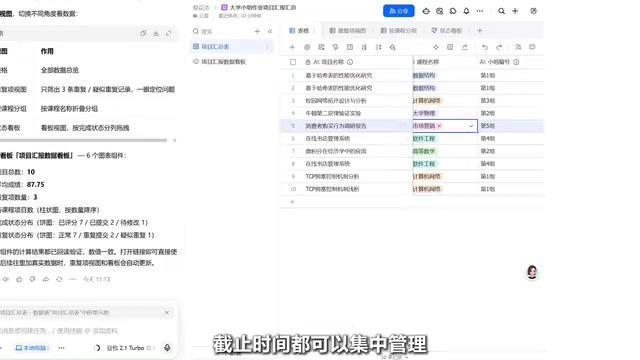
This is where the Document Processing skill comes in. Drop your materials in, tell it what you want — "summarize the key points," "extract core content," or "generate a summary report" — and it restructures the information around your goal rather than mechanically copying and pasting. In other words, it produces understanding-driven output, not simple information shuffling.
Multi-Dimensional Tables: Turn Scattered Information into a Manageable Structure
Once you've extracted the key information, a new problem surfaces: when project materials, client records, and task progress are all jumbled together, plain documents just don't cut it anymore.
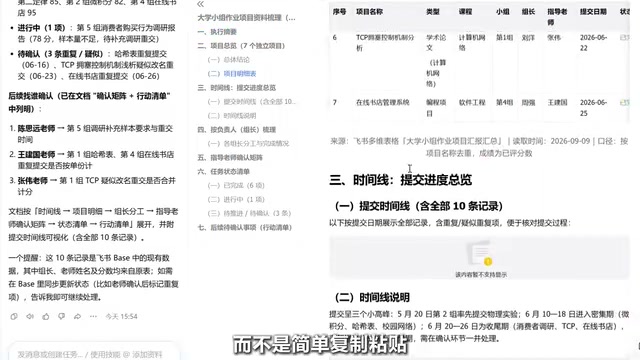
That's when you call on the Multi-Dimensional Table skill. Just tell it what you need to manage, and it will design a table structure to match — consolidating fields like project owner, current status, and deadline into a clear, unified management view. This step solves the "information structuring" pain point: it turns a tangled mess of data into an actionable table you can actually work with.
PPT Generation: Transform Content into a Presentable Format
With structured information in hand, the next step is usually external output — a report, a proposal presentation. More often than not, the problem isn't a lack of content; it's not knowing how to organize and communicate it.
Select the PPT skill, input your topic, target audience, and key message, and it will build a content framework, plan the slide logic, and shape your existing information into a form that's ready to present. For professionals who regularly need to deliver reports, this step alone can eliminate hours of building slides from scratch.
Audio Transcription: Turn Meeting Recordings into Actionable Records
In practice, a lot of critical information doesn't come from files — it comes from meetings. A one-hour session typically covers a huge amount of discussion, decisions, and action items, all of which need to be organized afterward.
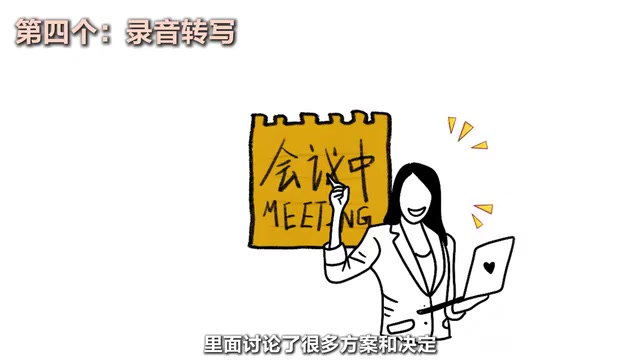
With the Audio Transcription skill, you hand the meeting recording to Doubao, and it extracts key points, organizes discussion outcomes, and compiles a to-do list — turning a meeting you might otherwise forget into an executable record. For information that needs ongoing monitoring, you can also use related task capabilities to have Doubao Work follow up automatically on a set schedule, closing the loop.
Under the hood, audio transcription relies on a combination of ASR (Automatic Speech Recognition) and NLP (Natural Language Processing). ASR converts speech signals into text — modern ASR is already highly accurate for Mandarin. The NLP layer then identifies speaker intent, extracts action items, and produces structured summaries. For meeting scenarios, the hard part isn't "understanding what was said" but "knowing what's worth recording" — and that's precisely where large language models make a meaningful difference. The final output isn't a verbatim transcript; it's meeting minutes your team can act on immediately, which has real value in reducing post-meeting communication overhead.
Takeaway: The Value of an Agent Lies in Coordination
After testing the full suite, the underlying logic of Doubao Work's capabilities is clear: Document Processing handles extraction, Multi-Dimensional Tables handle structured management, PPT handles output and presentation, and Audio Transcription captures communication. Each skill looks independent on the surface, but in practice they all coordinate around a single goal: getting one thing done.
For the average knowledge worker, the significance of this shift is real — AI is starting to embed itself into actual workflows rather than living inside a chat box. If files, tables, presentations, and meeting notes are constantly draining your energy, it's worth trying during the free membership period to see whether it can take over the repetitive busywork.
That said, the quality of what an Agent produces depends heavily on how clearly you define the goal upfront. The more specific your instructions, the better it executes. That's an important caveat to keep in mind when using tools like this.
Background: What Makes an Agent Different
AI Agents represent one of the most significant paradigm shifts in AI in recent years. Traditional conversational AI treats each interaction as independent and can't maintain a goal across multiple steps. An Agent's defining characteristic is goal-driven, autonomous planning — it can break a complex objective into sub-tasks, invoke different tools sequentially or in parallel, and adjust subsequent steps based on intermediate results until the overall goal is achieved.
This capability rests on three key mechanisms: (1) understanding task intent — not just keyword matching; (2) dynamically scheduling available tools and skills; and (3) maintaining context memory and state across multiple steps. For these reasons, Agents are widely seen as the critical step from "AI as a tool" to "AI as a collaborator," and they are the core direction that every major AI player is racing to deliver.
Related articles

Chain of Thought Isn't Just for AI: How Humans Can Use CoT to Improve Thinking Quality
Chain of Thought isn't just a prompt trick for large models. Starting from a Hacker News discussion, this article analyzes why CoT works for human thinking too, breaks down actionable ways to transfer it, and highlights the key differences between human CoT and machine CoT.
Cloudflare Teams Up with OpenAI: Closi…
Cloudflare Teams Up with OpenAI: Closing the Loop from Vulnerability Discovery to Defense with AI
Cloudflare uses OpenAI Daybreak to investigate security vulnerabilities and generate reviewable remediation plans, while developers use Codex to boost coding efficiency and quality.

Orca Multi-Agent Orchestration in Practice: A Guide to Parallel Collaboration with Claude and Codex
Orca is Stable AI's free open-source agent workbench supporting 34 agents like Claude Code and Codex in parallel. Learn its Git worktree isolation, multi-model orchestration, and mobile management.