DSH Plugin Lets AI Truly 'Understand' the Screen and Control the Computer

Open-source DSH plugin lets AI read screen semantics instead of guessing coordinates to control computers.
The article explores why AI Agents struggle to control computers, noting that traditional approaches rely on coordinate guessing and image recognition without true understanding. The DSH plugin instead reads screen semantic structure. It reveals two engineering challenges: up to 14.3KB of noise per state read with 3-7 RPC round trips per click, and click hit rate issues where a model clicked 55 times without success in Chrome. DSH aims to reduce ineffective polling through semantic understanding, offering a valuable infrastructure-layer attempt for RPA, game automation, and the Agent ecosystem.
AI can think and talk, but it has always lacked a pair of "hands"—when you ask it to open a file or click a button, it says "OK," and then... nothing. This is the awkward reality facing most AI Agents today. A recently discussed open-source project on Bilibili, the DSH (Deep Screen Handler) plugin, attempts to solve this problem at its root: instead of guessing coordinates, it lets AI truly understand the semantic structure of the screen.
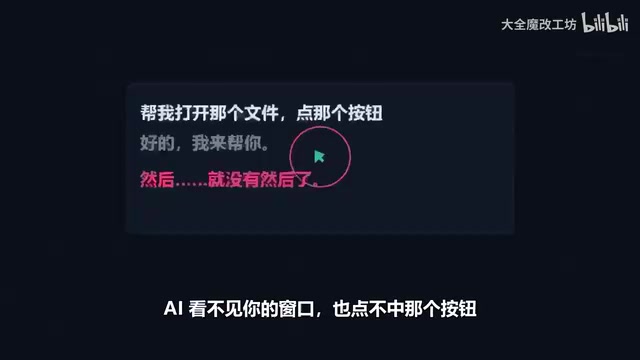
Why Is It So Hard for AI to Control a Computer?
A human can glance at a screen and immediately tell which is a button and which is an input field, but to AI, the screen is just a pile of pixels. Traditional screen control approaches mostly rely on coordinate guessing or image recognition, which is essentially "clicking blind"—the model doesn't know what it's clicking, only that there's a pixel change at some position.
DSH's approach is completely different. It lets AI read the semantic structure of the screen and understand the hierarchy and function of interface elements, thereby "understanding" the interface like a human does. According to a demonstration by a Bilibili content creator in a video, this semantic-level understanding is the core of what distinguishes DSH from other approaches.
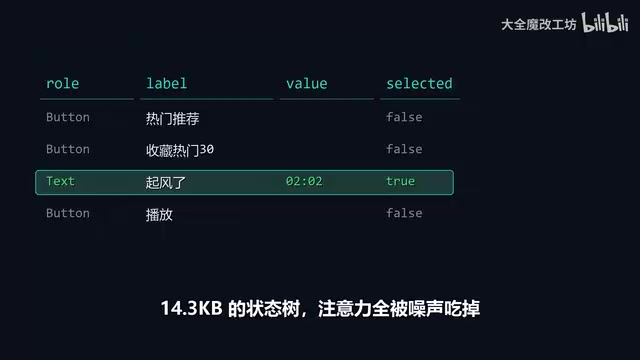
Semantic structure reading typically refers to directly obtaining the object tree of interface elements through the operating system's accessibility interfaces (such as Windows UIAutomation, macOS Accessibility API) or browser debugging protocols (such as Chrome DevTools Protocol), including control types, names, roles, hierarchy, and executable actions. Compared to screenshot pixel analysis, this approach gives the model "this is a button labeled Submit" rather than "there's a gray area at coordinates (x, y)," enabling decisions based on function rather than position, and making it more stable across different resolutions and themes.
Two Hidden "Pitfalls"
Even with semantic understanding, AI controlling a computer still faces two engineering-level challenges.
The First Pitfall: Noise and Latency in State Reading
In early approaches, a single state read could produce up to 14.3KB of noise data, and a single click required 3 to 7 RPC (Remote Procedure Call) round trips of trial and error. This means that before AI can actually execute an action, it must consume significant resources on "confirmation," greatly reducing both efficiency and accuracy.

RPC (Remote Procedure Call) here refers to cross-process communication between the Agent process and the screen reading/control components. Each call incurs overhead from serialization, transmission, and waiting for a response. If a single click requires multiple rounds of "read state—judge—read again" cycles, latency accumulates multiplicatively. Noise data comes from the large number of irrelevant nodes in the interface tree (hidden elements, decorative containers, dynamic ad slots, etc.), which consume model context and increase the probability of misjudgment. Therefore, in engineering practice, node pruning, diff comparison, and state caching are often needed to minimize the number of round trips per interaction.
The Second Pitfall: Clicking Doesn't Mean Hitting
A more subtle problem lies in the "hit rate" of clicks. In real tests, when scrolling the timeline in Chrome, the model clicked 55 times in a row without success. This shows that even if the coordinates are correct and the action is dispatched, the interface state may not change as expected—the click event may be blocked, intercepted, or the target element may have shifted at the moment of clicking.
Click hit rate issues are known in the automated testing field as "flaky elements." Common causes include: elements being obscured by overlays or cookie banners, click coordinates landing on a parent container rather than a clickable child node, page reflow due to asynchronous rendering at the moment of clicking, and events being intercepted by JavaScript or requiring hover/focus to be triggered first. Semantic-level approaches typically switch to directly dispatching click events to the target element or invoking its accessible actions, and then verifying whether the interface state has changed as expected after the action, rather than merely confirming that "the click command has been sent."
DSH's Approach
The DSH plugin attempts to bypass these two pitfalls. On one hand, it reduces ineffective state polling through semantic structure reading, lowering noise and RPC round trips; on the other hand, it lets AI understand the semantic target of a "click" rather than mechanically executing coordinate actions.
Judging from its positioning as an open-source project, DSH is more of an attempt at the infrastructure layer—it doesn't directly provide a specific application, but rather offers a more reliable interaction protocol for "AI controlling a computer." This is a direction worth watching for developers looking to build automated Agents, RPA tools, or game assistants.
Significance for the AI Agent Ecosystem
The competitive focus of AI Agents is shifting from "can converse" to "can get things done." And the prerequisite for "getting things done" is that AI must be able to reliably control digital interfaces. The value of projects like DSH lies in pushing screen control from "pixel-level guessing" toward "semantic-level understanding," which may be a key step for AI Agents to truly land in everyday office work, software operation, and even gaming scenarios.
Explorations like this in the open-source community often expose real problems more effectively than closed-door commercial product development—14.3KB of noise, 3 to 7 RPC round trips, 55 failed clicks. Behind these numbers are the details that cannot be avoided in engineering practice. Whether DSH can become a universal solution remains to be verified, but it at least points to a direction: let AI understand the screen, not guess at it.
One-line Summary
Open-source plugin DSH lets AI read the screen's semantic structure instead of guessing coordinates, attempting to solve the challenge of AI controlling computers.
Paragraph Summary
The article starts from the awkward situation of AI Agents that "can talk but can't act," pointing out that traditional screen control relies on coordinate guessing and image recognition, with models not truly understanding what they're clicking. The open-source project DSH (Deep Screen Handler) instead reads the semantic structure of the screen to understand the hierarchy and function of interface elements. The article further reveals two engineering challenges: early approaches produced up to 14.3KB of noise per state read, with a single click requiring 3 to 7 RPC round trips; and the click hit rate problem, where in real tests the model clicked 55 times in a row without success while scrolling the timeline in Chrome. DSH attempts to reduce ineffective polling and RPC overhead through semantic understanding, and is positioned as an infrastructure-layer attempt at AI computer control, with reference value for RPA, game automation, and the Agent ecosystem.
Related articles

Abnormal Error Rate Spike in Claude Mythos 5.2 and Fable 5.2
Claude Mythos 5.2 and Claude Fable 5.2 show an abnormal spike in request error rates, marked as investigating on the official status page. This article covers the incident overview, practical impact on developers, and recommended responses.

ReAct Runtime Context Trimming: Why Claude Code Acts at 70%
A deep dive into ReAct runtime context trimming: why Claude Code compresses at ~70% usage, why tool calls dominate, why messages must be dropped in pairs, and why codebases don't need RAG.

AI Agent vs LLM: How Cursor and Claude Code Actually Work
An in-depth analysis of the essential difference between AI Agents and LLMs: LLMs generate code suggestions, while Agents modify files and run tests via tool calls. Using a Spring Boot bug fix as an example, it breaks down the workflows, permission control, and verification mechanisms of Cursor and Claude Code.