DSH-SUBAGENT-UI Plugin: The Ultimate Sub-Agent Manager for DeepSeek Harness
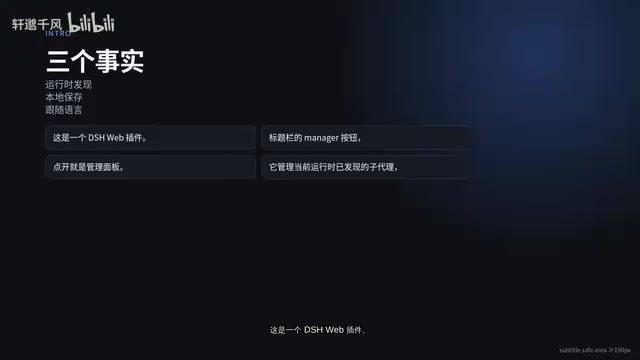
DSH-SUBAGENT-UI adds centralized sub-agent management, search, and completion snapshots to DeepSeek Harness.
DSH-SUBAGENT-UI is a browser plugin for the DeepSeek Harness Web client that solves the problem of scattered, hard-to-track results in multi-sub-agent workflows. After installation, users can open a management panel via a new title-bar icon to view statistics, search by keyword, apply local tag filters, and review completion snapshots — all in one place. The plugin's core design principle is non-invasiveness: all data is stored locally in the browser without modifying DSH session files. Completed sub-agents are preserved as static snapshots for easy reference. It supports English and Chinese, installs with a single command, and is ideal for developers who frequently run parallel sub-agents.
When working with the DeepSeek Harness (DSH) Web client, running multiple sub-agents in parallel is the norm — but it comes with a real pain point: as sub-agents multiply, their completed results end up scattered across the session. Knowing who finished, where the output landed, and how to retrieve it quickly becomes a hidden productivity killer. The DSH-SUBAGENT-UI plugin was built specifically to address this — it consolidates scattered sub-agents into a single management panel, offering four core capabilities: overview, search, local categorization, and completion snapshots.
What This Plugin Does: A Unified Workspace for Sub-Agents
DSH-SUBAGENT-UI is a browser plugin designed for the DeepSeek Harness Web client. Once installed, a puzzle-piece icon button appears in the client's title bar — click it to open the sub-agent management panel.
It's worth being clear about the plugin's scope: the panel manages sub-agents discovered during the current runtime. It archives and categorizes sub-agent history, storing that data locally in the browser without modifying DSH's original session files. In other words, it's a purely visual organization layer — non-invasive to the host environment, and its UI follows the host's theme.
The interface supports both Chinese and English, making it accessible to users worldwide.

DeepSeek Harness (DSH) is a Web client framework designed for AI-assisted development. One of its core features is support for parallel multi-sub-agent execution. Sub-agents are execution units dispatched by the main agent to independently complete specific subtasks — for example, simultaneously deploying a "code audit agent," a "testing agent," and a "documentation generation agent" to work in parallel for greater overall efficiency. This architecture significantly boosts performance on complex, multi-step tasks, but it also introduces state-tracking challenges: the more sub-agents there are, the harder it becomes to manage their outputs scattered across different parts of the session. This is especially true when a sub-agent has finished and you need to quickly locate its result — the absence of a unified view creates significant cognitive overhead.
Core Capabilities: Overview, Search, and Local Categorization
Opening the panel brings together statistics, a search bar, and scope and category filters all in one place — no jumping between multiple views. Using a Release Dashboard workspace as an example, the panel displays six completed sub-agents, organized under labels such as "Audit," "Testing," and "Implementation."
The search function uses standard matching logic and can simultaneously match against both the sub-agent's name and its parent workspace. For instance, typing "Review" immediately narrows results to relevant entries; clearing the keyword instantly restores the full list. This real-time feedback makes it easy to pinpoint a specific sub-agent among many.
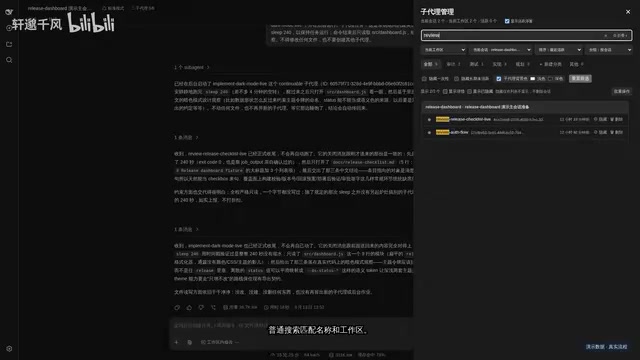
Categorization is implemented through local rule-based matching — clicking tags like "Audit" or "Implementation" applies the filter instantly. This local-first organization means the classification logic requires no server round-trips, making it fast and keeping data under your control.
Completion Snapshots: Results That Don't Disappear
In multi-sub-agent workflows, the easiest thing to lose is the output of a completed task. A key design decision in DSH-SUBAGENT-UI is that sub-agents don't vanish after completion. The panel retains a grayed-out snapshot alongside the final output, so you can review it at any time.
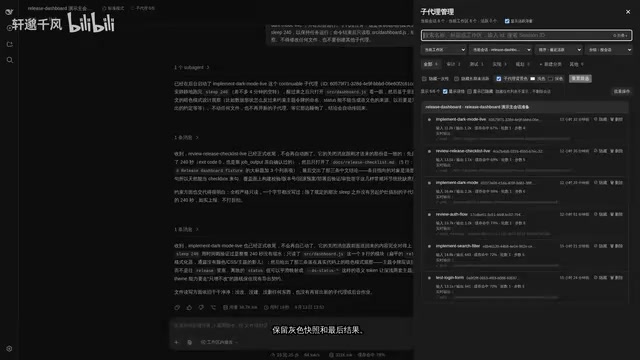
Combined with the fixed scope toggle and sorting controls at the top of the panel, users can focus on the current workspace and browse completed results by recent activity. The real value of this view is that it aggregates dispersed completion results into one place, forming a closed-loop workflow of "find → categorize → review snapshot."
In a typical multi-agent framework, once a sub-agent's task ends, its conversation context is often collapsed or removed from the active view. To trace back results, users have to manually dig through session history. The "completion snapshot" mechanism solves this by locally persisting the final output state: even if the sub-agent's session has been closed or cleared, the panel retains a static record containing the task name, parent workspace, completion time, and final output. This design is particularly valuable for workflows requiring cross-auditing or phased reviews — for example, during a release process where the conclusions from a testing agent and an audit agent need to be compared side by side, rather than retrieved from two separate conversation threads.
Installation and Use Cases
According to a demo by a Bilibili content creator, the installation overhead is minimal: a single command completes the install, and restarting the DSH Web client is all it takes. The project link is provided in the video description.
In terms of use cases, this plugin is especially well-suited for:
- Developers who frequently dispatch multiple sub-agents to handle tasks in parallel
- Team collaboration scenarios where quick auditing and tracing of sub-agent outputs is needed
- Users who want result retention and organized categorization without modifying their existing session data
Summary
DSH-SUBAGENT-UI is fundamentally a lightweight productivity tool. It doesn't change DeepSeek Harness's core capabilities — it fills the gap in the multi-sub-agent management experience. For users who rely heavily on DSH's multi-agent workflows, a centralized, local, non-invasive management panel can significantly reduce the mental overhead of searching and reviewing. If you've been struggling with sub-agent results scattered all over the place, a plugin like this is well worth trying.
Related articles
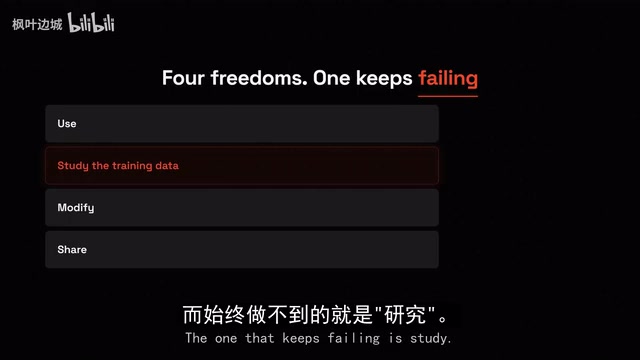
The Truth About Open-Source AI: You Got the Cake, Not the Recipe
Open-source AI exposed: what you download is weights (the cake), not training data or code (the recipe). A deep dive into open weights vs. true open source, Meta/Alibaba/DeepSeek business strategies, and how US/China/EU governments are redrawing the boundaries of openness.
Free DeepSeek V4.1 Flash via DSH: Bulk Point Collection & International WorkBuddy Tested
DSH project update tested: WorkBuddy now offers 100 points per claim, rate limits raised beyond 80M tokens with faster resets, and international WorkBuddy supports free Hunyuan 4 and DeepSeek V4.1 Flash.
Capsule: Pack Web Apps and Data into a Single SQLite File
Capsule is a Rust/Tauri 2.0 tool that packs HTML web apps and data into a single SQLite file — privacy-first, local storage, portable sharing, with AI support.