DynamicLake 2.0: Bringing Dynamic Island to Your Mac

DynamicLake 2.0 ports iPhone's Dynamic Island to the Mac notch, upgrading it into an extensible platform via plugins.
Built by indie developer Avior, DynamicLake 2.0 replicates the Dynamic Island interaction paradigm from iPhone onto the long-neglected Mac notch. It consolidates notifications, file drag-and-drop staging, format conversion, AirDrop, call display, and timers into a single focal point at the top of the screen. The headline upgrade over version 1.0 is a plugin system that transforms the product from a fixed feature set into an extensible platform — one whose ceiling is now set by third-party ecosystem activity rather than a single developer. It's best suited for heavy multitaskers and deep Apple ecosystem users, and represents a textbook case of third-party tools filling the experience gaps official platforms leave behind.
When Dynamic Island Leaves iPhone and Comes to Mac
The Dynamic Island on iPhone has become one of Apple's signature interaction design achievements — transforming what was once an awkward camera cutout into an interactive space that carries live, dynamic information. On the Mac, the notch area housing the webcam at the top of the screen has long been little more than a passive home for the menu bar, offering virtually no interactive value. DynamicLake 2.0 sets its sights squarely on that space — bringing the full Dynamic Island experience from iOS over to macOS.
Built by developer Avior, the app landed on Product Hunt with 82 upvotes and ranked 8th for the day, listed under the Mac, Menu Bar Apps, and Apple categories. Its pitch is straightforward: give Mac users a Dynamic Island-style information and action hub right at the top of the screen.
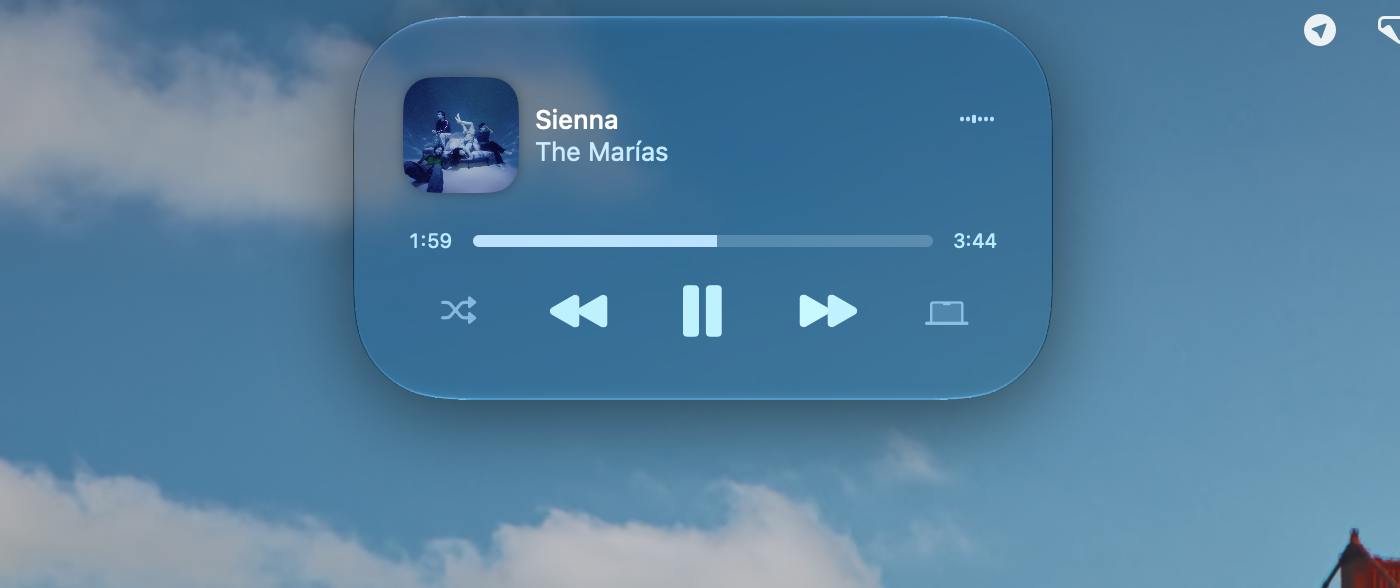
The Dynamic Island debuted in 2022 with the iPhone 14 Pro lineup. Apple's engineers combined the front-facing camera and Face ID sensors into a "pill-shaped" cutout, then wrapped it in software as a dynamically morphing black capsule. This capsule expands and contracts in real time based on current activity — displaying now-playing music, navigation status, timer countdowns, incoming call info, and more. A long press or tap reveals additional detail. The design essentially converts a hardware constraint into an interactive software surface, and the industry widely credits it with redefining how notch and cutout screens can be handled. The Mac notch arrived in 2021 with the M1 Pro/Max MacBook Pro, but Apple never opened it up for similar dynamic interaction — only allowing the menu bar to extend on either side of the notch, leaving the area directly above it as a permanent "dead zone" for developers and users alike.
What It Actually Does
According to the official description, DynamicLake 2.0 is more than a visual gimmick — it builds out an entire functional ecosystem around the notch area. Core capabilities include:
- Plugins: A plugin system that allows the space to host third-party capabilities, rather than being locked to a fixed feature set.
- Notifications: Consolidates system and app notifications into the Dynamic Island area, reducing the interruption of notification banners during your workflow.
- Drag and drop: Temporarily stage files in the Dynamic Island as a transit hub when moving content between apps or windows.
- Converter: A built-in conversion tool for common file or unit conversion tasks.
- Calls and AirDrop: Brings Apple ecosystem continuity features together in one glanceable spot at the top of the desktop.
- Timer: A persistent countdown timer, great for focused work or Pomodoro sessions.
The underlying design philosophy is about consolidating high-frequency operations that are normally scattered across macOS into a single visual focal point. For users who constantly switch between multiple apps, reducing mouse travel distance and window-switching overhead is a meaningful efficiency gain in its own right.
Rethinking the Value of Dynamic Island on Desktop
A big part of why Dynamic Island succeeded on iPhone is that it resolved the tension between a hardware limitation (the camera cutout) and the need to surface information. The Mac notch presents the same kind of "wasted space" problem — yet Apple has never given it interactive functionality. Third-party tools like DynamicLake are effectively filling the experience gap the platform left open, turning a purely physical obstruction into a composite entry point for file staging, notification aggregation, and quick actions. This "turn a flaw into a feature" philosophy is a direct continuation of Dynamic Island's design thinking, now applied to the desktop.
The introduction of a plugin system is worth paying particular attention to. Compared to the relatively fixed feature set of version 1.0, the 2.0 plugin architecture transforms the product from "a tool" into "a platform." This shifts the ceiling of what DynamicLake can become — it's no longer bounded by a single developer's output, but by the vitality of the broader extension ecosystem.
The plugin system is arguably the most critical architectural decision for whether tools like this survive long-term. Looking at how products in this category typically evolve, single-function toolsets often hit a "demand saturation" wall — once the built-in features cover most users' core needs, growth stalls. Introducing a plugin mechanism changes the equation: the product moves from being a "feature provider" to a "feature distribution platform," where a developer community can continuously contribute vertical-use-case extensions around the core container, and users' motivation to stay shifts from "what does this tool do" to "what does this ecosystem offer." The most relevant macOS success story here is Raycast — it started as a quick launcher and, through an open plugin marketplace, evolved into an efficiency platform spanning hundreds of workflow automation scenarios. Whether DynamicLake 2.0 can follow a similar path will depend heavily on how open its plugin API is and how well it cultivates its developer community.
Who Is It For
Based on its feature set, DynamicLake 2.0 is best suited for:
- Heavy multitaskers: People who frequently juggle files, notifications, and calls will benefit from having a centralized entry point.
- Efficiency-obsessed power users: Users who love optimizing their workflows with tools and squeezing value out of every pixel of screen real estate.
- Deep Apple ecosystem users: People running both iPhone and Mac who rely on AirDrop and Handoff-style continuity features will find the experience feels more cohesive.
That said, there are clear limits to who this is for. On Macs without a notch, the entire premise loses its footing. Users who prefer a minimal desktop and resist persistent utilities may find the constant presence of the Dynamic Island more distracting than helpful. And as a menu bar-style application, its resource footprint and long-term stability are things that will need to prove themselves over extended use.
Takeaway
DynamicLake 2.0 represents a classic third-party product logic: identify the interactive space Apple left incomplete, and fill it with extensibility and aggregation. It's not a revolutionary innovation, but for the specific goal of making Mac feel more fluid to use, it offers a concrete and practical answer. For devoted Dynamic Island fans, or anyone who wants to put that notch real estate to work, it's worth trying out.
Related articles

Deleted Reddit Post Sparks Debate Over AI Content Moderation
A Reddit post removed with only a 'Removed by Reddit' notice highlights AI content moderation's transparency gaps, misjudgment risks, and appeal challenges for platforms and creators.

DSH + Ollama Local LLM Deployment in Practice: Free Chat with Da Fei Yu
Bilibili creator tests DSH + Ollama local LLM deployment end to end: Ollama install, Xunlei-accelerated downloads, ModelScope GGUF model import, DSH custom API address setup, and a comparison of Qwen 3.5 4B, 8B, Gemma, and other models on 8GB VRAM, with advice on choosing local deployment vs. API calls.

Tested: A $899 Mac Mini vs. a $200/Month AI Subscription
Real-world test of whether an M4 Mac mini can replace a $200 AI subscription: 16GB can't fit large models, and both speed and quality fall short—but privacy, no caps, and near-zero running costs make it an ideal host for an always-on agent. Includes buying advice per configuration and money-saving strategies.