EgoLite Review: A Dedicated Browser for AI Agents — No More Fighting Over Your Screen

EgoLite lets AI agents browse the web in the background without stealing your screen or burning tokens.
EgoLite is a Google Chrome-based automation browser for AI Agents, designed to solve the three core pain points of traditional Computer Use: slow speed, high token costs, and screen conflicts. Instead of screenshot-based coordinate inference, it generates structured DOM snapshots so AI operates via code identifiers. It runs silently in the background, preserves Chrome login state, and supports parallel windows. A Bilibili creator's 3–4 months of real-world use reports strong speed gains and unaffected accuracy.
When using GPT's Computer Use or similar AI Agents to execute web tasks, many people run into the same frustrating problem: the AI is automatically controlling the browser while you're trying to look something up on the same screen. The constant back-and-forth between the two sides creates a terrible experience — not to mention the extra Token consumption and the risk of the task failing altogether.
EgoLite, which recently topped GitHub's daily trending chart, was built specifically to address this pain point. It bills itself as an automation browser that lets AI Agents execute web operations at maximum speed. This article draws on one Bilibili creator's three-to-four months of hands-on experience to break down EgoLite's core approach, performance, and practical use cases.
The Old Problem with Computer Use: Slow, Expensive, and Screen-Hogging
Traditional Computer Use solutions are highly versatile, but their underlying logic comes with serious drawbacks. They rely primarily on screenshot + coordinate inference to identify UI elements — every single action requires taking a screenshot, analyzing the image, calculating button positions, and then clicking.
This workflow leads to three direct consequences: slow execution, because every step requires visual reasoning; high Token consumption, because image analysis is inherently token-heavy; and a fragmented experience, because it shares the same foreground screen with the user, making it impossible to work while the AI is operating.
For heavy AI users, this "fighting over the screen" model is practically unbearable for long-running automation tasks.
Computer Use is a capability introduced by companies like OpenAI that allows AI models to directly control a computer's mouse, keyboard, and screen — completing tasks like web browsing, form filling, and file operations just like a human operator. Its core mechanism is a "perceive–reason–act" loop: the model receives screenshots as visual input, analyzes the current interface state, outputs coordinates to click or keyboard commands to execute, then takes another screenshot to confirm the result, repeating this cycle. The strength of this approach is its universality — theoretically any software with a UI can be controlled without custom integration. The downside, as described above, is that every step requires transmitting an image to the model for inference. Image tokens cost far more than plain text, and the combination of network round-trip latency and visual reasoning time makes it very difficult to achieve high speed. Both Anthropic's Claude and OpenAI's Operator use similar technical approaches, and they represent some of the most widely deployed AI Agent control methods in commercial applications today.
EgoLite's Core Idea: Give the Agent Its Own Dedicated Space
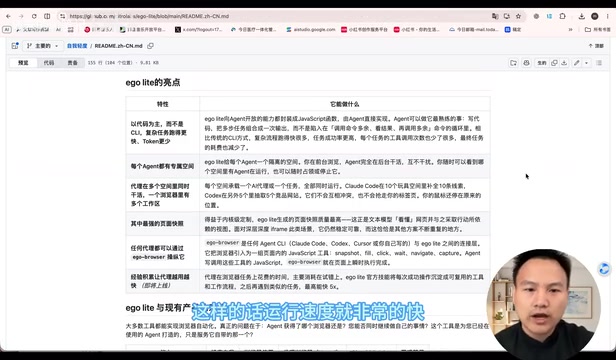
EgoLite's solution is to carve out a dedicated space exclusively for the AI Agent. Built on top of Google Chrome, it silently launches background windows to execute tasks while you work normally in the foreground — the two sides never interfere with each other. This is what the creator values most: humans and AI coexisting without competing for the screen.
Technically, EgoLite takes a fundamentally different approach from pure visual solutions. Rather than using screenshots to infer coordinates, it generates structured snapshots of web pages and operates primarily through code rather than relying on CLI interactions. This native structured approach enables faster responses and lower Token consumption — which is the fundamental reason it can deliver such a significant speed improvement.
Based on the comparisons and benchmarks shown in the video, EgoLite demonstrates a notable advantage over traditional agent browsers and GPT's built-in browser in both execution speed and Token consumption.
The essence of a "structured web snapshot" is leveraging the browser's native Accessibility Tree or DOM structure to convert page elements into structured text descriptions — including identifiers, hierarchy, and semantic tags for buttons, links, and input fields — rather than relying on pixel-level screenshots. This is similar to how screen readers work: instead of "there's a blue button at coordinates (320, 480) in the image," the model receives "a button element with id=submit-btn and the text 'Submit.'" Locating and interacting with elements via code identifiers eliminates the token overhead of image encoding and avoids the pixel-offset errors that can occur with coordinate inference. Headless browser frameworks like Playwright and Puppeteer have long used this approach for automated testing. EgoLite's innovation lies in combining this with AI Agent dynamic instruction scheduling while retaining a real Chrome environment rather than a purely headless mode — achieving compatibility with login states and anti-scraping measures.
Three Key Advantages
The creator summarized several advantages EgoLite holds over standard headless browsers and mainstream pure-visual AI tools:
Humans and AI Coexist Without Interfering
Background windows are launched silently. You work in the foreground; the AI executes tasks in the background. The AI never hijacks your screen focus and interrupts your workflow.
Login State Preserved — No Re-Authorization Needed
This is one of its most practical capabilities. Because EgoLite mirrors Google Chrome one-to-one, it can remember your login state and operate immediately after launching a background window — no need to log in again or re-authorize in the background each time. Your Chrome data and tabs are preserved as well.
Multiple Windows Running in Parallel

Whether you're using Codex, Claude Code, or any other tool, you can launch and run multiple EgoLite windows simultaneously — they won't conflict or compete with each other. It's also beginner-friendly: once EgoLite is installed, any client can launch background instances directly without needing to install additional CLI tools or Skills.
On the question of accuracy — many people worry that abandoning pure visual input will compromise recognition quality. The creator reports that over nearly three to four months of use, accuracy has not been affected, while speed has improved significantly. Combined with PyAgent, the overall experience is described as quite smooth. (Note: this reflects a single user's personal experience; actual results may vary — we recommend testing in your own context.)
Three Practical Use Cases

The creator shared three high-frequency use cases that illustrate where EgoLite delivers real value.
Automated Xianyu Store Operations
Leveraging the persistent login state and human-like interaction behavior, the creator uses PyAgent combined with EgoLite to automate Xianyu store operations: product analysis, item selection, listing, ongoing maintenance, and optimization. After sending a task, EgoLite automatically accesses the Xianyu account in the background without requiring a second login, identifies products to optimize, generates a plan, and — upon confirmation — executes it directly. Apart from the listing step, which requires authorization, most of the workflow runs automatically.
A "QA Engineer" for Product Self-Testing
Testing your own product is often extremely time-consuming. The creator uses PyAgent to give the AI a "QA engineer" role, providing a development URL and having it comprehensively check functionality, interaction logic, and alignment with the project documentation. It can open multiple windows simultaneously, checking the frontend UI, feature design, and backend code all at once, then generate an optimization report that can be fed directly into development tools for further iteration.
Multi-Account Content Distribution
For content creators, the combination of "silent multi-window launch + no re-login required" makes it possible to package the publishing workflows for platforms like Xiaohongshu, Douyin, and Bilibili into a single Skill. Once a video is ready, the Skill launches multiple background windows in EgoLite simultaneously and publishes to all platforms in parallel — dramatically cutting down distribution time.
Worth Watching, But Worth Evaluating Rationally
Based on the information presented in the video, EgoLite's value proposition is clear: replace visual screenshots with structured code to gain faster execution, lower Token consumption, and a better coexistence experience between humans and AI. These advantages directly address the most realistic pain points in deploying AI Agents for web automation today — which explains why it shot to the top of GitHub's trending charts.
That said, it's worth noting that the perspectives in this article come primarily from a single creator's hands-on experience. Conclusions about accuracy, stability, and compatibility range should be validated in your own use case. EgoLite's GitHub repository can be found in the original video link. For developers and content creators who rely heavily on AI automation, it's worth giving a try.
Background Notes
PyAgent, referenced multiple times in this article, is a companion tool — an AI Agent framework built on Python that breaks down natural language tasks into specific browser operation instruction sequences and calls EgoLite's interface to execute them. These frameworks typically implement three modules: task planning, tool use, and result feedback. Developers can define "roles" and "skills" using Python scripts and attach them to a browser automation backend. The "Skills" mentioned in the article are encapsulations of repetitive operation workflows — for example, packaging "log in to Xiaohongshu → create a new post → fill in the title and body → publish" into a reusable callable unit. After that, you only need to pass in the content parameters to trigger the entire workflow, without rewriting the operation logic each time.
Related articles

Amphibious Transforming Drone: Beyond 100x Power Savings, What Are the Real Needs?
Is the amphibious transforming drone just a gimmick? Starting from the 100x power difference of the M4 Morphobot, explore real application scenarios and thesis topic ideas, analyzing boundary conditions where pure drones and pure ground robots both fail.

Warhound Raises $200 Million: Genetically Engineered "War Dogs" Paired with Anduril Gear
Warhound raises $200M, backed by Ben Lamm and Palmer Luckey, to genetically engineer dogs for military and law enforcement use and equip them with Anduril gear. This article analyzes its technology direction, funding logic, and ethical controversy.

Claude API Comes to Google Cloud: IAM Integration and SDK Access Guide
Anthropic hosts the full Claude API on Google Cloud with IAM-controlled permissions and unified billing. This guide covers the Vertex AI and Anthropic-hosted entry points, IAM role configuration, and SDK access.