Enterprise RAG with LLMs: Building a Q&A System Architecture from Scratch

Week 1 of an application-driven enterprise RAG course: building an end-to-end LLM Q&A pipeline from scratch.
This article covers the core content of Week 1 of a practical RAG (Retrieval-Augmented Generation) course focused on enterprise deployment. The course skips the traditional "theory-first" approach and dives straight into coding, with the Week 1 goal of connecting a full frontend-to-backend LLM Q&A pipeline. The tech stack uses FastAPI to build RESTful APIs that unify calls to locally deployed ChatGLM3-6B and online GLM-4 — switchable by simply changing the model name. The course emphasizes enterprise engineering practices throughout: Linux deployment, local GitLab version control, PyCharm remote development, conda environment setup, and Postman validation.
RAG (Retrieval-Augmented Generation) is emerging as one of the two dominant directions in the LLM job market. An instructor with eight years of algorithm engineering experience — currently working as a project development engineer on a large model team — has launched a RAG enterprise project course on Bilibili. Using an "application-driven" approach, the course reconstructs the complete development workflow of an enterprise-grade Q&A system. This article summarizes the core content from Week 1, showing how a real LLM-powered Q&A system goes from architectural design to working code.
Why "Application-Driven" Instead of Starting with Fundamentals
The course's defining feature is its rejection of the traditional approach of "spending two weeks on fundamentals before touching development." The instructor is candid about this: front-loading theory before hands-on work leads to a noticeably poor learning experience. So from the very first lesson, everything revolves around practical coding.
The course is organized around an "application pipeline" logic: each week starts with a requirements analysis, maps out a complete application flow, connects business processes with code development, and ultimately delivers a fully functional, runnable system. Background knowledge (such as LangChain) is never taught systematically — instead, it's picked up on the fly as needed during development.
This design mirrors real-world work. As the instructor puts it, LLM technologies evolve at a breakneck pace — "we're constantly learning new things on the job as we build" — and the course aims to replicate that authentic engineering mindset: working toward a concrete deliverable and building skills along the way.
RAG (Retrieval-Augmented Generation) is a technical architecture that combines retrieval from an external knowledge base with the generative capabilities of a large language model. The core idea is: before the model generates an answer, it first retrieves relevant content snippets from an external document store or database, then feeds those snippets as context to the model. This makes the model's responses more accurate and traceable, while effectively reducing hallucinations. Compared to fine-tuning, RAG requires no retraining — updating knowledge only requires maintaining the external knowledge base, making it more cost-effective and flexible for enterprise deployment. Typical use cases include internal enterprise knowledge Q&A, customer service bots, and legal document retrieval. Understanding RAG's overall architecture helps clarify the motivation behind the retrieval pipeline design covered later in the course.
Week 1 Goal: Connecting the End-to-End LLM Q&A Pipeline
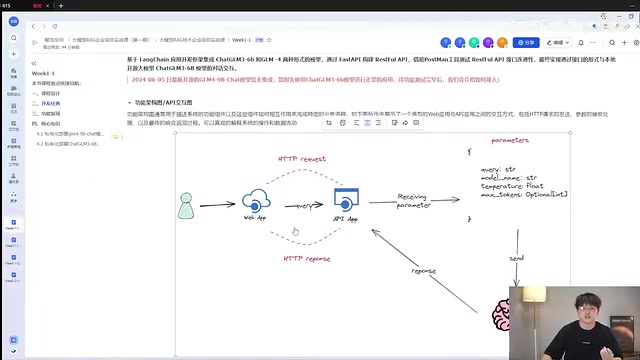
The pipeline for Week 1 is essentially a minimum viable Q&A system. A user sends parameters from the frontend (a ChatGPT-style chat interface or form) to a WebApp, which forwards the request via HTTP to the backend API. The backend calls the large model, processes the query, and renders the inference result back to the frontend.
The entire pipeline involves four core input parameters:
- query: The user's question
- model name: The name of the backend model to invoke
- temperature: Sampling temperature, which controls the randomness of the model's output
- max tokens: The model's maximum input limit — anything beyond this is truncated
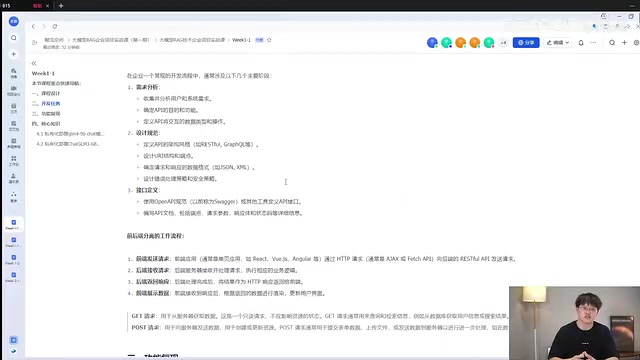
The instructor emphasizes that the daily work of a backend engineer essentially comes down to designing these RESTful API interfaces — defining input structures, specifying functional endpoints, and planning response formats. "Once you've analyzed the frontend and user requirements, you can define a standardized schema for receiving parameters." This is the starting point for the frontend/backend separation workflow in enterprise development.
Tech Stack: FastAPI + Open-Source Models + Unified Online API Dispatch
The course makes deliberate, enterprise-oriented technology choices. The backend uses Python's FastAPI to build RESTful APIs for frontend/backend interaction, and Postman is used for API testing to verify the data pipeline between frontend and backend.
One notable design decision is the unified model invocation abstraction: the system integrates both locally deployed open-source models (e.g., ChatGLM3-6B) and online API models (e.g., GLM-4), with the goal of being able to "swap out the backend model simply by changing the model name — using the exact same function." This abstraction makes model switching highly flexible and is a pragmatic approach for enterprise systems dealing with rapid technology change.
On the frontend side, the course moves away from the LangChain-ChatChat interface built on Streamlit, opting instead for an independent Vue-based frontend to achieve true frontend/backend separation. The instructor plans to open-source the frontend repository in about two weeks, with a dedicated session on how to connect it to the APIs built in the first two weeks.
LangChain is currently the most widely used framework for LLM application development. It provides a standardized set of component abstractions, including model interfaces (LLMs/ChatModels), prompt templates (PromptTemplate), memory modules (Memory), and retrieval chains (RetrievalChain). Its greatest value lies in abstracting away the interface differences between model providers — whether OpenAI, a locally deployed ChatGLM, or another open-source model, all can be called through a unified interface. This aligns perfectly with the course's design philosophy of "change only the model name to switch models." FastAPI, meanwhile, is a high-performance asynchronous Python web framework with native support for automatic OpenAPI documentation and Pydantic data validation, and is widely adopted in LLM backend service scenarios. Together, these two form the mainstream backend technology stack for enterprise RAG systems today.
Enterprise Engineering Standards: GitLab, Version Iteration, and Linux Deployment
The course's "enterprise feel" comes largely from its engineering practices. The instructor points out that real companies don't host projects on public GitHub — they run internal GitLab instances (accessed via IP and port). The course project is on the public internet only for educational purposes, and uses tags and releases to version each pipeline, simulating real iterative development: "Version one delivers X; version two builds on version one by optimizing Y, here's how."
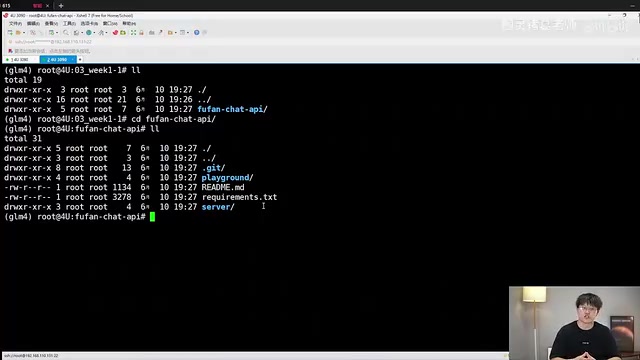
The choice of deployment environment also reflects engineering reality. The instructor states unequivocally: "Whatever the application, I can say with full confidence that in an enterprise, deployment on Windows simply does not happen." All LLM services are deployed and maintained on Linux systems, with developers accessing servers remotely. The hardware demonstrated in the course is a server equipped with four NVIDIA 3090 GPUs.
Full Setup for a Remote Development Environment
The instructor walks through the complete process of connecting to a Linux server remotely using PyCharm:
- Check the server IP with
ifconfig(example: 192.168.110.131) - Create an SFTP connection under Tools → Deployment → Configuration
- Configure the SSH remote host (default port 22), username, and password
- Set the Root Path to the project's absolute path (use
pwdto find it) - Open a remote terminal via Tools → Start SSH Session
For those without a server, Windows users can simply git clone the repo and open it in PyCharm — the interface is identical.
Setting Up Virtual Environments and Common Pitfalls
Dependencies are managed with conda. The instructor recommends Python 3.10 or 3.11 — "3.12 is not recommended because it has many bugs." The setup steps are:
conda create --name wk1_1 python=3.10
conda activate wk1_1
pip install -r requirements.txt
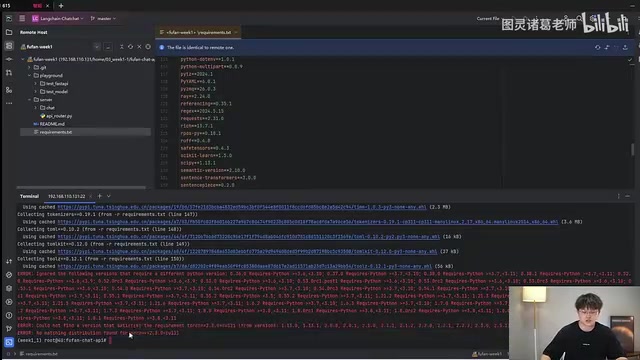
A common issue during installation is a torch version incompatibility error. The instructor's workaround is to temporarily comment out the three torch-related packages in requirements, since torch needs to be deployed separately based on your specific environment — this will be covered in a dedicated session later. Additional packages like fastchat and langchain also need to be installed separately.
Validating the Pipeline with Postman
Once the service is running (IP:port format, example: port 8000), Postman is used to simulate frontend requests and verify the pipeline. The request is configured as POST to IP:port/api/chat, where /api/chat is the endpoint that routes to the chat function.
The request body parameters must match the backend exactly: query (the user's question), model name (e.g., chatglm3-6b), temperature (e.g., 0.8), and max tokens (e.g., 4096). After clicking Send, the backend logs the received parameters and returns a lm_response field — the large model's answer to the user's question.
The core code for the entire pipeline is actually just a few lines: receive user question → pass to the LLM → generate result → return. But understanding why it's structured this way involves two key concepts: how to privately deploy and run open-source LLMs locally, and how to use LangChain to integrate and manage locally deployed open-source models. These are the focus of subsequent lessons.
Privately deploying open-source LLMs typically involves loading model weights with the Hugging Face Transformers library and using inference frameworks like FastChat or vLLM to expose an OpenAI-compatible API interface. Taking ChatGLM3-6B as an example: after deployment, a local HTTP service starts, and LangChain can call it using the ChatOpenAI class pointed at the local address — reusing the exact same code path as calling an online model. This explains why the course emphasizes the "unified function, change only the model name" design: under the hood, FastChat normalizes the calling interfaces of different models into an OpenAI-compatible format, enabling seamless interchangeability between local models and cloud APIs at the LangChain layer. The reason torch versions are so sensitive is that different CUDA driver versions require specific PyTorch build versions — a mismatch means the GPU won't be recognized or inference will crash. This is the most common pitfall in environment setup.
Conclusion
Week 1 of this course makes clear that deploying RAG in an enterprise context involves far more than calling an LLM API. It requires a full engineering skill set: API design, frontend/backend separation, remote Linux development, version control, and dependency management. For developers looking to move from algorithm research into production engineering, this style of teaching — focused on real deliverables and honest about the pitfalls — is far more valuable than piling on theory. The truly challenging parts, including the RAG retrieval pipeline (real-time web search, real-time recommendations, and advanced retrieval Q&A chains), are covered in later weeks. But a solid system architecture is the foundation for all of it.
Related articles

ChatGPT Space Launches: Team Collaboration and New Pages Features Explained
ChatGPT Space is OpenAI's new team collaboration feature with Pages, real-time collaboration, and Slack/Google Drive sync. We break down its privacy design, multi-platform integration, and the full workflow from conversation to document.

Migrating Apache Spark UDFs to GPU Acceleration with AI Agents
NVIDIA developer blog explains how AI Agents rewrite Apache Spark UDFs for GPU acceleration, covering migration criteria, agent rewriting and verification workflows, plus pitfalls like result consistency and CPU-GPU transfer overhead.

Zed Editor v0.40.4-rc2 Released: Usage Credits Now Available Without Upgrading
Zed editor releases v0.40.4-rc2, allowing users to use usage credits for AI features without upgrading to a paid plan, lowering the trial barrier.