Feishu Lark CLI Open-Source Review: An AI Automation Tool That Lets Claude Code Directly Control Feishu

Feishu open-sources Lark CLI, letting AI Agents directly control Feishu from the terminal for office automation
Feishu officially open-sourced the command-line tool Lark CLI, covering 11 domains with 200+ commands and 19 AI Skills, enabling AI Agents like Claude Code to directly control Feishu from the terminal. Compared to traditional API approaches, CLI is more concise, more token-efficient, and takes only 5 minutes to configure. Testing showed excellent performance in calendar management, document generation, and data organization, though limitations exist including Bot-only messaging identity and lack of bidirectional communication.
What is Feishu Lark CLI
Feishu (Lark) recently open-sourced a command-line tool called Lark CLI that enables AI Agents like Claude Code, Gemini CLI, and CodeX to directly control Feishu from the terminal — a powerful weapon for AI-powered office automation.
What is an AI Agent? An AI Agent is an AI system capable of autonomously perceiving its environment, making plans, and executing multi-step tasks. Unlike simple Q&A-style AI, Agents can invoke external tools, execute code, and manipulate file systems, forming a closed loop of "perceive-think-act." Claude Code, Gemini CLI, OpenAI CodeX, and similar systems all fall into this category. They natively run in terminal environments, making CLI command invocation the most architecturally natural interaction method — which is precisely why Lark CLI chose the command-line form factor.
This tool covers 11 domains, 200+ curated commands, and 19 AI Agent Skills, spanning core functions like calendar, messaging, cloud documents, cloud storage, and spreadsheets. In short, almost everything you can do on Feishu can now be delegated to AI.
Installation & Setup: Up and Running in 5 Minutes
Compared to third-party solutions like OpenClawAd, Lark CLI's installation and configuration process is remarkably smooth — the entire process takes roughly 5 minutes:
- Visit the Lark Suite CLI official website and copy the installation address
- Hand the address to Claude Code and let it automatically complete the installation based on the README
- Download the Skills files (retry if you encounter errors)
- Complete a one-time authorization following the instructions
Once authorization is complete, Lark CLI is configured — essentially opening a direct channel from your computer to control Feishu.
Core Mechanism: The CLI + Skill Pairing Logic
The Role of the CLI Command-Line Tool
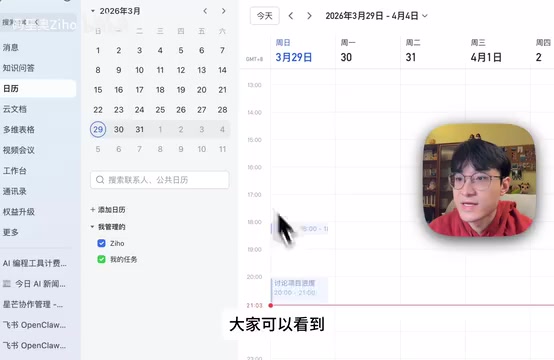
Simply put, CLI stands for command-line interface. You type a CLI command in the terminal, and it executes a series of operations for you. For example, entering a command to read your schedule returns all your calendar events for the day.
Why Skill Files Are Indispensable
Having CLI commands alone isn't enough — the AI Agent doesn't inherently know which CLI commands to invoke when executing your instructions. That's why Feishu provides a comprehensive set of Skills files, which are essentially an "instruction manual" that tells the AI:
- What capabilities Feishu offers
- Which commands to use in which scenarios
- How to fill in the parameters
The Technical Nature of Skill Files: Skill files typically define tool names, functional descriptions, parameter specifications, and other structured information in JSON or YAML format. They are closely related to LLM tool-calling standards like OpenAI Function Calling and Anthropic Tool Use. Large language models need these description files to understand "what tools are available" and "how to call them correctly." The more precise the Skill file descriptions, the higher the AI's invocation success rate, and the fewer parameter errors and "hallucination" issues occur. This also explains why Lark CLI provides 19 Skills while OpenClaw only has 9 — broader Skill coverage means the AI can handle a wider range of scenarios.
With Skills in place, Claude Code knows how to manipulate Feishu. The overall architecture is: Skills tell the AI what to do, and the LLM executes CLI commands to control Feishu — both components together deliver the complete experience.
Why CLI Over Traditional APIs
Here's an intuitive comparison: OpenClaw uses traditional APIs to control Feishu, requiring numerous parameters to be passed; under the CLI approach, operations like create and delete are much more concise.
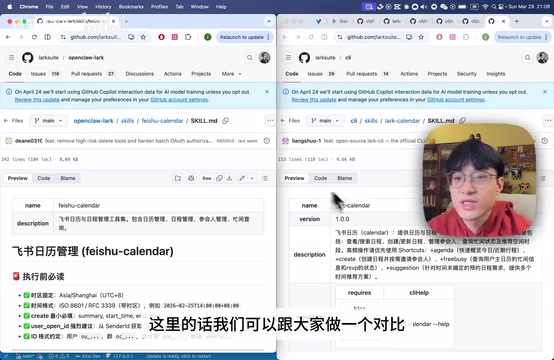
CLI's advantages over APIs manifest in three key areas:
- More natural: AI Agents run in the terminal natively, so calling terminal commands is the most natural approach — no additional configuration needed
- More concise: The simpler the commands, the lower the probability of AI errors
- More token-efficient: For the same operation, CLI input/output is much shorter than API equivalents, significantly reducing token consumption
Why is the token consumption difference so significant? Every time a large model invokes a tool, it needs to include tool descriptions, parameter structures, invocation examples, and other information in its context. Traditional REST API calls often require constructing complete HTTP request bodies containing heavily nested JSON fields; CLI commands typically need just a few short flags to accomplish the same operation. In long conversations or batch task scenarios, this difference is amplified many times over, directly impacting usage costs and response speed.
Hands-On Testing
Calendar Management
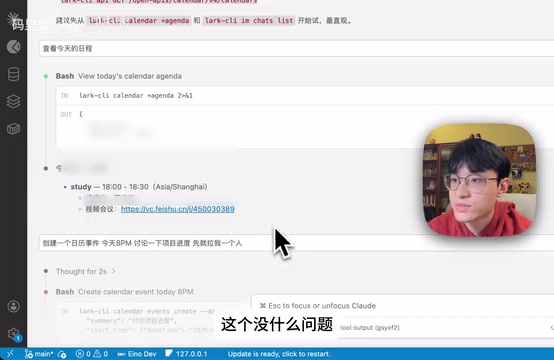
Tested both viewing today's schedule and creating calendar events — both completed successfully with accurate responses.
Group Messaging
Asked the AI to send a message saying "sync progress tomorrow at 11am" in a product group chat — completed smoothly. However, this exposed an important limitation: messages are sent under a Bot identity, not the user's personal account.
Currently, Lark CLI's messaging function only supports Bot identity and cannot simulate sending as the user themselves. This means scenarios like auto-replies or communicating on behalf of the user are temporarily impossible.
Why can't it impersonate the user? This isn't a Feishu-specific limitation but an industry convention for enterprise collaboration platforms. Feishu, Slack, Microsoft Teams, DingTalk, and similar platforms restrict third-party applications to Bot (robot account) identity for API calls under the OAuth 2.0 authorization framework, for security and compliance reasons. To operate as a real user identity requires enterprise administrators to specifically enable "User Impersonation" permissions, subject to strict approval and security review processes. This design prevents account abuse or unauthorized identity impersonation, protecting enterprise communication security.
Automated Document and Spreadsheet Generation
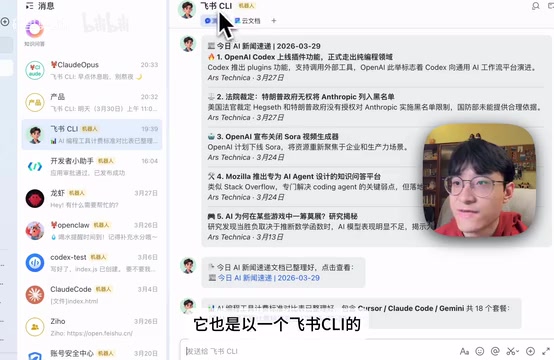
Asked the AI to compile AI news into a Feishu document — completed with high quality. Further tested having it scrape pricing information for Cursor, Claude Code, and Gemini and organize it into a spreadsheet — equally impressive performance with complete and accurate data organization.
Head-to-Head Comparison with OpenClaw
| Dimension | Lark CLI | OpenClaw |
|---|---|---|
| Number of Skills | 19 | 9 |
| Setup Difficulty | Minimal, ~5 minutes | Relatively complex |
| Command Complexity | Concise | More parameters |
| Token Consumption | Lower | Higher |
| Official Support | Official Feishu product | Third-party |
Overall, Lark CLI outperforms OpenClaw in both feature coverage and usability. The low configuration barrier is especially user-friendly for non-technical users.
Current Limitations
Despite solid overall performance, testing revealed several notable shortcomings:
- Bot identity restriction: All messages are sent under a robot identity; cannot simulate the user themselves
- One-way communication: CLI can only send messages to users; when users proactively message the Bot or issue commands, there's no bidirectional communication channel with Claude Code
- Cannot act on behalf of the user: Advanced scenarios like auto-replies and communicating as the user are not yet supported
The deeper reason for one-way communication: True bidirectional interaction requires the Bot to have "event listening" capabilities — meaning when a user sends a message, the system can trigger a real-time callback and pass the content to the AI for processing. This typically requires deploying a continuously running Webhook server to receive event pushes from Feishu. As a local command-line tool, Lark CLI has not yet integrated this server-side capability, so it can only achieve "AI proactive push" rather than a complete "user-triggered AI response" closed loop. This is one of the most anticipated upgrade directions for future versions.
Summary and Recommendations
As an open-source tool officially produced by Feishu, Lark CLI genuinely helps users achieve office automation within Claude Code. The configuration process is smooth, feature coverage is comprehensive, and it's worth trying for anyone who regularly uses Feishu for work.
While the Bot identity limitation prevents some advanced scenarios for now, it can already significantly boost efficiency in calendar management, document generation, and data organization. If you don't want to wrestle with complex API configurations but want AI to handle repetitive Feishu tasks, Lark CLI is currently the most hassle-free option available.
Key Takeaways
- Feishu officially open-sourced Lark CLI, covering 11 domains and 200+ commands, enabling AI Agents like Claude Code to control Feishu from the terminal
- The CLI + Skill pairing mechanism: Skills tell the AI what to do, CLI executes the operations — more concise and token-efficient than traditional APIs
- Setup takes only 5 minutes, much simpler than OpenClaw, with broader feature coverage (19 Skills vs 9)
- Key limitation: Messages can only be sent under Bot identity, cannot impersonate the user, and auto-reply scenarios are not yet supported
- Performs excellently in calendar management, document generation, and data organization with high completion quality
Related articles
 Product Reviews
The Programmer's Desk Setup Guide: Building a Workspace That Feels Like Home
Discover how programmers build productive, comfortable workspaces. From multi-monitor setups to ergonomic design, explore the desk philosophy that drives focus and flow.
 Product Reviews
Qoder vs Cursor Real-World Comparison: Which $20/Month AI IDE Is Better?
Hands-on comparison of Qoder vs Cursor AI IDEs: Agent autonomy, human interaction count, and architecture decisions. Qoder needed only 2 interactions vs Cursor's 8.
 Product Reviews
Cursor Cloud Agent Demo: Eliminating Bottlenecks Across the Entire Software Development Lifecycle
Deep analysis of Cursor's Cloud Agent demo showing how cloud VMs, automated test artifacts, and a full-chain control plane systematically eliminate human bottlenecks across the software development lifecycle.