Figma Motion to Cursor: A Practical Workflow for Turning Animation Design into Code

Figma Motion → AI Agent prompt → Cursor code: a seamless workflow from animation design to runnable frontend code.
Bilibili creator Cole shares a workflow for turning Figma animation designs directly into runnable code: refine the animation feel in Figma Motion, let an AI Agent translate it into a structured prompt with DOM structure and timing parameters, then paste that prompt into Cursor to generate working frontend code — with room to layer on additional interactions like drag behavior. The core value is bridging the longstanding gap between animation design and implementation, letting AI handle the translation while keeping subjective judgment inside the visual design environment.
The gap between design and development has long been a pain point in product delivery — especially for complex interactive animations. A designer can spend hours perfecting smooth transitions in a prototype tool, only to see them fall apart once handed off to an engineer. Cole, a content creator on Bilibili, shares a workflow that offers a fresh approach: polish the animation in Figma Motion until it feels right, then use an AI Agent to generate a structured prompt, and finally hand it to Cursor to produce working, runnable code.
From Idea to Animation: Refining in Figma Motion
The starting point for this workflow was a landing page design project. Cole wanted to play with the concept of "stacking" based on the copy, so he began exploring a card layout — inspired by a header illustration from the Figma Community — with the goal of creating a stacked-card menu interaction.
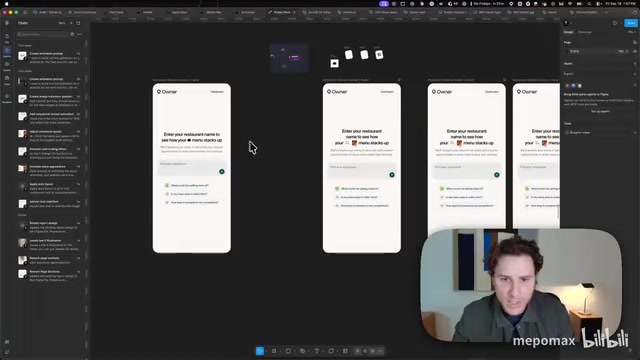
The time-consuming part was tuning the animation. Cole admits the early versions were quite "janky," and he spent a lot of time wrestling with the Agent, adjusting easing curves and scale behaviors bit by bit. He tried several approaches for elements scaling in before gradually zeroing in on the feel he was after.
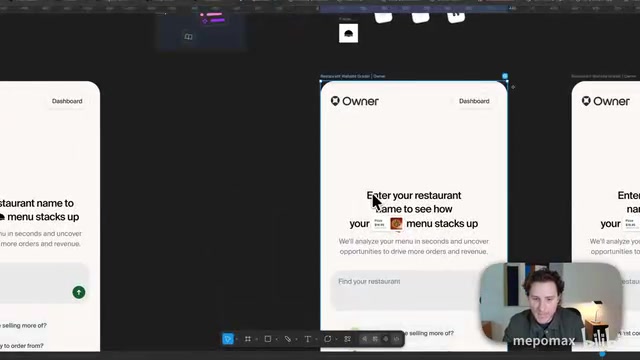
This trial-and-error process is precisely where the workflow's value lies. Animation quality is subjective — designers need to experience and tweak it in a visual environment rather than writing blind code. Cole eventually landed on an effect he was happy with: elements rising, easing, then settling gently back into place. The approach of "locking in the feel inside the design tool first" keeps uncertainty in the stage where it costs the least.
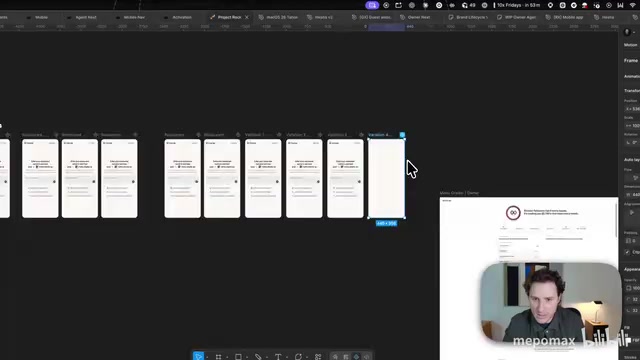
Figma Motion is Figma's built-in animation design module (some features are available through plugins or Figma's native Prototype animation system). It allows designers to define motion paths, easing curves, delays, and durations directly on the design canvas with real-time preview. Unlike traditional static annotation, Motion lets designers feel an animation rather than describe it — which is critical for interactions that require repeated tactile refinement. Easing curves (such as ease-in, ease-out, and spring curves) determine whether an animation feels natural and fluid. Subtle parameter differences can produce vastly different visual sensations, and those nuances are nearly impossible to convey accurately to developers through numerical annotations alone. They must be experienced and compared in a visual environment.
The Key Step: Having the Agent Generate a Deliverable Prompt
Once the animation felt right, the clever handoff happened. Rather than manually describing the animation parameters, Cole switched to the Agent, fed it the finished animation, and gave it a clear instruction: "I want to implement this animation on a website — give me a prompt that includes all the DOM elements so I can hand it to an LLM."
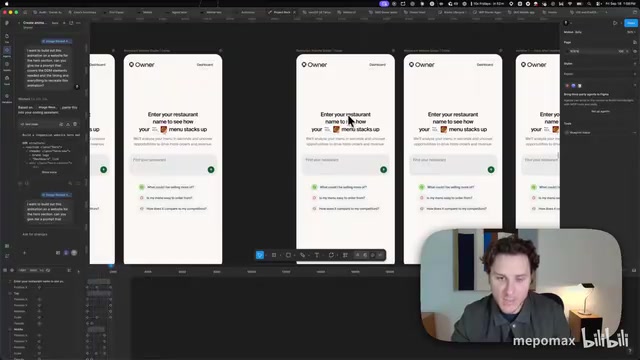
The Agent immediately produced a structured implementation brief. This step is the pivot of the entire chain: it translates the visual animation from the design tool into engineering-readable language with DOM element descriptions. It essentially uses AI as a translator between design and code, sparing the designer the hassle of laboriously writing out easing curves, delays, and layer relationships in plain text.
The "structured prompt" here is essentially an engineering implementation spec written for an LLM. It typically includes: a description of the DOM structure of animated elements (HTML tag hierarchy, class naming), initial and final states for each element (translation, scale, opacity), timing parameters (duration, delay), and easing functions. Compared to a designer writing something like "the card slowly rises and then settles back down," this kind of structured description significantly reduces ambiguity for the LLM, enabling AI coding tools like Cursor to more accurately generate CSS Animation, Web Animations API, or JavaScript animation code. This translation path — design tool → structured description → code generation — is one of the most promising breakthroughs in AI-assisted development today.
Handing Off to Cursor: From Prompt to Runnable Code
With the prompt in hand, Cole pasted it directly into Cursor, and the code was generated "very quickly." At this point, the animation that had only existed inside Figma had become real, runnable frontend code.
Even more interesting: once the animation was in code form, new possibilities opened up. Cole continued layering interactions on top of the generated code — adding a draggable element, for example. This shows that converting to code isn't the finish line; it's what gives the animation the ability to keep evolving in a real environment, something a pure design prototype simply can't do.
Cursor is a code editor deeply integrated with AI code generation capabilities, built on VS Code, and supports generating and modifying code directly through natural language or structured prompts. Compared to using general-purpose tools like ChatGPT, Cursor's advantage is that it understands the full context of your project's codebase — generated code can be inserted directly into existing files, with instant in-browser preview. For frontend animation implementation, Cursor typically selects the appropriate approach based on the prompt — CSS Keyframes, JavaScript requestAnimationFrame, or animation libraries like GSAP — and generates complete, runnable snippets, dramatically reducing the time from design mockup to live page effect.
Workflow Value and Where It Applies
The complete pipeline can be summarized as: Figma → Figma Motion → Figma Agent → Cursor (or another AI coding tool). Its core logic is to let each stage do what it does best:
- Figma Motion handles the subjective, feel-based animation tuning that requires repeated iteration;
- The Agent translates the visual result into an engineering-readable prompt;
- Cursor turns that prompt into real, working code.
The biggest value of this approach is that it addresses the longstanding problem of animation design being disconnected from implementation. In the past, even the most detailed designer annotations would often result in imprecise recreations by engineers. Now, the animation's "true form" is directly translated into code by AI, producing a much higher fidelity result.
It's worth noting that this is still a personal, experimental workflow shared by a single creator. The complexity of the animation, the quality and maintainability of the generated code, and compatibility across different AI tools can all affect real-world results. Cole himself used the phrase "wrestling with the agent" to describe the tuning process — AI doesn't deliver perfect results in one shot; it still requires repeated human guidance.
For indie developers who straddle both design and frontend, or for small teams, this workflow offers a compelling approach worth trying: keep subjective judgment inside the visual tool, and hand the repetitive translation work off to AI.
Related articles

Random Pruning of the DPO Computation Graph: 1.4x Training Speedup and Lower Peak Memory
DPO training too slow and memory-hungry? This paper proposes a random pruning framework for the DPO computation graph, sampling independently across position, sequence, and branch dimensions; branch pruning achieves a 1.426x step-time speedup and cuts training time by about 30%, with in-depth attribution of memory and time gains.

Why Does JEPA Underperform MLM in Longitudinal EHR Representation Learning?
New study compares JEPA and MLM for longitudinal EHR representation learning on MIMIC-IV: three JEPA variants train stably without collapse but underperform MLM; target size, not heterogeneity, drives prediction error.

Transfer Learning + Visible Light Communication: A New Approach to Energy-Efficient Indoor Positioning
A study proposes a transfer learning-based visible light communication indoor positioning method, achieving 47% accuracy improvement on the BOSCH factory dataset, 67.5% model efficiency under high noise, and introducing the ME composite metric for energy-efficient positioning in energy-constrained industrial IoT scenarios.