FindDiskKiller: Catch the Mac Apps Secretly Thrashing Your Disk

Free open-source macOS tool that monitors disk I/O by process, tracks AI coding agents, and checks SSD health.
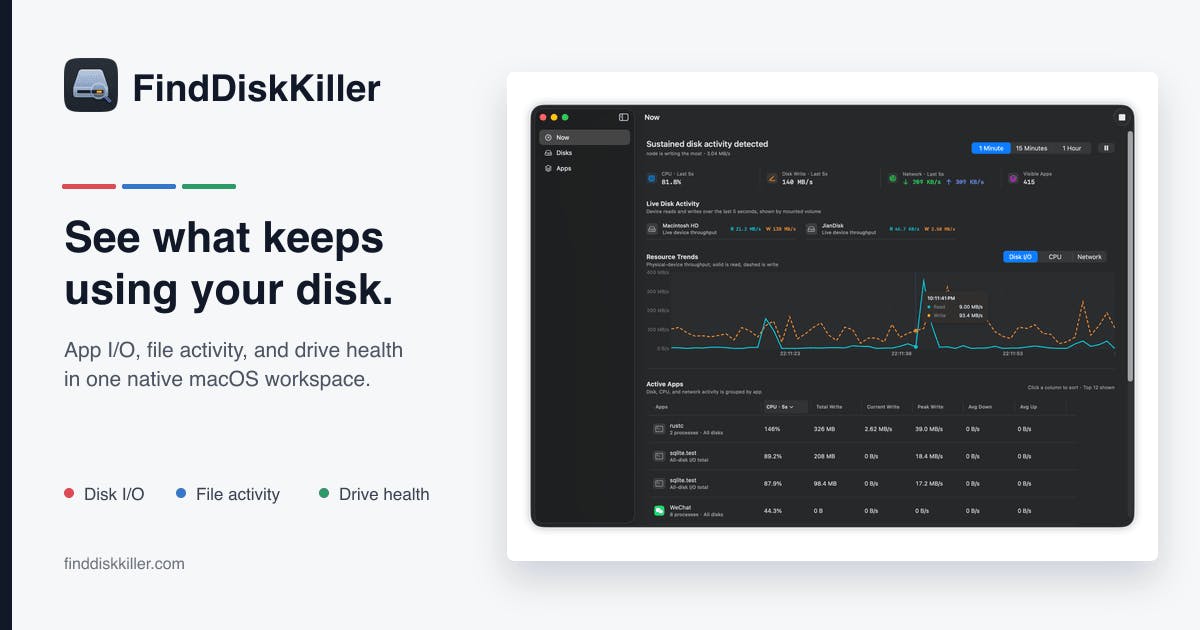
FindDiskKiller is a free, open-source native macOS tool that monitors disk activity per process, with special focus on AI coding assistants like Cursor and Claude Code that generate heavy I/O. It offers live file access tracking, folder tracing, and built-in SMART/NVMe health monitoring to help developers protect their Mac's soldered SSD from premature wear.
Disk I/O: The Overlooked Mac Performance Killer
When we talk about Mac performance optimization, attention typically focuses on CPU and memory usage. But in the SSD era, disk I/O activity is becoming an increasingly stealthy yet far-reaching performance bottleneck. Frequent disk reads and writes not only slow down system responsiveness but also accelerate SSD wear, shortening hardware lifespan — especially concerning for modern Macs with soldered storage that can't be user-replaced.
SSDs use NAND flash as their storage medium, where each storage cell has a limited number of program/erase (P/E) cycles. Consumer-grade SSDs typically support hundreds to thousands of P/E cycles, depending on the flash type (SLC, MLC, TLC, QLC). Even more noteworthy is the Write Amplification effect — since SSD erase operations work at the block level, actual physical writes are often far greater than logical writes, further accelerating wear. Since 2016, Apple has soldered storage chips directly onto the motherboard in MacBook models. Once an SSD reaches its lifespan limit, repair costs are extremely high or may even require replacing the entire logic board, elevating disk I/O management from a "performance optimization" concern to an "asset protection" issue.
The open-source tool FindDiskKiller, recently launched on Product Hunt, targets precisely this pain point. It's a native macOS disk activity monitoring tool that reveals exactly which apps and AI coding assistants are aggressively reading and writing to your disk. After launch, it earned 109 upvotes and 22 comments, ranking 15th for the day and garnering significant attention in the Mac developer community.
Why AI Coding Assistants Are Major Disk Consumers
One of FindDiskKiller's unique selling points is its explicit focus on AI coding agents as key monitoring targets. This isn't coincidental. As AI-assisted programming tools like Cursor, Claude Code, and GitHub Copilot become widespread, more developers are discovering their Macs enduring abnormally heavy disk loads in the background.
These AI tools frequently read entire codebases, build indexes, write caches, and generate temporary files during operation, with disk I/O intensity far exceeding traditional editors. Specifically, modern AI coding assistants perform semantic indexing across entire project codebases at runtime — recursively traversing file trees, reading each source file's contents, building vector embeddings, and writing to local index databases. Take Cursor as an example: it maintains a continuously updated project-level semantic cache that triggers incremental index updates whenever files change; LLM context window management also generates substantial temporary file creation and deletion operations. Combined, these operations can produce several GB of disk I/O per hour, far exceeding the near-zero disk activity levels of traditional text editors like Vim or Sublime Text.
For developers running these tools long-term, understanding and quantifying this disk consumption is both a performance tuning necessity and a practical consideration for protecting expensive SSDs. FindDiskKiller has astutely captured this rapidly growing use case.
Full-Chain Tracing from Process to File
The tool's core capability is per-process disk I/O tracking, clearly quantifying the read/write volume generated by each application. Beyond this, it integrates CPU and network activity monitoring, allowing users to assess a process's resource consumption from multiple dimensions.
Going further, FindDiskKiller supports live file access viewing and folder tracing. This means users can not only see "which app is reading/writing to disk" but drill down to "exactly which files and directories it's accessing."
From a technical implementation perspective, macOS provides multiple kernel mechanisms to support this kind of monitoring. Apple's Endpoint Security framework (introduced in macOS 10.15 Catalina) is the currently recommended file system event monitoring solution, replacing the deprecated kauth and OpenBSN mechanisms, allowing apps to monitor file system operations with proper authorization. Additionally, the IOKit framework provides block device-level I/O statistics, while the FSEvents API offers directory-level change notifications. As a native macOS app, FindDiskKiller needs to make technical choices among these system-level APIs, balancing monitoring granularity with its own performance overhead — after all, a monitoring tool shouldn't itself become a new performance burden.
For troubleshooting abnormal disk activity and pinpointing runaway processes, this fine-grained visibility offers tremendous practical value.
SMART/NVMe Drive Health Monitoring
Beyond activity monitoring, FindDiskKiller also includes built-in SMART/NVMe drive health viewing. SMART (Self-Monitoring, Analysis and Reporting Technology) is a health self-check standard widely supported by hard drives and SSDs, reflecting critical metrics like power-on hours, total bytes written, and bad block status.
For SSDs, the most critical SMART/NVMe health attributes include: Total Bytes Written (TBW, measuring cumulative data written to the SSD), Wear Leveling Count (reflecting wear uniformity across storage cells), Percentage Used (intuitively showing what portion of the SSD's expected lifespan has been consumed), and Available Spare (indicating reserved capacity the controller can use to replace bad blocks). Notably, Apple's Mac product line uses a custom NVMe implementation, and some health attributes are accessed differently compared to standard NVMe devices — which is why fully-featured disk health monitoring tools are relatively scarce on macOS.
Combining disk activity monitoring with hardware health checks creates a logical closed loop: users can see both "who's consuming the disk" and assess "how much impact this consumption has on the hardware." For example, users can quantitatively evaluate an AI coding tool's actual SSD lifespan consumption over a period by observing TBW growth rates. For developers and creators who heavily use SSDs, this integrated perspective helps make smarter usage decisions and avoid unnecessary hardware degradation.
Free and Open Source: A Transparent, Trustworthy Mac Monitoring Solution
It's worth emphasizing that FindDiskKiller is completely free and open source. In the macOS tool ecosystem, many similar system monitoring applications are paid or subscription-based (such as iStat Menus, DaisyDisk, etc.), while FindDiskKiller has chosen the open route, categorized under Mac, Open Source, Developer Tools, and GitHub tags.
Open source holds special significance for system monitoring tools. This category of software inherently requires elevated system privileges — accessing process lists, reading I/O statistics, and monitoring file system activity typically involve sensitive authorizations like Full Disk Access. With closed-source monitoring software, after granting these permissions, users cannot verify whether its behavior exceeds its stated functionality. The open-source model allows security researchers and community members to audit the code, confirming the tool doesn't exfiltrate collected system information or perform unexpected operations. In an era where users have increasingly high trust thresholds for system-level tools, the ability to inspect the code itself constitutes an important foundation of trust.
Simultaneously, open-source community participation enables continuous iteration. For the target user base already active on GitHub, this positioning feels especially fitting — they're both users and potential contributors.
Summary: A Mac Disk Guardian for the AI Era
FindDiskKiller's emergence reflects a broader trend: the proliferation of AI tools is quietly changing how we consume local computing resources. As AI coding assistants become part of daily workflows, the hidden resource overhead they bring surfaces alongside them, creating targeted monitoring needs. This aligns with the "Observability" concept in cloud computing — you can't optimize what you can't see.
As a native, free, open-source macOS tool, FindDiskKiller fills a practical gap in this niche. For users concerned about performance optimization, hoping to extend SSD lifespan, or simply wanting to figure out "what exactly is slowing down my Mac," it's worth a try. Of course, as a newly launched project, its long-term feature completeness and community activity remain to be proven over time.
Key Takeaways
Related articles

Deep Dive into webpack: Core Features, Code Splitting, and Frontend Build Practices
A comprehensive analysis of webpack's core mechanisms including Loaders, Code Splitting, and its vital role in modern frontend engineering and ecosystem value.

Weak at ML Programming? A Complete Path to Breakthrough Through Systematic Practice
A systematic coding practice path for ML practitioners who 'understand theory but can't implement,' covering math basics to deep learning components with Deep-ML platform guidance.

Deep Analysis of the Potomac River Air Disaster: Why Multiple Safety Barriers Failed Simultaneously
Deep analysis of the 2025 Potomac River midair collision near Reagan Airport, examining airspace design, ATC staffing, TCAS limitations, and systemic safety failures.