Firebase Full-Stack in Practice: Authentication, Database, and Hosting

Firebase is Google's out-of-the-box backend service; the course shows using MCP to let AI auto-build full-stack apps.
The article starts from the frontend-backend division of labor, explaining Firebase's positioning as Google's out-of-the-box backend service: the frontend handles presentation, the backend handles authentication, data, and file storage. The course breaks down the core services—Authentication supports Google, email/password, phone OTP, and more, with the instructor recommending the email/password plus phone OTP combination to prevent fake accounts; the database is split between Firestore (suited for complex data like e-commerce and accounting) and Realtime Database (suited for zero-latency scenarios like chat and online status); Storage holds files, databases hold text, and the two shouldn't be confused. On payment, Firebase has no fixed subscription fee and charges by usage, with auto-payment only applying to a single project. The hands-on section builds an event registration app with Flutter plus Firestore and Google authentication, and uses MCP to let AI auto-generate the frontend and backend, shifting the developer's role toward describing requirements and verifying results.
What Firebase Really Is: Starting from the Frontend-Backend Split
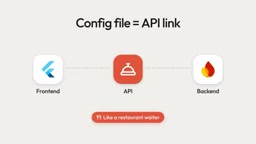
When many beginners first encounter full-stack development, the first thing that trips them up is the question of "what the backend actually does." The YouTube course Complete Firebase Course starts from a very simple comparison: the frontend is the part users can see—buttons, layout, colors, written with Flutter, React, HTML/CSS/JavaScript; the backend is the part running behind the scenes—account creation, data storage, saving images and videos. In the video you're watching right now, the player interface is the frontend, while the title, thumbnail, and view count are managed by the backend.
Once you understand this division of labor, Firebase's positioning becomes clear: it's a set of out-of-the-box backend services provided by Google. You don't need to set up your own servers or configure database clusters—you can just call Firebase's ready-made capabilities to get your app running. For individual developers and independent projects, this dramatically compresses the distance from idea to launch.
Breaking Down the Core Services: Authentication, Database, and Storage
Authentication: Trade-offs Between Multiple Login Methods
Firebase's authentication service supports mainstream methods like Google sign-in, email/password, phone number OTP, Facebook, and Apple. The course instructor shares a judgment worth considering: he personally leans toward a combination of email/password + phone number OTP, because emails can be registered infinitely, while phone numbers are limited in number, making the latter more effective at preventing fake accounts.
The authentication service also provides customizable email templates with HTML support, meaning the styling of password reset emails can be adjusted to match your brand. The dashboard can track monthly active users for each provider, making it easy to evaluate the actual usage of each login method.
Database: How to Choose Between Firestore and Realtime Database
Firebase offers two routes—SQL (for complex applications) and non-SQL—and under non-SQL there are Firestore and Realtime Database. Both update data in real time, but Realtime Database has lower latency, with almost instant synchronization; Firestore is better suited for scenarios with complex structures.
The course's recommendation for dividing them: e-commerce and accounting apps have complex data with many fields, so use Firestore; for scenarios requiring "zero-latency" push to users—real-time chat, online status, real-time location, notifications—Realtime Database is more suitable.
The essential difference between SQL and NoSQL lies in how data is organized. SQL databases (like MySQL, PostgreSQL) store data in two-dimensional tables, with tables linked through foreign keys, requiring a strictly predefined table structure (Schema). They're suited for scenarios with complex data relationships and transaction guarantees, such as e-commerce order systems. NoSQL databases don't enforce a fixed structure, storing data as documents, key-value pairs, or graphs, offering more flexible reads/writes and easier horizontal scaling, at the cost of weaker complex queries and cross-table joins. The reason Firebase primarily pushes NoSQL is that it targets applications with rapid iteration and frequently changing structures.
The mechanism behind real-time synchronization is also worth understanding. Realtime Database maintains a channel between client and server through a long-lived WebSocket connection, so any data change on either end is immediately pushed to all online clients, resulting in extremely low latency. Firestore also supports real-time listeners, but it's built on document snapshots and incremental updates underneath, offering richer features (such as composite queries, offline caching, transactions), at the cost of slightly higher latency for initial sync and complex queries. When choosing, you can use "whether millisecond-level multi-user sync is needed" as the core criterion.
Storage and Hosting: Don't Forget How They Differ from Databases
Storage is a cloud file repository for images, videos, and documents; databases store text-format data, and the two shouldn't be conflated. After a video is uploaded to YouTube, it's stored in YouTube's storage and then distributed to viewers—this is a typical use of Storage.
On the Hosting side, Firebase offers two types: regular Hosting and App Hosting, the latter for deploying web applications.
Free Quotas and Payment Mechanisms: An Easily Misunderstood Point
Many people worry about whether Firebase will "quietly charge them." The course explains: you don't need any payment to get started, but free quotas have limits. Firestore and Realtime Database each allow 1GB of data storage, and notification and analytics services are essentially unlimited.
The key point about paid plans is this—Firebase has no fixed subscription fee; it charges by actual usage. The more users you have and the more you use databases and storage, the higher your bill. To activate, you need to enter billing information and set up auto-payment, supporting UPI, debit cards, and credit cards. The first verification charges two rupees, and canceling auto-payment invalidates the subscription—this is something to watch out for.
Another detail: auto-payment only applies to a single project and cannot be shared across projects. UPI QR code methods cannot set up auto-payment. To track usage and billing, you need to go to the Google Cloud Console and select the corresponding Firebase project, where you can view top-ups, spending, and usage ratios, and also create a budget in advance to avoid service interruptions due to billing issues. The course mentions the minimum budget needs to be set at two thousand.
Capabilities unlocked after upgrading to a paid plan include: Firebase Hosting, Cloud Functions (for deploying backend logic such as payment gateways), Storage, and more.

Firebase's two pricing tiers need to be clearly distinguished: the Spark plan is the free tier, suitable for development and testing, but it does not allow calling services that require outbound network access such as Cloud Functions; the Blaze plan is the "pay-as-you-go" tier, with all features unlocked, and it still includes a certain free quota each month, charging only for what exceeds it. Many people mistakenly think that upgrading to Blaze necessarily means paying, when in reality at small-scale usage the bill may still be zero.
Budgets and the shutdown mechanism are also worth explaining. In the Google Cloud Console you can set up a Budget Alert, which sends an email notification when estimated or actual spending reaches a set amount, but it does not automatically stop services—to truly prevent overage charges, you need to additionally configure Cloud Functions instance limits or use API quota limits. The minimum of two thousand (rupees) mentioned in the course is an alert threshold, not a hard threshold; understanding this can keep you from being misled by the word "budget."
In Practice: Using MCP to Let AI Auto-Generate Frontend and Backend
The real highlight of the course is in the second half—building an event registration app from scratch. Admin creates events, and users fill in basic information to register and participate. The frontend uses Flutter, the backend uses Firebase, with specific services being Firestore and Google authentication.
The entire process starts with creating a Flutter project, creating a new project in the Firebase console, and linking the frontend to the backend. Here's a commonly overlooked pitfall: if you plan to use Google authentication for sign-in, don't download the configuration file when registering the app, because at that point the configuration API for Google authentication hasn't been unlocked yet, and importing it directly will fail. The correct order is to first enable the Google authentication provider in the console, then go back and download the configuration file, placing it in Android's app directory.
For the database mode selection, the course recommends beginners start with test mode, then switch to production rules afterward.
Next comes the most interesting part of the course—using MCP to connect to Firebase. Open the MCP Store in the editor, search for Firebase and install it, then have the Agent connect to the backend. After authorizing through a Google account, the Agent gains access permissions to Firebase, and the entire frontend-backend setup and database configuration are all completed automatically by AI—developers don't need to write code by hand.
MCP (Model Context Protocol) is an open protocol proposed by Anthropic for letting AI models connect to external tools and data sources in a standardized way. You can think of MCP as "AI's USB interface": as long as each service (such as Firebase, GitHub, databases) implements an MCP Server, AI clients (such as MCP-supporting editor Agents) can invoke its capabilities through a unified interface. Before MCP, integrating each tool required writing dedicated adapter code; with MCP, the integration cost is greatly reduced.
In the context of this course, the MCP Server provided by Firebase exposes operations like "creating collections, configuring authentication, writing data, deploying functions" as tools the AI can call. After the Agent obtains access permissions through Google account authorization, it can autonomously complete operations that previously required developers to manually click through the console or write code. This is also the technical foundation that makes the new development paradigm of "AI generation + manual verification + error-fix loops" viable.
Verification and the Admin Backend
After the app was running, the course did an end-to-end verification: signing in with a Google account, the user immediately appeared in the authentication list; in Firestore's users collection, the email, name, and sample event data could be seen. Changing the event title in the frontend synced after refresh; deleting an event made it disappear from the frontend too—proving the frontend and backend were correctly connected.
During the registration step, a rules error occurred. Copying the error message back into the editor for the Agent to fix, trying again succeeded. The registration data appeared in the registered collection, with phone number, email, and name all matching up.
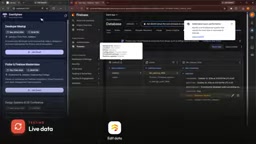
The app itself was still missing an admin side. The course built an Admin page using a single HTML/CSS/JavaScript file, supporting login, viewing events, deleting events, creating new events, and viewing registered users. For those unfamiliar with database operations, having a visual Admin interface is indeed much more convenient.
This loop of "AI generation + manual verification + error-fix" is becoming a new development paradigm: the developer's role shifts from writing code to describing requirements and verifying results.
One-line Summary
Firebase is Google's out-of-the-box backend service, and the course demonstrates using MCP to let AI automatically build full-stack applications.
Paragraph Summary
The article starts from the frontend-backend division of labor, explaining Firebase's positioning as Google's out-of-the-box backend service: the frontend handles presentation, the backend handles authentication, data, and file storage. The course breaks down the core services—Authentication supports Google, email/password, phone number OTP, and more, with the instructor recommending the email/password plus phone OTP combination to prevent fake accounts; the database is split between Firestore (suited for complex data like e-commerce and accounting) and Realtime Database (suited for zero-latency scenarios like chat and online status); Storage holds files, databases hold text—the two shouldn't be confused. On payment, Firebase has no fixed subscription fee and charges by usage, and auto-payment only applies to a single project. The hands-on section builds an event registration app with Flutter plus Firestore and Google authentication, and uses MCP to let AI auto-generate the frontend and backend, shifting the developer's role toward describing requirements and verifying results.
Related articles

ChatGPT Space Launches: Team Collaboration and New Pages Features Explained
ChatGPT Space is OpenAI's new team collaboration feature with Pages, real-time collaboration, and Slack/Google Drive sync. We break down its privacy design, multi-platform integration, and the full workflow from conversation to document.

Migrating Apache Spark UDFs to GPU Acceleration with AI Agents
NVIDIA developer blog explains how AI Agents rewrite Apache Spark UDFs for GPU acceleration, covering migration criteria, agent rewriting and verification workflows, plus pitfalls like result consistency and CPU-GPU transfer overhead.

Zed Editor v0.40.4-rc2 Released: Usage Credits Now Available Without Upgrading
Zed editor releases v0.40.4-rc2, allowing users to use usage credits for AI features without upgrading to a paid plan, lowering the trial barrier.