Flexible Elixir: Let Claude Code Operate Your IDE Directly Inside IntelliJ

Flexible Elixir lets AI agents operate IntelliJ's Elixir toolchain directly via MCP with one-click setup.
Flexible Elixir is an IntelliJ plugin for the JetBrains platform that runs an MCP server inside the IDE, giving Claude Code direct access to the code index, IEX shell, Mix build tool, and Credo static analyzer. Setup is a single click with no manual config editing. Every command the agent runs is visible in the console, and it always asks for permission before acting. It can run tests with line-level failure pinpointing and apply the project's own Credo rules for team-consistent suggestions — a clear step toward AI tools that operate the toolchain rather than just generating code.
When an AI Agent Moves Into Your IDE
AI coding assistants are nothing new, but most tools stay confined to a chat panel — generating code for you to copy and paste manually. Flexible Elixir takes a different approach: it runs an MCP (Model Context Protocol) server inside IntelliJ, giving AI agents direct access to the IDE's own capabilities.
As shown in the original video demo, once the author launches this MCP server with a single click from IntelliJ's Elixir tool window, Claude Code can use the IDE's own code index, IEX interactive shell, Mix build tool, and Credo static analyzer. In other words, the agent is no longer watching your project through a glass pane — it's actually in the driver's seat.
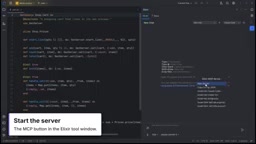
The real value of this integration lies in context. The most reliable source of information for an AI trying to understand an Elixir project isn't the model's training memory — it's the IDE's live index, module structure, and file outline. Flexible Elixir feeds this first-hand data directly to the agent, leaving less room for hallucinations.
MCP (Model Context Protocol) is an open protocol released by Anthropic in late 2024, designed to standardize how AI models communicate with external tools and data sources. Think of it as the "USB interface" of the AI world — any tool that exposes an MCP-compliant interface can be called uniformly by any MCP client, without needing a custom adapter for each integration. MCP servers encapsulate specific capabilities (such as file I/O, code execution, or database queries), while MCP clients (like Claude Code) make the calls. Flexible Elixir wraps IntelliJ's internal APIs into an MCP server, effectively turning the IDE into a standardized tool provider that any MCP-compatible AI client can connect to.
Zero-Configuration Setup with Claude Code
The onboarding process has been stripped down to its bare minimum. In the video, the author emphasizes that a single click is all it takes to register the MCP server — including its address and access token — directly into Claude Code, with no manual config file editing required.
For anyone who has worked with MCP before, this matters. Manually configuring an MCP server typically involves juggling JSON files, ports, and auth tokens, where a single mistake breaks the connection. Flexible Elixir compresses the entire process into a one-click install, lowering the barrier enough for any developer to pick it up without friction.
Once configured, interaction happens directly in the IDE's AI tab. The author's first prompt is simply asking what's in the project and what a particular card does. Before taking any action, the agent asks for permission — it requests to use a specific tool, the user clicks to allow, and only then does it query the IDE for the module list and file outline. This "ask before acting" permission model is an essential safety valve when an agent is operating inside a real development environment.
What the Agent Can Do: IEX, Tests, and Credo
The video demonstrates three categories of core operations that cover the key moments of everyday Elixir development.
Running IEX with Full Visibility
When the author asks it to start IEX and run some logic, the agent opens a real IEX session inside the IDE. The critical detail: every command it executes appears in the console below. Developers aren't facing a black box — they can see exactly what the agent did and what feedback it received. This level of transparency is essential for building trust.
Running Tests and Pinpointing Failures
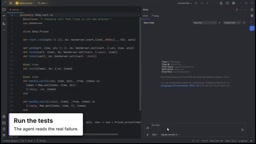
Next comes the testing phase. The agent runs the project's tests through the IDE, receives failure output with line numbers, and traces the issue directly to a Map.put call inside the card. This goes beyond simply "running tests" — it links test results to source code locations, forming an actionable debugging trail.
Reusing the Project's Own Credo Rules
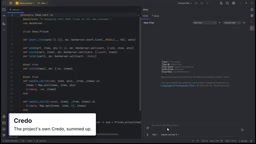
Finally, static analysis. The agent runs the project's own Credo configuration — not some generic ruleset — and summarizes the results: a missing module doc, a forgotten IO.inspect, and a spot where it suggests switching to map/join. Using the project's own Credo rules means the suggestions stay aligned with the team's established coding standards, rather than introducing style noise from an external source.
IEX (Interactive Elixir) is Elixir's built-in interactive shell, similar to Python's REPL, where developers can evaluate Elixir expressions in real time, load modules, and inspect function return values. Mix is Elixir's official build tool, handling dependency management, project compilation, and test execution — roughly the equivalent of npm in the Node.js ecosystem. Credo is a widely used static code analysis tool in the Elixir community that checks code style, potential issues, and best practices through a configurable rule set; each project can maintain its own
.credo.exsconfig file to enforce team-wide standards. Together, these three tools form the core of the Elixir development workflow.
Why This Pattern Is Worth Paying Attention To
What Flexible Elixir demonstrates represents an evolution in AI coding tools: a shift from "generating code" to "operating the toolchain." The agent isn't just suggesting what to write — it can run IEX to validate assumptions, execute tests to confirm results, and invoke Credo to check against coding standards. These are all things a developer would do anyway.
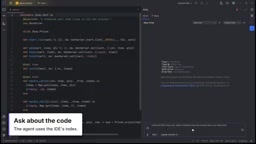
Several design choices here are worth noting. First, transparency: all command executions are visible in the console, keeping developers fully in the loop. Second, permission control: the agent asks before acting, preventing it from making unsanctioned changes. Third, reuse of existing infrastructure: it plugs directly into the IDE's index and the project's own configuration rather than building a parallel system — which both ensures accuracy and respects team conventions.
Of course, there's only so much a demo can reveal. How it handles indexing performance in large projects, whether the permission prompts become disruptive in practice, and how well it manages complex multi-module refactoring are all questions that real-world use will need to answer. But as a focused MCP integration for the Elixir ecosystem on the JetBrains platform, it presents a clear and pragmatic product vision.
The plugin is already available on the JetBrains Marketplace — Elixir developers who are curious can search for it and try it directly.
Related articles

Random Pruning of the DPO Computation Graph: 1.4x Training Speedup and Lower Peak Memory
DPO training too slow and memory-hungry? This paper proposes a random pruning framework for the DPO computation graph, sampling independently across position, sequence, and branch dimensions; branch pruning achieves a 1.426x step-time speedup and cuts training time by about 30%, with in-depth attribution of memory and time gains.

Why Does JEPA Underperform MLM in Longitudinal EHR Representation Learning?
New study compares JEPA and MLM for longitudinal EHR representation learning on MIMIC-IV: three JEPA variants train stably without collapse but underperform MLM; target size, not heterogeneity, drives prediction error.

Transfer Learning + Visible Light Communication: A New Approach to Energy-Efficient Indoor Positioning
A study proposes a transfer learning-based visible light communication indoor positioning method, achieving 47% accuracy improvement on the BOSCH factory dataset, 67.5% model efficiency under high noise, and introducing the ME composite metric for energy-efficient positioning in energy-constrained industrial IoT scenarios.