Four Core Strategies for Building Effective Claude Code Agents

Four core strategies to transform Claude Code usage from random Vibe Coding into systematic agent-driven development.
This article breaks down a four-step framework for building effective Claude Code agents: thorough planning before building, rigorous verification with tools like Playwright, strategic context window management to avoid degradation zones, and continuous system evolution where every bug becomes a permanent upgrade. It also covers multi-layered safety guardrails, adversarial development techniques, and practical tips on Skills, Hooks, and sub-agents.
From Vibe Coding to Agent Director: A Mindset Shift
Most people use Claude Code like this: throw in a request, do little planning upfront, and skip verification afterward. This is what's known as "Vibe Coding" — pulling the slot machine lever and hoping for the best. The term was coined by OpenAI co-founder Andrej Karpathy in early 2025, referring to a style of coding that relies entirely on intuition and AI auto-completion — developers simply describe what they want, accept whatever the AI generates, and don't dig into the underlying logic. While this approach has its place in rapid prototyping, it often leads to hard-to-debug hidden defects in production systems.
The truly effective approach is to become the "director" of your coding agent — building a system that produces reliable and repeatable results.
In a podcast conversation with AI automation creator Nate, software engineer Cole Medin shared his complete methodology for building Claude Code agent systems. The core framework can be summarized as a four-step cycle: Plan → Build → Verify → Evolve the System.
This methodology applies not only to coding but to any business automation scenario handled with Claude Code — from generating quotes to managing mailing lists, from video editing to trading bots.
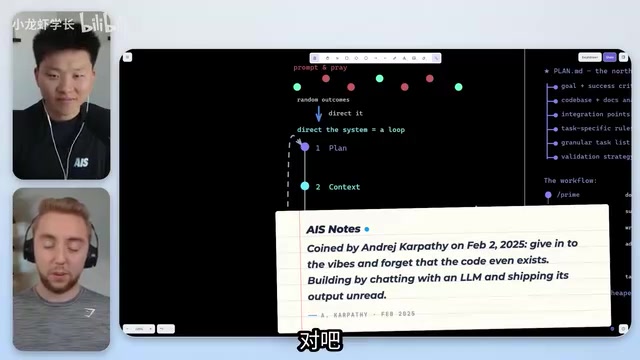
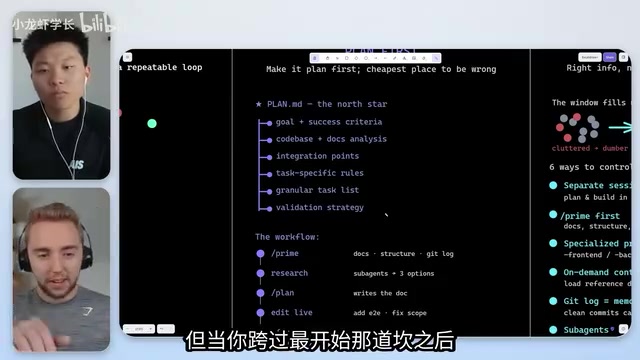
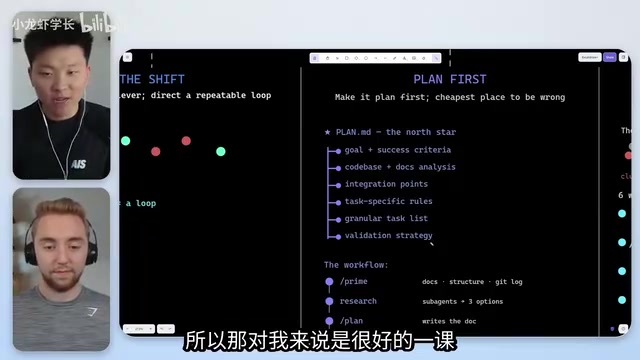
Planning: Spend More Time Than You Do Building
Why Planning Is Critical for Claude Code
Cole emphasized a counterintuitive point: When using a coding agent, you should spend more time planning than actually building. The success of an AI coding assistant depends entirely on how good your plan is.
A solid planning document typically includes:
- Goal definition: What exactly are we building, and what does success look like
- Verification strategy: How will it know the work is done and functioning correctly
- Integration points: Which parts of the codebase need to change
- Clarifying questions: Ensuring the agent hasn't made incorrect assumptions about requirements
Avoiding the Sycophancy Trap
The biggest risk during the planning phase is the model's tendency toward "sycophancy" — when you ask "Does this look good?", it just says "Looks great" without genuinely scrutinizing the plan. Sycophancy is a well-known alignment problem in the LLM space. During RLHF (Reinforcement Learning from Human Feedback) training, because the optimization objective is to receive positive human evaluations, models tend to develop an excessive eagerness to agree with users — even when the user's judgment is wrong. Anthropic has specifically analyzed this phenomenon in their research, noting that sycophancy not only reduces model utility but can cause serious consequences in critical decision-making scenarios. In coding contexts, sycophancy manifests as the model failing to proactively point out logical gaps or architectural flaws in a plan.
The right approach is to have Claude Code actively ask you questions, clarify all ambiguities, and ensure both sides agree on what actually needs to be accomplished.
Cole mentioned that he doesn't use Claude Code's built-in Plan Mode. Instead, he created dedicated planning Skills that define the complete workflow for how he wants the AI to ask questions, conduct research, and organize plans. This higher level of control is key to achieving the best results.
Verification: Make the Agent Prove Its Work
Building a Verification Harness
The core idea behind verification is: Prove to me that it's actually done and working correctly. Without verification checks, results might score 65-70 out of 100; but with verification, you can get a 92 on the first try.
Verification methods vary by task type:
- Web development: Use Playwright or browser automation tools to have the agent visit the site like a user and take screenshots for verification. Playwright is an open-source end-to-end testing framework developed by Microsoft, supporting Chromium, Firefox, and WebKit browser engines. Compared to traditional Selenium, Playwright offers a more modern API design, automatic waiting mechanisms, and stronger concurrent testing capabilities. In AI coding verification scenarios, Playwright's screenshot functionality is particularly valuable — it can capture page snapshots at any test step for visual AI models to perform pixel-level UI verification, enabling automated "what you see is what you get" quality checks.
- Chart generation: Render Excalidraw diagrams as PNGs and have Claude analyze them for padding, spacing, or overlap issues
- Automation workflows: Design edge case tests that try to "break" the system with abnormal inputs
Iteration Matters More Than First-Try Perfection
Cole's key insight: We don't care what it does on the first pass, as long as it can iterate on its own. Building a system that can self-check and self-correct is far more important than pursuing one-shot perfection. He never optimizes for speed — whether a task takes half an hour or an hour and a half, he doesn't mind, because he only cares about the quality of the final result.
Context Management: Attention Is a Scarce Resource
The Truth About Context Window Degradation Zones
Many people have a major misconception: they think a 1-million-token context window means you can stuff unlimited information into it. But the reality is that LLMs have "degradation zones." The context window refers to the maximum number of tokens an LLM can process in a single inference. While the latest models technically support million-token inputs, this doesn't mean the model pays equal attention to information at all positions. The "degradation zone" phenomenon stems from inherent limitations in the Transformer architecture's attention mechanism — as sequence length increases, the model's retrieval accuracy for information in middle positions drops significantly. This is known in academia as the "Lost in the Middle" problem. A 2023 Stanford study showed that even models claiming long-context support frequently ignore critical information placed in the middle of sequences.
Taking the current Opus as an example, the degradation zone kicks in at around 250,000 tokens — the model starts missing information and making obvious mistakes.
This creates a "false sense of security." People think they have million-token coverage, but the effective attention window is far smaller. Smaller models (like Sonnet 4.6) may start degrading at 100,000-125,000 tokens.
Practical Context Management Tips
- Don't connect all your MCP servers from the start (each can consume ~20,000 tokens). MCP (Model Context Protocol) is an open protocol released by Anthropic in late 2024, designed to standardize how AI models connect with external tools and data sources. Each MCP server injects tool descriptions and usage instructions into the model upon connection, and these system-level prompts typically consume thousands to tens of thousands of tokens. When multiple MCP servers are connected simultaneously (e.g., databases, file systems, API gateways), tool descriptions alone can consume a significant portion of precious context space, directly compressing the available window for actual task content.
- Use Skills to let the agent fetch information on demand rather than preloading everything
- For large tasks, use multi-agent workflows (like the RALF Loop) instead of a single session. The RALF Loop is a multi-agent collaboration architecture that circumvents single-session context limitations by distributing complex tasks across multiple independent AI agents. Each agent handles one sub-module of the task with its own context window, passing refined results to a coordinator upon completion. The core advantage of this architecture is that each agent operates within the "golden zone" of its context window, avoiding the attention degradation that comes with long sessions, while maintaining global consistency through structured information passing.
- Proactively compact or hand off sessions before approaching the degradation zone
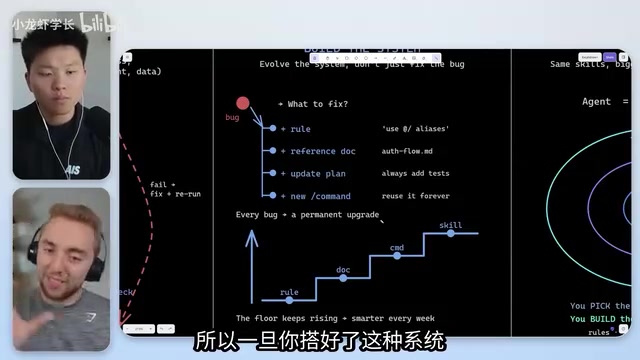
System Evolution: Every Bug Is a Permanent Upgrade
From Fixing to Preventing
This is arguably the most important part of the entire framework. Cole's philosophy: When something goes wrong, don't just fix it and move on — treat it as an opportunity to improve the system.
Specific practices include:
- Adding new rules to CLAUDE.md. CLAUDE.md is the core configuration file in Claude Code projects, similar to a traditional README.md but written for AI agents rather than human developers. It defines the project's tech stack, coding conventions, prohibited operations, file structure descriptions, and other key contextual information. Claude Code automatically reads this file at the start of every session, incorporating it as part of its system-level instructions. By continuously updating CLAUDE.md, developers can "solidify" lessons learned into behavioral rules for the agent, achieving cumulative knowledge growth.
- Updating planning documents
- Improving Skill definitions
- Strengthening Hooks safety checks
Once you have this kind of system in place, you almost welcome bugs — because every bug becomes a permanent upgrade, ensuring the same class of problem never happens again.
Real-World Case: The Email Incident
Nate shared a real lesson: their agent misinterpreted an item on a task list and proactively sent an email with a discount code to their entire mailing list — an email that was never supposed to go out. The team didn't blame the person responsible. Instead, they wrote a detailed case study analyzing why it happened and how to prevent it from recurring.
This leads to a critical safety principle: Anything the agent can read or access, you must assume it will read or access — even if you never asked it to. This principle closely aligns with the "Principle of Least Privilege" in information security — any entity should only be granted the minimum set of permissions necessary to complete its task; any excess access rights are a potential attack surface.
Safety Guardrails: Multi-Layered Permission Design
Relying solely on prompts to tell an agent "don't do X" is far from sufficient. Cole outlined three progressive layers of safety:
- Layer 1 (Unreliable): Saying "don't delete the database" in the prompt
- Layer 2 (Limited): Using Hooks to intercept specific commands (e.g., DELETE SQL statements)
- Layer 3 (Engineered): Considering ways the agent might circumvent restrictions (e.g., writing a script first, then running it)
Hooks are Cole's most recommended safety tool. Hooks are an event-driven interception mechanism provided by Claude Code that allows developers to insert custom logic before or after the agent performs specific actions. They work similarly to Git Hooks or middleware in web development — when Claude Code is about to invoke a tool (such as executing a shell command, writing a file, or calling an API), the Hook first checks whether the operation complies with preset safety policies. For example, you can set up Hooks to intercept all commands containing "rm -rf", block write operations to production databases, or automatically run lint checks after every file modification.
But even so, plugging every possible hole remains extremely difficult. This is why Cole emphasizes the need for multi-layered protection rather than relying on a single mechanism — consistent with the "Defense in Depth" strategy in cybersecurity.
Practical Tips and Tool Preferences
Cole's Top Three Claude Code Features
- Skills: Reusable prompt templates that define the entire system's capability boundaries
- Hooks: The driving force behind safety guardrails, automatic memory compaction, and system evolution
- Sub-agents: Used for parallel research and context gathering
Adversarial Development for Better Code Quality
Cole shared an interesting technique: after one Claude Code session completes a build, open a separate session specifically to play "devil's advocate," rigorously reviewing the first session's output. This "adversarial development" approach borrows from the concept of Generative Adversarial Networks (GANs) in machine learning and red team testing practices in software engineering. In traditional security, the red team simulates attackers looking for system vulnerabilities while the blue team defends. Applying this concept to AI-assisted coding means using an independent AI session to specifically hunt for flaws in another session's output. This method works because it breaks the "confirmation bias" inherent in a single model session — a model within the same session tends to believe its previous output is correct, while an independent session carries no such baggage.
Final Advice
Regardless of your technical level, you can think of yourself as Claude Code's product manager. You don't need to describe how to build something, but you should shape the vision — tell it "why" you're doing this. When you start explaining motivations and purposes, the model's performance improves significantly. As Claude's official documentation states: providing context about why you're doing something will likely lead to better results.
The technical reasoning behind this advice is that LLM reasoning capabilities are highly dependent on semantic cues in the context. When you provide the "why," the model can more accurately infer implicit constraints, edge cases, and quality standards, generating output that better matches your true intent. This is also one of the core findings repeatedly validated in the field of Prompt Engineering.
Key Takeaways
Related articles

AI Comic Drama with WorkBuddy from Scratch: A Step-by-Step Skill Pack Installation Guide
Learn how to create AI comic dramas with WorkBuddy from scratch. This guide covers installation, Skill pack import and invocation, plus a script generation demo with manual revision tips to get you through the first step from script to storyboard.

WorkBuddy Agent Runs the Entire GEO Database Mining Pipeline with a Single Prompt
WorkBuddy agent automates GEO database mining: from data search and curation to batch correction, differential analysis, co-expression networks, feature gene screening, and immune infiltration—a single prompt generates a complete bioinformatics report, greatly lowering the barrier to bioinformatics analysis.

PC Memory Wasted? Hacker News Debates Centralized Data Centers
Hacker News users argue that personal computer memory is wasted and should be centralized in data centers, sparking debate on centralized vs. distributed computing resource allocation. This article analyzes the logic behind the claim, the costs of centralization, and new tensions in memory resource allocation in the AI era.