Free Access to Mystery Model & DeepSeek V4 via Cline: Complete Setup Tutorial
Step-by-step guide to using DeepSeek V4 and a mystery model for free via Cline's IDE extension or CLI.
This guide walks through using DeepSeek V4 and an anonymous beta model nicknamed "Niumai" for free on Cline, an AI coding assistant for VSCode. Installation is available via IDE extension (simplest) or CLI (requires Node.js), with authorization via Google, Microsoft, or GitHub. The mystery model refuses to reveal its identity — typical of vendor pre-release testing. Membership popups can be skipped by pressing any key.
Cline: Free Access to a Mystery Model and DeepSeek V4
As AI programming tools grow increasingly mainstream, using high-performance code models at zero cost has become a hot topic among developers. This guide is based on a hands-on demo from a Bilibili creator and walks through the full process of using DeepSeekAd V4 and a mysterious model nicknamed "Niumai" for free on Cline — covering both IDE extension and command-line installation methods.
What Is Cline and Why Does It Matter
Cline is an AI coding assistant that integrates directly into VSCode. It supports both an IDE extension and a CLI (command-line) installation. One of its biggest draws is a built-in free model tier — simply click the Free option in the left panel of the model selection menu to see a list of models available at no cost.
According to the demo, this free tier includes a mystery model nicknamed "Niumai," described as performing "just below the 5.6 SOTA level," along with the widely anticipated DeepSeek V4. For everyday coding tasks, you can invoke Cline with these models directly — no paid subscription required.
DeepSeek V4 is the latest-generation code and general reasoning model from DeepSeek. It performs strongly across multiple programming benchmarks and competes in the same tier as mainstream commercial models like GPT-4o and Claude 3.5 Sonnet. One of the DeepSeek series' key advantages is its open or semi-open source strategy, which allows third-party platforms like Cline to integrate it via API and offer free usage quotas — meaning developers can access near-top-tier code completion and Q&A capabilities without paying OpenAI or Anthropic directly. "SOTA" (State of the Art) is a common AI term meaning the current best performance level. The phrase "just below the 5.6 SOTA level" is the creator's subjective description of the mystery model's capability — not an official benchmark ranking — so readers should evaluate it based on their own experience.
IDE Extension Method: One-Click Installation via GUI
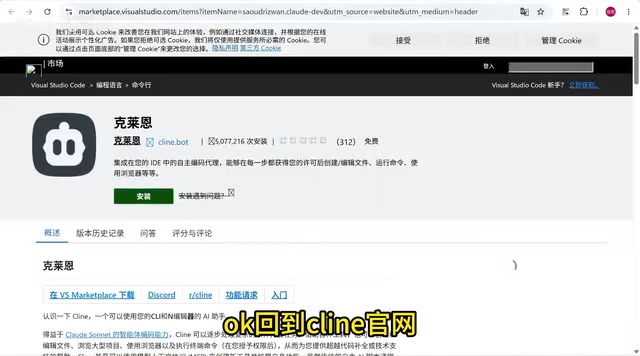
The easiest way to get started is through the IDE extension. On the Cline website, the IDE extension entry point is at the top of the page, with CLI installation instructions below.
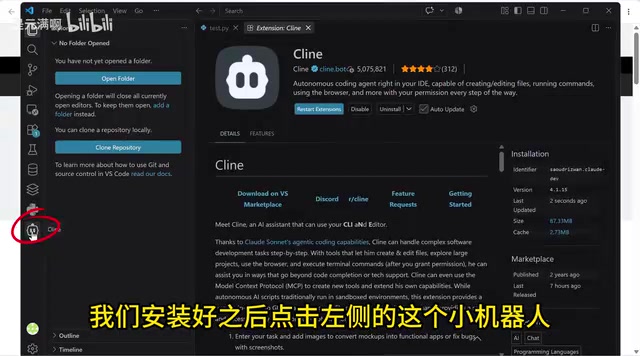
Click the install button in the top-right corner, then click Install. The system will automatically redirect to VSCode and open the Cline extension page. Once installed, click the small robot icon on the left sidebar in VSCode to launch it.
First-time users will need to authorize with a Google or Microsoft account. After authorization, a dialog will appear — click the model selector at the bottom, then click Free on the left to view all available free models. From there, you can select the "Niumai" mystery model or DeepSeek V4 and start working.
Command-Line Method: Requires Node.js
If you prefer working in the terminal, Cline also offers a CLI installation option — but it requires Node.js to be set up on your machine.
If Node.js isn't installed, download and install it from the official website first. Once done, press Win + R, type cmd, and hit Enter to open Command Prompt. Then copy and run the commands provided on the Cline website one by one.
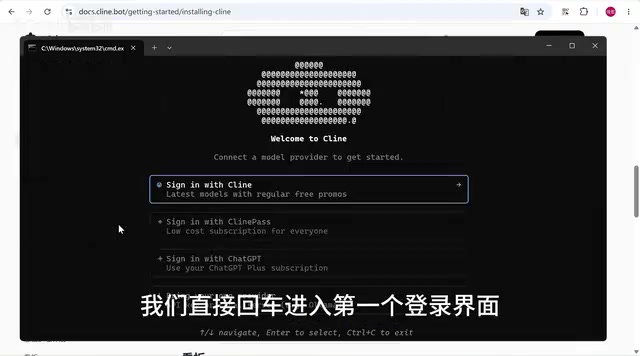
After the commands complete, you'll arrive at a login screen where you can sign in with a Google or GitHub account. The creator mentioned preferring the Authenticator method for its speed — just click confirm to complete authorization.
Node.js is a JavaScript runtime built on Chrome's V8 engine, allowing JavaScript to run outside the browser — i.e., on a server or in a local terminal. Many modern developer tools, including AI coding assistant CLI clients, are built on Node.js and distributed via npm (Node Package Manager). When installing Node.js, it's recommended to choose the LTS (Long-Term Support) version for better stability. After installation, you can verify the setup by running node -v and npm -v in Command Prompt — if both return version numbers, your environment is ready.
Launching and Selecting a Model
Once everything is configured, reopen the CMD terminal you kept open, and select the Free model group from the model menu.
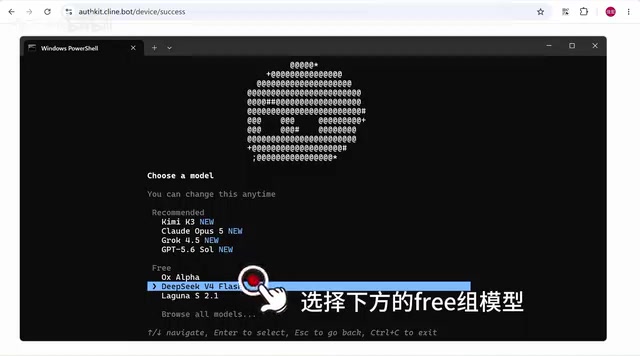
In the demo, the creator chose the "deepest thinking mode," then simply typed klan (as spoken in the video — refer to the official docs for the exact command) to launch. If a prompt appears asking whether you want a membership, don't click to subscribe — just press any key on your keyboard to skip and continue with the free tier.
Interestingly, when the creator tried to ask the mystery model who it really was, it refused to reveal its true identity — which is exactly why it's called the "mystery model." Models like this are typically anonymous beta releases, deployed by vendors before an official launch to gather real-world usage feedback and refine performance.
Anonymous beta models (also known as gray-scale or A/B test models) are a common strategy among AI vendors: deploying a new model under a hidden name in real user environments to collect natural usage data and evaluate reasoning quality, latency, and edge case handling — without the bias that comes from users knowing which model they're using. For users, this means there's no official documentation or technical report to reference upfront. Capability boundaries and usage limits have to be discovered through hands-on testing, and the model could be swapped out or taken offline at any time without notice.
Tips and Things to Watch Out For
Overall, Cline's free model tier significantly lowers the barrier to accessing high-performance code models. That said, a few things are worth keeping in mind:
- Account authorization is mandatory — both the IDE extension and CLI require signing in with a Google, Microsoft, or GitHub account;
- The CLI method requires Node.js — install it first, or the commands won't run;
- Free models may have time limits and usage quotas — anonymous models like "Niumai" can be adjusted or taken offline at any time, so always check what's currently listed on the official site;
- Stay calm if a membership popup appears — just press any key to skip and continue using the free tier.
For developers looking to explore AI-assisted coding at minimal cost, this setup offers a practical entry point. Whether it's worth relying on long-term will depend on the free models' continued stability and performance.
Related articles

Qwen 3.8 Beats Opus at Coding—But Can Your Mac Run It?
Open-source Qwen 3.8 beats Opus 4.6 at coding at just 18GB, but how much Mac memory do you need? 24GB crashes; 32GB is the sweet spot. Full config guide inside.

Claude Code + Agent: Building a Fully Automated AI Testing Loop
Bilibili course breakdown: how test developers can use Claude Code terminal-based Agents to build a fully automated AI testing loop. Compares permission boundaries of terminal vs. device Agents, explains why enterprise projects choose Claude Code over Open Claude-type tools, and outlines the Node.js environment setup and DeepSeek model integration path.

Working with AI Agents Requires Nerves of Steel
The more autonomous AI agents become, the heavier the user's psychological burden. Drawing from a Hacker News discussion, this article analyzes black-box anxiety, behavior drift, and monitoring fatigue in agent collaboration, and offers practical approaches like sandbox isolation, permission control, and task granularity management to reduce cognitive load.